arrow-left

All pages
gitbookPowered by GitBook
1 of 19

Loading...

Loading...

Loading...

Loading...

Loading...

Loading...

Loading...

Loading...

Loading...

Loading...

Loading...

Loading...

Loading...

Loading...

Loading...

Loading...

Loading...

Loading...

Loading...

Frequently Asked Questions (FAQs)

This page lists pages with frequently asked questions with answers from the community.

circle-info

This is a list of questions frequently asked in our troubleshooting channel on Slack. To contribute additional questions and answers, make a pull requestarrow-up-right.

Generalchevron-rightPinot On Kubernetes FAQchevron-rightIngestion FAQchevron-rightQuery FAQchevron-rightOperations FAQchevron-right

Getting Started

This section contains quick start guides to help you get up and running with Pinot.

hashtag
Running Pinot

To simplify the getting started experience, Pinot ships with quick start guides that launch Pinot components in a single process and import pre-built datasets.

For a full list of these guides, see Quick Start Examples.

Running Pinot locallychevron-rightRunning Pinot in Dockerchevron-rightRunning in Kuberneteschevron-right

hashtag
Deploy to a public cloud

hashtag
Data import examples

Getting data into Pinot is easy. Take a look at these two quick start guides which will help you get up and running with sample data for offline and real-time .

Running on Azurechevron-right
Running on GCPchevron-right
Running on AWSchevron-right
tables
Batch import examplechevron-right
Stream ingestion examplechevron-right

Running Pinot locally

This quick start guide will help you bootstrap a Pinot standalone instance on your local machine.

In this guide, you'll learn how to download and install Apache Pinot as a standalone instance.

  • Download Apache Pinot

  • Set up a cluster

hashtag
Download Apache Pinot

First, download the Pinot distribution for this tutorial. You can either download a packaged release or build a distribution from the source code.

hashtag
Prerequisites

  • Install JDK11 or higher (JDK16 is not yet supported).

  • For JDK 8 support, use Pinot 0.7.1 or compile from the source code.

Note that some installations of the JDK do not contain the JNI bindings necessary to run all tests. If you see an error like java.lang.UnsatisfiedLinkError while running tests, you might need to change your JDK.

If using Homebrew, install AdoptOpenJDK 11 using brew install --cask adoptopenjdk11.

circle-info

Support for M1 and M2 Mac systems

Currently, Apache Pinot doesn't provide official binaries for M1 or M2 Macs. For instructions, see .

Download the distribution or build from source by selecting one of the following tabs:

Download the latest binary release from , or use this command:

Extract the TAR file:

Navigate to the directory containing the launcher scripts:

You can also find older versions of Apache Pinot at . For example, to download Pinot 0.10.0, run the following command:

Follow these steps to checkout code from and build Pinot locally

hashtag
M1 and M2 Mac Support

Currently, Apache Pinot doesn't provide official binaries for M1 or M2 Mac systems. Follow the instructions below to run on an M1 or M2 Mac:

  1. Add the following to your ~/.m2/settings.xml:

  1. Install Rosetta:

hashtag
Set up a cluster

Now that we've downloaded Pinot, it's time to set up a cluster. There are two ways to do this: through quick start or through setting up a cluster manually.

hashtag
Quick start

Pinot comes with quick start commands that launch instances of Pinot components in the same process and import pre-built datasets.

For example, the following quick start command launches Pinot with a baseball dataset pre-loaded:

For a list of all the available quick start commands, see the .

hashtag
Manual cluster

If you want to play with bigger datasets (more than a few megabytes), you can launch each component individually.

The video below is a step-by-step walk through for launching the individual components of Pinot and scaling them to multiple instances.

You can find the commands that are shown in this video in the .

circle-info

The examples below assume that you are using Java 8.

If you are using Java 11+ users, remove the GC settings insideJAVA_OPTS. So, for example, instead of this:

Use the following:

hashtag
Start Zookeeper

You can use to browse the Zookeeper instance.

hashtag
Start Pinot Controller

hashtag
Start Pinot Broker

hashtag
Start Pinot Server

hashtag
Start Kafka

Once your cluster is up and running, you can head over to to learn how to run queries against the data.

hashtag
Start a Pinot component in debug mode with IntelliJ

Set break points and inspect variables by starting a Pinot component with debug mode in IntelliJ.

The following example demonstrates server debugging:

  1. First, startzookeeper , controller, and broker using the .

  2. Then, use the following configuration under $PROJECT_DIR$\.run ) to start the server, replacing the metrics-core version and cluster name as needed. This is an example of how to use it.

Pinot On Kubernetes FAQ

This page has a collection of frequently asked questions about Pinot on Kubernetes with answers from the community.

circle-info

This is a list of questions frequently asked in our troubleshooting channel on Slack. To contribute additional questions and answers, .

hashtag
How to increase server disk size on AWS

General

This page has a collection of frequently asked questions of a general nature with answers from the community.

circle-info

This is a list of questions frequently asked in our troubleshooting channel on Slack. To contribute additional questions and answers, .

hashtag
How does Apache Pinot use deep storage?

Running on public clouds

This page links to multiple quick start guides for deploying Pinot to different public cloud providers.

These quickstart guides show you how to run an Apache Pinot cluster using Kubernetes on different public cloud providers.

When data is pushed to Apache Pinot, Pinot makes a backup copy of the data and stores it on the configured deep-storage (S3/GCP/ADLS/NFS/etc). This copy is stored as tar.gz Pinot segments. Note, that Pinot servers keep a (untarred) copy of the segments on their local disk as well. This is done for performance reasons.

hashtag
How does Pinot use Zookeeper?

Pinot uses Apache Helix for cluster management, which in turn is built on top of Zookeeper. Helix uses Zookeeper to store the cluster state, including Ideal State, External View, Participants, and so on. Pinot also uses Zookeeper to store information such as Table configurations, schemas, Segment Metadata, and so on.

hashtag
Why am I getting "Could not find or load class" error when running Quickstart using 0.8.0 release?

Please check the JDK version you are using. You may be getting this error if you are using an older version than the current Pinot binary release was built on. If so, you have two options: switch to the same JDK release as Pinot was built with or download the source codearrow-up-right for the Pinot release and buildarrow-up-right it locally.

make a pull requestarrow-up-right
Running on Azurechevron-right
Running on GCPchevron-right
Running on AWSchevron-right
circle-info

Prerequisites

Install Apache Mavenarrow-up-right 3.6 or higher

circle-info

For M1 and M2 Macs, first follow the steps below first.

Check out Pinot:

Build Pinot:

circle-info

If you're building with JDK 8, add Maven option -Djdk.version=8.

Navigate to the directory containing the setup scripts. Note that Pinot scripts are located under pinot-distribution/target, not the target directory under root.

tar -zxvf apache-pinot-$PINOT_VERSION-bin.tar.gz
cd apache-pinot-$PINOT_VERSION-bin
OLDER_VERSION="0.10.0"
wget https://archive.apache.org/dist/pinot/apache-pinot-$OLDER_VERSION/apache-pinot-$OLDER_VERSION-bin.tar.gz
Start a Pinot component in debug mode with IntelliJ
M1 and M2 Mac Support
Apache Pinotarrow-up-right
https://archive.apache.org/dist/pinot/arrow-up-right
Githubarrow-up-right
Quick Start Examples
this Github repositoryarrow-up-right
Zooinspectorarrow-up-right
Exploring Pinot
steps described above
commitarrow-up-right
PINOT_VERSION=0.12.0 #set to the Pinot version you decide to use

wget https://downloads.apache.org/pinot/apache-pinot-$PINOT_VERSION/apache-pinot-$PINOT_VERSION-bin.tar.gz
git clone https://github.com/apache/pinot.git
cd pinot
mvn install package -DskipTests -Pbin-dist
cd build

The following is an example using Amazon Elastic Kubernetes Service (Amazon EKS).

hashtag
1. Update Storage Class

In the Kubernetes (k8s) cluster, check the storage class: in Amazon EKS, it should be gp2.

Then update StorageClass to ensure:

Once StorageClass is updated, it should look like this:

hashtag
2. Update PVC

Once the storage class is updated, then we can update the PersistentVolumeClaim (PVC) for the server disk size.

Now we want to double the disk size for pinot-server-3.

The following is an example of current disks:

The following is the output of data-pinot-server-3:

PVC data-pinot-server-3

Now, let's change the PVC size to 2T by editing the server PVC.

Once updated, the specification's PVC size is updated to 2T, but the status's PVC size is still 1T.

hashtag
3. Restart pod to let it reflect

Restart the pinot-server-3 pod:

Recheck the PVC size:

make a pull requestarrow-up-right

Running on GCP

This quickstart guide helps you get started running Pinot on Google Cloud Platform (GCP).

In this quickstart guide, you will set up a Kubernetes Cluster on Google Kubernetes Engine(GKE)arrow-up-right

hashtag
1. Tooling Installation

hashtag
1.1 Install Kubectl

Follow this link () to install kubectl.

For Mac users

Check kubectl version after installation.

circle-info

Quickstart scripts are tested under kubectl client version v1.16.3 and server version v1.13.12

hashtag
1.2 Install Helm

Follow this link () to install helm.

For Mac users

Check helm version after installation.

circle-info

This quickstart provides helm supports for helm v3.0.0 and v2.12.1. Choose the script based on your helm version.

hashtag
1.3 Install Google Cloud SDK

To install Google Cloud SDK, see

hashtag
1.3.1 For Mac users

  • Install Google Cloud SDK

Restart your shell

hashtag
2. (Optional) Initialize Google Cloud Environment

hashtag
3. (Optional) Create a Kubernetes cluster(GKE) in Google Cloud

This script will create a 3 node cluster named pinot-quickstart in us-west1-b with n1-standard-2 machines for demo purposes.

Modify the parameters in the following example command with your gcloud details:

Use the following command do monitor cluster status:

Once the cluster is in RUNNING status, it's ready to be used.

hashtag
4. Connect to an existing cluster

Run the following command to get the credential for the cluster pinot-quickstart that you just created:

To verify the connection, run the following:

hashtag
5. Pinot quickstart

Follow this to deploy your Pinot demo.

hashtag
6. Delete a Kubernetes Cluster

Running on Azure

This quickstart guide helps you get started running Pinot on Microsoft Azure.

In this quickstart guide, you will set up a Kubernetes Cluster on

hashtag
1. Tooling Installation

hashtag

<settings>
  <activeProfiles>
    <activeProfile>
      apple-silicon
    </activeProfile>
  </activeProfiles>
  <profiles>
    <profile>
      <id>apple-silicon</id>
      <properties>
        <os.detected.classifier>osx-x86_64</os.detected.classifier>
      </properties>
    </profile>
  </profiles>
</settings>  
softwareupdate --install-rosetta
./bin/pinot-admin.sh QuickStart -type batch
export JAVA_OPTS="-Xms4G -Xmx8G -XX:+UseG1GC -XX:MaxGCPauseMillis=200 -Xloggc:gc-pinot-controller.log"
export JAVA_OPTS="-Xms4G -Xmx8G"
./bin/pinot-admin.sh StartZookeeper \
  -zkPort 2191
export JAVA_OPTS="-Xms4G -Xmx8G -XX:+UseG1GC -XX:MaxGCPauseMillis=200 -Xloggc:gc-pinot-controller.log"
./bin/pinot-admin.sh StartController \
    -zkAddress localhost:2191 \
    -controllerPort 9000
export JAVA_OPTS="-Xms4G -Xmx4G -XX:+UseG1GC -XX:MaxGCPauseMillis=200 -Xloggc:gc-pinot-broker.log"
./bin/pinot-admin.sh StartBroker \
    -zkAddress localhost:2191
export JAVA_OPTS="-Xms4G -Xmx16G -XX:+UseG1GC -XX:MaxGCPauseMillis=200 -Xloggc:gc-pinot-server.log"
./bin/pinot-admin.sh StartServer \
    -zkAddress localhost:2191
./bin/pinot-admin.sh  StartKafka \ 
  -zkAddress=localhost:2191/kafka \
  -port 19092
<component name="ProjectRunConfigurationManager">
  <configuration default="false" name="HelixServerStarter" type="Application" factoryName="Application" nameIsGenerated="true">
    <classpathModifications>
      <entry path="$PROJECT_DIR$/pinot-plugins/pinot-metrics/pinot-yammer/target/classes" />
      <entry path="$MAVEN_REPOSITORY$/com/yammer/metrics/metrics-core/2.2.0/metrics-core-2.2.0.jar" />
    </classpathModifications>
    <option name="MAIN_CLASS_NAME" value="org.apache.pinot.server.starter.helix.HelixServerStarter" />
    <module name="pinot-server" />
    <extension name="coverage">
      <pattern>
        <option name="PATTERN" value="org.apache.pinot.server.starter.helix.*" />
        <option name="ENABLED" value="true" />
      </pattern>
    </extension>
    <method v="2">
      <option name="Make" enabled="true" />
    </method>
  </configuration>
</component>
allowVolumeExpansion: true
kubectl edit pvc data-pinot-server-3 -n pinot
https://kubernetes.io/docs/tasks/tools/install-kubectlarrow-up-right
https://helm.sh/docs/using_helm/#installing-helmarrow-up-right
Install the gcloud CLIarrow-up-right
Kubernetes quickstart
1.1 Install Kubectl

Follow this link (https://kubernetes.io/docs/tasks/tools/install-kubectlarrow-up-right) to install kubectl.

For Mac users

Check kubectl version after installation.

circle-info

Quickstart scripts are tested under kubectl client version v1.16.3 and server version v1.13.12

hashtag
1.2 Install Helm

To install Helm, see Installing Helmarrow-up-right.

For Mac users

Check helm version after installation.

circle-info

This quickstart provides helm supports for helm v3.0.0 and v2.12.1. Pick the script based on your helm version.

hashtag
1.3 Install Azure CLI

Follow this link (https://docs.microsoft.com/en-us/cli/azure/install-azure-cli?view=azure-cli-latestarrow-up-right) to install Azure CLI.

For Mac users

hashtag
2. (Optional) Log in to your Azure account

This script will open your default browser to sign-in to your Azure Account.

hashtag
3. (Optional) Create a Resource Group

Use the following script create a resource group in location eastus.

hashtag
4. (Optional) Create a Kubernetes cluster(AKS) in Azure

This script will create a 3 node cluster named pinot-quickstart for demo purposes.

Modify the parameters in the following example command with your resource group and cluster details:

Once the command succeeds, the cluster is ready to be used.

hashtag
5. Connect to an existing cluster

Run the following command to get the credential for the cluster pinot-quickstart that you just created:

To verify the connection, run the following:

hashtag
6. Pinot quickstart

Follow this Kubernetes quickstart to deploy your Pinot demo.

hashtag
7. Delete a Kubernetes Cluster

Azure Kubernetes Service (AKS)arrow-up-right
brew install kubernetes-cli
kubectl version
brew install kubernetes-helm
helm version
curl https://sdk.cloud.google.com | bash
exec -l $SHELL
gcloud init
GCLOUD_PROJECT=[your gcloud project name]
GCLOUD_ZONE=us-west1-b
GCLOUD_CLUSTER=pinot-quickstart
GCLOUD_MACHINE_TYPE=n1-standard-2
GCLOUD_NUM_NODES=3
gcloud container clusters create ${GCLOUD_CLUSTER} \
  --num-nodes=${GCLOUD_NUM_NODES} \
  --machine-type=${GCLOUD_MACHINE_TYPE} \
  --zone=${GCLOUD_ZONE} \
  --project=${GCLOUD_PROJECT}
gcloud compute instances list
GCLOUD_PROJECT=[your gcloud project name]
GCLOUD_ZONE=us-west1-b
GCLOUD_CLUSTER=pinot-quickstart
gcloud container clusters get-credentials ${GCLOUD_CLUSTER} --zone ${GCLOUD_ZONE} --project ${GCLOUD_PROJECT}
kubectl get nodes
GCLOUD_ZONE=us-west1-b
gcloud container clusters delete pinot-quickstart --zone=${GCLOUD_ZONE}
brew install kubernetes-cli
kubectl version
brew install kubernetes-helm
helm version
brew update && brew install azure-cli
az login
AKS_RESOURCE_GROUP=pinot-demo
AKS_RESOURCE_GROUP_LOCATION=eastus
az group create --name ${AKS_RESOURCE_GROUP} \
                --location ${AKS_RESOURCE_GROUP_LOCATION}
AKS_RESOURCE_GROUP=pinot-demo
AKS_CLUSTER_NAME=pinot-quickstart
az aks create --resource-group ${AKS_RESOURCE_GROUP} \
              --name ${AKS_CLUSTER_NAME} \
              --node-count 3
AKS_RESOURCE_GROUP=pinot-demo
AKS_CLUSTER_NAME=pinot-quickstart
az aks get-credentials --resource-group ${AKS_RESOURCE_GROUP} \
                       --name ${AKS_CLUSTER_NAME}
kubectl get nodes
AKS_RESOURCE_GROUP=pinot-demo
AKS_CLUSTER_NAME=pinot-quickstart
az aks delete --resource-group ${AKS_RESOURCE_GROUP} \
              --name ${AKS_CLUSTER_NAME}

HDFS as Deep Storage

This guide shows how to set up HDFS as deep storage for a Pinot segment.

To use HDFS as deep storage you need to include HDFS dependency jars and plugins.

hashtag
Server Setup

hashtag
Configuration

hashtag
Executable

hashtag
Controller Setup

hashtag
Configuration

hashtag
Executable

hashtag
Broker Setup

hashtag
Configuration

hashtag
Executable

hashtag
Troubleshooting

If you receive an error that says No FileSystem for scheme"hdfs", the problem is likely to be a class loading issue.

To fix, try adding the following property to core-site.xml:

fs.hdfs.impl org.apache.hadoop.hdfs.DistributedFileSystem

And then export /opt/pinot/lib/hadoop-common-<release-version>.jar in the classpath.

Troubleshooting Pinot

hashtag
Find debug information in Pinot

Pinot offers various ways to assist with troubleshooting and debugging problems that might happen.

Start with the debug api which will surface many of the commonly occurring problems. The debug api provides information such as tableSize, ingestion status, and error messages related to state transition in server.

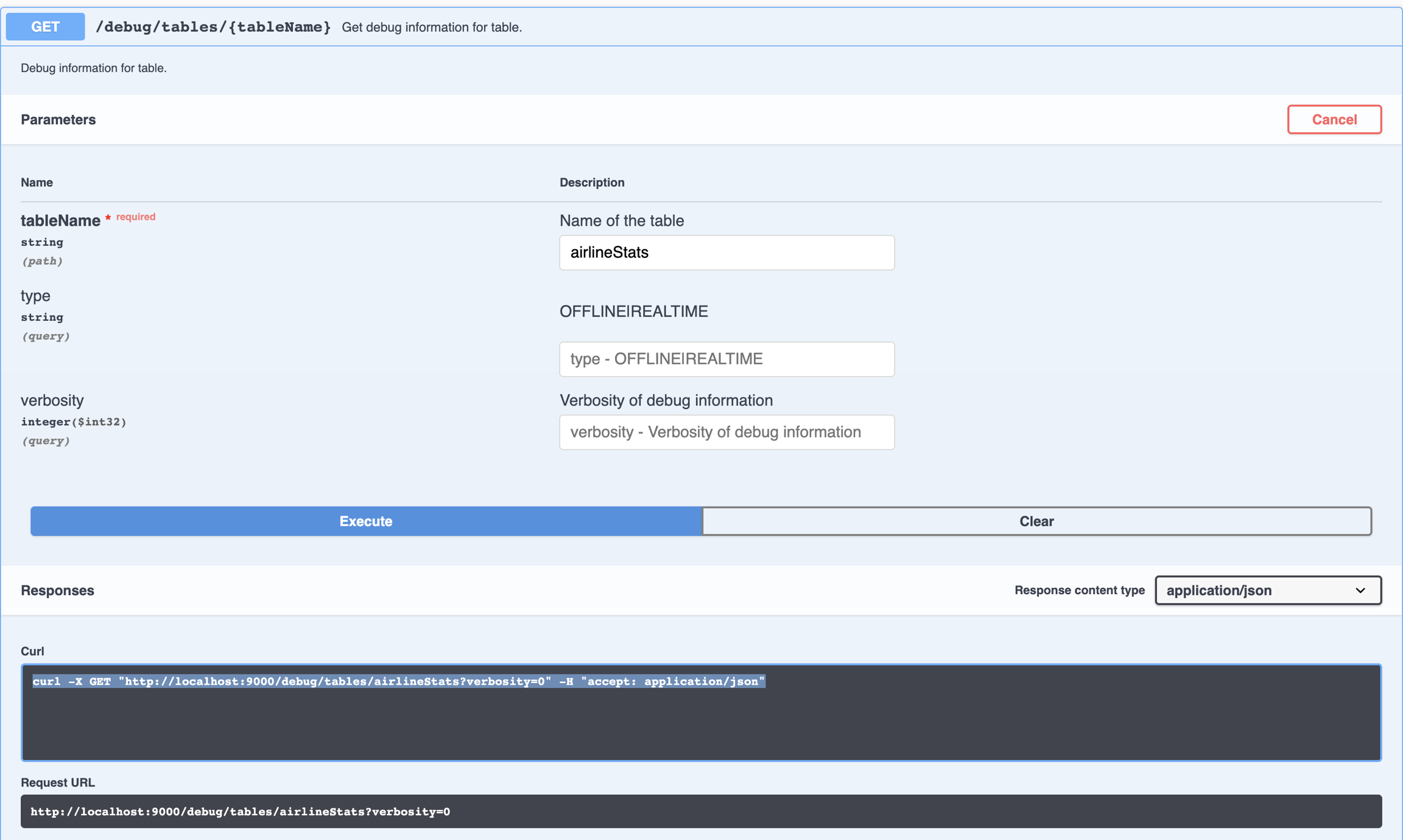
The table debug api can be invoked via the Swagger UI, as in the following image:

It can also be invoked directly by accessing the URL as follows. The api requires the tableName, and can optionally take tableType (offline|realtime) and verbosity level.

Pinot also provides a variety of operational metrics that can be used for creating dashboards, alerting and .

Finally, all pinot components log debug information related to error conditions.

hashtag
Debug a slow query or a query which keeps timing out

Use the following steps:

  1. If the query executes, look at the query result. Specifically look at numEntriesScannedInFilter and numDocsScanned.

    1. If numEntriesScannedInFilter is very high, consider adding indexes for the corresponding columns being used in the filter predicates. You should also think about partitioning the incoming data based on the dimension most heavily used in your filter queries.

pinot.server.instance.enable.split.commit=true
pinot.server.storage.factory.class.hdfs=org.apache.pinot.plugin.filesystem.HadoopPinotFS
pinot.server.storage.factory.hdfs.hadoop.conf.path=/path/to/hadoop/conf/directory/
pinot.server.segment.fetcher.protocols=file,http,hdfs
pinot.server.segment.fetcher.hdfs.class=org.apache.pinot.common.utils.fetcher.PinotFSSegmentFetcher
pinot.server.segment.fetcher.hdfs.hadoop.kerberos.principle=<your kerberos principal>
pinot.server.segment.fetcher.hdfs.hadoop.kerberos.keytab=<your kerberos keytab>
pinot.set.instance.id.to.hostname=true
pinot.server.instance.dataDir=/path/in/local/filesystem/for/pinot/data/server/index
pinot.server.instance.segmentTarDir=/path/in/local/filesystem/for/pinot/data/server/segment
pinot.server.grpc.enable=true
pinot.server.grpc.port=8090
export HADOOP_HOME=/path/to/hadoop/home
export HADOOP_VERSION=2.7.1
export HADOOP_GUAVA_VERSION=11.0.2
export HADOOP_GSON_VERSION=2.2.4
export GC_LOG_LOCATION=/path/to/gc/log/file
export PINOT_VERSION=0.10.0
export PINOT_DISTRIBUTION_DIR=/path/to/apache-pinot-${PINOT_VERSION}-bin/
export SERVER_CONF_DIR=/path/to/pinot/conf/dir/
export ZOOKEEPER_ADDRESS=localhost:2181


export CLASSPATH_PREFIX="${HADOOP_HOME}/share/hadoop/hdfs/hadoop-hdfs-${HADOOP_VERSION}.jar:${HADOOP_HOME}/share/hadoop/common/lib/hadoop-annotations-${HADOOP_VERSION}.jar:${HADOOP_HOME}/share/hadoop/common/lib/hadoop-auth-${HADOOP_VERSION}.jar:${HADOOP_HOME}/share/hadoop/common/hadoop-common-${HADOOP_VERSION}.jar:${HADOOP_HOME}/share/hadoop/common/lib/guava-${HADOOP_GUAVA_VERSION}.jar:${HADOOP_HOME}/share/hadoop/common/lib/gson-${HADOOP_GSON_VERSION}.jar"
export JAVA_OPTS="-Xms4G -Xmx16G -XX:+UseG1GC -XX:MaxGCPauseMillis=200 -Xloggc:${GC_LOG_LOCATION}/gc-pinot-server.log"
${PINOT_DISTRIBUTION_DIR}/bin/start-server.sh  -zkAddress ${ZOOKEEPER_ADDRESS} -configFileName ${SERVER_CONF_DIR}/server.conf
controller.data.dir=hdfs://path/in/hdfs/for/controller/segment
controller.local.temp.dir=/tmp/pinot/
controller.zk.str=<ZOOKEEPER_HOST:ZOOKEEPER_PORT>
controller.enable.split.commit=true
controller.access.protocols.http.port=9000
controller.helix.cluster.name=PinotCluster
pinot.controller.storage.factory.class.hdfs=org.apache.pinot.plugin.filesystem.HadoopPinotFS
pinot.controller.storage.factory.hdfs.hadoop.conf.path=/path/to/hadoop/conf/directory/
pinot.controller.segment.fetcher.protocols=file,http,hdfs
pinot.controller.segment.fetcher.hdfs.class=org.apache.pinot.common.utils.fetcher.PinotFSSegmentFetcher
pinot.controller.segment.fetcher.hdfs.hadoop.kerberos.principle=<your kerberos principal>
pinot.controller.segment.fetcher.hdfs.hadoop.kerberos.keytab=<your kerberos keytab>
controller.vip.port=9000
controller.port=9000
pinot.set.instance.id.to.hostname=true
pinot.server.grpc.enable=true
export HADOOP_HOME=/path/to/hadoop/home
export HADOOP_VERSION=2.7.1
export HADOOP_GUAVA_VERSION=11.0.2
export HADOOP_GSON_VERSION=2.2.4
export GC_LOG_LOCATION=/path/to/gc/log/file
export PINOT_VERSION=0.10.0
export PINOT_DISTRIBUTION_DIR=/path/to/apache-pinot-${PINOT_VERSION}-bin/
export SERVER_CONF_DIR=/path/to/pinot/conf/dir/
export ZOOKEEPER_ADDRESS=localhost:2181


export CLASSPATH_PREFIX="${HADOOP_HOME}/share/hadoop/hdfs/hadoop-hdfs-${HADOOP_VERSION}.jar:${HADOOP_HOME}/share/hadoop/common/lib/hadoop-annotations-${HADOOP_VERSION}.jar:${HADOOP_HOME}/share/hadoop/common/lib/hadoop-auth-${HADOOP_VERSION}.jar:${HADOOP_HOME}/share/hadoop/common/hadoop-common-${HADOOP_VERSION}.jar:${HADOOP_HOME}/share/hadoop/common/lib/guava-${HADOOP_GUAVA_VERSION}.jar:${HADOOP_HOME}/share/hadoop/common/lib/gson-${HADOOP_GSON_VERSION}.jar"
export JAVA_OPTS="-Xms8G -Xmx12G -XX:+UseG1GC -XX:MaxGCPauseMillis=200 -Xloggc:${GC_LOG_LOCATION}/gc-pinot-controller.log"
${PINOT_DISTRIBUTION_DIR}/bin/start-controller.sh -configFileName ${SERVER_CONF_DIR}/controller.conf
pinot.set.instance.id.to.hostname=true
pinot.server.grpc.enable=true
export HADOOP_HOME=/path/to/hadoop/home
export HADOOP_VERSION=2.7.1
export HADOOP_GUAVA_VERSION=11.0.2
export HADOOP_GSON_VERSION=2.2.4
export GC_LOG_LOCATION=/path/to/gc/log/file
export PINOT_VERSION=0.10.0
export PINOT_DISTRIBUTION_DIR=/path/to/apache-pinot-${PINOT_VERSION}-bin/
export SERVER_CONF_DIR=/path/to/pinot/conf/dir/
export ZOOKEEPER_ADDRESS=localhost:2181


export CLASSPATH_PREFIX="${HADOOP_HOME}/share/hadoop/hdfs/hadoop-hdfs-${HADOOP_VERSION}.jar:${HADOOP_HOME}/share/hadoop/common/lib/hadoop-annotations-${HADOOP_VERSION}.jar:${HADOOP_HOME}/share/hadoop/common/lib/hadoop-auth-${HADOOP_VERSION}.jar:${HADOOP_HOME}/share/hadoop/common/hadoop-common-${HADOOP_VERSION}.jar:${HADOOP_HOME}/share/hadoop/common/lib/guava-${HADOOP_GUAVA_VERSION}.jar:${HADOOP_HOME}/share/hadoop/common/lib/gson-${HADOOP_GSON_VERSION}.jar"
export JAVA_OPTS="-Xms4G -Xmx4G -XX:+UseG1GC -XX:MaxGCPauseMillis=200 -Xloggc:${GC_LOG_LOCATION}/gc-pinot-broker.log"
${PINOT_DISTRIBUTION_DIR}/bin/start-broker.sh -zkAddress ${ZOOKEEPER_ADDRESS} -configFileName  ${SERVER_CONF_DIR}/broker.conf

If numDocsScanned is very high, that means the selectivity for the query is low and lots of documents need to be processed after the filtering. Consider refining the filter to increase the selectivity of the query.

  • If the query is not executing, you can extend the query timeout by appending a timeoutMs parameter to the query, for example, select * from mytable limit 10 option(timeoutMs=60000). Then repeat step 1, as needed.

  • Look at garbage collection (GC) stats for the corresponding Pinot servers. If a particular server seems to be running full GC all the time, you can do a couple of things such as

    1. Increase Java Virtual Machine (JVM) heap (java -Xmx<size>).

    2. Consider using off-heap memory for segments.

    3. Decrease the total number of segments per server (by partitioning the data in a more efficient way).

  • monitoringarrow-up-right
    Swagger - Table Debug Api

    Running Pinot in Docker

    This guide will show you to run a Pinot cluster using Docker.

    Get started setting up a Pinot cluster with Docker using the guide below.

    Prerequisites:

    • Install Dockerarrow-up-right

    • Configure Docker memory with the following minimum resources:

      • CPUs: 8

      • Memory: 16.00 GB

      • Swap: 4 GB

    The latest Pinot Docker image is published at apachepinot/pinot:latest. View a list of .

    Pull the latest Docker image onto your machine by running the following command:

    To pull a specific version, modify the command like below:

    hashtag
    Set up a cluster

    Once you've downloaded the Pinot Docker image, it's time to set up a cluster. There are two ways to do this.

    hashtag
    Quick start

    Pinot comes with quick start commands that launch instances of Pinot components in the same process and import pre-built datasets.

    For example, the following quick start command launches Pinot with a baseball dataset pre-loaded:

    For a list of all available quick start commands, see .

    hashtag
    Manual cluster

    The quick start scripts launch Pinot with minimal resources. If you want to play with bigger datasets (more than a few MB), you can launch each of the Pinot components individually.

    circle-info

    Note that these are sample configurations to be used as references. You will likely want to customize them to meet your needs for production use.

    hashtag
    Docker

    hashtag
    Create a Network

    Create an isolated bridge network in docker

    hashtag
    Start Zookeeper

    Start Zookeeper in daemon mode. This is a single node zookeeper setup. Zookeeper is the central metadata store for Pinot and should be set up with replication for production use. For more information, see .

    hashtag
    Start Pinot Controller

    Start Pinot Controller in daemon and connect to Zookeeper.

    circle-info

    The command below expects a 4GB memory container. Tune-Xms and-Xmx if your machine doesn't have enough resources.

    hashtag
    Start Pinot Broker

    Start Pinot Broker in daemon and connect to Zookeeper.

    circle-info

    The command below expects a 4GB memory container. Tune-Xms and-Xmx if your machine doesn't have enough resources.

    hashtag
    Start Pinot Server

    Start Pinot Server in daemon and connect to Zookeeper.

    circle-info

    The command below expects a 16GB memory container. Tune-Xms and-Xmx if your machine doesn't have enough resources.

    hashtag
    Start Kafka

    Optionally, you can also start Kafka for setting up real-time streams. This brings up the Kafka broker on port 9092.

    Now all Pinot related components are started as an empty cluster.

    Run the below command to check container status:

    Sample Console Output

    hashtag
    Docker Compose

    Create a file called docker-compose.yml that contains the following:

    Run the following command to launch all the components:

    Run the below command to check the container status:

    Sample Console Output

    Once your cluster is up and running, see to learn how to run queries against the data.

    If you have or installed, you can also try running the .

    Stream ingestion example

    The Docker instructions on this page are still WIP

    This example assumes you have set up your cluster using .

    hashtag
    Data Stream

    First, we need to set up a stream. Pinot has out-of-the-box real-time ingestion support for Kafka. Other streams can be plugged in for use, see .

    Let's set up a demo Kafka cluster locally, and create a sample topic transcript-topic

    Running on AWS

    This quickstart guide helps you get started running Pinot on Amazon Web Services (AWS).

    In this quickstart guide, you will set up a Kubernetes Cluster on

    hashtag
    1. Tooling Installation

    hashtag

    curl -X GET "http://localhost:9000/debug/tables/airlineStats?verbosity=0" -H "accept: application/json"
    Disk Image size: 60 GB
    all published tags on Docker Hubarrow-up-right
    Quick Start Examples
    Running Replicated Zookeeperarrow-up-right
    Exploring Pinot
    minikubearrow-up-right
    Docker Kubernetesarrow-up-right
    Kubernetes quick start
    1.1 Install Kubectl

    To install kubectl, see Install kubectlarrow-up-right.

    For Mac users

    Check kubectl version after installation.

    circle-info

    Quickstart scripts are tested under kubectl client version v1.16.3 and server version v1.13.12

    hashtag
    1.2 Install Helm

    Follow this link (https://helm.sh/docs/using_helm/#installing-helmarrow-up-right) to install helm.

    For Mac users

    Check helm version after installation.

    circle-info

    This quickstart provides helm supports for helm v3.0.0 and v2.12.1. Pick the script based on your helm version.

    hashtag
    1.3 Install AWS CLI

    Follow this link (https://docs.aws.amazon.com/cli/latest/userguide/cli-chap-install.html#install-tool-bundledarrow-up-right) to install AWS CLI.

    For Mac users

    hashtag
    1.4 Install Eksctl

    Follow this link (https://docs.aws.amazon.com/eks/latest/userguide/eksctl.html#installing-eksctlarrow-up-right) to install AWS CLI.

    For Mac users

    hashtag
    2. (Optional) Log in to your AWS account

    For first-time AWS users, register your account at https://aws.amazon.com/arrow-up-right.

    Once you have created the account, go to AWS Identity and Access Management (IAM)arrow-up-right to create a user and create access keys under Security Credential tab.

    circle-info

    Environment variables AWS_ACCESS_KEY_ID and AWS_SECRET_ACCESS_KEY will override the AWS configuration stored in file ~/.aws/credentials

    hashtag
    3. (Optional) Create a Kubernetes cluster(EKS) in AWS

    The script below will create a 1 node cluster named pinot-quickstart in us-west-2 with a t3.xlarge machine for demo purposes:

    For k8s 1.23+, run the following commands to allow the containers to provision their storage:

    Use the following command to monitor the cluster status:

    Once the cluster is in ACTIVE status, it's ready to be used.

    hashtag
    4. Connect to an existing cluster

    Run the following command to get the credential for the cluster pinot-quickstart that you just created:

    To verify the connection, run the following:

    hashtag
    5. Pinot quickstart

    Follow this Kubernetes quickstart to deploy your Pinot demo.

    hashtag
    6. Delete a Kubernetes Cluster

    Amazon Elastic Kubernetes Service (Amazon EKS)arrow-up-right
    docker pull apachepinot/pinot:latest
    docker pull apachepinot/pinot:0.12.0
    docker run \
        -p 9000:9000 \
        apachepinot/pinot:0.12.0 QuickStart \
        -type batch
    docker network create -d bridge pinot-demo
    docker run \
        --network=pinot-demo \
        --name pinot-zookeeper \
        --restart always \
        -p 2181:2181 \
        -d zookeeper:3.5.6
    docker run --rm -ti \
        --network=pinot-demo \
        --name pinot-controller \
        -p 9000:9000 \
        -e JAVA_OPTS="-Dplugins.dir=/opt/pinot/plugins -Xms1G -Xmx4G -XX:+UseG1GC -XX:MaxGCPauseMillis=200 -Xloggc:gc-pinot-controller.log" \
        -d ${PINOT_IMAGE} StartController \
        -zkAddress pinot-zookeeper:2181
    docker run --rm -ti \
        --network=pinot-demo \
        --name pinot-broker \
        -p 8099:8099 \
        -e JAVA_OPTS="-Dplugins.dir=/opt/pinot/plugins -Xms4G -Xmx4G -XX:+UseG1GC -XX:MaxGCPauseMillis=200 -Xloggc:gc-pinot-broker.log" \
        -d ${PINOT_IMAGE} StartBroker \
        -zkAddress pinot-zookeeper:2181
    docker run --rm -ti \
        --network=pinot-demo \
        --name pinot-server \
        -p 8098:8098 \
        -e JAVA_OPTS="-Dplugins.dir=/opt/pinot/plugins -Xms4G -Xmx16G -XX:+UseG1GC -XX:MaxGCPauseMillis=200 -Xloggc:gc-pinot-server.log" \
        -d ${PINOT_IMAGE} StartServer \
        -zkAddress pinot-zookeeper:2181
    docker run --rm -ti \
        --network pinot-demo --name=kafka \
        -e KAFKA_ZOOKEEPER_CONNECT=pinot-zookeeper:2181/kafka \
        -e KAFKA_BROKER_ID=0 \
        -e KAFKA_ADVERTISED_HOST_NAME=kafka \
        -p 9092:9092 \
        -d bitnami/kafka:latest
    docker container ls -a
    CONTAINER ID        IMAGE                       COMMAND                  CREATED             STATUS              PORTS                                                  NAMES
    9ec20e4463fa        bitnami/kafka:latest        "start-kafka.sh"         43 minutes ago      Up 43 minutes                                                              kafka
    0775f5d8d6bf        apachepinot/pinot:latest    "./bin/pinot-admin.s…"   44 minutes ago      Up 44 minutes       8096-8099/tcp, 9000/tcp                                pinot-server
    64c6392b2e04        apachepinot/pinot:latest    "./bin/pinot-admin.s…"   44 minutes ago      Up 44 minutes       8096-8099/tcp, 9000/tcp                                pinot-broker
    b6d0f2bd26a3        apachepinot/pinot:latest    "./bin/pinot-admin.s…"   45 minutes ago      Up 45 minutes       8096-8099/tcp, 0.0.0.0:9000->9000/tcp                  pinot-controller
    570416fc530e        zookeeper:3.5.6             "/docker-entrypoint.…"   45 minutes ago      Up 45 minutes       2888/tcp, 3888/tcp, 0.0.0.0:2181->2181/tcp, 8080/tcp   pinot-zookeeper
    docker-compose.yml
    version: '3.7'
    services:
      pinot-zookeeper:
        image: zookeeper:3.5.6
        container_name: pinot-zookeeper
        ports:
          - "2181:2181"
        environment:
          ZOOKEEPER_CLIENT_PORT: 2181
          ZOOKEEPER_TICK_TIME: 2000
      pinot-controller:
        image: apachepinot/pinot:0.12.0
        command: "StartController -zkAddress pinot-zookeeper:2181"
        container_name: pinot-controller
        restart: unless-stopped
        ports:
          - "9000:9000"
        environment:
          JAVA_OPTS: "-Dplugins.dir=/opt/pinot/plugins -Xms1G -Xmx4G -XX:+UseG1GC -XX:MaxGCPauseMillis=200 -Xloggc:gc-pinot-controller.log"
        depends_on:
          - pinot-zookeeper
      pinot-broker:
        image: apachepinot/pinot:0.12.0
        command: "StartBroker -zkAddress pinot-zookeeper:2181"
        restart: unless-stopped
        container_name: "pinot-broker"
        ports:
          - "8099:8099"
        environment:
          JAVA_OPTS: "-Dplugins.dir=/opt/pinot/plugins -Xms4G -Xmx4G -XX:+UseG1GC -XX:MaxGCPauseMillis=200 -Xloggc:gc-pinot-broker.log"
        depends_on:
          - pinot-controller
      pinot-server:
        image: apachepinot/pinot:0.12.0
        command: "StartServer -zkAddress pinot-zookeeper:2181"
        restart: unless-stopped
        container_name: "pinot-server"
        ports:
          - "8098:8098"
        environment:
          JAVA_OPTS: "-Dplugins.dir=/opt/pinot/plugins -Xms4G -Xmx16G -XX:+UseG1GC -XX:MaxGCPauseMillis=200 -Xloggc:gc-pinot-server.log"
        depends_on:
          - pinot-broker
    docker-compose --project-name pinot-demo up
    docker container ls 
    CONTAINER ID   IMAGE                     COMMAND                  CREATED              STATUS              PORTS                                                                     NAMES
    ba5cb0868350   apachepinot/pinot:0.9.3   "./bin/pinot-admin.s…"   About a minute ago   Up About a minute   8096-8099/tcp, 9000/tcp                                                   pinot-server
    698f160852f9   apachepinot/pinot:0.9.3   "./bin/pinot-admin.s…"   About a minute ago   Up About a minute   8096-8098/tcp, 9000/tcp, 0.0.0.0:8099->8099/tcp, :::8099->8099/tcp        pinot-broker
    b1ba8cf60d69   apachepinot/pinot:0.9.3   "./bin/pinot-admin.s…"   About a minute ago   Up About a minute   8096-8099/tcp, 0.0.0.0:9000->9000/tcp, :::9000->9000/tcp                  pinot-controller
    54e7e114cd53   zookeeper:3.5.6           "/docker-entrypoint.…"   About a minute ago   Up About a minute   2888/tcp, 3888/tcp, 0.0.0.0:2181->2181/tcp, :::2181->2181/tcp, 8080/tcp   pinot-zookeeper
    brew install kubernetes-cli
    kubectl version
    brew install kubernetes-helm
    helm version
    curl "https://d1vvhvl2y92vvt.cloudfront.net/awscli-exe-macos.zip" -o "awscliv2.zip"
    unzip awscliv2.zip
    sudo ./aws/install
    brew tap weaveworks/tap
    brew install weaveworks/tap/eksctl
    aws configure
    EKS_CLUSTER_NAME=pinot-quickstart
    eksctl create cluster \
    --name ${EKS_CLUSTER_NAME} \
    --version 1.16 \
    --region us-west-2 \
    --nodegroup-name standard-workers \
    --node-type t3.xlarge \
    --nodes 1 \
    --nodes-min 1 \
    --nodes-max 1
    eksctl utils associate-iam-oidc-provider --region=us-east-2 --cluster=pinot-quickstart --approve
    
    eksctl create iamserviceaccount \
      --name ebs-csi-controller-sa \
      --namespace kube-system \
      --cluster pinot-quickstart \
      --attach-policy-arn arn:aws:iam::aws:policy/service-role/AmazonEBSCSIDriverPolicy \
      --approve \
      --role-only \
      --role-name AmazonEKS_EBS_CSI_DriverRole
    
    eksctl create addon --name aws-ebs-csi-driver --cluster pinot-quickstart --service-account-role-arn arn:aws:iam::$(aws sts get-caller-identity --query Account --output text):role/AmazonEKS_EBS_CSI_DriverRole --force
    EKS_CLUSTER_NAME=pinot-quickstart
    aws eks describe-cluster --name ${EKS_CLUSTER_NAME} --region us-west-2
    EKS_CLUSTER_NAME=pinot-quickstart
    aws eks update-kubeconfig --name ${EKS_CLUSTER_NAME}
    kubectl get nodes
    EKS_CLUSTER_NAME=pinot-quickstart
    aws eks delete-cluster --name ${EKS_CLUSTER_NAME}
    .

    Start Kafka

    docker run \
        --network pinot-demo --name=kafka \
        -e KAFKA_ZOOKEEPER_CONNECT=manual-zookeeper:2181/kafka \
        -e KAFKA_BROKER_ID=0 \
        -e KAFKA_ADVERTISED_HOST_NAME=kafka \
        -d bitnami/kafka:latest

    Create a Kafka Topic

    docker exec \
      -t kafka \
      /opt/kafka/bin/kafka-topics.sh \
      --zookeeper manual-zookeeper:2181/kafka \
      --partitions=1 --replication-factor=1 \
      --create --topic transcript-topic

    Start Kafka

    Start Kafka cluster on port 9876 using the same Zookeeper from the quick-start examples.

    bin/pinot-admin.sh  StartKafka -zkAddress=localhost:2123/kafka -port 9876

    Create a Kafka topic

    Download the latest . Create a topic.

    hashtag
    Creating a schema

    If you followed Batch upload sample data, you have already pushed a schema for your sample table. If not, see Creating a schema to learn how to create a schema for your sample data.

    hashtag
    Creating a table configuration

    If you followed Batch upload sample data, you pushed an offline table and schema. To create a real-time table configuration for the sample use this table configuration for the transcript table. For a more detailed overview about table, see Table.

    hashtag
    Uploading your schema and table configuration

    Next, upload the table and schema to the cluster. As soon as the real-time table is created, it will begin ingesting from the Kafka topic.

    hashtag
    Loading sample data into stream

    Use the following sample JSON file for transcript table data in the following step.

    Push the sample JSON file into the Kafka topic, using the Kafka script from the Kafka download.

    hashtag
    Ingesting streaming data

    As soon as data flows into the stream, the Pinot table will consume it and it will be ready for querying. Browse to the Query Console arrow-up-rightrunning in your Pinot instance (we use localhost in this link as an example) to examine the real-time data.

    Pinot in Dockerarrow-up-right
    Pluggable Streams

    Query FAQ

    This page has a collection of frequently asked questions about queries with answers from the community.

    circle-info

    This is a list of questions frequently asked in our troubleshooting channel on Slack. To contribute additional questions and answers, .

    hashtag
    Querying

    docker run \
        --network=pinot-demo \
        -v /tmp/pinot-quick-start:/tmp/pinot-quick-start \
        --name pinot-streaming-table-creation \
        apachepinot/pinot:latest AddTable \
        -schemaFile /tmp/pinot-quick-start/transcript-schema.json \
        -tableConfigFile /tmp/pinot-quick-start/transcript-table-realtime.json \
        -controllerHost manual-pinot-controller \
        -controllerPort 9000 \
        -exec
    bin/pinot-admin.sh AddTable \
        -schemaFile /tmp/pinot-quick-start/transcript-schema.json \
        -tableConfigFile /tmp/pinot-quick-start/transcript-table-realtime.json \
        -exec
    /tmp/pinot-quick-start/transcript-table-realtime.json
    {
      "tableName": "transcript",
      "tableType": "REALTIME",
      "segmentsConfig": {
        "timeColumnName": "timestampInEpoch",
        "timeType": "MILLISECONDS",
        "schemaName": "transcript",
        "replicasPerPartition": "1"
      },
      "tenants": {},
      "tableIndexConfig": {
        "loadMode": "MMAP",
        "streamConfigs": {
          "streamType": "kafka",
          "stream.kafka.consumer.type": "lowlevel",
          "stream.kafka.topic.name": "transcript-topic",
          "stream.kafka.decoder.class.name": "org.apache.pinot.plugin.stream.kafka.KafkaJSONMessageDecoder",
          "stream.kafka.consumer.factory.class.name": "org.apache.pinot.plugin.stream.kafka20.KafkaConsumerFactory",
          "stream.kafka.broker.list": "kafka:9092",
          "realtime.segment.flush.threshold.rows": "0",
          "realtime.segment.flush.threshold.time": "24h",
          "realtime.segment.flush.threshold.segment.size": "50M",
          "stream.kafka.consumer.prop.auto.offset.reset": "smallest"
        }
      },
      "metadata": {
        "customConfigs": {}
      }
    }
    /tmp/pinot-quick-start/rawData/transcript.json
    {"studentID":205,"firstName":"Natalie","lastName":"Jones","gender":"Female","subject":"Maths","score":3.8,"timestampInEpoch":1571900400000}
    {"studentID":205,"firstName":"Natalie","lastName":"Jones","gender":"Female","subject":"History","score":3.5,"timestampInEpoch":1571900400000}
    {"studentID":207,"firstName":"Bob","lastName":"Lewis","gender":"Male","subject":"Maths","score":3.2,"timestampInEpoch":1571900400000}
    {"studentID":207,"firstName":"Bob","lastName":"Lewis","gender":"Male","subject":"Chemistry","score":3.6,"timestampInEpoch":1572418800000}
    {"studentID":209,"firstName":"Jane","lastName":"Doe","gender":"Female","subject":"Geography","score":3.8,"timestampInEpoch":1572505200000}
    {"studentID":209,"firstName":"Jane","lastName":"Doe","gender":"Female","subject":"English","score":3.5,"timestampInEpoch":1572505200000}
    {"studentID":209,"firstName":"Jane","lastName":"Doe","gender":"Female","subject":"Maths","score":3.2,"timestampInEpoch":1572678000000}
    {"studentID":209,"firstName":"Jane","lastName":"Doe","gender":"Female","subject":"Physics","score":3.6,"timestampInEpoch":1572678000000}
    {"studentID":211,"firstName":"John","lastName":"Doe","gender":"Male","subject":"Maths","score":3.8,"timestampInEpoch":1572678000000}
    {"studentID":211,"firstName":"John","lastName":"Doe","gender":"Male","subject":"English","score":3.5,"timestampInEpoch":1572678000000}
    {"studentID":211,"firstName":"John","lastName":"Doe","gender":"Male","subject":"History","score":3.2,"timestampInEpoch":1572854400000}
    {"studentID":212,"firstName":"Nick","lastName":"Young","gender":"Male","subject":"History","score":3.6,"timestampInEpoch":1572854400000}
    bin/kafka-console-producer.sh \
        --broker-list localhost:9876 \
        --topic transcript-topic < /tmp/pinot-quick-start/rawData/transcript.json
    hashtag
    I get the following error when running a query, what does it mean?

    This implies that the Pinot Broker assigned to the table specified in the query was not found. A common root cause for this is a typo in the table name in the query. Another uncommon reason could be if there wasn't actually a broker with required broker tenant tag for the table.

    hashtag
    What are all the fields in the Pinot query's JSON response?

    See this page explaining the Pinot response format: https://docs.pinot.apache.org/users/api/querying-pinot-using-standard-sql/response-formatarrow-up-right.

    hashtag
    SQL Query fails with "Encountered 'timestamp' was expecting one of..."

    "timestamp" is a reserved keyword in SQL. Escape timestamp with double quotes.

    Other commonly encountered reserved keywords are date, time, table.

    hashtag
    Filtering on STRING column WHERE column = "foo" does not work?

    For filtering on STRING columns, use single quotes:

    hashtag
    ORDER BY using an alias doesn't work?

    The fields in the ORDER BY clause must be one of the group by clauses or aggregations, BEFORE applying the alias. Therefore, this will not work:

    But, this will work:

    hashtag
    Does pagination work in GROUP BY queries?

    No. Pagination only works for SELECTION queries.

    hashtag
    How do I increase timeout for a query ?

    You can add this at the end of your query: option(timeoutMs=X). Tthe following example uses a timeout of 20 seconds for the query:

    You can also use SET "timeoutMs" = 20000; SELECT COUNT(*) from myTable.

    For changing the timeout on the entire cluster, set this property pinot.broker.timeoutMs in either broker configs or cluster configs (using the POST /cluster/configs API from Swagger).

    hashtag
    How do I cancel a query?

    Add these two configs for Pinot server and broker to start tracking of running queries. The query tracks are added and cleaned as query starts and ends, so should not consume much resource.

    Then use the Rest APIs on Pinot controller to list running queries and cancel them via the query ID and broker ID (as query ID is only local to broker), like in the following:

    hashtag
    How do I optimize my Pinot table for doing aggregations and group-by on high cardinality columns ?

    In order to speed up aggregations, you can enable metrics aggregation on the required column by adding a metric fieldarrow-up-right in the corresponding schema and setting aggregateMetrics to true in the table configuration. You can also use a star-tree index config for columns like these (see here for more about star-treearrow-up-right).

    hashtag
    How do I verify that an index is created on a particular column ?

    There are two ways to verify this:

    1. Log in to a server that hosts segments of this table. Inside the data directory, locate the segment directory for this table. In this directory, there is a file named index_map which lists all the indexes and other data structures created for each segment. Verify that the requested index is present here.

    2. During query: Use the column in the filter predicate and check the value of numEntriesScannedInFilter. If this value is 0, then indexing is working as expected (works for Inverted index).

    hashtag
    Does Pinot use a default value for LIMIT in queries?

    Yes, Pinot uses a default value of LIMIT 10 in queries. The reason behind this default value is to avoid unintentionally submitting expensive queries that end up fetching or processing a lot of data from Pinot. Users can always overwrite this by explicitly specifying a LIMIT value.

    hashtag
    Does Pinot cache query results?

    Pinot does not cache query results. Each query is computed in its entirety. Note though, running the same or similar query multiple times will naturally pull in segment pages into memory making subsequent calls faster. Also, for real-time systems, the data is changing in real-time, so results cannot be cached. For offline-only systems, caching layer can be built on top of Pinot, with invalidation mechanism built-in to invalidate the cache when data is pushed into Pinot.

    hashtag
    I'm noticing that the first query is slower than subsequent queries. Why is that?

    Pinot memory maps segments. It warms up during the first query, when segments are pulled into the memory by the OS. Subsequent queries will have the segment already loaded in memory, and hence will be faster. The OS is responsible for bringing the segments into memory, and also removing them in favor of other segments when other segments not already in memory are accessed.

    hashtag
    How do I determine if the star-tree index is being used for my query?

    The query execution engine will prefer to use the star-tree index for all queries where it can be used. The criteria to determine whether the star-tree index can be used is as follows:

    • All aggregation function + column pairs in the query must exist in the star-tree index.

    • All dimensions that appear in filter predicates and group-by should be star-tree dimensions.

    For queries where above is true, a star-tree index is used. For other queries, the execution engine will default to using the next best index available.

    make a pull requestarrow-up-right
    {'errorCode': 410, 'message': 'BrokerResourceMissingError'}
    select "timestamp" from myTable
    SELECT COUNT(*) from myTable WHERE column = 'foo'
    SELECT count(colA) as aliasA, colA from tableA GROUP BY colA ORDER BY aliasA
    SELECT count(colA) as sumA, colA from tableA GROUP BY colA ORDER BY count(colA)
    SELECT COUNT(*) from myTable option(timeoutMs=20000)
    pinot.server.enable.query.cancellation=true // false by default
    pinot.broker.enable.query.cancellation=true // false by default
    GET /queries: to show running queries as tracked by all brokers
    Response example: `{
      "Broker_192.168.0.105_8000": {
        "7": "select G_old from baseballStats limit 10",
        "8": "select G_old from baseballStats limit 100"
      }
    }`
    
    DELETE /query/{brokerId}/{queryId}[?verbose=false/true]: to cancel a running query 
    with queryId and brokerId. The verbose is false by default, but if set to true, 
    responses from servers running the query also return.
    
    Response example: `Cancelled query: 8 with responses from servers: 
    {192.168.0.105:7501=404, 192.168.0.105:7502=200, 192.168.0.105:7500=200}`
    Kafkaarrow-up-right
    bin/kafka-topics.sh --create --bootstrap-server localhost:9876 --replication-factor 1 --partitions 1 --topic transcript-topic
    Neha Pawar from the Apache Pinot team shows you how to set up a Pinot cluster

    Batch import example

    Step-by-step guide for pushing your own data into the Pinot cluster

    This example assumes you have set up your cluster using Pinot in Dockerarrow-up-right.

    hashtag
    Preparing your data

    Let's gather our data files and put them in pinot-quick-start/rawdata.

    Supported file formats are CSV, JSON, AVRO, PARQUET, THRIFT, ORC. If you don't have sample data, you can use this sample CSV.

    hashtag
    Creating a schema

    Schema is used to define the columns and data types of the Pinot table. A detailed overview of the schema can be found in .

    Columns are categorized into 3 types:

    Column Type
    Description

    In our example transcript-schema, the studentID,firstName,lastName,gender,subject columns are the dimensions, the score column is the metric and timestampInEpoch is the time column.

    Once you have identified the dimensions, metrics and time columns, create a schema for your data, using the following reference.

    hashtag
    Creating a table configuration

    A table configuration is used to define the configuration related to the Pinot table. A detailed overview of the table can be found in .

    Here's the table configuration for the sample CSV file. You can use this as a reference to build your own table configuration. Edit the tableName and schemaName.

    hashtag
    Uploading your table configuration and schema

    Review the directory structure so far.

    Upload the table configuration using the following command.

    Use the that is running on your Pinot instance to review the table configuration and schema and make sure it was successfully uploaded. This link uses localhost as an example.

    hashtag
    Creating a segment

    A Pinot table's data is stored as Pinot segments. A detailed overview of segments can be found in .

    To generate a segment, we need to first create a job specification (JobSpec) yaml file. A JobSpec yaml file contains all the information regarding data format, input data location, and pinot cluster coordinates. Copy the following job specification file to begin. If you're using your own data, be sure to 1) replace transcript with your table name and 2) set the correct recordReaderSpec.

    Use the following command to generate a segment and upload it.

    Here is some sample output.

    Confirm that your segment made it into the table using the .

    hashtag
    Querying your data

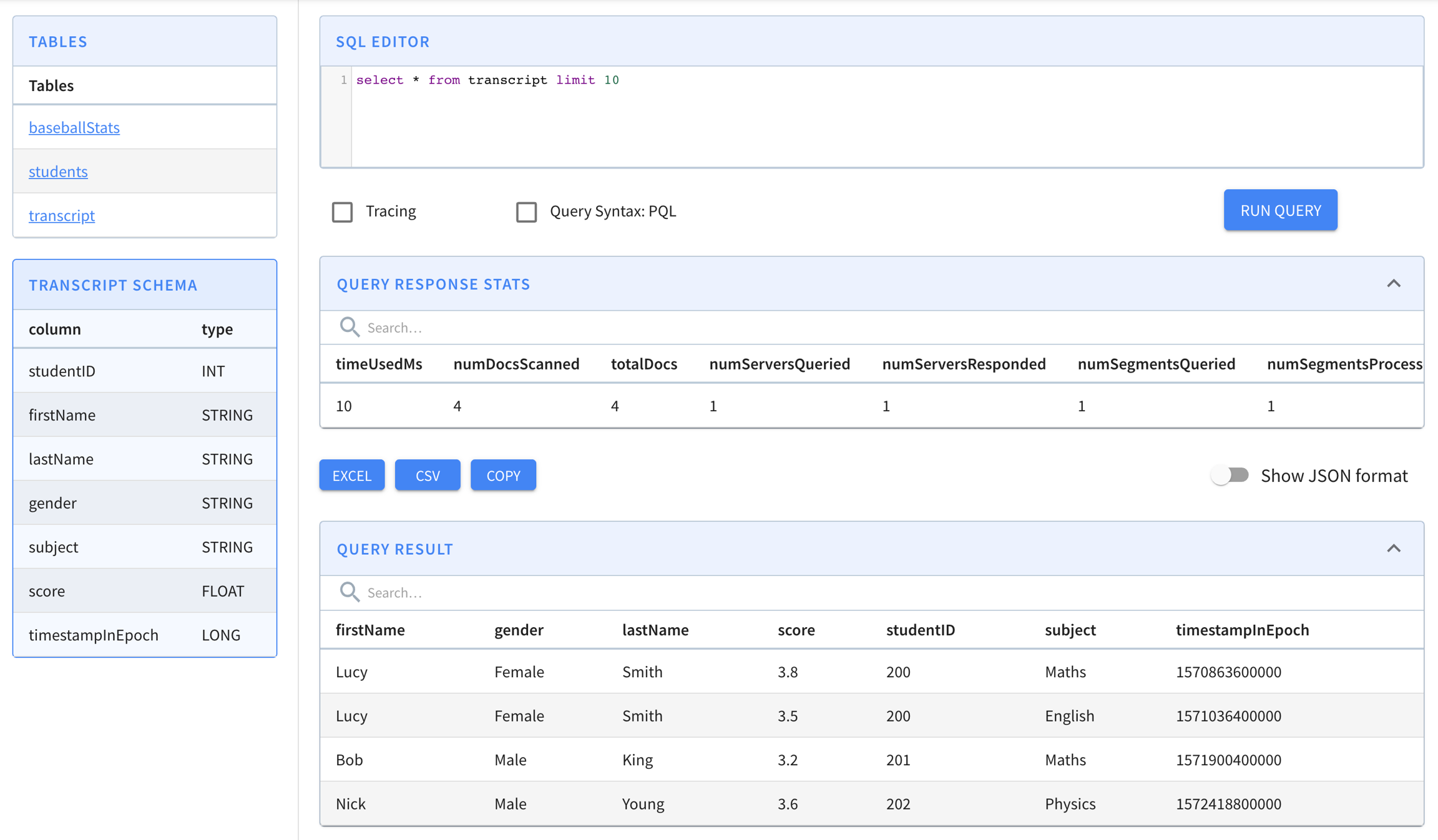
    If everything worked, find your table in the to run queries against it.

    Ingestion FAQ

    This page has a collection of frequently asked questions about ingestion with answers from the community.

    circle-info

    This is a list of questions frequently asked in our troubleshooting channel on Slack. To contribute additional questions and answers, .

    hashtag
    Data processing

    mkdir -p /tmp/pinot-quick-start/rawdata
    hashtag
    What is a good segment size?

    While Apache Pinot can work with segments of various sizes, for optimal use of Pinot, you want to get your segments sized in the 100MB to 500MB (un-tarred/uncompressed) range. Having too many (thousands or more) tiny segments for a single table creates overhead in terms of the metadata storage in Zookeeper as well as in the Pinot servers' heap. At the same time, having too few really large (GBs) segments reduces parallelism of query execution, as on the server side, the thread parallelism of query execution is at segment level.

    hashtag
    Can multiple Pinot tables consume from the same Kafka topic?

    Yes. Each table can be independently configured to consume from any given Kafka topic, regardless of whether there are other tables that are also consuming from the same Kafka topic.

    hashtag
    If I add a partition to a Kafka topic, will Pinot automatically ingest data from this partition?

    Pinot automatically detects new partitions in Kafka topics. It checks for new partitions whenever RealtimeSegmentValidationManager periodic job runs and starts consumers for new partitions.

    You can configure the interval for this job using thecontroller.realtime.segment.validation.frequencyPeriod property in the controller configuration.

    hashtag
    Does Pinot support partition pruning on multiple partition columns?

    Pinot supports multi-column partitioning for offline tables. Map multiple columns under tableIndexConfig.segmentPartitionConfig.columnPartitionMaparrow-up-right. Pinot assigns the input data to each partition according to the partition configuration individually for each column.

    The following example partitions the segment based on two columns, memberID and caseNumber. Note that each partition column is handled separately, so in this case the segment is partitioned on memberID (partition ID 1) and also partiitoned on caseNumber (partition ID 2).

    For multi-column partitioning to work, you must also set routing.segementPrunerTypes as follows:

    hashtag
    How do I enable partitioning in Pinot when using Kafka stream?

    Set up partitioner in the Kafka producer: https://docs.confluent.io/current/clients/producer.htmlarrow-up-right

    The partitioning logic in the stream should match the partitioning config in Pinot. Kafka uses murmur2, and the equivalent in Pinot is the Murmur function.

    Set the partitioning configuration as below using same column used in Kafka:

    and also set:

    To learn how partition works, see routing tuning.

    hashtag
    How do I store BYTES column in JSON data?

    For JSON, you can use a hex encoded string to ingest BYTES.

    hashtag
    How do I flatten my JSON Kafka stream?

    See the json_format(field)arrow-up-right function which can store a top level json field as a STRING in Pinot.

    Then you can use these json functionsarrow-up-right during query time, to extract fields from the json string.

    circle-exclamation

    NOTE This works well if some of your fields are nested json, but most of your fields are top level json keys. If all of your fields are within a nested JSON key, you will have to store the entire payload as 1 column, which is not ideal.

    hashtag
    How do I escape Unicode in my Job Spec YAML file?

    To use explicit code points, you must double-quote (not single-quote) the string, and escape the code point via "\uHHHH", where HHHH is the four digit hex code for the character. See https://yaml.org/spec/spec.html#escaping/in%20double-quoted%20scalars/arrow-up-right for more details.

    hashtag
    Is there a limit on the maximum length of a string column in Pinot?

    By default, Pinot limits the length of a String column to 512 bytes. If you want to overwrite this value, you can set the maxLength attribute in the schema as follows:

    hashtag
    When are new events queryable when getting ingested into a real-time table?

    Events are available to queries as soon as they are ingested. This is because events are instantly indexed in memory upon ingestion.

    The ingestion of events into the real-time table is not transactional, so replicas of the open segment are not immediately consistent. Pinot trades consistency for availability upon network partitioning (CAP theorem) to provide ultra-low ingestion latencies at high throughput.

    However, when the open segment is closed and its in-memory indexes are flushed to persistent storage, all its replicas are guaranteed to be consistent, with the commit protocolarrow-up-right.

    hashtag
    How to reset a CONSUMING segment stuck on an offset which has expired from the stream?

    This typically happens if:

    1. The consumer is lagging a lot.

    2. The consumer was down (server down, cluster down), and the stream moved on, resulting in offset not found when consumer comes back up.

    In case of Kafka, to recover, set property "auto.offset.reset":"earliest" in the streamConfigs section and reset the CONSUMING segment. See Real-time table configsarrow-up-right for more details about the configuration.

    You can also also use the "Resume Consumption" endpoint with "resumeFrom" parameter set to "smallest" (or "largest" if you want). See Pause Stream Ingestionarrow-up-right for more details.

    hashtag
    Indexing

    hashtag
    How to set inverted indexes?

    Inverted indexes are set in the tableConfig's tableIndexConfig -> invertedIndexColumns list. For more info on table configuration, see Table Config Reference. For an example showing how to configure an inverted index, see Inverted Index.

    Applying inverted indexes to a table configuration will generate an inverted index for all new segments. To apply the inverted indexes to all existing segments, see How to apply an inverted index to existing segments?

    hashtag
    How to apply an inverted index to existing segments?

    1. Add the columns you wish to index to the tableIndexConfig-> invertedIndexColumns list. To update the table configuration use the Pinot Swagger API: http://localhost:9000/help#!/Table/updateTableConfigarrow-up-right.

    2. Invoke the reload API: http://localhost:9000/help#!/Segment/reloadAllSegmentsarrow-up-right.

    Once you've done that, you can check whether the index has been applied by querying the segment metadata API at http://localhost:9000/help#/Segment/getServerMetadataarrow-up-right. Don't forget to include the names of the column on which you have applied the index.

    The output from this API should look something like the following:

    hashtag
    Can I retrospectively add an index to any segment?

    Not all indexes can be retrospectively applied to existing segments.

    If you want to add or change the sorted index column or adjust the dictionary encoding of the default forward index you will need to manually re-load any existing segments.

    hashtag
    How to create star-tree indexes?

    Star-tree indexes are configured in the table config under the tableIndexConfig -> starTreeIndexConfigs (list) and enableDefaultStarTree (boolean). See here for more about how to configure star-tree indexes: https://docs.pinot.apache.org/basics/indexing/star-tree-index#index-generationarrow-up-right

    The new segments will have star-tree indexes generated after applying the star-tree index configurations to the table configuration. Currently, Pinot does not support adding star-tree indexes to the existing segments.

    hashtag
    Handling time in Pinot

    hashtag
    How does Pinot’s real-time ingestion handle out-of-order events?

    Pinot does not require ordering of event time stamps. Out of order events are still consumed and indexed into the "currently consuming" segment. In a pathological case, if you have a 2 day old event come in "now", it will still be stored in the segment that is open for consumption "now". There is no strict time-based partitioning for segments, but star-indexes and hybrid tables will handle this as appropriate.

    See the Components > Brokerarrow-up-right for more details about how hybrid tables handle this. Specifically, the time-boundary is computed as max(OfflineTIme) - 1 unit of granularity. Pinot does store the min-max time for each segment and uses it for pruning segments, so segments with multiple time intervals may not be perfectly pruned.

    When generating star-indexes, the time column will be part of the star-tree so the tree can still be efficiently queried for segments with multiple time intervals.

    hashtag
    What is the purpose of a hybrid table not using max(OfflineTime) to determine the time-boundary, and instead using an offset?

    This lets you have an old event up come in without building complex offline pipelines that perfectly partition your events by event timestamps. With this offset, even if your offline data pipeline produces segments with a maximum timestamp, Pinot will not use the offline dataset for that last chunk of segments. The expectation is if you process offline the next time-range of data, your data pipeline will include any late events.

    hashtag
    Why are segments not strictly time-partitioned?

    It might seem odd that segments are not strictly time-partitioned, unlike similar systems such as Apache Druid. This allows real-time ingestion to consume out-of-order events. Even though segments are not strictly time-partitioned, Pinot will still index, prune, and query segments intelligently by time intervals for the performance of hybrid tables and time-filtered data.

    When generating offline segments, the segments generated such that segments only contain one time interval and are well partitioned by the time column.

    make a pull requestarrow-up-right
    "tableIndexConfig": {
          ..
          "segmentPartitionConfig": {
            "columnPartitionMap": {
              "memberId": {
                "functionName": "Modulo",
                "numPartitions": 3 
              },
              "caseNumber": {
                "functionName": "Murmur",
                "numPartitions": 12 
              }
            }
          }
    "routing": {
          "segmentPrunerTypes": ["partition"]
        }
    "tableIndexConfig": {
          ..
          "segmentPartitionConfig": {
            "columnPartitionMap": {
              "column_foo": {
                "functionName": "Murmur",
                "numPartitions": 12 // same as number of kafka partitions
              }
            }
          }
    "routing": {
          "segmentPrunerTypes": ["partition"]
        }
        {
          "dataType": "STRING",
          "maxLength": 1000,
          "name": "textDim1"
        },
    {
      "<segment-name>": {
        "segmentName": "<segment-name>",
        "indexes": {
          "<columnName>": {
            "bloom-filter": "NO",
            "dictionary": "YES",
            "forward-index": "YES",
            "inverted-index": "YES",
            "null-value-vector-reader": "NO",
            "range-index": "NO",
            "json-index": "NO"
          }
        }
      }
    }

    Dimensions

    Typically used in filters and group by, for slicing and dicing into data

    Metrics

    Typically used in aggregations, represents the quantitative data

    Time

    Optional column, represents the timestamp associated with each row

    Schema
    Table
    Rest APIarrow-up-right
    Segment
    Rest APIarrow-up-right
    Query Consolearrow-up-right
    /tmp/pinot-quick-start/rawdata/transcript.csv
    studentID,firstName,lastName,gender,subject,score,timestampInEpoch
    200,Lucy,Smith,Female,Maths,3.8,1570863600000
    200,Lucy,Smith,Female,English,3.5,1571036400000
    201,Bob,King,Male,Maths,3.2,1571900400000
    202,Nick,Young,Male,Physics,3.6,1572418800000
    /tmp/pinot-quick-start/transcript-schema.json
    {
      "schemaName": "transcript",
      "dimensionFieldSpecs": [
        {
          "name": "studentID",
          "dataType": "INT"
        },
        {
          "name": "firstName",
          "dataType": "STRING"
        },
        {
          "name": "lastName",
          "dataType": "STRING"
        },
        {
          "name": "gender",
          "dataType": "STRING"
        },
        {
          "name": "subject",
          "dataType": "STRING"
        }
      ],
      "metricFieldSpecs": [
        {
          "name": "score",
          "dataType": "FLOAT"
        }
      ],
      "dateTimeFieldSpecs": [{
        "name": "timestampInEpoch",
        "dataType": "LONG",
        "format" : "1:MILLISECONDS:EPOCH",
        "granularity": "1:MILLISECONDS"
      }]
    }
    /tmp/pinot-quick-start/transcript-table-offline.json
    {
      "tableName": "transcript",
      "segmentsConfig" : {
        "timeColumnName": "timestampInEpoch",
        "timeType": "MILLISECONDS",
        "replication" : "1",
        "schemaName" : "transcript"
      },
      "tableIndexConfig" : {
        "invertedIndexColumns" : [],
        "loadMode"  : "MMAP"
      },
      "tenants" : {
        "broker":"DefaultTenant",
        "server":"DefaultTenant"
      },
      "tableType":"OFFLINE",
      "metadata": {}
    }
    $ ls /tmp/pinot-quick-start
    rawdata			transcript-schema.json	transcript-table-offline.json
    
    $ ls /tmp/pinot-quick-start/rawdata 
    transcript.csv
    docker run --rm -ti \
        --network=pinot-demo \
        -v /tmp/pinot-quick-start:/tmp/pinot-quick-start \
        --name pinot-batch-table-creation \
        apachepinot/pinot:latest AddTable \
        -schemaFile /tmp/pinot-quick-start/transcript-schema.json \
        -tableConfigFile /tmp/pinot-quick-start/transcript-table-offline.json \
        -controllerHost manual-pinot-controller \
        -controllerPort 9000 -exec
    bin/pinot-admin.sh AddTable \
      -tableConfigFile /tmp/pinot-quick-start/transcript-table-offline.json \
      -schemaFile /tmp/pinot-quick-start/transcript-schema.json -exec
    /tmp/pinot-quick-start/docker-job-spec.yml
    executionFrameworkSpec:
      name: 'standalone'
      segmentGenerationJobRunnerClassName: 'org.apache.pinot.plugin.ingestion.batch.standalone.SegmentGenerationJobRunner'
      segmentTarPushJobRunnerClassName: 'org.apache.pinot.plugin.ingestion.batch.standalone.SegmentTarPushJobRunner'
      segmentUriPushJobRunnerClassName: 'org.apache.pinot.plugin.ingestion.batch.standalone.SegmentUriPushJobRunner'
    jobType: SegmentCreationAndTarPush
    inputDirURI: '/tmp/pinot-quick-start/rawdata/'
    includeFileNamePattern: 'glob:**/*.csv'
    outputDirURI: '/tmp/pinot-quick-start/segments/'
    overwriteOutput: true
    pinotFSSpecs:
      - scheme: file
        className: org.apache.pinot.spi.filesystem.LocalPinotFS
    recordReaderSpec:
      dataFormat: 'csv'
      className: 'org.apache.pinot.plugin.inputformat.csv.CSVRecordReader'
      configClassName: 'org.apache.pinot.plugin.inputformat.csv.CSVRecordReaderConfig'
    tableSpec:
      tableName: 'transcript'
      schemaURI: 'http://manual-pinot-controller:9000/tables/transcript/schema'
      tableConfigURI: 'http://manual-pinot-controller:9000/tables/transcript'
    pinotClusterSpecs:
      - controllerURI: 'http://manual-pinot-controller:9000'
    /tmp/pinot-quick-start/batch-job-spec.yml
    executionFrameworkSpec:
      name: 'standalone'
      segmentGenerationJobRunnerClassName: 'org.apache.pinot.plugin.ingestion.batch.standalone.SegmentGenerationJobRunner'
      segmentTarPushJobRunnerClassName: 'org.apache.pinot.plugin.ingestion.batch.standalone.SegmentTarPushJobRunner'
      segmentUriPushJobRunnerClassName: 'org.apache.pinot.plugin.ingestion.batch.standalone.SegmentUriPushJobRunner'
    jobType: SegmentCreationAndTarPush
    inputDirURI: '/tmp/pinot-quick-start/rawdata/'
    includeFileNamePattern: 'glob:**/*.csv'
    outputDirURI: '/tmp/pinot-quick-start/segments/'
    overwriteOutput: true
    pushJobSpec:
      pushFileNamePattern: 'glob:**/*.tar.gz'
    pinotFSSpecs:
      - scheme: file
        className: org.apache.pinot.spi.filesystem.LocalPinotFS
    recordReaderSpec:
      dataFormat: 'csv'
      className: 'org.apache.pinot.plugin.inputformat.csv.CSVRecordReader'
      configClassName: 'org.apache.pinot.plugin.inputformat.csv.CSVRecordReaderConfig'
    tableSpec:
      tableName: 'transcript'
      schemaURI: 'http://localhost:9000/tables/transcript/schema'
      tableConfigURI: 'http://localhost:9000/tables/transcript'
    pinotClusterSpecs:
      - controllerURI: 'http://localhost:9000'
    docker run --rm -ti \
        --network=pinot-demo \
        -v /tmp/pinot-quick-start:/tmp/pinot-quick-start \
        --name pinot-data-ingestion-job \
        apachepinot/pinot:latest LaunchDataIngestionJob \
        -jobSpecFile /tmp/pinot-quick-start/docker-job-spec.yml
    bin/pinot-admin.sh LaunchDataIngestionJob \
        -jobSpecFile /tmp/pinot-quick-start/batch-job-spec.yml
    SegmentGenerationJobSpec: 
    !!org.apache.pinot.spi.ingestion.batch.spec.SegmentGenerationJobSpec
    excludeFileNamePattern: null
    executionFrameworkSpec: {extraConfigs: null, name: standalone, segmentGenerationJobRunnerClassName: org.apache.pinot.plugin.ingestion.batch.standalone.SegmentGenerationJobRunner,
      segmentTarPushJobRunnerClassName: org.apache.pinot.plugin.ingestion.batch.standalone.SegmentTarPushJobRunner,
      segmentUriPushJobRunnerClassName: org.apache.pinot.plugin.ingestion.batch.standalone.SegmentUriPushJobRunner}
    includeFileNamePattern: glob:**\/*.csv
    inputDirURI: /tmp/pinot-quick-start/rawdata/
    jobType: SegmentCreationAndTarPush
    outputDirURI: /tmp/pinot-quick-start/segments
    overwriteOutput: true
    pinotClusterSpecs:
    - {controllerURI: 'http://localhost:9000'}
    pinotFSSpecs:
    - {className: org.apache.pinot.spi.filesystem.LocalPinotFS, configs: null, scheme: file}
    pushJobSpec: null
    recordReaderSpec: {className: org.apache.pinot.plugin.inputformat.csv.CSVRecordReader,
      configClassName: org.apache.pinot.plugin.inputformat.csv.CSVRecordReaderConfig,
      configs: null, dataFormat: csv}
    segmentNameGeneratorSpec: null
    tableSpec: {schemaURI: 'http://localhost:9000/tables/transcript/schema', tableConfigURI: 'http://localhost:9000/tables/transcript',
      tableName: transcript}
    
    Trying to create instance for class org.apache.pinot.plugin.ingestion.batch.standalone.SegmentGenerationJobRunner
    Initializing PinotFS for scheme file, classname org.apache.pinot.spi.filesystem.LocalPinotFS
    Finished building StatsCollector!
    Collected stats for 4 documents
    Using fixed bytes value dictionary for column: studentID, size: 9
    Created dictionary for STRING column: studentID with cardinality: 3, max length in bytes: 3, range: 200 to 202
    Using fixed bytes value dictionary for column: firstName, size: 12
    Created dictionary for STRING column: firstName with cardinality: 3, max length in bytes: 4, range: Bob to Nick
    Using fixed bytes value dictionary for column: lastName, size: 15
    Created dictionary for STRING column: lastName with cardinality: 3, max length in bytes: 5, range: King to Young
    Created dictionary for FLOAT column: score with cardinality: 4, range: 3.2 to 3.8
    Using fixed bytes value dictionary for column: gender, size: 12
    Created dictionary for STRING column: gender with cardinality: 2, max length in bytes: 6, range: Female to Male
    Using fixed bytes value dictionary for column: subject, size: 21
    Created dictionary for STRING column: subject with cardinality: 3, max length in bytes: 7, range: English to Physics
    Created dictionary for LONG column: timestampInEpoch with cardinality: 4, range: 1570863600000 to 1572418800000
    Start building IndexCreator!
    Finished records indexing in IndexCreator!
    Finished segment seal!
    Converting segment: /var/folders/3z/qn6k60qs6ps1bb6s2c26gx040000gn/T/pinot-1583443148720/output/transcript_OFFLINE_1570863600000_1572418800000_0 to v3 format
    v3 segment location for segment: transcript_OFFLINE_1570863600000_1572418800000_0 is /var/folders/3z/qn6k60qs6ps1bb6s2c26gx040000gn/T/pinot-1583443148720/output/transcript_OFFLINE_1570863600000_1572418800000_0/v3
    Deleting files in v1 segment directory: /var/folders/3z/qn6k60qs6ps1bb6s2c26gx040000gn/T/pinot-1583443148720/output/transcript_OFFLINE_1570863600000_1572418800000_0
    Starting building 1 star-trees with configs: [StarTreeV2BuilderConfig[splitOrder=[studentID, firstName],skipStarNodeCreation=[],functionColumnPairs=[org.apache.pinot.core.startree.v2.AggregationFunctionColumnPair@3a48efdc],maxLeafRecords=1]] using OFF_HEAP builder
    Starting building star-tree with config: StarTreeV2BuilderConfig[splitOrder=[studentID, firstName],skipStarNodeCreation=[],functionColumnPairs=[org.apache.pinot.core.startree.v2.AggregationFunctionColumnPair@3a48efdc],maxLeafRecords=1]
    Generated 3 star-tree records from 4 segment records
    Finished constructing star-tree, got 9 tree nodes and 4 records under star-node
    Finished creating aggregated documents, got 6 aggregated records
    Finished building star-tree in 10ms
    Finished building 1 star-trees in 27ms
    Computed crc = 3454627653, based on files [/var/folders/3z/qn6k60qs6ps1bb6s2c26gx040000gn/T/pinot-1583443148720/output/transcript_OFFLINE_1570863600000_1572418800000_0/v3/columns.psf, /var/folders/3z/qn6k60qs6ps1bb6s2c26gx040000gn/T/pinot-1583443148720/output/transcript_OFFLINE_1570863600000_1572418800000_0/v3/index_map, /var/folders/3z/qn6k60qs6ps1bb6s2c26gx040000gn/T/pinot-1583443148720/output/transcript_OFFLINE_1570863600000_1572418800000_0/v3/metadata.properties, /var/folders/3z/qn6k60qs6ps1bb6s2c26gx040000gn/T/pinot-1583443148720/output/transcript_OFFLINE_1570863600000_1572418800000_0/v3/star_tree_index, /var/folders/3z/qn6k60qs6ps1bb6s2c26gx040000gn/T/pinot-1583443148720/output/transcript_OFFLINE_1570863600000_1572418800000_0/v3/star_tree_index_map]
    Driver, record read time : 0
    Driver, stats collector time : 0
    Driver, indexing time : 0
    Tarring segment from: /var/folders/3z/qn6k60qs6ps1bb6s2c26gx040000gn/T/pinot-1583443148720/output/transcript_OFFLINE_1570863600000_1572418800000_0 to: /var/folders/3z/qn6k60qs6ps1bb6s2c26gx040000gn/T/pinot-1583443148720/output/transcript_OFFLINE_1570863600000_1572418800000_0.tar.gz
    Size for segment: transcript_OFFLINE_1570863600000_1572418800000_0, uncompressed: 6.73KB, compressed: 1.89KB
    Trying to create instance for class org.apache.pinot.plugin.ingestion.batch.standalone.SegmentTarPushJobRunner
    Initializing PinotFS for scheme file, classname org.apache.pinot.spi.filesystem.LocalPinotFS
    Start pushing segments: [/tmp/pinot-quick-start/segments/transcript_OFFLINE_1570863600000_1572418800000_0.tar.gz]... to locations: [org.apache.pinot.spi.ingestion.batch.spec.PinotClusterSpec@243c4f91] for table transcript
    Pushing segment: transcript_OFFLINE_1570863600000_1572418800000_0 to location: http://localhost:9000 for table transcript
    Sending request: http://localhost:9000/v2/segments?tableName=transcript to controller: nehas-mbp.hsd1.ca.comcast.net, version: Unknown
    Response for pushing table transcript segment transcript_OFFLINE_1570863600000_1572418800000_0 to location http://localhost:9000 - 200: {"status":"Successfully uploaded segment: transcript_OFFLINE_1570863600000_1572418800000_0 of table: transcript"}

    Operations FAQ

    This page has a collection of frequently asked questions about operations with answers from the community.

    circle-info

    This is a list of questions frequently asked in our troubleshooting channel on Slack. To contribute additional questions and answers, make a pull requestarrow-up-right.

    hashtag
    Memory

    hashtag
    How much heap should I allocate for my Pinot instances?

    Typically, Apache Pinot components try to use as much off-heap (MMAP/DirectMemory) wherever possible. For example, Pinot servers load segments in memory-mapped files in MMAP mode (recommended), or direct memory in HEAP mode. Heap memory is used mostly for query execution and storing some metadata. We have seen production deployments with high throughput and low-latency work well with just 16 GB of heap for Pinot servers and brokers. The Pinot controller may also cache some metadata (table configurations etc) in heap, so if there are just a few tables in the Pinot cluster, a few GB of heap should suffice.

    hashtag
    DR

    hashtag
    Does Pinot provide any backup/restore mechanism?

    Pinot relies on deep-storage for storing a backup copy of segments (offline as well as real-time). It relies on Zookeeper to store metadata (table configurations, schema, cluster state, and so on). It does not explicitly provide tools to take backups or restore these data, but relies on the deep-storage (ADLS/S3/GCP/etc), and ZK to persist these data/metadata.

    hashtag
    Alter Table

    hashtag
    Can I change a column name in my table, without losing data?

    Changing a column name or data type is considered backward incompatible change. While Pinot does support schema evolution for backward compatible changes, it does not support backward incompatible changes like changing name/data-type of a column.

    hashtag
    How to change number of replicas of a table?

    You can change the number of replicas by updating the table configuration's section. Make sure you have at least as many servers as the replication.

    For offline tables, update :

    For real-time tables, update :

    After changing the replication, run a .

    Note that if you are using replica groups, it's expected these configurations equal numReplicaGroups. If they do not match, Pinot will use numReplicaGroups.

    hashtag
    How to set or change table retention?

    By default there is no retention set for a table in Apache Pinot. You may however, set retention by setting the following properties in the section inside table configs:

    • retentionTimeUnit

    • retentionTimeValue

    Updating the retention value in the table config should be good enough, there is no need to rebalance the table or reload its segments.

    hashtag
    Rebalance

    hashtag
    How to run a rebalance on a table?

    See .

    hashtag
    Why does my real-time table not use the new nodes I added to the cluster?

    Likely explanation: num partitions * num replicas < num servers.

    In real-time tables, segments of the same partition always remain on the same node. This sticky assignment is needed for replica groups and is critical if using upserts. For instance, if you have 3 partitions, 1 replica, and 4 nodes, only ¾ nodes will be used, and all of p0 segments will be on 1 node, p1 on 1 node, and p2 on 1 node. One server will be unused, and will remain unused through rebalances.

    There’s nothing we can do about CONSUMING segments, they will continue to use only 3 nodes if you have 3 partitions. But we can rebalance such that completed segments use all nodes. If you want to force the completed segments of the table to use the new server use this config:

    hashtag
    Segments

    hashtag
    How to control the number of segments generated?

    The number of segments generated depends on the number of input files. If you provide only 1 input file, you will get 1 segment. If you break up the input file into multiple files, you will get as many segments as the input files.

    hashtag
    What are the common reasons my segment is in a BAD state ?

    This typically happens when the server is unable to load the segment. Possible causes: out-of-memory, no disk space, unable to download segment from deep-store, and similar other errors. Check server logs for more information.

    hashtag
    How to reset a segment when it runs into a BAD state?

    Use the segment reset controller REST API to reset the segment:

    hashtag
    How do I pause real-time ingestion?

    Refer to .

    hashtag
    What's the difference between Reset, Refresh, and Reload?

    • Reset: Gets a segment in ERROR state back to ONLINE or CONSUMING state. Behind the scenes, the Pinot controller takes the segment to the OFFLINE state, waits for External View to stabilize, and then moves it back to ONLINE or CONSUMING state, thus effectively resetting segments or consumers in error states.

    In addition, RESET brings the segment OFFLINE temporarily; while REFRESH and RELOAD swap the segment on server atomically without bringing down the segment or affecting ongoing queries.

    hashtag
    Tenants

    hashtag
    How can I make brokers/servers join the cluster without the DefaultTenant tag?

    Set this property in your controller.conf file:

    Now your brokers and servers should join the cluster as broker_untagged and server_untagged. You can then directly use the POST /tenants API to create the desired tenants, as in the following:

    hashtag
    Minion

    hashtag
    How do I tune minion task timeout and parallelism on each worker?

    There are two task configurations, but they are set as part of cluster configurations, like in the following example. One controls the task's overall timeout (1hr by default) and one sets how many tasks to run on a single minion worker (1 by default). The <taskType> is the task to tune, such as MergeRollupTask or RealtimeToOfflineSegmentsTask etc.

    hashtag
    How to I manually run a Periodic Task?

    See .

    hashtag
    Tuning and Optimizations

    hashtag
    Do replica groups work for real-time?

    Yes, replica groups work for real-time. There's 2 parts to enabling replica groups:

    1. Replica groups segment assignment.

    2. Replica group query routing.

    Replica group segment assignment

    Replica group segment assignment is achieved in real-time, if number of servers is a multiple of number of replicas. The partitions get uniformly sprayed across the servers, creating replica groups. For example, consider we have 6 partitions, 2 replicas, and 4 servers.

    r1
    r2

    As you can see, the set (S0, S2) contains r1 of every partition, and (s1, S3) contains r2 of every partition. The query will only be routed to one of the sets, and not span every server. If you are are adding/removing servers from an existing table setup, you have to run for segment assignment changes to take effect.

    Replica group query routing

    Once replica group segment assignment is in effect, the query routing can take advantage of it. For replica group based query routing, set the following in the table config's section, and then restart brokers

    hashtag
    Overwrite index configs at tier level

    When using , user may want to have different encoding and indexing types for a column in different tiers to balance query latency and cost saving more flexibly. For example, segments in the hot tier can use dict-encoding, bloom filter and all kinds of relevant index types for very fast query execution. But for segments in the cold tier, where cost saving matters more than low query latency, one may want to use raw values and bloom filters only.

    The following two examples show how to overwrite encoding type and index configs for tiers. Similar changes are also demonstrated in the .

    1. Overwriting single-column index configs using fieldConfigList. All top level fields in can be overwritten, and fields not overwritten are kept intact.

    1. Overwriting star-tree index configurations using tableIndexConfig. The StarTreeIndexConfigs is overwritten as a whole. In fact, all top level fields defined in can be overwritten, so single-column index configs defined in tableIndexConfig can also be overwritten but it's less clear than using fieldConfigList.

    hashtag
    Credential

    hashtag
    How do I update credentials for real-time upstream without downtime?

    1. .

    2. Wait for the pause status to change to success.

    3. Update the credential in the table config.

    Quick Start Examples

    This section describes quick start commands that launch all Pinot components in a single process.

    Pinot ships with QuickStart commands that launch Pinot components in a single process and import pre-built datasets. These quick start examples are a good place if you're just getting started with Pinot. The examples begin with the Batch Processing example, after the following notes:

    • Prerequisites

      You must have either installed Pinot locally or have Docker installed if you want to use the Pinot Docker image. The examples are available in each option and work the same. The decision of which to choose depends on your installation preference and how you generally like to work. If you don't know which to choose, using Docker will make your cleanup easier after you are done with the examples.

    • Pinot versions in examples

      The Docker-based examples on this page use pinot:latest, which instructs Docker to pull and use the most recent release of Apache Pinot. If you prefer to use a specific release instead, you can designate it by replacing latest with the release number, like this: pinot:0.12.1.

      The local install-based examples that are run using the launcher scripts will use the Apache Pinot version you installed.

    • Running examples with Docker on a Mac with an M1 or M2 CPU

      Add the -arm64 suffix to the run commands, like this:

    • Stopping a running example

      To stop a running example, enter Ctrl+C in the same terminal where you ran the docker run command to start the example.

    circle-exclamation

    macOS Monterey Users

    By default the Airplay receiver server runs on port 7000, which is also the port used by the Pinot Server in the Quick Start. You may see the following error when running these examples:

    If you disable the Airplay receiver server and try again, you shouldn't see this error message anymore.

    hashtag
    Batch Processing

    This example demonstrates how to do batch processing with Pinot. The command:

    • Starts Apache Zookeeper, Pinot Controller, Pinot Broker, and Pinot Server.

    • Creates the baseballStats table

    • Launches a standalone data ingestion job that builds one segment for a given CSV data file for the baseballStats table and pushes the segment to the Pinot Controller.

    hashtag
    Batch JSON

    This example demonstrates how to import and query JSON documents in Pinot. The command:

    • Starts Apache Zookeeper, Pinot Controller, Pinot Broker, and Pinot Server.

    • Creates the githubEvents table

    • Launches a standalone data ingestion job that builds one segment for a given JSON data file for the githubEvents table and pushes the segment to the Pinot Controller.

    hashtag
    Batch with complex data types

    This example demonstrates how to do batch processing in Pinot where the the data items have complex fields that need to be unnested. The command:

    • Starts Apache Zookeeper, Pinot Controller, Pinot Broker, and Pinot Server.

    • Creates the githubEvents table

    • Launches a standalone data ingestion job that builds one segment for a given JSON data file for the githubEvents table and pushes the segment to the Pinot Controller.

    hashtag
    Streaming

    This example demonstrates how to do stream processing with Pinot. The command:

    • Starts Apache Kafka, Apache Zookeeper, Pinot Controller, Pinot Broker, and Pinot Server.

    • Creates meetupRsvp table

    • Launches a meetup stream

    hashtag
    Streaming JSON

    This example demonstrates how to do stream processing with JSON documents in Pinot. The command:

    • Starts Apache Kafka, Apache Zookeeper, Pinot Controller, Pinot Broker, and Pinot Server.

    • Creates meetupRsvp table

    • Launches a meetup stream

    hashtag
    Streaming with minion cleanup

    This example demonstrates how to do stream processing in Pinot with RealtimeToOfflineSegmentsTask and MergeRollupTask minion tasks continuously optimizing segments as data gets ingested. The command:

    • Starts Apache Kafka, Apache Zookeeper, Pinot Controller, Pinot Broker, Pinot Minion, and Pinot Server.

    • Creates githubEvents table

    • Launches a GitHub events stream

    hashtag
    Streaming with complex data types

    This example demonstrates how to do stream processing in Pinot where the stream contains items that have complex fields that need to be unnested. The command:

    • Starts Apache Kafka, Apache Zookeeper, Pinot Controller, Pinot Broker, Pinot Minion, and Pinot Server.

    • Creates meetupRsvp table

    • Launches a meetup stream

    hashtag
    Upsert

    This example demonstrates how to do with Pinot. The command:

    • Starts Apache Kafka, Apache Zookeeper, Pinot Controller, Pinot Broker, and Pinot Server.

    • Creates meetupRsvp table

    • Launches a meetup stream

    hashtag
    Upsert JSON

    This example demonstrates how to do with JSON documents in Pinot. The command:

    • Starts Apache Kafka, Apache Zookeeper, Pinot Controller, Pinot Broker, and Pinot Server.

    • Creates meetupRsvp table

    • Launches a meetup stream

    hashtag
    Hybrid

    This example demonstrates how to do hybrid stream and batch processing with Pinot. The command:

    1. Starts Apache Kafka, Apache Zookeeper, Pinot Controller, Pinot Broker, and Pinot Server.

    2. Creates airlineStats table

    3. Launches a standalone data ingestion job that builds segments under a given directory of Avro files for the airlineStats table and pushes the segments to the Pinot Controller.

    hashtag
    Join

    This example demonstrates how to do joins in Pinot using the . The command:

    • Starts Apache Zookeeper, Pinot Controller, Pinot Broker, and Pinot Server in the same container.

    • Creates the baseballStats table

    • Launches a data ingestion job that builds one segment for a given CSV data file for the baseballStats table and pushes the segment to the Pinot Controller.

    Refresh: Replaces the segment with a new one, with the same name but often different data. Under the hood, the Pinot controller sets new segment metadata in Zookeeper, and notifies brokers and servers to check their local states about this segment and update accordingly. Servers also download the new segment to replace the old one, when both have different checksums. There is no separate rest API for refreshing, and it is done as part of the SegmentUpload API.
  • Reload: Loads the segment again, often to generate a new index as updated in the table configuration. Underlying, the Pinot server gets the new table configuration from Zookeeper, and uses it to guide the segment reloading. In fact, the last step of REFRESH as explained above is to load the segment into memory to serve queries. There is a dedicated rest API for reloading. By default, it doesn't download segments, but the option is provided to force the server to download the segment to replace the local one cleanly.

  • S3

    p5

    S0

    S1

    p6

    S2

    S3

    Resume the consumption.

    p1

    S0

    S1

    p2

    S2

    S3

    p3

    S0

    S1

    p4

    segmentsConfigarrow-up-right
    replicationarrow-up-right
    replicasPerPartitionarrow-up-right
    table rebalance
    segmentsConfigarrow-up-right
    Rebalance
    Pause Stream Ingestionarrow-up-right
    Running a Periodic Task Manually
    rebalance
    routingarrow-up-right
    tiered storagearrow-up-right
    MultiDirQuickStart examplearrow-up-right
    FieldConfig classarrow-up-right
    IndexingConfig classarrow-up-right
    Pause the stream ingestionarrow-up-right

    S2

  • Issues sample queries to Pinot

  • Issues sample queries to Pinot

  • Issues sample queries to Pinot

  • Publishes data to a Kafka topic meetupRSVPEvents that is subscribed to by Pinot.

  • Issues sample queries to Pinot

  • Publishes data to a Kafka topic meetupRSVPEvents that is subscribed to by Pinot

  • Issues sample queries to Pinot

  • Publishes data to a Kafka topic githubEvents that is subscribed to by Pinot.

  • Issues sample queries to Pinot

  • Publishes data to a Kafka topic meetupRSVPEvents that is subscribed to by Pinot.

  • Issues sample queries to Pinot

  • Publishes data to a Kafka topic meetupRSVPEvents that is subscribed to by Pinot

  • Issues sample queries to Pinot

  • Publishes data to a Kafka topic meetupRSVPEvents that is subscribed to by Pinot

  • Issues sample queries to Pinot

  • Launches a stream of flights stats

  • Publishes data to a Kafka topic airlineStatsEvents that is subscribed to by Pinot.

  • Issues sample queries to Pinot

  • Creates the dimBaseballTeams table

  • Launches a data ingestion job that builds one segment for a given CSV data file for the dimBaseballStats table and pushes the segment to the Pinot Controller.

  • Issues sample queries to Pinot

  • stream processing with upsert
    stream processing with upsert
    Lookup UDF
    { 
        "tableName": "pinotTable", 
        "tableType": "OFFLINE", 
        "segmentsConfig": {
          "replication": "3", 
          ... 
        }
        ..
    { 
        "tableName": "pinotTable", 
        "tableType": "REALTIME", 
        "segmentsConfig": {
          "replicasPerPartition": "3", 
          ... 
        }
        ..
    "instanceAssignmentConfigMap": {
          "COMPLETED": {
            "tagPoolConfig": {
              "tag": "DefaultTenant_OFFLINE"
            },
            "replicaGroupPartitionConfig": {
            }
          }
        },
    curl -X POST "{host}/segments/{tableNameWithType}/{segmentName}/reset"
    cluster.tenant.isolation.enable=false
    curl -X POST "http://localhost:9000/tenants" 
    -H "accept: application/json" 
    -H "Content-Type: application/json" 
    -d "{\"tenantRole\":\"BROKER\",\"tenantName\":\"foo\",\"numberOfInstances\":1}"
    Using "POST /cluster/configs API" on CLUSTER tab in Swagger, with this payload:
    {
    	"<taskType>.timeoutMs": "600000",
    	"<taskType>.numConcurrentTasksPerInstance": "4"
    }
    {
        "tableName": "pinotTable", 
        "tableType": "REALTIME",
        "routing": {
            "instanceSelectorType": "replicaGroup"
        }
        ..
    }
    {
      ...
      "fieldConfigList": [    
        {
          "name": "ArrTimeBlk",
          "encodingType": "DICTIONARY",
          "indexes": {
            "inverted": {
              "enabled": "true"
            }
          },
          "tierOverwrites": {
            "hotTier": {
              "encodingType": "DICTIONARY",
              "indexes": { // change index types for this tier
                "bloom": {
                  "enabled": "true"
                }
              }
            },
            "coldTier": {
              "encodingType": "RAW", // change encoding type for this tier
              "indexes": { } // remove all indexes
            }
          }
        }
      ],
      "tableIndexConfig": {
        "starTreeIndexConfigs": [
          {
            "dimensionsSplitOrder": [
              "AirlineID",
              "Origin",
              "Dest"
            ],
            "skipStarNodeCreationForDimensions": [],
            "functionColumnPairs": [
              "COUNT__*",
              "MAX__ArrDelay"
            ],
            "maxLeafRecords": 10
          }
        ],
    ...
        "tierOverwrites": {
          "hotTier": {
            "starTreeIndexConfigs": [ // create different STrTree index on this tier
              {
                "dimensionsSplitOrder": [
                  "Carrier",
                  "CancellationCode",
                  "Origin",
                  "Dest"
                ],
                "skipStarNodeCreationForDimensions": [],
                "functionColumnPairs": [
                  "MAX__CarrierDelay",
                  "AVG__CarrierDelay"
                ],
                "maxLeafRecords": 10
              }
            ]
          },
          "coldTier": {
            "starTreeIndexConfigs": [] // removes ST index for this tier
          }
        }
      },
     ...
    docker run \
        -p 9000:9000 \
        apachepinot/pinot:latest-arm64 QuickStart \
        -type batch
    Failed to start a Pinot [SERVER]
    java.lang.RuntimeException: java.net.BindException: Address already in use
    	at org.apache.pinot.core.transport.QueryServer.start(QueryServer.java:103) ~[pinot-all-0.9.0-jar-with-dependencies.jar:0.9.0-cf8b84e8b0d6ab62374048de586ce7da21132906]
    	at org.apache.pinot.server.starter.ServerInstance.start(ServerInstance.java:158) ~[pinot-all-0.9.0-jar-with-dependencies.jar:0.9.0-cf8b84e8b0d6ab62374048de586ce7da21132906]
    	at org.apache.helix.manager.zk.ParticipantManager.handleNewSession(ParticipantManager.java:110) ~[pinot-all-0.9.0-jar-with-dependencies.jar:0.9.0-cf8b84e8b0d6ab62374048de586ce7da2113
    docker run \
        -p 9000:9000 \
        apachepinot/pinot:latest QuickStart \
        -type batch
    ./bin/pinot-admin.sh QuickStart -type batch
    docker run \
        -p 9000:9000 \
        apachepinot/pinot:latest QuickStart \
        -type batch_json_index
    ./bin/pinot-admin.sh QuickStart -type batch_json_index
    docker run \
        -p 9000:9000 \
        apachepinot/pinot:latest QuickStart \
        -type batch_complex_type
    ./bin/pinot-admin.sh QuickStart -type batch_complex_type
    docker run \
        -p 9000:9000 \
        apachepinot/pinot:latest QuickStart \
        -type stream
    ./bin/pinot-admin.sh QuickStart -type stream
    docker run \
        -p 9000:9000 \
        apachepinot/pinot:latest QuickStart \
        -type stream_json_index
    ./bin/pinot-admin.sh QuickStart -type stream_json_index
    docker run \
        -p 9000:9000 \
        apachepinot/pinot:latest QuickStart \
        -type realtime_minion
    ./bin/pinot-admin.sh QuickStart -type realtime_minion
    docker run \
        -p 9000:9000 \
        apachepinot/pinot:latest QuickStart \
        -type stream_complex_type
    ./bin/pinot-admin.sh QuickStart -type stream_complex_type
    docker run \
        -p 9000:9000 \
        apachepinot/pinot:latest QuickStart \
        -type upsert
    ./bin/pinot-admin.sh QuickStart -type upsert
    docker run \
        -p 9000:9000 \
        apachepinot/pinot:latest QuickStart \
        -type upsert_json_index
    ./bin/pinot-admin.sh QuickStart -type upsert_json_index
    docker run \
        -p 9000:9000 \
        apachepinot/pinot:latest QuickStart \
        -type hybrid
    ./bin/pinot-admin.sh QuickStart -type hybrid
    docker run \
        -p 9000:9000 \
        apachepinot/pinot:latest QuickStart \
        -type join
    ./bin/pinot-admin.sh QuickStart -type join

    Running in Kubernetes

    Pinot quick start in Kubernetes

    Get started running Pinot in Kubernetes.

    circle-info

    Note: The examples in this guide are sample configurations to be used as reference. For production setup, you may want to customize it to your needs.

    hashtag

    Prerequisites

    hashtag
    Kubernetes

    This guide assumes that you already have a running Kubernetes cluster.

    If you haven't yet set up a Kubernetes cluster, see the links below for instructions:

    • Enable Kubernetes on Docker-Desktoparrow-up-right

    • Install Minikube for local setuparrow-up-right

      • Make sure to run with enough resources: minikube start --vm=true --cpus=4 --memory=8g --disk-size=50g

    hashtag
    Pinot

    Make sure that you've downloaded Apache Pinot. The scripts for the setup in this guide can be found in our open source project on GitHubarrow-up-right.

    # checkout pinot
    git clone https://github.com/apache/pinot.git
    cd 

    hashtag
    Set up a Pinot cluster in Kubernetes

    hashtag
    Start Pinot with Helm

    The Pinot repository has pre-packaged Helm charts for Pinot and Presto. The Helm repository index file is herearrow-up-right.

    Note: Specify StorageClass based on your cloud vendor. Don't mount a blob store (such as AzureFile, GoogleCloudStorage, or S3) as the data serving file system. Use only Amazon EBS/GCP Persistent Disk/Azure Disk-style disks.

    • For AWS: "gp2"

    • For GCP: "pd-ssd" or "standard"

    • For Azure: "AzureDisk"

    • For Docker-Desktop: "hostpath"

    1.1.1 Update Helm dependency

    1.1.2 Start Pinot with Helm

    For Helm v2.12.1:

    If your Kubernetes cluster is recently provisioned, ensure Helm is initialized by running:

    Then deploy a new HA Pinot cluster using the following command:

    For Helm v3.0.0:

    hashtag
    Check Pinot deployment status

    hashtag
    Load data into Pinot using Kafka

    hashtag
    Bring up a Kafka cluster for real-time data ingestion

    hashtag
    Check Kafka deployment status

    Ensure the Kafka deployment is ready before executing the scripts in the following steps. Run the following command:

    Below is an example output showing the deployment is ready:

    hashtag
    Create Kafka topics

    Run the scripts below to create two Kafka topics for data ingestion:

    hashtag
    Load data into Kafka and create Pinot schema/tables

    The script below does the following:

    • Ingests 19492 JSON messages to Kafka topic flights-realtime at a speed of 1 msg/sec

    • Ingests 19492 Avro messages to Kafka topic flights-realtime-avro at a speed of 1 msg/sec

    • Uploads Pinot schema airlineStats

    • Creates Pinot table airlineStats to ingest data from JSON encoded Kafka topic flights-realtime

    • Creates Pinot table airlineStatsAvro to ingest data from Avro encoded Kafka topic flights-realtime-avro

    hashtag
    Query with the Pinot Data Explorer

    hashtag
    Pinot Data Explorer

    The script below, located at ./pinot/helm/pinot, performs local port forwarding, and opens the Pinot query console in your default web browser.

    hashtag
    Query Pinot with Superset

    hashtag
    Bring up Superset using Helm

    1. Install the SuperSet Helm repository:

    1. Get the Helm values configuration file:

    1. For Superset to install Pinot dependencies, edit /tmp/superset-values.yaml file to add apinotdb pip dependency into bootstrapScript field.

    2. You can also build your own image with this dependency or use the image apachepinot/pinot-superset:latest instead.

    1. Replace the default admin credentials inside the init section with a meaningful user profile and stronger password.

    2. Install Superset using Helm:

    1. Ensure your cluster is up by running:

    hashtag
    Access the Superset UI

    1. Run the below command to port forward Superset to your localhost:18088.

    1. Navigate to Superset in your browser with the admin credentials you set in the previous section.

    2. Create a new database connection with the following URI: pinot+http://pinot-broker.pinot-quickstart:8099/query?controller=http://pinot-controller.pinot-quickstart:9000/

    3. Once the database is added, you can add more data sets and explore the dashboard options.

    hashtag
    Access Pinot with Trino

    hashtag
    Deploy Trino

    1. Deploy Trino with the Pinot plugin installed:

    1. See the charts in the Trino Helm chart repository:

    1. In order to connect Trino to Pinot, you'll need to add the Pinot catalog, which requires extra configurations. Run the below command to get all the configurable values.

    1. To add the Pinot catalog, edit the additionalCatalogs section by adding:

    circle-info

    Pinot is deployed at namespace pinot-quickstart, so the controller serviceURL is pinot-controller.pinot-quickstart:9000

    1. After modifying the /tmp/trino-values.yaml file, deploy Trino with:

    1. Once you've deployed Trino, check the deployment status:

    hashtag
    Query Pinot with the Trino CLI

    Once Trino is deployed, run the below command to get a runnable Trino CLI.

    1. Download the Trino CLI:

    1. Port forward Trino service to your local if it's not already exposed:

    1. Use the Trino console client to connect to the Trino service:

    1. Query Pinot data using the Trino CLI, like in the sample queries below.

    hashtag
    Sample queries to execute

    hashtag
    List all catalogs

    hashtag
    List all tables

    hashtag
    Show schema

    hashtag
    Count total documents

    hashtag
    Access Pinot with Presto

    hashtag
    Deploy Presto with the Pinot plugin

    1. First, deploy Presto with default configurations:

    1. To customize your deployment, run the below command to get all the configurable values.

    1. After modifying the /tmp/presto-values.yaml file, deploy Presto:

    1. Once you've deployed the Presto instance, check the deployment status:

    Sample Output of K8s Deployment Status

    hashtag
    Query Presto using the Presto CLI

    Once Presto is deployed, you can run the below command from herearrow-up-right, or follow the steps below.

    1. Download the Presto CLI:

    1. Port forward presto-coordinator port 8080 to localhost port 18080:

    1. Start the Presto CLI with the Pinot catalog:

    1. Query Pinot data with the Presto CLI, like in the sample queries below.

    hashtag
    Sample queries to execute

    hashtag
    List all catalogs

    hashtag
    List all tables

    hashtag
    Show schema

    hashtag
    Count total documents

    hashtag
    Delete a Pinot cluster in Kubernetes

    To delete your Pinot cluster in Kubernetes, run the following command:

    helm repo add pinot https://raw.githubusercontent.com/apache/pinot/master/helm
    kubectl create ns pinot-quickstart
    helm install pinot pinot/pinot \
        -n pinot-quickstart \
        --set cluster.name=pinot \
        --set server.replicaCount=2
    helm install presto pinot/presto -n pinot-quickstart
    kubectl apply -f presto-coordinator.yaml
    kubectl get all -n pinot-quickstart
    helm repo add kafka https://charts.bitnami.com/bitnami
    helm install -n pinot-quickstart kafka kafka/kafka --set replicas=1,zookeeper.image.tag=latest
    kubectl get all -n pinot-quickstart | grep kafka
    pod/kafka-0                                                 1/1     Running     0          2m
    pod/kafka-zookeeper-0                                       1/1     Running     0          10m
    pod/kafka-zookeeper-1                                       1/1     Running     0          9m
    pod/kafka-zookeeper-2                                       1/1     Running     0          8m
    kubectl -n pinot-quickstart exec kafka-0 -- kafka-topics.sh --bootstrap-server kafka-0:9092 --topic flights-realtime --create --partitions 1 --replication-factor 1
    kubectl -n pinot-quickstart exec kafka-0 -- kafka-topics.sh --bootstrap-server kafka-0:9092 --topic flights-realtime-avro --create --partitions 1 --replication-factor 1
    kubectl apply -f pinot/pinot-realtime-quickstart.yml
    ./query-pinot-data.sh
    helm repo add superset https://apache.github.io/superset
    helm inspect values superset/superset > /tmp/superset-values.yaml
    kubectl create ns superset
    helm upgrade --install --values /tmp/superset-values.yaml superset superset/superset -n superset
    kubectl get all -n superset
    kubectl port-forward service/superset 18088:8088 -n superset
    helm repo add trino https://trinodb.github.io/charts/
    helm search repo trino
    helm inspect values trino/trino > /tmp/trino-values.yaml
    additionalCatalogs:
      pinot: |
        connector.name=pinot
        pinot.controller-urls=pinot-controller.pinot-quickstart:9000
    kubectl create ns trino-quickstart
    helm install my-trino trino/trino --version 0.2.0 -n trino-quickstart --values /tmp/trino-values.yaml
    kubectl get pods -n trino-quickstart
    curl -L https://repo1.maven.org/maven2/io/trino/trino-cli/363/trino-cli-363-executable.jar -o /tmp/trino && chmod +x /tmp/trino
    echo "Visit http://127.0.0.1:18080 to use your application"
    kubectl port-forward service/my-trino 18080:8080 -n trino-quickstart
    /tmp/trino --server localhost:18080 --catalog pinot --schema default
    trino:default> show catalogs;
      Catalog
    ---------
     pinot
     system
     tpcds
     tpch
    (4 rows)
    
    Query 20211025_010256_00002_mxcvx, FINISHED, 2 nodes
    Splits: 36 total, 36 done (100.00%)
    0.70 [0 rows, 0B] [0 rows/s, 0B/s]
    trino:default> show tables;
        Table
    --------------
     airlinestats
    (1 row)
    
    Query 20211025_010326_00003_mxcvx, FINISHED, 3 nodes
    Splits: 36 total, 36 done (100.00%)
    0.28 [1 rows, 29B] [3 rows/s, 104B/s]
    trino:default> DESCRIBE airlinestats;
            Column        |      Type      | Extra | Comment
    ----------------------+----------------+-------+---------
     flightnum            | integer        |       |
     origin               | varchar        |       |
     quarter              | integer        |       |
     lateaircraftdelay    | integer        |       |
     divactualelapsedtime | integer        |       |
     divwheelsons         | array(integer) |       |
     divwheelsoffs        | array(integer) |       |
    ......
    
    Query 20211025_010414_00006_mxcvx, FINISHED, 3 nodes
    Splits: 36 total, 36 done (100.00%)
    0.37 [79 rows, 5.96KB] [212 rows/s, 16KB/s]
    trino:default> select count(*) as cnt from airlinestats limit 10;
     cnt
    ------
     9746
    (1 row)
    
    Query 20211025_015607_00009_mxcvx, FINISHED, 2 nodes
    Splits: 17 total, 17 done (100.00%)
    0.24 [1 rows, 9B] [4 rows/s, 38B/s]
    helm inspect values pinot/presto > /tmp/presto-values.yaml
    helm install presto pinot/presto -n pinot-quickstart --values /tmp/presto-values.yaml
    kubectl get pods -n pinot-quickstart
    ./pinot-presto-cli.sh
    curl -L https://repo1.maven.org/maven2/com/facebook/presto/presto-cli/0.246/presto-cli-0.246-executable.jar -o /tmp/presto-cli && chmod +x /tmp/presto-cli
    kubectl port-forward service/presto-coordinator 18080:8080 -n pinot-quickstart> /dev/null &
    /tmp/presto-cli --server localhost:18080 --catalog pinot --schema default
    presto:default> show catalogs;
     Catalog
    ---------
     pinot
     system
    (2 rows)
    
    Query 20191112_050827_00003_xkm4g, FINISHED, 1 node
    Splits: 19 total, 19 done (100.00%)
    0:01 [0 rows, 0B] [0 rows/s, 0B/s]
    presto:default> show tables;
        Table
    --------------
     airlinestats
    (1 row)
    
    Query 20191112_050907_00004_xkm4g, FINISHED, 1 node
    Splits: 19 total, 19 done (100.00%)
    0:01 [1 rows, 29B] [1 rows/s, 41B/s]
    presto:default> DESCRIBE pinot.dontcare.airlinestats;
            Column        |  Type   | Extra | Comment
    ----------------------+---------+-------+---------
     flightnum            | integer |       |
     origin               | varchar |       |
     quarter              | integer |       |
     lateaircraftdelay    | integer |       |
     divactualelapsedtime | integer |       |
    ......
    
    Query 20191112_051021_00005_xkm4g, FINISHED, 1 node
    Splits: 19 total, 19 done (100.00%)
    0:02 [80 rows, 6.06KB] [35 rows/s, 2.66KB/s]
    presto:default> select count(*) as cnt from pinot.dontcare.airlinestats limit 10;
     cnt
    ------
     9745
    (1 row)
    
    Query 20191112_051114_00006_xkm4g, FINISHED, 1 node
    Splits: 17 total, 17 done (100.00%)
    0:00 [1 rows, 8B] [2 rows/s, 19B/s]
    kubectl delete ns pinot-quickstart
    1.1.3 Troubleshooting (For helm v2.12.1)

    If you see the error below:

    Run the following:

    If you encounter a permission issue, like the following:

    Error: release pinot failed: namespaces "pinot-quickstart" is forbidden: User "system:serviceaccount:kube-system:default" cannot get resource "namespaces" in API group "" in the namespace "pinot-quickstart"

    Run the command below:

    pinot/helm/pinot
    Set up a Kubernetes Cluster using Amazon Elastic Kubernetes Service (Amazon EKS)
    Set up a Kubernetes Cluster using Google Kubernetes Engine (GKE)
    Set up a Kubernetes Cluster using Azure Kubernetes Service (AKS)
    helm dependency update
    helm init --service-account tiller
    helm install --namespace "pinot-quickstart" --name "pinot" pinot
    kubectl create ns pinot-quickstart
    helm install -n pinot-quickstart pinot ./pinot
    Error: could not find tiller.
    kubectl -n kube-system delete deployment tiller-deploy
    kubectl -n kube-system delete service/tiller-deploy
    helm init --service-account tiller
    kubectl apply -f helm-rbac.yaml