All pages
Powered by GitBook
1 of 18

Loading...

Loading...

Loading...

Loading...

Loading...

Loading...

Loading...

Loading...

Loading...

Loading...

Loading...

Loading...

Loading...

Loading...

Loading...

Loading...

Loading...

Loading...

Concepts

Explore the fundamental concepts of Apache Pinot™ as a distributed OLAP database.

Apache Pinot™ is a database designed to deliver highly concurrent, ultra-low-latency queries on large datasets through a set of common data model abstractions. Delivering on these goals requires several foundational architectural commitments, including:

  • Storing data in columnar form to support high-performance scanning

  • Sharding of data to scale both storage and computation

  • A distributed architecture designed to scale capacity linearly

  • A tabular data model read by SQL queries

To learn about Pinot components, terminology, and gain a conceptual understanding of how data is stored in Pinot, review the following sections:

Pinot storage model
Pinot architecture
Pinot components

Pinot storage model

Apache Pinot™ uses a variety of terms which can refer to either abstractions that model the storage of data or infrastructure components that drive the functionality of the system, including:

  • Tables to store data

  • Segments to partition data

  • Tenants to isolate data

  • to manage data

Pinot has a distributed systems architecture that scales horizontally. Pinot expects the size of a table to grow infinitely over time. To achieve this, all data needs to be distributed across multiple nodes. Pinot achieves this by breaking data into smaller chunks known as (similar to shards/partitions in HA relational databases). Segments can also be seen as time-based partitions.

Table

Similar to traditional databases, Pinot has the concept of a —a logical abstraction to refer to a collection of related data. As is the case with relational database management systems (RDBMS), a table is a construct that consists of columns and rows (documents) that are queried using SQL. A table is associated with a , which defines the columns in a table as well as their data types.

As opposed to RDBMS schemas, multiple tables can be created in Pinot (real-time or batch) that inherit a single schema definition. Tables are independently configured for concerns such as indexing strategies, partitioning, tenants, data sources, and replication.

Pinot stores data in . A Pinot table is conceptually identical to a relational database table with rows and columns. Columns have the same name and data type, known as the table's .

Pinot schemas are defined in a JSON file. Because that schema definition is in its own file, multiple tables can share a single schema. Each table can have a unique name, indexing strategy, partitioning, data sources, and other metadata.

Pinot table types include:

  • real-time: Ingests data from a streaming source like Apache Kafka®

  • offline: Loads data from a batch source

  • hybrid: Loads data from both a batch source and a streaming source

Segment

Pinot tables are stored in one or more independent shards called . A small table may be contained by a single segment, but Pinot lets tables grow to an unlimited number of segments. There are different processes for creating segments (see ). Segments have time-based partitions of table data, and are stored on Pinot that scale horizontally as needed for both storage and computation.

Tenant

To support multi-tenancy, Pinot has first class support for tenants. A table is associated with a . This allows all tables belonging to a particular logical namespace to be grouped under a single tenant name and isolated from other tenants. This isolation between tenants provides different namespaces for applications and teams to prevent sharing tables or schemas. Development teams building applications do not have to operate an independent deployment of Pinot. An organization can operate a single cluster and scale it out as new tenants increase the overall volume of queries. Developers can manage their own schemas and tables without being impacted by any other tenant on a cluster.

Every table is associated with a , or a logical namespace that restricts where the cluster processes queries on the table. A Pinot tenant takes the form of a text tag in the logical tenant namespace. Physical cluster hardware resources (i.e., and ) are also associated with a tenant tag in the common tenant namespace. Tables of a particular tenant tag will only be scheduled for storage and query processing on hardware resources that belong to the same tenant tag. This lets Pinot cluster operators assign specified workloads to certain hardware resources, preventing data from separate workloads from being stored or processed on the same physical hardware.

By default, all tables, brokers, and servers belong to a tenant called DefaultTenant, but you can configure multiple tenants in a Pinot cluster.

Cluster

A Pinot is a collection of the software processes and hardware resources required to ingest, store, and process data. For detail about Pinot cluster components, see .

Physical architecture

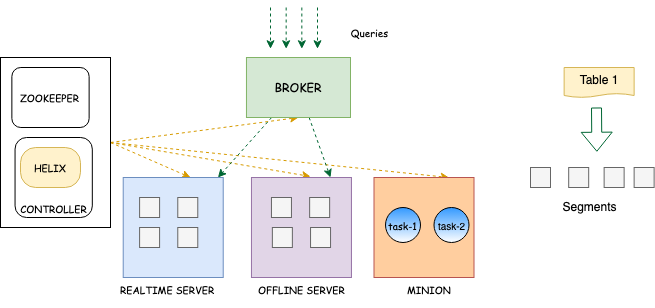
A Pinot cluster consists of the following processes, which are typically deployed on separate hardware resources in production. In development, they can fit comfortably into Docker containers on a typical laptop.

  • Controller: Maintains cluster metadata and manages cluster resources.

  • Zookeeper: Manages the Pinot cluster on behalf of the controller. Provides fault-tolerant, persistent storage of metadata, including table configurations, schemas, segment metadata, and cluster state.

  • Broker: Accepts queries from client processes and forwards them to servers for processing.

  • Server

The simplest possible Pinot cluster consists of four components: a server, a broker, a controller, and a Zookeeper node. In production environments, these components typically run on separate server instances, and scale out as needed for data volume, load, availability, and latency. Pinot clusters in production range from fewer than ten total instances to more than 1,000.

Pinot uses as a distributed metadata store and and for cluster management.

Helix is a cluster management solution created by the authors of Pinot. Helix maintains a persistent, fault-tolerant map of the intended state of the Pinot cluster. It constantly monitors the cluster to ensure that the right hardware resources are allocated to implement the present configuration. When the configuration changes, Helix schedules or decommissions hardware resources to reflect the new configuration. When elements of the cluster change state catastrophically, Helix schedules hardware resources to keep the actual cluster consistent with the ideal represented in the metadata. From a physical perspective, Helix takes the form of a controller process plus agents running on servers and brokers.

Controller

A is the core orchestrator that drives the consistency and routing in a Pinot cluster. Controllers are horizontally scaled as an independent component (container) and has visibility of the state of all other components in a cluster. The controller reacts and responds to state changes in the system and schedules the allocation of resources for tables, segments, or nodes. As mentioned earlier, Helix is embedded within the controller as an agent that is a participant responsible for observing and driving state changes that are subscribed to by other components.

The Pinot schedules and re-schedules resources in a Pinot cluster when metadata changes or a node fails. As an Apache Helix Controller, it schedules the resources that comprise the cluster and orchestrates connections between certain external processes and cluster components (e.g., ingest of and ). It can be deployed as a single process on its own server or as a group of redundant servers in an active/passive configuration.

The controller exposes a for cluster-wide administrative operations as well as a web-based query console to execute interactive SQL queries and perform simple administrative tasks.

Server

host segments (shards) that are scheduled and allocated across multiple nodes and routed on an assignment to a tenant (there is a single tenant by default). Servers are independent containers that scale horizontally and are notified by Helix through state changes driven by the controller. A server can either be a real-time server or an offline server.

A real-time and offline server have very different resource usage requirements, where real-time servers are continually consuming new messages from external systems (such as Kafka topics) that are ingested and allocated on segments of a tenant. Because of this, resource isolation can be used to prioritize high-throughput real-time data streams that are ingested and then made available for query through a broker.

Broker

Pinot take query requests from client processes, scatter them to applicable servers, gather the results, and return them to the client. The controller shares cluster metadata with the brokers that allows the brokers to create a plan for executing the query involving a minimal subset of servers with the source data and, when required, other servers to shuffle and consolidate results.

A production Pinot cluster contains many brokers. In general, the more brokers, the more concurrent queries a cluster can process, and the lower latency it can deliver on queries.

Pinot minion

Pinot minion is an optional component that can be used to run background tasks such as "purge" for GDPR (General Data Protection Regulation). As Pinot is an immutable aggregate store, records containing sensitive private data need to be purged on a request-by-request basis. Minion provides a solution for this purpose that complies with GDPR while optimizing Pinot segments and building additional indices that guarantees performance in the presence of the possibility of data deletion. One can also write a custom task that runs on a periodic basis. While it's possible to perform these tasks on the Pinot servers directly, having a separate process (Minion) lessens the overall degradation of query latency as segments are impacted by mutable writes.

A Pinot is an optional cluster component that executes background tasks on table data apart from the query processes performed by brokers and servers. Minions run on independent hardware resources, and are responsible for executing minion tasks as directed by the controller. Examples of minon tasks include converting batch data from a standard format like Avro or JSON into segment files to be loaded into an offline table, and rewriting existing segment files to purge records as required by data privacy laws like GDPR. Minion tasks can run once or be scheduled to run periodically.

Minions isolate the computational burden of out-of-band data processing from the servers. Although a Pinot cluster can function with or without minions, they are typically present to support routine tasks like batch data ingest.

\

: Provides storage for segment files and compute for query processing.
  • (Optional) Minion: Computes background tasks other than query processing, minimizing impact on query latency. Optimizes segments, and builds additional indexes to ensure performance (even if data is deleted).

  • Clusters
    segments
    table
    schema
    tables
    schema
    segments
    ingestion
    servers
    tenant
    tenant
    brokers
    servers
    cluster
    Physical architecture
    Apache Zookeeper
    Apache Helix
    controller
    controller
    real-time tables
    offline tables
    REST API endpoint
    Servers
    brokers
    minion

    Components

    Discover the core components of Apache Pinot, enabling efficient data processing and analytics. Unleash the power of Pinot's building blocks for high-performance data-driven applications.

    Apache Pinot™ is a database designed to deliver highly concurrent, ultra-low-latency queries on large datasets through a set of common data model abstractions. Delivering on these goals requires several foundational architectural commitments, including:

    • Storing data in columnar form to support high-performance scanning

    • Sharding of data to scale both storage and computation

    • A distributed architecture designed to scale capacity linearly

    • A tabular data model read by SQL queries

    Components

    Learn about the major components and logical abstractions used in Pinot.

    Operator reference

    Developer reference

    Cluster
    Controller
    Broker
    Server
    Minion
    Tenant
    Table
    Schema
    Segment

    Time boundary

    Learn about time boundaries in hybrid tables.

    Learn about time boundaries in hybrid tables. Hybrid tables are when we have offline and real-time tables with the same name.

    When querying these tables, the Pinot broker decides which records to read from the offline table and which to read from the real-time table. It does this using the time boundary.

    How is the time boundary determined?

    The time boundary is determined by looking at the maximum end time of the offline segments and the segment ingestion frequency specified for the offline table.

    If it's set to hourly, then:

    timeBoundary = Maximum end time of offline segments - 1 hour

    Otherwise:

    timeBoundary = Maximum end time of offline segments - 1 day

    It is possible to force the hybrid table to use max(all offline segments' end time) by calling the API (V 0.12.0+)

    Note that this will not automatically update the time boundary as more segments are added to the offline table, and must be called each time a segment with more recent end time is uploaded to the offline table. You can revert back to using the derived time boundary by calling API:

    Querying

    When a Pinot broker receives a query for a hybrid table, the broker sends a time boundary annotated version of the query to the offline and real-time tables.

    For example, if we executed the following query:

    The broker would send the following query to the offline table:

    And the following query to the real-time table:

    The results of the two queries are merged by the broker before being returned to the client.

    Cluster

    Learn to build and manage Apache Pinot clusters, uncovering key components for efficient data processing and optimized analysis.

    A Pinot cluster is a collection of the software processes and hardware resources required to ingest, store, and process data. For detail about Pinot cluster components, see .

    A Pinot cluster consists of the following processes, which are typically deployed on separate hardware resources in production. In development, they can fit comfortably into Docker containers on a typical laptop:

    • Controller: Maintains cluster metadata and manages cluster resources.

    • Zookeeper: Manages the Pinot cluster on behalf of the controller. Provides fault-tolerant, persistent storage of metadata, including table configurations, schemas, segment metadata, and cluster state.

    Deep Store

    Leverage Apache Pinot's deep store component for efficient large-scale data storage and management, enabling impactful data processing and analysis.

    The deep store (or deep storage) is the permanent store for files.

    It is used for backup and restore operations. New nodes in a cluster will pull down a copy of segment files from the deep store. If the local segment files on a server gets damaged in some way (or accidentally deleted), a new copy will be pulled down from the deep store on server restart.

    The deep store stores a compressed version of the segment files and it typically won't include any indexes. These compressed files can be stored on a local file system or on a variety of other file systems. For more details on supported file systems, see .

    Note: Deep store by itself is not sufficient for restore operations. Pinot stores metadata such as table config, schema, segment metadata in Zookeeper. For restore operations, both Deep Store as well as Zookeeper metadata are required.

    curl -X POST \
      "http://localhost:9000/tables/{tableName}/timeBoundary" \
      -H "accept: application/json"
    curl -X DELETE \
      "http://localhost:9000/tables/{tableName}/timeBoundary" \
      -H "accept: application/json"
    SELECT count(*)
    FROM events
    SELECT count(*)
    FROM events_OFFLINE
    WHERE timeColumn <= $timeBoundary
    SELECT count(*)
    FROM events_REALTIME
    WHERE timeColumn > $timeBoundary

    Broker: Accepts queries from client processes and forwards them to servers for processing.

  • Server: Provides storage for segment files and compute for query processing.

  • (Optional) Minion: Computes background tasks other than query processing, minimizing impact on query latency. Optimizes segments, and builds additional indexes to ensure performance (even if data is deleted).

  • The simplest possible Pinot cluster consists of four components: a server, a broker, a controller, and a Zookeeper node. In production environments, these components typically run on separate server instances, and scale out as needed for data volume, load, availability, and latency. Pinot clusters in production range from fewer than ten total instances to more than 1,000.

    Pinot uses Apache Zookeeper as a distributed metadata store and Apache Helix for cluster management.

    Helix is a cluster management solution that maintains a persistent, fault-tolerant map of the intended state of the Pinot cluster. Helix constantly monitors the cluster to ensure that the right hardware resources are allocated for the present configuration. When the configuration changes, Helix schedules or decommissions hardware resources to reflect the new configuration. When elements of the cluster change state catastrophically, Helix schedules hardware resources to keep the actual cluster consistent with the ideal represented in the metadata. From a physical perspective, Helix takes the form of a controller process plus agents running on servers and brokers.

    Cluster configuration

    For details of cluster configuration settings, see Cluster configuration reference.

    Cluster components

    Helix divides nodes into logical components based on their responsibilities:

    Participant

    Participants are the nodes that host distributed, partitioned resources

    Pinot servers are modeled as participants. For details about server nodes, see Server.

    Spectator

    Spectators are the nodes that observe the current state of each participant and use that information to access the resources. Spectators are notified of state changes in the cluster (state of a participant, or that of a partition in a participant).

    Pinot brokers are modeled as spectators. For details about broker nodes, see Broker.

    Controller

    The node that observes and controls the Participant nodes. It is responsible for coordinating all transitions in the cluster and ensuring that state constraints are satisfied while maintaining cluster stability.

    Pinot controllers are modeled as controllers. For details about controller nodes, see Controller.

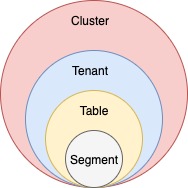
    Logical view

    Another way to visualize the cluster is a logical view, where:

    • A cluster contains tenants

    • Tenants contain tables

    • Tables contain segments

    Set up a Pinot cluster

    Typically, there is only one cluster per environment/data center. There is no need to create multiple Pinot clusters because Pinot supports tenants.

    To set up a cluster, see one of the following guides:

    • Running Pinot in Docker

    • Running Pinot locally

    Physical architecture
    How do segments get into the deep store?

    There are several different ways that segments are persisted in the deep store.

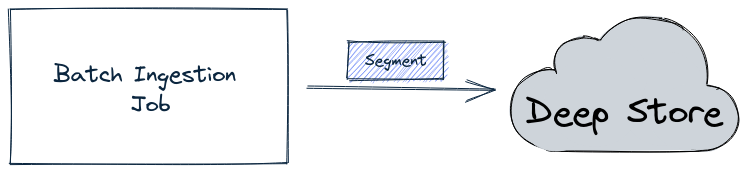
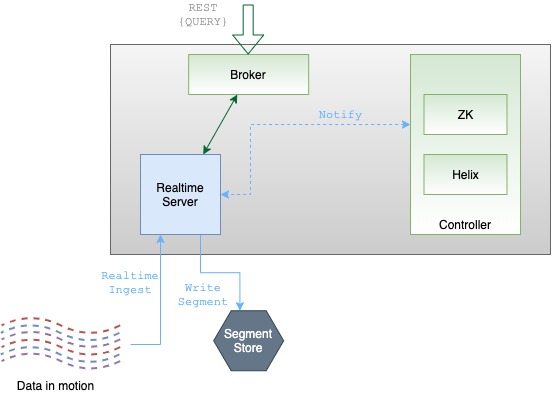
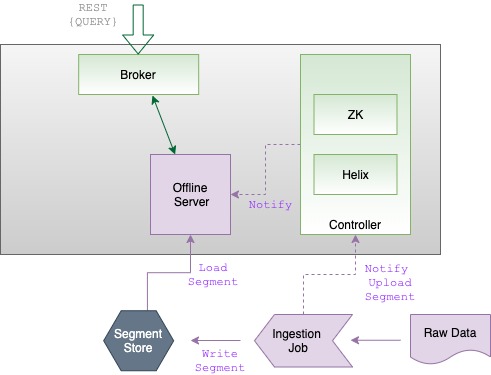
    For offline tables, the batch ingestion job writes the segment directly into the deep store, as shown in the diagram below:

    Batch job writing a segment into the deep store

    The ingestion job then sends a notification about the new segment to the controller, which in turn notifies the appropriate server to pull down that segment.

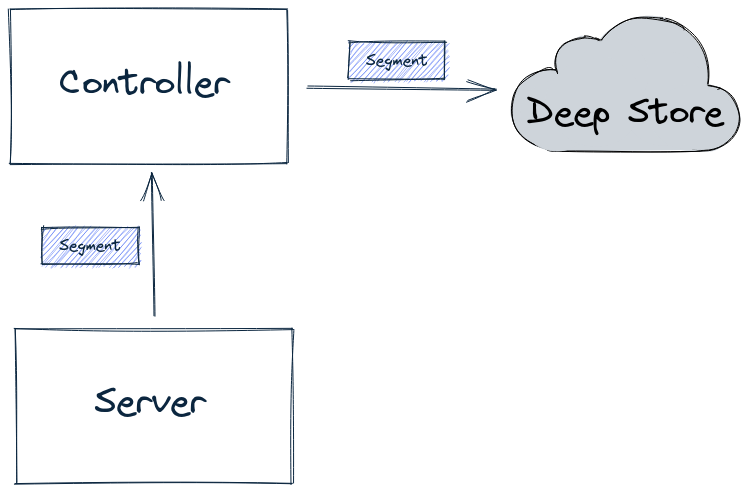
    For real-time tables, by default, a segment is first built-in memory by the server. It is then uploaded to the lead controller (as part of the Segment Completion Protocol sequence), which writes the segment into the deep store, as shown in the diagram below:

    Server sends segment to Controller, which writes segments into the deep store

    Having all segments go through the controller can become a system bottleneck under heavy load, in which case you can use the peer download policy, as described in Decoupling Controller from the Data Path.

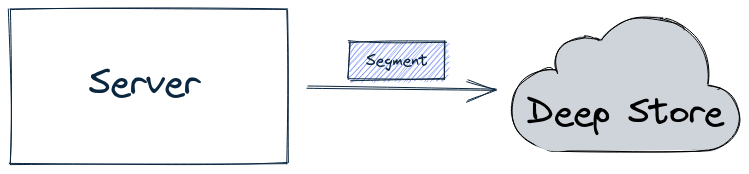
    When using this configuration, the server will directly write a completed segment to the deep store, as shown in the diagram below:

    Server writing a segment into the deep store

    Configuring the deep store

    For hands-on examples of how to configure the deep store, see the following tutorials:

    • Use OSS as Deep Storage for Pinot

    • Use S3 as Deep Storage for Pinot

    segment
    server
    File Systems

    Server

    Uncover the efficient data processing and storage capabilities of Apache Pinot's server component, optimizing performance for data-driven applications.

    Pinot servers provide the primary storage for segments and perform the computation required to execute queries. A production Pinot cluster contains many servers. In general, the more servers, the more data the cluster can retain in tables, the lower latency the cluster can deliver on queries, and the more concurrent queries the cluster can process.

    Servers are typically segregated into real-time and offline workloads, with "real-time" servers hosting only real-time tables, and "offline" servers hosting only offline tables. This is a ubiquitous operational convention, not a difference or an explicit configuration in the server process itself. There are two types of servers:

    Offline

    Offline servers are responsible for downloading segments from the segment store, to host and serve queries off. When a new segment is uploaded to the controller, the controller decides the servers (as many as replication) that will host the new segment and notifies them to download the segment from the segment store. On receiving this notification, the servers download the segment file and load the segment onto the server, to server queries off them.

    Real-time

    Real-time servers directly ingest from a real-time stream (such as Kafka or EventHubs). Periodically, they make segments of the in-memory ingested data, based on certain thresholds. This segment is then persisted onto the segment store.

    Pinot servers are modeled as Helix participants, hosting Pinot tables (referred to as resources in Helix terminology). Segments of a table are modeled as Helix partitions (of a resource). Thus, a Pinot server hosts one or more Helix partitions of one or more helix resources (i.e. one or more segments of one or more tables).

    Starting a server

    Make sure you've . If you're using Docker, make sure to . To start a server:

    set up Zookeeper
    pull the Pinot Docker image
    Usage: StartServer
    	-serverHost               <String>                      : Host name for controller. (required=false)
    	-serverPort               <int>                         : Port number to start the server at. (required=false)
    	-serverAdminPort          <int>                         : Port number to serve the server admin API at. (required=false)
    	-dataDir                  <string>                      : Path to directory containing data. (required=false)
    	-segmentDir               <string>                      : Path to directory containing segments. (required=false)
    	-zkAddress                <http>                        : Http address of Zookeeper. (required=false)
    	-clusterName              <String>                      : Pinot cluster name. (required=false)
    	-configFileName           <Config File Name>            : Broker Starter Config file. (required=false)
    	-help                                                   : Print this message. (required=false)
    docker run \
        --network=pinot-demo \
        --name pinot-server \
        -d ${PINOT_IMAGE} StartServer \
        -zkAddress pinot-zookeeper:2181
    bin/pinot-admin.sh StartServer \
        -zkAddress localhost:2181

    Schema

    Explore the Schema component in Apache Pinot, vital for defining the structure and data types of Pinot tables, enabling efficient data processing and analysis.

    Each table in Pinot is associated with a schema. A schema defines:

    • Fields in the table with their data types.

    • Whether the table uses column-based or table-based null handling. For more information, see Null value support.

    The schema is stored in Zookeeper along with the table configuration.

    Schema naming in Pinot follows typical database table naming conventions, such as starting names with a letter, not ending with an underscore, and using only alphanumeric characters

    Categories

    A schema also defines what category a column belongs to. Columns in a Pinot table can be categorized into three categories:

    Category
    Description

    Pinot does not enforce strict rules on which of these categories columns belong to, rather the categories can be thought of as hints to Pinot to do internal optimizations.

    For example, metrics may be stored without a dictionary and can have a different default null value.

    The categories are also relevant when doing segment merge and rollups. Pinot uses the dimension and time fields to identify records against which to apply merge/rollups.

    Metrics aggregation is another example where Pinot uses dimensions and time are used as the key, and automatically aggregates values for the metric columns.

    For configuration details, see .

    Date and time fields

    Since Pinot doesn't have a dedicated DATETIME datatype support, you need to input time in either STRING, LONG, or INT format. However, Pinot needs to convert the date into an understandable format such as epoch timestamp to do operations. You can refer to for more details on supported formats.

    Creating a schema

    First, Make sure your and running.

    Let's create a schema and put it in a JSON file. For this example, we have created a schema for flight data.

    For more details on constructing a schema file, see the .

    Then, we can upload the sample schema provided above using either a Bash command or REST API call.

    Check out the schema in the to make sure it was successfully uploaded

    Pinot Data Explorer

    Pinot Data Explorer is a user-friendly interface in Apache Pinot for interactive data exploration, querying, and visualization.

    Once you have set up a cluster, you can start exploring the data and the APIs using the Pinot Data Explorer.

    Navigate to http://localhost:9000 in your browser to open the Data Explorer UI.

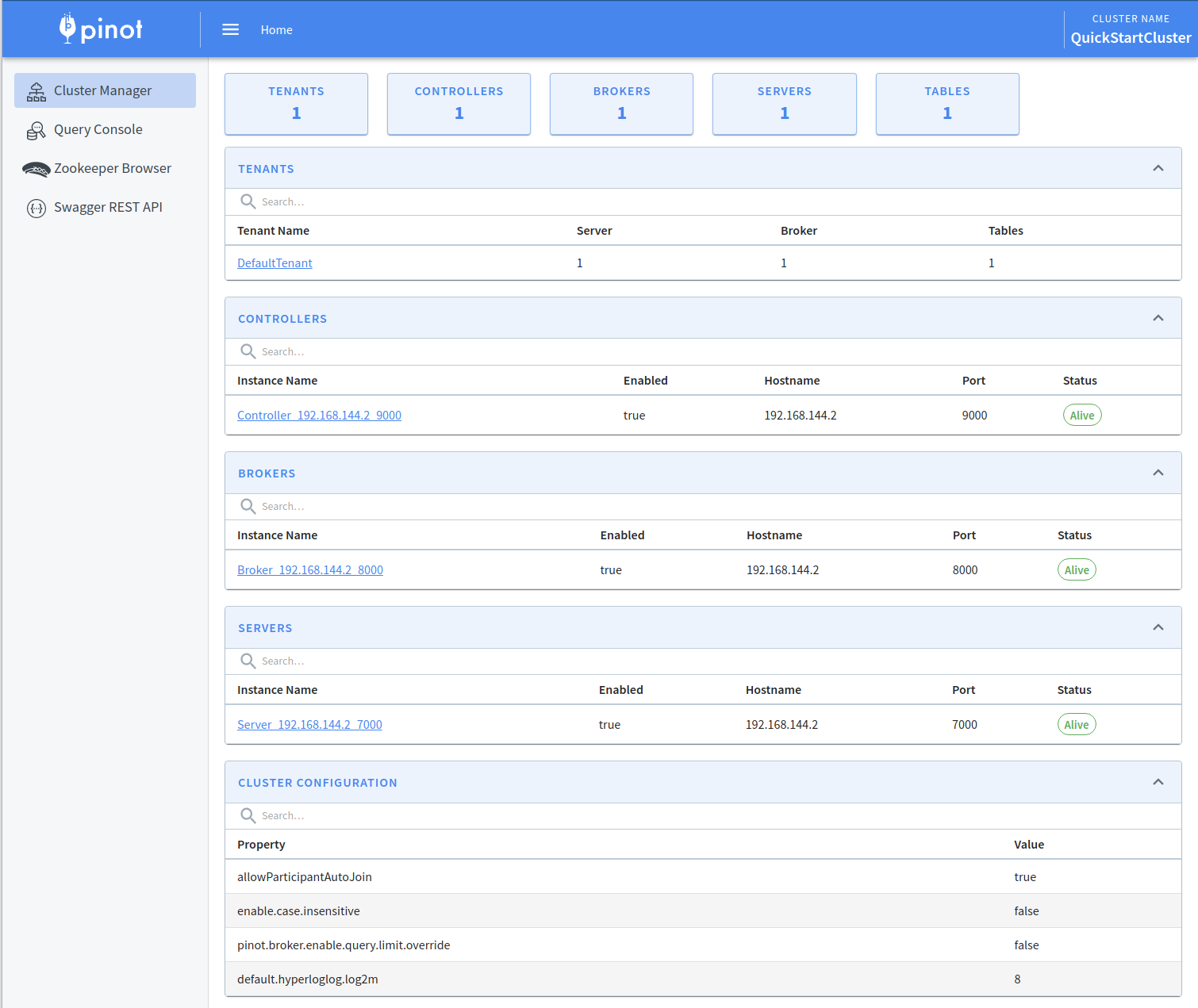
    Cluster Manager

    The first screen that you'll see when you open the Pinot Data Explorer is the Cluster Manager. The Cluster Manager provides a UI to operate and manage your cluster.

    Pinot Cluster Manager

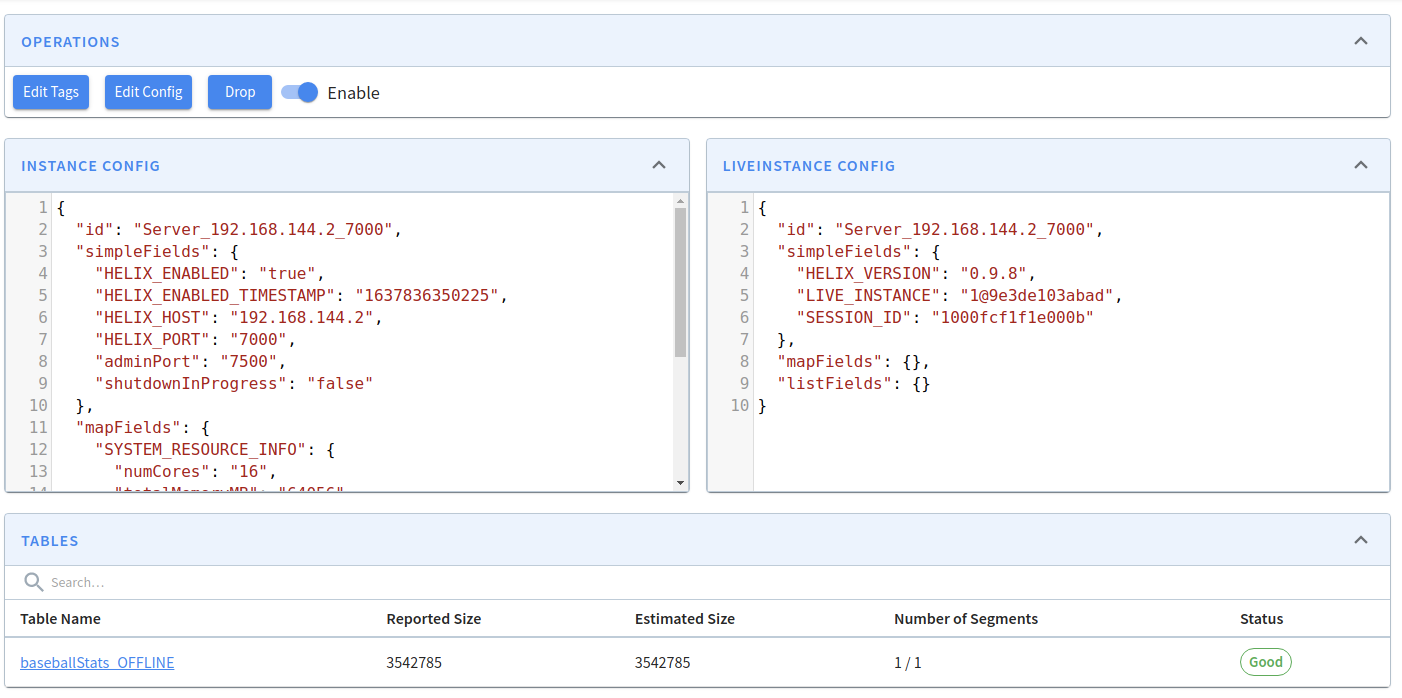
    If you want to view the contents of a server, click on its instance name. You'll then see the following:

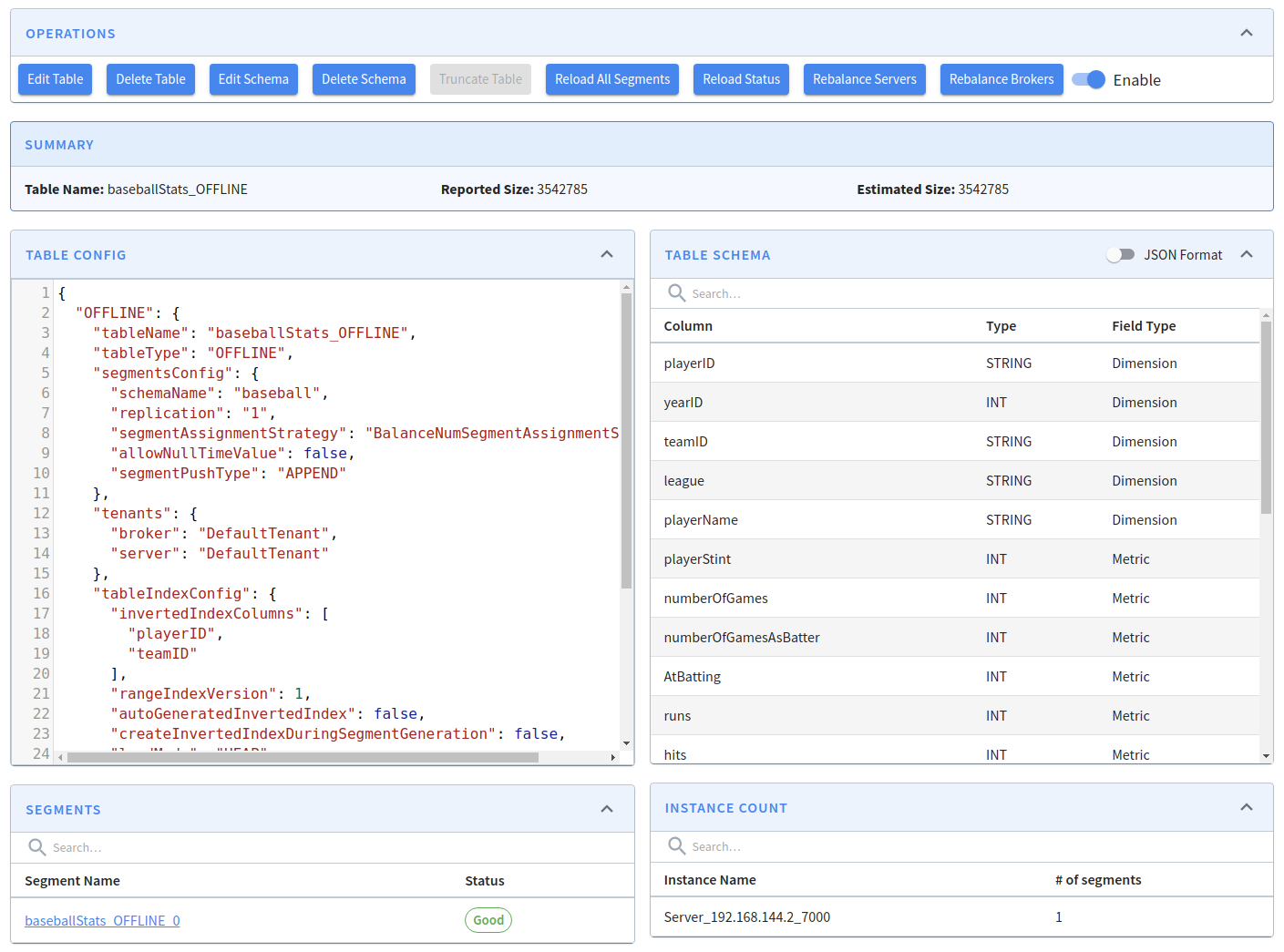
    To view the baseballStats table, click on its name, which will show the following screen:

    From this screen, we can edit or delete the table, edit or adjust its schema, as well as several other operations.

    For example, if we want to add yearID to the list of inverted indexes, click on Edit Table, add the extra column, and click Save:

    Query Console

    Let's run some queries on the data in the Pinot cluster. Navigate to to see the querying interface.

    We can see our baseballStats table listed on the left (you will see meetupRSVP or airlineStats if you used the streaming or the hybrid ). Click on the table name to display all the names along with the data types of the columns of the table.

    You can also execute a sample query select * from baseballStats limit 10 by typing it in the text box and clicking the Run Query button.

    Cmd + Enter can also be used to run the query when focused on the console.

    Here are some sample queries you can try:

    Pinot supports a subset of standard SQL. For more information, see .

    Rest API

    The contains all the APIs that you will need to operate and manage your cluster. It provides a set of APIs for Pinot cluster management including health check, instances management, schema and table management, data segments management.

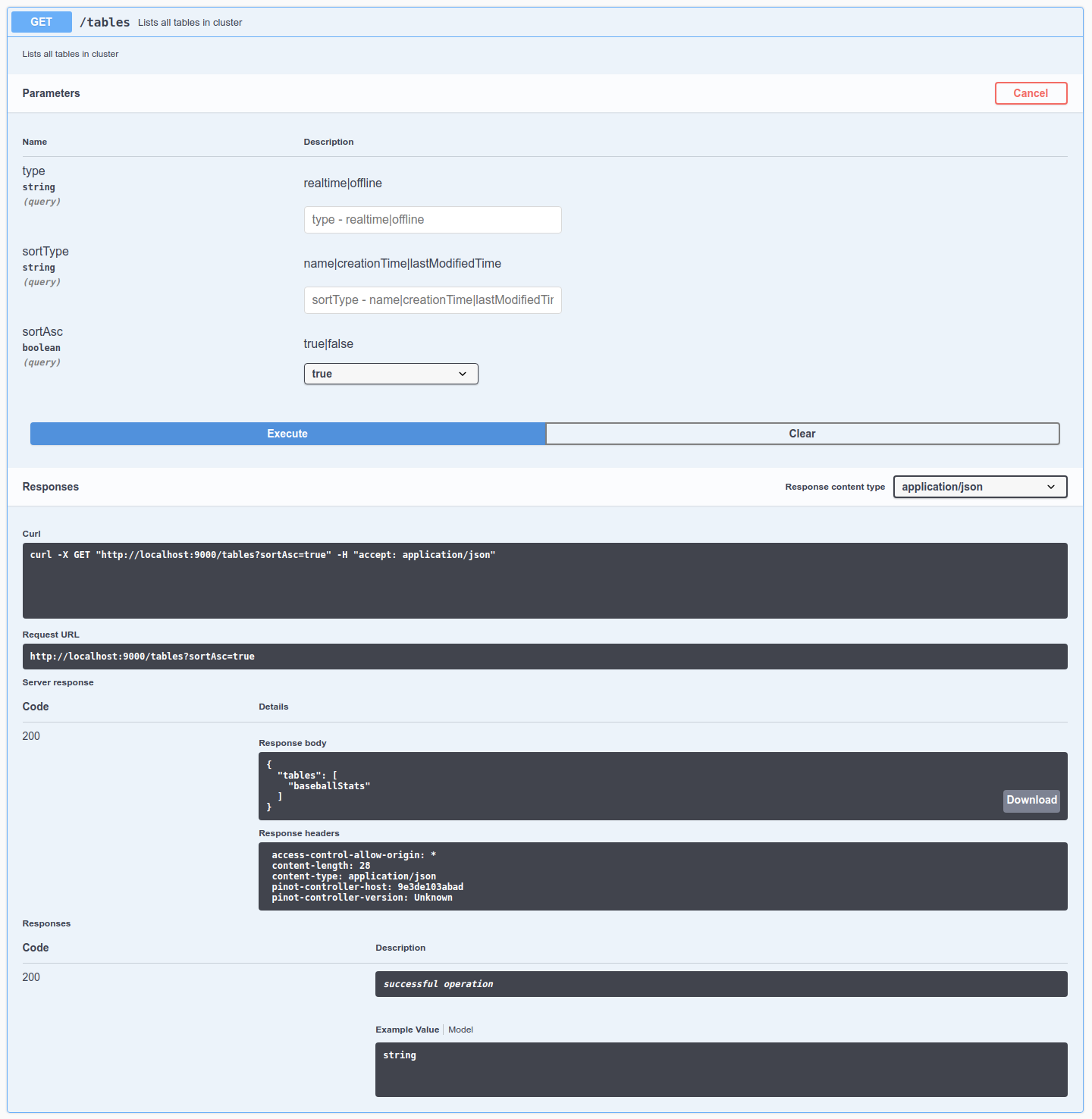
    Let's check out the tables in this cluster by going to , click Try it out, and then click Execute. We can see thebaseballStats table listed here. We can also see the exact cURL call made to the controller API.

    You can look at the configuration of this table by going to , click Try it out, type baseballStats in the table name, and then click Execute.

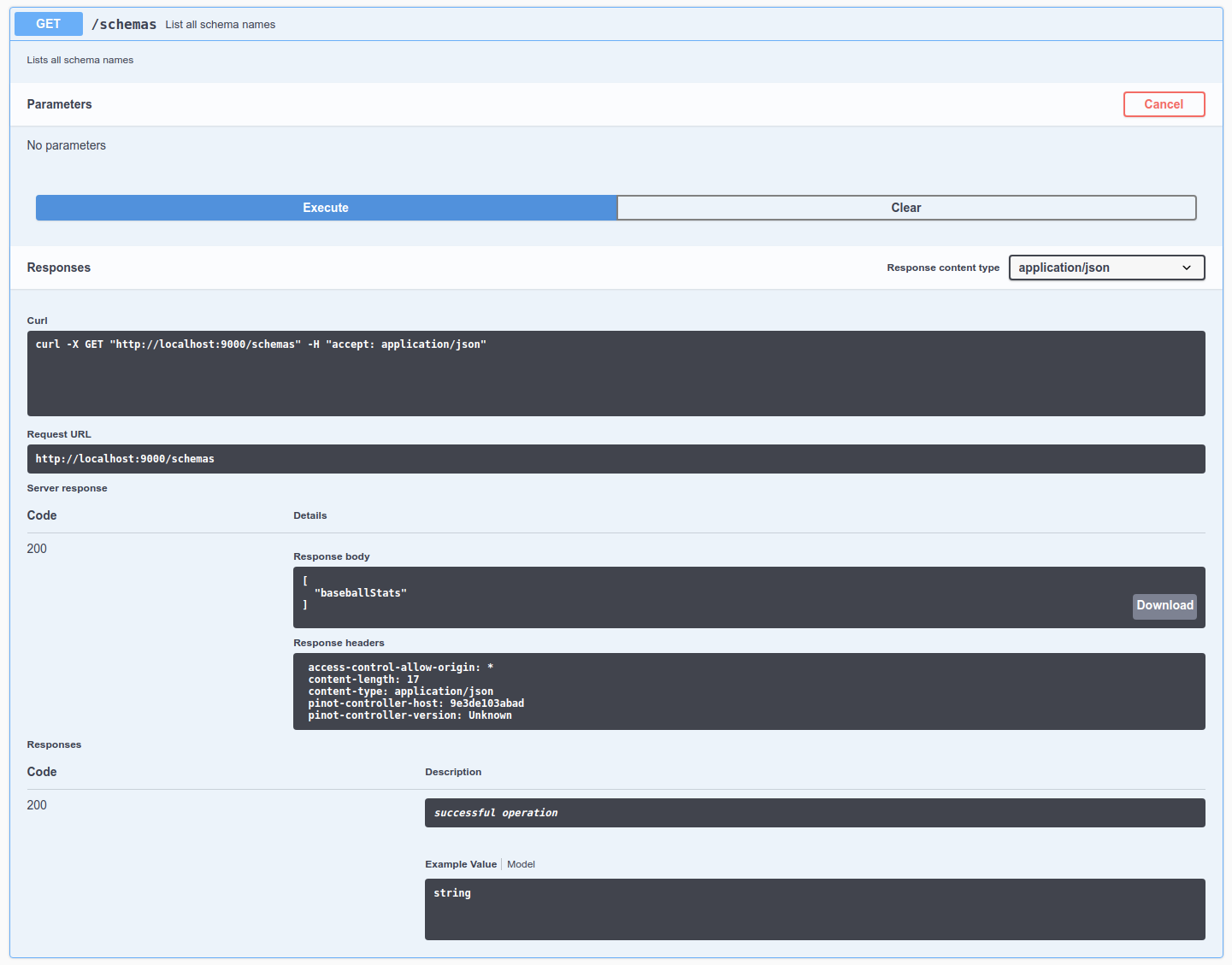
    Let's check out the schemas in the cluster by going to , click Try it out, and then click Execute. We can see a schema called baseballStats in this list.

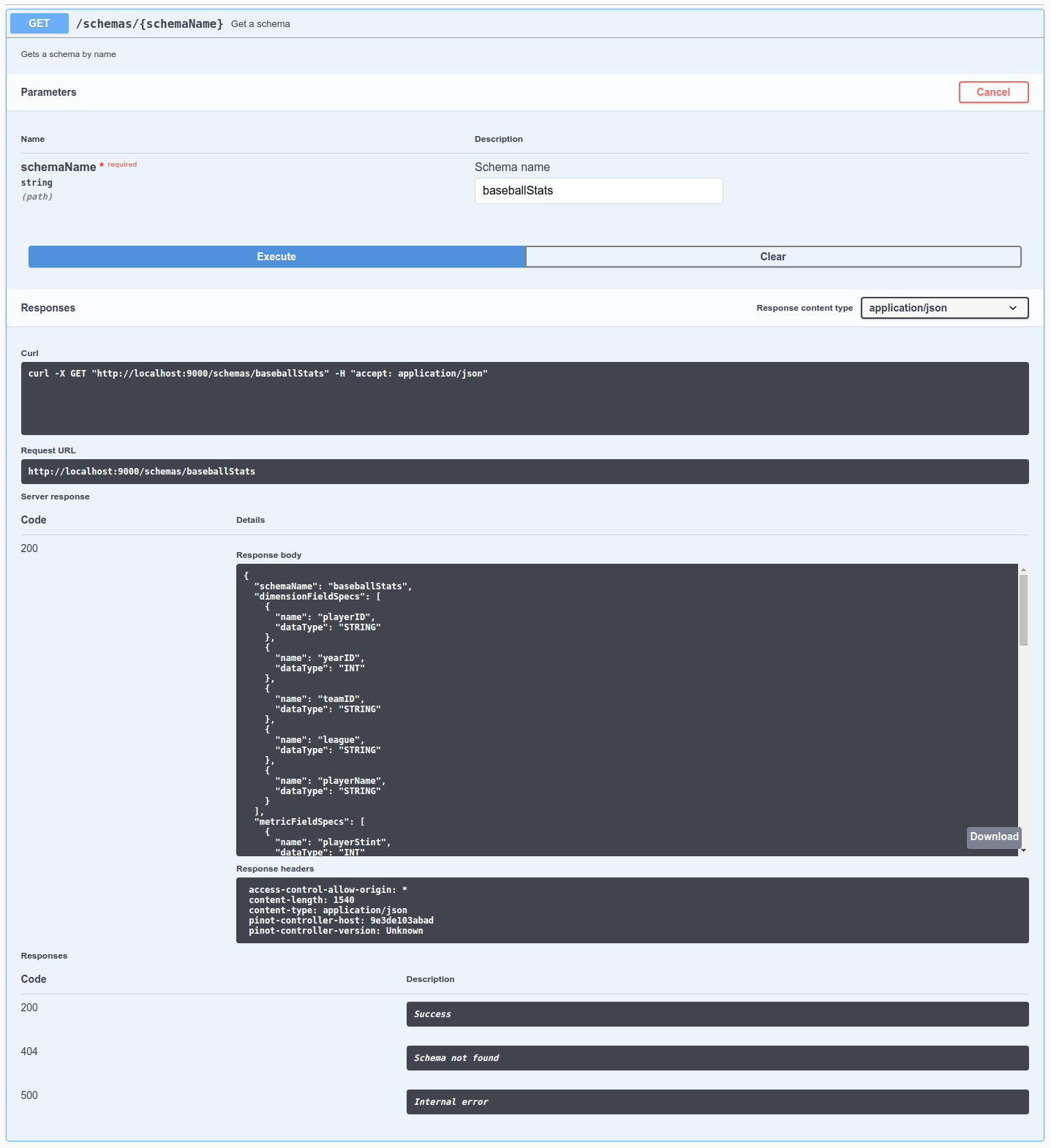
    Take a look at the schema by going to , click Try it out, type baseballStats in the schema name, and then click Execute.

    Finally, let's check out the data segments in the cluster by going to , click Try it out, type in baseballStats in the table name, and then click Execute. There's 1 segment for this table, called baseballStats_OFFLINE_0.

    To learn how to upload your own data and schema, see or .

    Tenant

    Discover the tenant component of Apache Pinot, which facilitates efficient data isolation and resource management within Pinot clusters.

    Every table is associated with a tenant, or a logical namespace that restricts where the cluster processes queries on the table. A Pinot tenant takes the form of a text tag in the logical tenant namespace. Physical cluster hardware resources (i.e., and ) are also associated with a tenant tag in the common tenant namespace. Tables of a particular tenant tag will only be scheduled for storage and query processing on hardware resources that belong to the same tenant tag. This lets Pinot cluster operators assign specified workloads to certain hardware resources, preventing data in separate workloads from being stored or processed on the same physical hardware.

    By default, all tables, brokers, and servers belong to a tenant called DefaultTenant, but you can configure multiple tenants in a Pinot cluster.

    To support multi-tenancy, Pinot has first-class support for tenants. Every table is associated with a server tenant and a broker tenant, which controls the nodes used by the table as servers and brokers. Multi-tenancy lets Pinot group all tables belonging to a particular use case under a single tenant name.

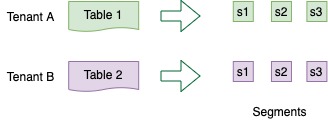
    The concept of tenants is very important when the multiple use cases are using Pinot and there is a need to provide quotas or some sort of isolation across tenants. For example, consider we have two tables Table A and Table B

    Dimension

    Dimension columns are typically used in slice and dice operations for answering business queries. Some operations for which dimension columns are used:

    • GROUP BY - group by one or more dimension columns along with aggregations on one or more metric columns

    • Filter clauses such as WHERE

    Metric

    These columns represent the quantitative data of the table. Such columns are used for aggregation. In data warehouse terminology, these can also be referred to as fact or measure columns.

    Some operation for which metric columns are used:

    • Aggregation - SUM, MIN, MAX, COUNT, AVG etc

    • Filter clause such as WHERE

    DateTime

    This column represents time columns in the data. There can be multiple time columns in a table, but only one of them can be treated as primary. The primary time column is the one that is present in the segment config. The primary time column is used by Pinot to maintain the time boundary between offline and real-time data in a hybrid table and for retention management. A primary time column is mandatory if the table's push type is APPEND and optional if the push type is REFRESH .

    Common operations that can be done on time column:

    • GROUP BY

    • Filter clauses such as WHERE

    Schema configuration reference
    DateTime field spec configs
    cluster is up
    Schema configuration reference
    Rest API
    flights-schema.json
    {
      "schemaName": "flights",
      "enableColumnBasedNullHandling": true,
      "dimensionFieldSpecs": [
        {
          "name": "flightNumber",
          "dataType": "LONG",
          "notNull": true
        },
        {
          "name": "tags",
          "dataType": "STRING",
          "singleValueField": false,
          "defaultNullValue": "null"
        }
      ],
      "metricFieldSpecs": [
        {
          "name": "price",
          "dataType": "DOUBLE",
          "notNull": true,
          "defaultNullValue": 0
        }
      ],
      "dateTimeFieldSpecs": [
        {
          "name": "millisSinceEpoch",
          "dataType": "LONG",
          "format": "EPOCH",
          "granularity": "15:MINUTES"
        },
        {
          "name": "hoursSinceEpoch",
          "dataType": "INT",
          "notNull": true,
          "format": "EPOCH|HOURS",
          "granularity": "1:HOURS"
        },
        {
          "name": "dateString",
          "dataType": "STRING",
          "format": "SIMPLE_DATE_FORMAT|yyyy-MM-dd",
          "granularity": "1:DAYS"
        }
      ]
    }
    bin/pinot-admin.sh AddSchema -schemaFile flights-schema.json -exec
    
    OR
    
    bin/pinot-admin.sh AddTable -schemaFile flights-schema.json -tableFile flights-table.json -exec
    curl -F [email protected]  localhost:9000/schemas
    in the same Pinot cluster.
    Defining tenants for tables

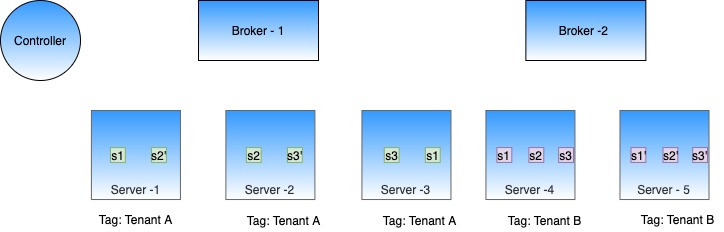
    We can configure Table A with server tenant Tenant A and Table B with server tenant Tenant B. We can tag some of the server nodes for Tenant A and some for Tenant B. This will ensure that segments of Table A only reside on servers tagged with Tenant A, and segment of Table B only reside on servers tagged with Tenant B. The same isolation can be achieved at the broker level, by configuring broker tenants to the tables.

    Table isolation using tenants

    No need to create separate clusters for every table or use case!

    Tenant configuration

    This tenant is defined in the tenants section of the table config.

    This section contains two main fields broker and server , which decide the tenants used for the broker and server components of this table.

    In the above example:

    • The table will be served by brokers that have been tagged as brokerTenantName_BROKER in Helix.

    • If this were an offline table, the offline segments for the table will be hosted in Pinot servers tagged in Helix as serverTenantName_OFFLINE

    • If this were a real-time table, the real-time segments (both consuming as well as completed ones) will be hosted in pinot servers tagged in Helix as serverTenantName_REALTIME.

    Create a tenant

    Broker tenant

    Here's a sample broker tenant config. This will create a broker tenant sampleBrokerTenant by tagging three untagged broker nodes as sampleBrokerTenant_BROKER.

    To create this tenant use the following command. The creation will fail if number of untagged broker nodes is less than numberOfInstances.

    Follow instructions in Getting Pinot to get Pinot locally, and then

    Check out the table config in the Rest API to make sure it was successfully uploaded.

    Server tenant

    Here's a sample server tenant config. This will create a server tenant sampleServerTenant by tagging 1 untagged server node as sampleServerTenant_OFFLINE and 1 untagged server node as sampleServerTenant_REALTIME.

    To create this tenant use the following command. The creation will fail if number of untagged server nodes is less than offlineInstances + realtimeInstances.

    Follow instructions in Getting Pinot to get Pinot locally, and then

    Check out the table config in the Rest API to make sure it was successfully uploaded.

    brokers
    servers
    Query Console
    quick start
    Pinot Query Language
    Pinot Admin UI
    Table -> List all tables in cluster
    Tables -> Get/Enable/Disable/Drop a table
    Schema -> List all schemas in the cluster
    Schema -> Get a schema
    Segment -> List all segments
    Batch Ingestion
    Stream ingestion
    Pinot Server
    baseballStats Table
    Edit Table
    List all tables in cluster
    List all schemas in the cluster
    baseballStats Schema
    bin/pinot-admin.sh AddTenant \
        -name sampleBrokerTenant 
        -role BROKER 
        -instanceCount 3 -exec
    curl -i -X POST -H 'Content-Type: application/json' -d @sample-broker-tenant.json localhost:9000/tenants
    bin/pinot-admin.sh AddTenant \
        -name sampleServerTenant \
        -role SERVER \
        -offlineInstanceCount 1 \
        -realtimeInstanceCount 1 -exec
    curl -i -X POST -H 'Content-Type: application/json' -d @sample-server-tenant.json localhost:9000/tenants
    "tenants": {
      "broker": "brokerTenantName",
      "server": "serverTenantName"
    }
    sample-broker-tenant.json
    {
         "tenantRole" : "BROKER",
         "tenantName" : "sampleBrokerTenant",
         "numberOfInstances" : 3
    }
    sample-server-tenant.json
    {
         "tenantRole" : "SERVER",
         "tenantName" : "sampleServerTenant",
         "offlineInstances" : 1,
         "realtimeInstances" : 1
    }
    select playerName, max(hits) 
    from baseballStats 
    group by playerName 
    order by max(hits) desc
    select sum(hits), sum(homeRuns), sum(numberOfGames) 
    from baseballStats 
    where yearID > 2010
    select * 
    from baseballStats 
    order by league

    Architecture

    Understand how the components of Apache Pinot™ work together to create a scalable OLAP database that can deliver low-latency, high-concurrency queries at scale.

    Apache Pinot™ is a distributed OLAP database designed to serve real-time, user-facing use cases, which means handling large volumes of data and many concurrent queries with very low query latencies. Pinot supports the following requirements:

    • Ultra low-latency queries (as low as 10ms P95)

    • High query concurrency (as many as 100,000 queries per second)

    • High data freshness (streaming data available for query immediately upon ingestion)

    • Large data volume (up to petabytes)

    Distributed design principles

    To accommodate large data volumes with stringent latency and concurrency requirements, Pinot is designed as a distributed database that supports the following requirements:

    • Highly available: Pinot has no single point of failure. When tables are configured for replication, and a node goes down, the cluster is able to continue processing queries.

    • Horizontally scalable: Operators can scale a Pinot cluster by adding new nodes when the workload increases. There are even two node types ( and ) to scale query volume, query complexity, and data size independently.

    • Immutable data: Pinot assumes all stored data is immutable, which helps simplify the parts of the system that handle data storage and replication. However, Pinot still supports upserts on streaming entity data and background purges of data to comply with data privacy regulations.

    Core components

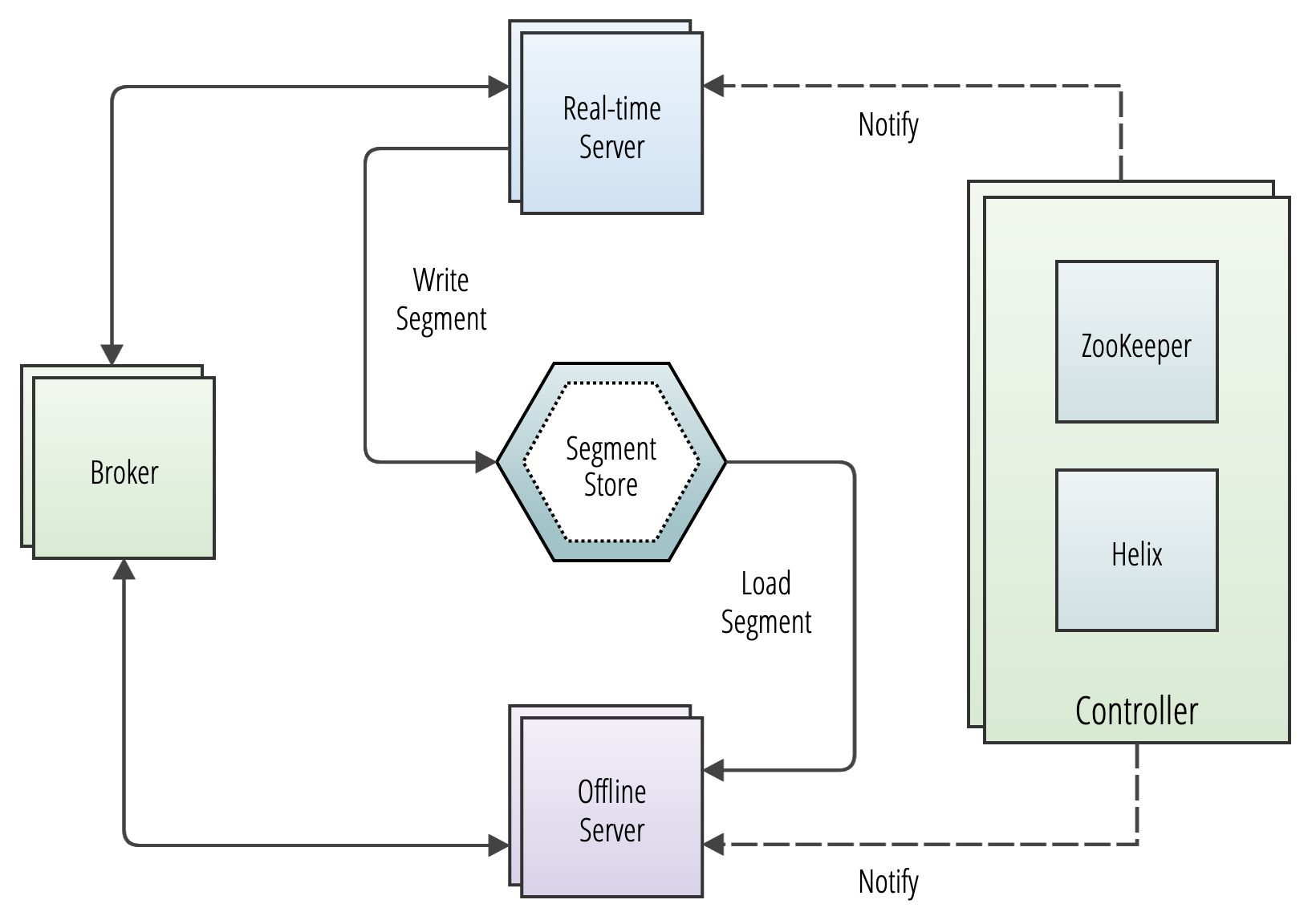
    As described in the Pinot , Pinot has four node types:

    Apache Helix and ZooKeeper

    Distributed systems do not maintain themselves, and in fact require sophisticated scheduling and resource management to function. Pinot uses for this purpose. Helix exists as an independent project, but it was designed by the original creators of Pinot for Pinot's own cluster management purposes, so the architectures of the two systems are well-aligned. Helix takes the form of a process on the controller, plus embedded agents on the brokers and servers. It uses as a fault-tolerant, strongly consistent, durable state store.

    Helix maintains a picture of the intended state of the cluster, including the number of servers and brokers, the configuration and schema of all tables, connections to streaming ingest sources, currently executing batch ingestion jobs, the assignment of table segments to the servers in the cluster, and more. All of these configuration items are potentially mutable quantities, since operators routinely change table schemas, add or remove streaming ingest sources, begin new batch ingestion jobs, and so on. Additionally, physical cluster state may change as servers and brokers fail or suffer network partition. Helix works constantly to drive the actual state of the cluster to match the intended state, pushing configuration changes to brokers and servers as needed.

    There are three physical node types in a Helix cluster:

    • Participant: These nodes do things, like store data or perform computation. Participants host resources, which are Helix's fundamental storage abstraction. Because Pinot servers store segment data, they are participants.

    • Spectator: These nodes see things, observing the evolving state of the participants through events pushed to the spectator. Because Pinot brokers need to know which servers host which segments, they are spectators.

    • Controller: This node observes and manages the state of participant nodes. The controller is responsible for coordinating all state transitions in the cluster and ensures that state constraints are satisfied while maintaining cluster stability.

    In addition, Helix defines two logical components to express its storage abstraction:

    • Partition. A unit of data storage that lives on at least one participant. Partitions may be replicated across multiple participants. A Pinot segment is a partition.

    • Resource. A logical collection of partitions, providing a single view over a potentially large set of data stored across a distributed system. A Pinot table is a resource.

    In summary, the Pinot architecture maps onto Helix components as follows:

    Pinot Component
    Helix Component

    Helix uses ZooKeeper to maintain cluster state. ZooKeeper sends Helix spectators notifications of changes in cluster state (which correspond to changes in ZNodes). Zookeeper stores the following information about the cluster:

    Resource
    Stored Properties

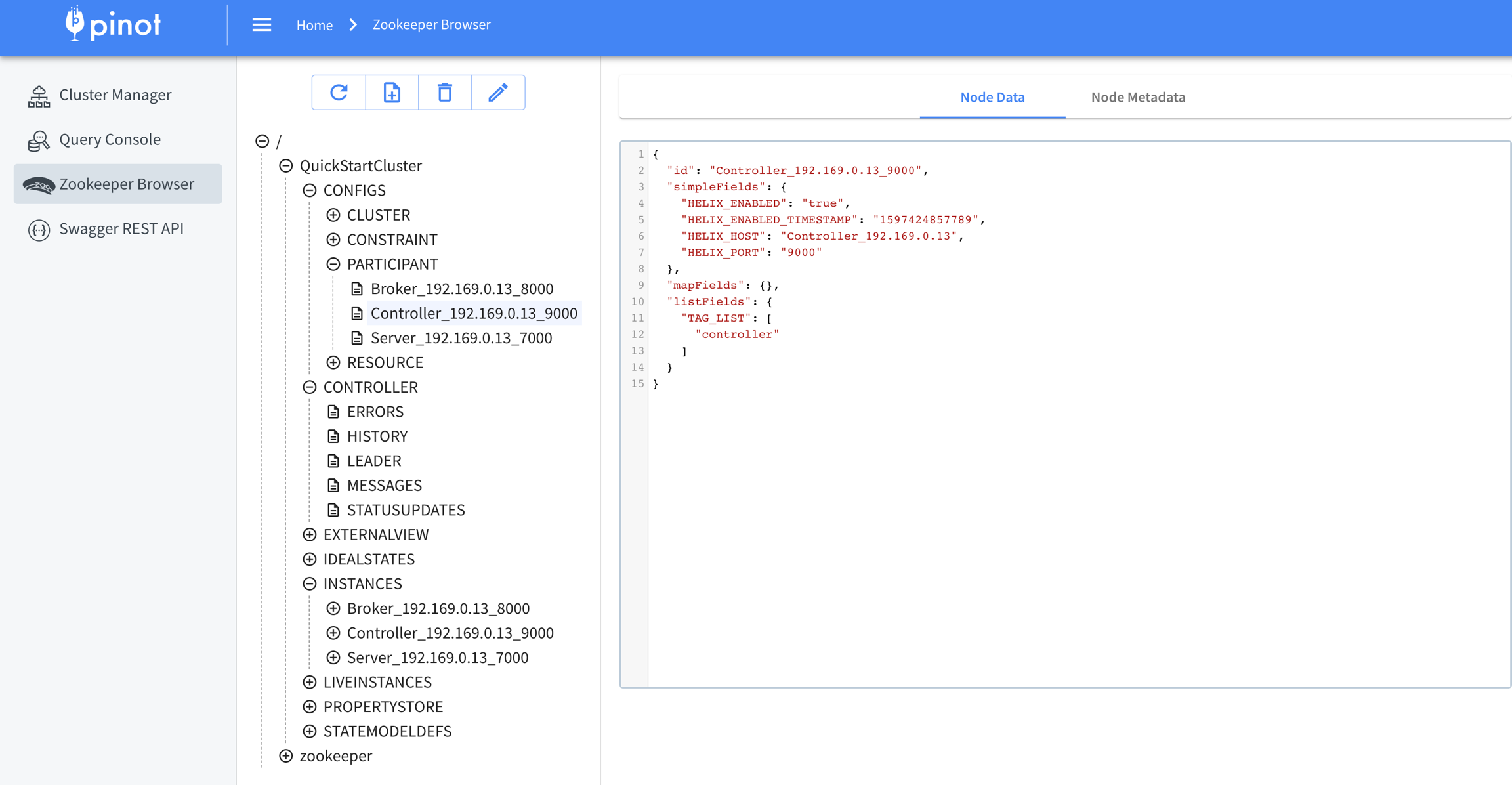
    Zookeeper, as a first-class citizen of a Pinot cluster, may use the well-known ZNode structure for operations and troubleshooting purposes. Be advised that this structure can change in future Pinot releases.

    Controller

    The Pinot schedules and re-schedules resources in a Pinot cluster when metadata changes or a node fails. As an Apache Helix Controller, it schedules the resources that comprise the cluster and orchestrates connections between certain external processes and cluster components (e.g., ingest of and ). It can be deployed as a single process on its own server or as a group of redundant servers in an active/passive configuration.

    Fault tolerance

    Only one controller can be active at a time, so when multiple controllers are present in a cluster, they elect a leader. When that controller instance becomes unavailable, the remaining instances automatically elect a new leader. Leader election is achieved using Apache Helix. A Pinot cluster can serve queries without an active controller, but it can't perform any metadata-modifying operations, like adding a table or consuming a new segment.

    Controller REST interface

    The controller provides a REST interface that allows read and write access to all logical storage resources (e.g., servers, brokers, tables, and segments). See for more information on the web-based admin tool.

    Broker

    The responsibility is to route queries to the appropriate instances, or in the case of multi-stage queries, to compute a complete query plan and distribute it to the servers required to execute it. The broker collects and merges the responses from all servers into a final result, then sends the result back to the requesting client. The broker exposes an HTTP endpoint that accepts SQL queries in JSON format and returns the response in JSON.

    Each broker maintains a query routing table. The routing table maps segments to the servers that store them. (When replication is configured on a table, each segment is stored on more than one server.) The broker computes multiple routing tables depending on the configured strategy for a table. The default strategy is to balance the query load across all available servers.

    Advanced routing strategies are available, such as replica-aware routing, partition-based routing, and minimal server selection routing.

    Query processing

    Every query processed by a broker uses the single-stage engine or the . For single-stage queries, the broker does the following:

    • Computes query routes based on the routing strategy defined in the configuration.

    • Computes the list of segments to query on each . (See for further details on this process.)

    • Sends the query to each of those servers for local execution against their segments.

    For multi-stage queries, the broker performs the following:

    • Computes a query plan that runs on multiple sets of servers. The servers selected for the first stage are selected based on the segments required to execute the query, which are determined in a process similar to single-stage queries.

    • Sends the relevant portions of the query plan to one or more servers in the cluster for each stage of the query plan.

    • The servers that received query plans each execute their part of the query. For more details on this process, read about the .

    Server

    host on locally attached storage and process queries on those segments. By convention, operators speak of "real-time" and "offline" servers, although there is no difference in the server process itself or even its configuration that distinguishes between the two. This is merely a convention reflected in the assignment strategy to confine the two different kinds of workloads to two groups of physical instances, since the performance-limiting factors differ between the two kinds of workloads. For example, offline servers might optimize for larger storage capacity, whereas real-time servers might optimize for memory and CPU cores.

    Offline servers

    Offline servers host segments created by ingesting batch data. The controller writes these segments to the offline server according to the table's replication factor and segment assignment strategy. Typically, the controller writes new segments to the , and affected servers download the segment from deep store. The controller then notifies brokers that a new segment exists, and is available to participate in queries.

    Because offline tables tend to have long retention periods, offline servers tend to scale based on the size of the data they store.

    Real-time servers

    Real-time servers ingest data from streaming sources, like Apache Kafka®, Apache Pulsar®, or AWS Kinesis. Streaming data ends up in conventional segment files just like batch data, but is first accumulated in an in-memory data structure known as a consuming segment. Each message consumed from a streaming source is written immediately to the relevant consuming segment, and is available for query processing from the consuming segment immediately, since consuming segments participate in query processing as first-class citizens. Consuming segments get flushed to disk periodically based on a completion threshold, which can be calculated by row count, ingestion time, or segment size. A flushed segment on a real-time table is called a completed segment, and is functionally equivalent to a segment created during offline ingest.

    Real-time servers tend to be scaled based on the rate at which they ingest streaming data.

    Minion

    A Pinot is an optional cluster component that executes background tasks on table data apart from the query processes performed by brokers and servers. Minions run on independent hardware resources, and are responsible for executing minion tasks as directed by the controller. Examples of minion tasks include converting batch data from a standard format like Avro or JSON into segment files to be loaded into an offline table, and rewriting existing segment files to purge records as required by data privacy laws like GDPR. Minion tasks can run once or be scheduled to run periodically.

    Minions isolate the computational burden of out-of-band data processing from the servers. Although a Pinot cluster can function without minions, they are typically present to support routine tasks like ingesting batch data.

    Data ingestion overview

    Pinot exist in two varieties: offline (or batch) and real-time. Offline tables contain data from batch sources like CSV, Avro, or Parquet files, and real-time tables contain data from streaming sources like like Apache Kafka®, Apache Pulsar®, or AWS Kinesis.

    Offline (batch) ingest

    Pinot ingests batch data using an , which follows a process like this:

    1. The job transforms a raw data source (such as a CSV file) into . This is a potentially complex process resulting in a file that is typically several hundred megabytes in size.

    2. The job then transfers the file to the cluster's and notifies the that a new segment exists.

    3. The controller (in its capacity as a Helix controller) updates the ideal state of the cluster in its cluster metadata map.

    Real-time ingest

    Ingestion is established at the time a real-time table is created, and continues as long as the table exists. When the controller receives the metadata update to create a new real-time table, the table configuration specifies the source of the streaming input data—often a topic in a Kafka cluster. This kicks off a process like this:

    1. The controller picks one or more servers to act as direct consumers of the streaming input source.

    2. The controller creates consuming segments for the new table. It does this by creating an entry in the global metadata map for a new consuming segment for each of the real-time servers selected in step 1.

    3. Through Helix functionality on the controller and the relevant servers, the servers proceed to create consuming segments in memory and establish a connection to the streaming input source. When this input source is Kafka, each server acts as a Kafka consumer directly, with no other components involved in the integration.

    Segment

    Discover the segment component in Apache Pinot for efficient data storage and querying within Pinot clusters, enabling optimized data processing and analysis.
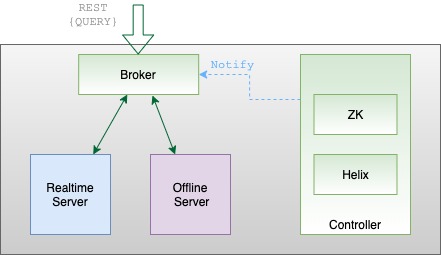
    Pinot tables are stored in one or more independent shards called segments. A small table may be contained by a single segment, but Pinot lets tables grow to an unlimited number of segments. There are different processes for creating segments (see ingestion). Segments have time-based partitions of table data, and are stored on Pinot servers that scale horizontally as needed for both storage and computation.

    Pinot achieves this by breaking the data into smaller chunks known as segments (similar to shards/partitions in relational databases). Segments can be seen as time-based partitions.

    A segment is a horizontal shard representing a chunk of table data with some number of rows. The segment stores data for all columns of the table. Each segment packs the data in a columnar fashion, along with the dictionaries and indices for the columns. The segment is laid out in a columnar format so that it can be directly mapped into memory for serving queries.

    Columns can be single or multi-valued and the following types are supported: STRING, BOOLEAN, INT, LONG, FLOAT, DOUBLE, TIMESTAMP or BYTES. Only single-valued BIG_DECIMAL data type is supported.

    Columns may be declared to be metric or dimension (or specifically as a time dimension) in the schema. Columns can have default null values. For example, the default null value of a integer column can be 0. The default value for bytes columns must be hex-encoded before it's added to the schema.

    Pinot uses dictionary encoding to store values as a dictionary ID. Columns may be configured to be “no-dictionary” column in which case raw values are stored. Dictionary IDs are encoded using minimum number of bits for efficient storage (e.g. a column with a cardinality of 3 will use only 2 bits for each dictionary ID).

    A forward index is built for each column and compressed for efficient memory use. In addition, you can optionally configure inverted indices for any set of columns. Inverted indices take up more storage, but improve query performance. Specialized indexes like Star-Tree index are also supported. For more details, see .

    Creating a segment

    Once the table is configured, we can load some data. Loading data involves generating pinot segments from raw data and pushing them to the pinot cluster. Data can be loaded in batch mode or streaming mode. For more details, see the page.

    Load data in batch

    Prerequisites

    Below are instructions to generate and push segments to Pinot via standalone scripts. For a production setup, you should use frameworks such as Hadoop or Spark. For more details on setting up data ingestion jobs, see

    Job Spec YAML

    To generate a segment, we need to first create a job spec YAML file. This file contains all the information regarding data format, input data location, and pinot cluster coordinates. Note that this assumes that the controller is RUNNING to fetch the table config and schema. If not, you will have to configure the spec to point at their location. For full configurations, see .

    Create and push segment

    To create and push the segment in one go, use the following:

    Sample Console Output

    Alternately, you can separately create and then push, by changing the jobType to SegmentCreation or SegmenTarPush.

    Templating Ingestion Job Spec

    The Ingestion job spec supports templating with Groovy Syntax.

    This is convenient if you want to generate one ingestion job template file and schedule it on a daily basis with extra parameters updated daily.

    e.g. you could set inputDirURI with parameters to indicate the date, so that the ingestion job only processes the data for a particular date. Below is an example that templates the date for input and output directories.

    You can pass in arguments containing values for ${year}, ${month}, ${day} when kicking off the ingestion job: -values $param=value1 $param2=value2...

    This ingestion job only generates segments for date 2014-01-03

    Load data in streaming

    Prerequisites

    Below is an example of how to publish sample data to your stream. As soon as data is available to the real-time stream, it starts getting consumed by the real-time servers.

    Kafka

    Run below command to stream JSON data into Kafka topic: flights-realtime

    Run below command to stream JSON data into Kafka topic: flights-realtime

    Indexing
    ingestion overview
    Set up a cluster
    Create broker and server tenants
    Create an offline table
    Import Data.
    Ingestion Job Spec
    Set up a cluster
    Create broker and server tenants
    Create a real-time table and set up a real-time stream
    job-spec.yml
    executionFrameworkSpec:
      name: 'standalone'
      segmentGenerationJobRunnerClassName: 'org.apache.pinot.plugin.ingestion.batch.standalone.SegmentGenerationJobRunner'
      segmentTarPushJobRunnerClassName: 'org.apache.pinot.plugin.ingestion.batch.standalone.SegmentTarPushJobRunner'
      segmentUriPushJobRunnerClassName: 'org.apache.pinot.plugin.ingestion.batch.standalone.SegmentUriPushJobRunner'
    
    jobType: SegmentCreationAndTarPush
    inputDirURI: 'examples/batch/baseballStats/rawdata'
    includeFileNamePattern: 'glob:**/*.csv'
    excludeFileNamePattern: 'glob:**/*.tmp'
    outputDirURI: 'examples/batch/baseballStats/segments'
    overwriteOutput: true
    
    pinotFSSpecs:
      - scheme: file
        className: org.apache.pinot.spi.filesystem.LocalPinotFS
    
    recordReaderSpec:
      dataFormat: 'csv'
      className: 'org.apache.pinot.plugin.inputformat.csv.CSVRecordReader'
      configClassName: 'org.apache.pinot.plugin.inputformat.csv.CSVRecordReaderConfig'
      configs:
    
    tableSpec:
      tableName: 'baseballStats'
      schemaURI: 'http://localhost:9000/tables/baseballStats/schema'
      tableConfigURI: 'http://localhost:9000/tables/baseballStats'
      
    segmentNameGeneratorSpec:
    
    pinotClusterSpecs:
      - controllerURI: 'http://localhost:9000'
    
    pushJobSpec:
      pushParallelism: 2
      pushAttempts: 2
      pushRetryIntervalMillis: 1000
    docker run \
        --network=pinot-demo \
        --name pinot-data-ingestion-job \
        ${PINOT_IMAGE} LaunchDataIngestionJob \
        -jobSpecFile examples/docker/ingestion-job-specs/airlineStats.yaml
    SegmentGenerationJobSpec:
    !!org.apache.pinot.spi.ingestion.batch.spec.SegmentGenerationJobSpec
    excludeFileNamePattern: null
    executionFrameworkSpec: {extraConfigs: null, name: standalone, segmentGenerationJobRunnerClassName: org.apache.pinot.plugin.ingestion.batch.standalone.SegmentGenerationJobRunner,
      segmentTarPushJobRunnerClassName: org.apache.pinot.plugin.ingestion.batch.standalone.SegmentTarPushJobRunner,
      segmentUriPushJobRunnerClassName: org.apache.pinot.plugin.ingestion.batch.standalone.SegmentUriPushJobRunner}
    includeFileNamePattern: glob:**/*.avro
    inputDirURI: examples/batch/airlineStats/rawdata
    jobType: SegmentCreationAndTarPush
    outputDirURI: examples/batch/airlineStats/segments
    overwriteOutput: true
    pinotClusterSpecs:
    - {controllerURI: 'http://pinot-controller:9000'}
    pinotFSSpecs:
    - {className: org.apache.pinot.spi.filesystem.LocalPinotFS, configs: null, scheme: file}
    pushJobSpec: {pushAttempts: 2, pushParallelism: 1, pushRetryIntervalMillis: 1000,
      segmentUriPrefix: null, segmentUriSuffix: null}
    recordReaderSpec: {className: org.apache.pinot.plugin.inputformat.avro.AvroRecordReader,
      configClassName: null, configs: null, dataFormat: avro}
    segmentNameGeneratorSpec: null
    tableSpec: {schemaURI: 'http://pinot-controller:9000/tables/airlineStats/schema',
      tableConfigURI: 'http://pinot-controller:9000/tables/airlineStats', tableName: airlineStats}
    
    Trying to create instance for class org.apache.pinot.plugin.ingestion.batch.standalone.SegmentGenerationJobRunner
    Initializing PinotFS for scheme file, classname org.apache.pinot.spi.filesystem.LocalPinotFS
    Finished building StatsCollector!
    Collected stats for 403 documents
    Created dictionary for INT column: FlightNum with cardinality: 386, range: 14 to 7389
    Using fixed bytes value dictionary for column: Origin, size: 294
    Created dictionary for STRING column: Origin with cardinality: 98, max length in bytes: 3, range: ABQ to VPS
    Created dictionary for INT column: Quarter with cardinality: 1, range: 1 to 1
    Created dictionary for INT column: LateAircraftDelay with cardinality: 50, range: -2147483648 to 303
    ......
    ......
    Pushing segment: airlineStats_OFFLINE_16085_16085_29 to location: http://pinot-controller:9000 for table airlineStats
    Sending request: http://pinot-controller:9000/v2/segments?tableName=airlineStats to controller: a413b0013806, version: Unknown
    Response for pushing table airlineStats segment airlineStats_OFFLINE_16085_16085_29 to location http://pinot-controller:9000 - 200: {"status":"Successfully uploaded segment: airlineStats_OFFLINE_16085_16085_29 of table: airlineStats"}
    Pushing segment: airlineStats_OFFLINE_16084_16084_30 to location: http://pinot-controller:9000 for table airlineStats
    Sending request: http://pinot-controller:9000/v2/segments?tableName=airlineStats to controller: a413b0013806, version: Unknown
    Response for pushing table airlineStats segment airlineStats_OFFLINE_16084_16084_30 to location http://pinot-controller:9000 - 200: {"status":"Successfully uploaded segment: airlineStats_OFFLINE_16084_16084_30 of table: airlineStats"}
    bin/pinot-admin.sh LaunchDataIngestionJob \
        -jobSpecFile examples/batch/airlineStats/ingestionJobSpec.yaml
    inputDirURI: 'examples/batch/airlineStats/rawdata/${year}/${month}/${day}'
    outputDirURI: 'examples/batch/airlineStats/segments/${year}/${month}/${day}'
    docker run \
        --network=pinot-demo \
        --name pinot-data-ingestion-job \
        ${PINOT_IMAGE} LaunchDataIngestionJob \
        -jobSpecFile examples/docker/ingestion-job-specs/airlineStats.yaml
        -values year=2014 month=01 day=03
    docker run \
      --network pinot-demo \
      --name=loading-airlineStats-data-to-kafka \
      ${PINOT_IMAGE} StreamAvroIntoKafka \
      -avroFile examples/stream/airlineStats/sample_data/airlineStats_data.avro \
      -kafkaTopic flights-realtime -kafkaBrokerList kafka:9092 -zkAddress pinot-zookeeper:2181/kafka
    bin/pinot-admin.sh StreamAvroIntoKafka \
      -avroFile examples/stream/airlineStats/sample_data/airlineStats_data.avro \
      -kafkaTopic flights-realtime -kafkaBrokerList localhost:19092 -zkAddress localhost:2191/kafka
    Dynamic configuration changes: Operations like adding new tables, expanding a cluster, ingesting data, modifying an existing table, and adding indexes do not impact query availability or performance.

    Receives the results from each server and merges them.
  • Sends the query result to the client.

  • The broker receives a complete result set from the final stage of the query, which is always a single server.
  • The broker sends the query result to the client.

  • The controller then assigns the segment to one or more "offline" servers (depending on replication factor) and notifies them that new segments are available.
  • The servers then download the newly created segments directly from the deep store.

  • The cluster's brokers, which watch for state changes as Helix spectators, detect the new segments and update their segment routing tables accordingly. The cluster is now able to query the new offline segments.

  • Through Helix functionality on the controller and all of the cluster's brokers, the brokers become aware of the consuming segments, and begin including them in query routing immediately.

  • The consuming servers simultaneously begin consuming messages from the streaming input source, storing them in the consuming segment.

  • When a server decides its consuming segment is complete, it commits the in-memory consuming segment to a conventional segment file, uploads it to the deep store, and notifies the controller.

  • The controller and the server create a new consuming segment to continue real-time ingestion.

  • The controller marks the newly committed segment as online. Brokers then discover the new segment through the Helix notification mechanism, allowing them to route queries to it in the usual fashion.

  • Segment

    Helix Partition

    Table

    Helix Resource

    Controller

    Helix Controller or Helix agent that drives the overall state of the cluster

    Server

    Helix Participant

    Broker

    A Helix Spectator that observes the cluster for changes in the state of segments and servers. To support multi-tenancy, brokers are also modeled as Helix Participants.

    Minion

    Helix Participant that performs computation rather than storing data

    Controller

    • Controller that is assigned as the current leader

    Servers and Brokers

    • List of servers and brokers

    • Configuration of all current servers and brokers

    • Health status of all current servers and brokers

    Tables

    • List of tables

    • Table configurations

    • Table schema

    • List of the table's segments

    Segment

    • Exact server locations of a segment

    • State of each segment (online/offline/error/consuming)

    • Metadata about each segment

    servers
    brokers
    Components
    Controller
    Broker
    Server
    Minion
    Apache Helix
    Apache ZooKeeper
    controller
    real-time tables
    offline tables
    Pinot Data Explorer
    broker's
    server
    routing
    multi-stage engine
    table
    server
    routing
    multi-stage engine
    Servers
    segments
    table
    deep store
    minion
    tables
    ingestion job
    segments
    deep store
    controller
    Pinot's Zookeeper Browser UI
    //This is an example ZNode config for EXTERNAL VIEW in Helix
    {
      "id" : "baseballStats_OFFLINE",
      "simpleFields" : {
        ...
      },
      "mapFields" : {
        "baseballStats_OFFLINE_0" : {
          "Server_10.1.10.82_7000" : "ONLINE"
        }
      },
      ...
    }
    // Query: select count(*) from baseballStats limit 10
    
    // RESPONSE
    // ========
    {
        "resultTable": {
            "dataSchema": {
                "columnDataTypes": ["LONG"],
                "columnNames": ["count(*)"]
            },
            "rows": [
                [97889]
            ]
        },
        "exceptions": [],
        "numServersQueried": 1,
        "numServersResponded": 1,
        "numSegmentsQueried": 1,
        "numSegmentsProcessed": 1,
        "numSegmentsMatched": 1,
        "numConsumingSegmentsQueried": 0,
        "numDocsScanned": 97889,
        "numEntriesScannedInFilter": 0,
        "numEntriesScannedPostFilter": 0,
        "numGroupsLimitReached": false,
        "totalDocs": 97889,
        "timeUsedMs": 5,
        "segmentStatistics": [],
        "traceInfo": {},
        "minConsumingFreshnessTimeMs": 0
    }

    Segment threshold

    Learn how segment thresholds work in Pinot.

    The segment threshold determines when a segment is committed in real-time tables.

    When data is first ingested from a streaming provider like Kafka, Pinot stores the data in a consuming segment.

    This segment is on the disk of the server(s) processing a particular partition from the streaming provider.

    However, it's not until a segment is committed that the segment is written to the deep store. The segment threshold decides when that should happen.

    Why is the segment threshold important?

    The segment threshold is important because it ensures segments are a reasonable size.

    When queries are processed, smaller segments may increase query latency due to more overhead (number of threads spawned, meta data processing, and so on).

    Larger segments may cause servers to run out of memory. When a server is restarted, the consuming segment must start consuming from the first row again, causing a lag between Pinot and the streaming provider.

    Mark Needham explains the segment threshold

    Segment retention

    In this Apache Pinot concepts guide, we'll learn how segment retention works.

    Segments in Pinot tables have a retention time, after which the segments are deleted. Typically, offline tables retain segments for a longer period of time than real-time tables.

    The removal of segments is done by the retention manager. By default, the retention manager runs once every 6 hours.

    The retention manager purges two types of segments:

    • Expired segments: Segments whose end time has exceeded the retention period.

    • Replaced segments: Segments that have been replaced as part of the

    There are a couple of scenarios where segments in offline tables won't be purged:

    • If the segment doesn't have an end time. This would happen if the segment doesn't contain a time column.

    • If the segment's table has a segmentIngestionType of REFRESH.

    If the retention period isn't specified, segments aren't purged from tables.

    The retention manager initially moves these segments into a Deleted Segments area, from where they will eventually be permanently removed.

    merge rollup task.

    Controller

    Discover the controller component of Apache Pinot, enabling efficient data and query management.

    The Pinot controller schedules and reschedules resources in a Pinot cluster when metadata changes or a node fails. As an Apache Helix Controller, the Pinot controller schedules the resources that comprise the cluster and orchestrates connections between certain external processes and cluster components (for example, ingest of real-time tables and offline tables). The Pinot controller can be deployed as a single process on its own server or as a group of redundant servers in an active/passive configuration.

    The controller exposes a REST API endpoint for cluster-wide administrative operations as well as a web-based query console to execute interactive SQL queries and perform simple administrative tasks.

    The Pinot controller is responsible for the following:

    • Maintaining global metadata (e.g., configs and schemas) of the system with the help of Zookeeper which is used as the persistent metadata store.

    • Hosting the Helix Controller and managing other Pinot components (brokers, servers, minions)

    • Maintaining the mapping of which servers are responsible for which segments. This mapping is used by the servers to download the portion of the segments that they are responsible for. This mapping is also used by the broker to decide which servers to route the queries to.

    • Serving admin endpoints for viewing, creating, updating, and deleting configs, which are used to manage and operate the cluster.

    • Serving endpoints for segment uploads, which are used in offline data pushes. They are responsible for initializing real-time consumption and coordination of persisting real-time segments into the segment store periodically.

    • Undertaking other management activities such as managing retention of segments, validations.

    For redundancy, there can be multiple instances of Pinot controllers. Pinot expects that all controllers are configured with the same back-end storage system so that they have a common view of the segments (e.g. NFS). Pinot can use other storage systems such as HDFS or .

    Running the periodic task manually

    The controller runs several periodic tasks in the background, to perform activities such as management and validation. Each periodic task has to define the run frequency and default frequency. Each task runs at its own schedule or can also be triggered manually if needed. The task runs on the lead controller for each table.

    For period task configuration details, see .

    Use the GET /periodictask/names API to fetch the names of all the periodic tasks running on your Pinot cluster.

    To manually run a named periodic task, use the GET /periodictask/run API:

    The Log Request Id (api-09630c07) can be used to search through pinot-controller log file to see log entries related to execution of the Periodic task that was manually run.

    If tableName (and its type OFFLINE or REALTIME) is not provided, the task will run against all tables.

    Starting a controller

    Make sure you've . If you're using Docker, make sure to . To start a controller:

    Broker

    Discover how Apache Pinot's broker component optimizes query processing, data retrieval, and enhances data-driven applications.

    Pinot brokers take query requests from client processes, scatter them to applicable servers, gather the results, and return results to the client. The controller shares cluster metadata with the brokers, which allows the brokers to create a plan for executing the query involving a minimal subset of servers with the source data and, when required, other servers to shuffle and consolidate results.

    A production Pinot cluster contains many brokers. In general, the more brokers, the more concurrent queries a cluster can process, and the lower latency it can deliver on queries.

    Broker interaction with other components

    Pinot brokers are modeled as Helix spectators. They need to know the location of each segment of a table (and each replica of the segments) and route requests to the appropriate server that hosts the segments of the table being queried.

    The broker ensures that all the rows of the table are queried exactly once so as to return correct, consistent results for a query. The brokers may optimize to prune some of the segments as long as accuracy is not sacrificed.

    Helix provides the framework by which spectators can learn the location in which each partition of a resource (i.e. participant) resides. The brokers use this mechanism to learn the servers that host specific segments of a table.

    In the case of hybrid tables, the brokers ensure that the overlap between real-time and offline segment data is queried exactly once, by performing offline and real-time federation.

    Let's take this example, we have real-time data for five days - March 23 to March 27, and offline data has been pushed until Mar 25, which is two days behind real-time. The brokers maintain this time boundary.

    Suppose, we get a query to this table : select sum(metric) from table. The broker will split the query into 2 queries based on this time boundary – one for offline and one for real-time. This query becomes select sum(metric) from table_REALTIME where date >= Mar 25 and select sum(metric) from table_OFFLINE where date < Mar 25

    The broker merges results from both these queries before returning the result to the client.

    Starting a broker

    Make sure you've . If you're using Docker, make sure to . To start a broker:

    ADLS
    its own configuration
    Controller configuration reference
    set up Zookeeper
    pull the Pinot Docker image
    curl -X GET "http://localhost:9000/periodictask/names" -H "accept: application/json"
    
    [
      "RetentionManager",
      "OfflineSegmentIntervalChecker",
      "RealtimeSegmentValidationManager",
      "BrokerResourceValidationManager",
      "SegmentStatusChecker",
      "SegmentRelocator",
      "StaleInstancesCleanupTask",
      "TaskMetricsEmitter"
    ]
    curl -X GET "http://localhost:9000/periodictask/run?taskname=SegmentStatusChecker&tableName=jsontypetable&type=OFFLINE" -H "accept: application/json"
    
    {
      "Log Request Id": "api-09630c07",
      "Controllers notified": true
    }
    docker run \
        --network=pinot-demo \
        --name pinot-controller \
        -p 9000:9000 \
        -d ${PINOT_IMAGE} StartController \
        -zkAddress pinot-zookeeper:2181
    bin/pinot-admin.sh StartController \
      -zkAddress localhost:2181 \
      -clusterName PinotCluster \
      -controllerPort 9000
    set up Zookeeper
    pull the
    Pinot Docker image
    docker run \
        --network=pinot-demo \
        --name pinot-broker \
        -d ${PINOT_IMAGE} StartBroker \
        -zkAddress pinot-zookeeper:2181
    bin/pinot-admin.sh StartBroker \
      -zkAddress localhost:2181 \
      -clusterName PinotCluster \
      -brokerPort 7000

    Table

    Explore the table component in Apache Pinot, a fundamental building block for organizing and managing data in Pinot clusters, enabling effective data processing and analysis.

    Pinot stores data in tables. A Pinot table is conceptually identical to a relational database table with rows and columns. Columns have the same name and data type, known as the table's schema.

    Pinot schemas are defined in a JSON file. Because that schema definition is in its own file, multiple tables can share a single schema. Each table can have a unique name, indexing strategy, partitioning, data sources, and other metadata.

    Pinot table types include:

    • real-time: Ingests data from a streaming source like Apache Kafka®

    • offline: Loads data from a batch source

    • hybrid: Loads data from both a batch source and a streaming source

    Pinot breaks a table into multiple and stores these segments in a deep-store such as Hadoop Distributed File System (HDFS) as well as Pinot servers.

    In the Pinot cluster, a table is modeled as a and each segment of a table is modeled as a .

    Table naming in Pinot follows typical naming conventions, such as starting names with a letter, not ending with an underscore, and using only alphanumeric characters.

    Pinot supports the following types of tables:

    Type
    Description

    The user querying the database does not need to know the type of the table. They only need to specify the table name in the query.

    e.g. regardless of whether we have an offline table myTable_OFFLINE, a real-time table myTable_REALTIME, or a hybrid table containing both of these, the query will be:

    is used to define the table properties, such as name, type, indexing, routing, and retention. It is written in JSON format and is stored in Zookeeper, along with the table schema.

    Use the following properties to make your tables faster or leaner:

    • Segment

    • Indexing

    • Tenants

    Segments

    A table is comprised of small chunks of data known as segments. Learn more about how Pinot creates and manages segments .

    For offline tables, segments are built outside of Pinot and uploaded using a distributed executor such as Spark or Hadoop. For details, see .

    For real-time tables, segments are built in a specific interval inside Pinot. You can tune the following for the real-time segments.

    Flush

    The Pinot real-time consumer ingests the data, creates the segment, and then flushes the in-memory segment to disk. Pinot allows you to configure when to flush the segment in the following ways:

    • Number of consumed rows: After consuming the specified number of rows from the stream, Pinot will persist the segment to disk.

    • Number of rows per segment: Pinot learns and then estimates the number of rows that need to be consumed. The learning phase starts by setting the number of rows to 100,000 (this value can be changed) and adjusts it to reach the appropriate segment size. Because Pinot corrects the estimate as it goes along, the segment size might go significantly over the correct size during the learning phase. You should set this value to optimize the performance of queries.

    • Max time duration to wait: Pinot consumers wait for the configured time duration after which segments are persisted to the disk.

    Replicas A segment can have multiple replicas to provide higher availability. You can configure the number of replicas for a table segment .

    Completion Mode By default, if the in-memory segment in the is equivalent to the committed segment, then the non-winner server builds and replaces the segment. If the available segment is not equivalent to the committed segment, the server just downloads the committed segment from the controller.

    However, in certain scenarios, the segment build can get very memory-intensive. In these cases, you might want to enforce the non-committer servers to just download the segment from the controller instead of building it again. You can do this by setting completionMode: "DOWNLOAD" in the table configuration.

    For details, see .

    Download Scheme

    A Pinot server might fail to download segments from the deep store, such as HDFS, after its completion. However, you can configure servers to download these segments from peer servers instead of the deep store. Currently, only HTTP and HTTPS download schemes are supported. More methods, such as gRPC/Thrift, are planned be added in the future.

    For more details about peer segment download during real-time ingestion, refer to this design doc on

    Indexing

    You can create multiple indices on a table to increase the performance of the queries. The following types of indices are supported:

      • Dictionary-encoded forward index with bit compression

      • Raw value forward index

      • Sorted forward index with run-length encoding

    For more details on each indexing mechanism and corresponding configurations, see .

    Set up on columns to make queries faster. You can also keep segments in off-heap instead of on-heap memory for faster queries.

    Pre-aggregation

    Aggregate the real-time stream data as it is consumed to reduce segment sizes. We add the metric column values of all rows that have the same values for all dimension and time columns and create a single row in the segment. This feature is only available on REALTIME tables.

    The only supported aggregation is SUM. The columns to pre-aggregate need to satisfy the following requirements:

    • All metrics should be listed in noDictionaryColumns.

    • No multi-value dimensions

    • All dimension columns are treated to have a dictionary, even if they appear as noDictionaryColumns in the config.

    The following table config snippet shows an example of enabling pre-aggregation during real-time ingestion:

    Tenants

    Each table is associated with a tenant. A segment resides on the server, which has the same tenant as itself. For details, see .

    Optionally, override if a table should move to a server with different tenant based on segment status. The example below adds a tagOverrideConfig under the tenants section for real-time tables to override tags for consuming and completed segments.

    In the above example, the consuming segments will still be assigned to serverTenantName_REALTIME hosts, but once they are completed, the segments will be moved to serverTeantnName_OFFLINE.

    You can specify the full name of any tag in this section. For example, you could decide that completed segments for this table should be in Pinot servers tagged as allTables_COMPLETED). To learn more about, see the section.

    Hybrid table

    A hybrid table is a table composed of two tables, one offline and one real-time, that share the same name. In a hybrid table, offline segments can be pushed periodically. The retention on the offline table can be set to a high value because segments are coming in on a periodic basis, whereas the retention on the real-time part can be small.

    Once an offline segment is pushed to cover a recent time period, the brokers automatically switch to using the offline table for segments for that time period and use the real-time table only for data not available in the offline table.

    To learn how time boundaries work for hybrid tables, see .

    A typical use case for hybrid tables is pushing deduplicated, cleaned-up data into an offline table every day while consuming real-time data as it arrives. Data can remain in offline tables for as long as a few years, while the real-time data would be cleaned every few days.

    Examples

    Create a table config for your data, or see for all possible batch/streaming tables.

    Prerequisites

    Offline table creation

    Sample console output

    Check out the table config in the to make sure it was successfully uploaded.

    Streaming table creation

    Start Kafka

    Create a Kafka topic

    Create a streaming table

    Sample output

    Start Kafka-Zookeeper

    Start Kafka

    Create stream table

    Check out the table config in the to make sure it was successfully uploaded.

    Hybrid table creation

    To create a hybrid table, you have to create the offline and real-time tables individually. You don't need to create a separate hybrid table.

  • Inverted Index

    • Bitmap inverted index

    • Sorted inverted index

  • Star-tree Index

  • Range Index

  • Text Index

  • Geospatial

  • Offline

    Offline tables ingest pre-built Pinot segments from external data stores and are generally used for batch ingestion.

    Real-time

    Real-time tables ingest data from streams (such as Kafka) and build segments from the consumed data.

    Hybrid

    Hybrid Pinot tables have both real-time as well as offline tables under the hood. By default, all tables in Pinot are hybrid.

    segments
    Helix resource
    Helix Partition
    Table configuration
    here
    Batch Ingestion
    using the CLI
    non-winner server
    Completion Config
    bypass deep store for segment completion.
    Forward Index
    Indexing
    Bloomfilters
    Tenant
    Moving Completed Segments
    Broker
    examples
    Set up the cluster
    Create broker and server tenants
    Rest API
    Rest API
    select count(*)
    from myTable
    pinot-table-realtime.json
        "tableIndexConfig": { 
          "noDictionaryColumns": ["metric1", "metric2"],
          "aggregateMetrics": true,
          ...
        }
      "broker": "brokerTenantName",
      "server": "serverTenantName",
      "tagOverrideConfig" : {
        "realtimeConsuming" : "serverTenantName_REALTIME"
        "realtimeCompleted" : "serverTenantName_OFFLINE"
      }
    }
    docker run \
        --network=pinot-demo \
        --name pinot-batch-table-creation \
        ${PINOT_IMAGE} AddTable \
        -schemaFile examples/batch/airlineStats/airlineStats_schema.json \
        -tableConfigFile examples/batch/airlineStats/airlineStats_offline_table_config.json \
        -controllerHost pinot-controller \
        -controllerPort 9000 \
        -exec
    Executing command: AddTable -tableConfigFile examples/batch/airlineStats/airlineStats_offline_table_config.json -schemaFile examples/batch/airlineStats/airlineStats_schema.json -controllerHost pinot-controller -controllerPort 9000 -exec
    Sending request: http://pinot-controller:9000/schemas to controller: a413b0013806, version: Unknown
    {"status":"Table airlineStats_OFFLINE succesfully added"}
    bin/pinot-admin.sh AddTable \
        -schemaFile examples/batch/airlineStats/airlineStats_schema.json \
        -tableConfigFile examples/batch/airlineStats/airlineStats_offline_table_config.json \
        -exec
    # add schema
    curl -F schemaName=@airlineStats_schema.json  localhost:9000/schemas
    
    # add table
    curl -i -X POST -H 'Content-Type: application/json' \
        -d @airlineStats_offline_table_config.json localhost:9000/tables
    docker run \
        --network pinot-demo --name=kafka \
        -e KAFKA_ZOOKEEPER_CONNECT=pinot-zookeeper:2181/kafka \
        -e KAFKA_BROKER_ID=0 \
        -e KAFKA_ADVERTISED_HOST_NAME=kafka \
        -d wurstmeister/kafka:latest
    docker exec \
      -t kafka \
      /opt/kafka/bin/kafka-topics.sh \
      --zookeeper pinot-zookeeper:2181/kafka \
      --partitions=1 --replication-factor=1 \
      --create --topic flights-realtime
    docker run \
        --network=pinot-demo \
        --name pinot-streaming-table-creation \
        ${PINOT_IMAGE} AddTable \
        -schemaFile examples/stream/airlineStats/airlineStats_schema.json \
        -tableConfigFile examples/docker/table-configs/airlineStats_realtime_table_config.json \
        -controllerHost pinot-controller \
        -controllerPort 9000 \
        -exec
    Executing command: AddTable -tableConfigFile examples/docker/table-configs/airlineStats_realtime_table_config.json -schemaFile examples/stream/airlineStats/airlineStats_schema.json -controllerHost pinot-controller -controllerPort 9000 -exec
    Sending request: http://pinot-controller:9000/schemas to controller: 8fbe601012f3, version: Unknown
    {"status":"Table airlineStats_REALTIME succesfully added"}
    bin/pinot-admin.sh StartZookeeper -zkPort 2191
    bin/pinot-admin.sh  StartKafka -zkAddress=localhost:2191/kafka -port 19092
    bin/pinot-admin.sh AddTable \
        -schemaFile examples/stream/airlineStats/airlineStats_schema.json \
        -tableConfigFile examples/stream/airlineStats/airlineStats_realtime_table_config.json \
        -exec
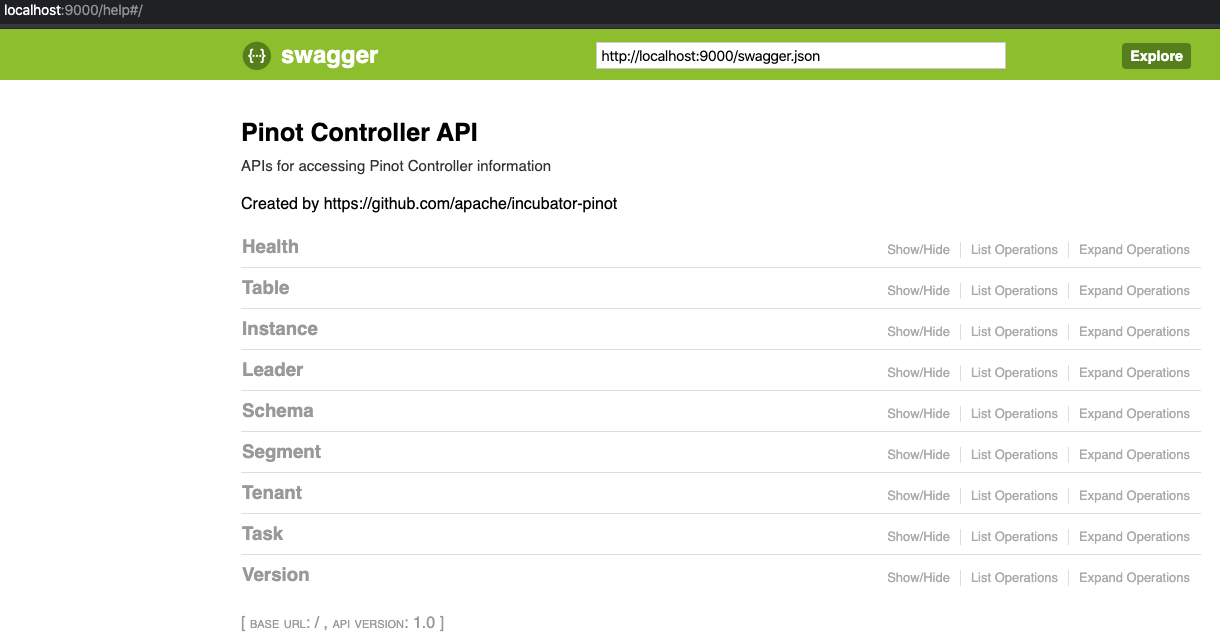
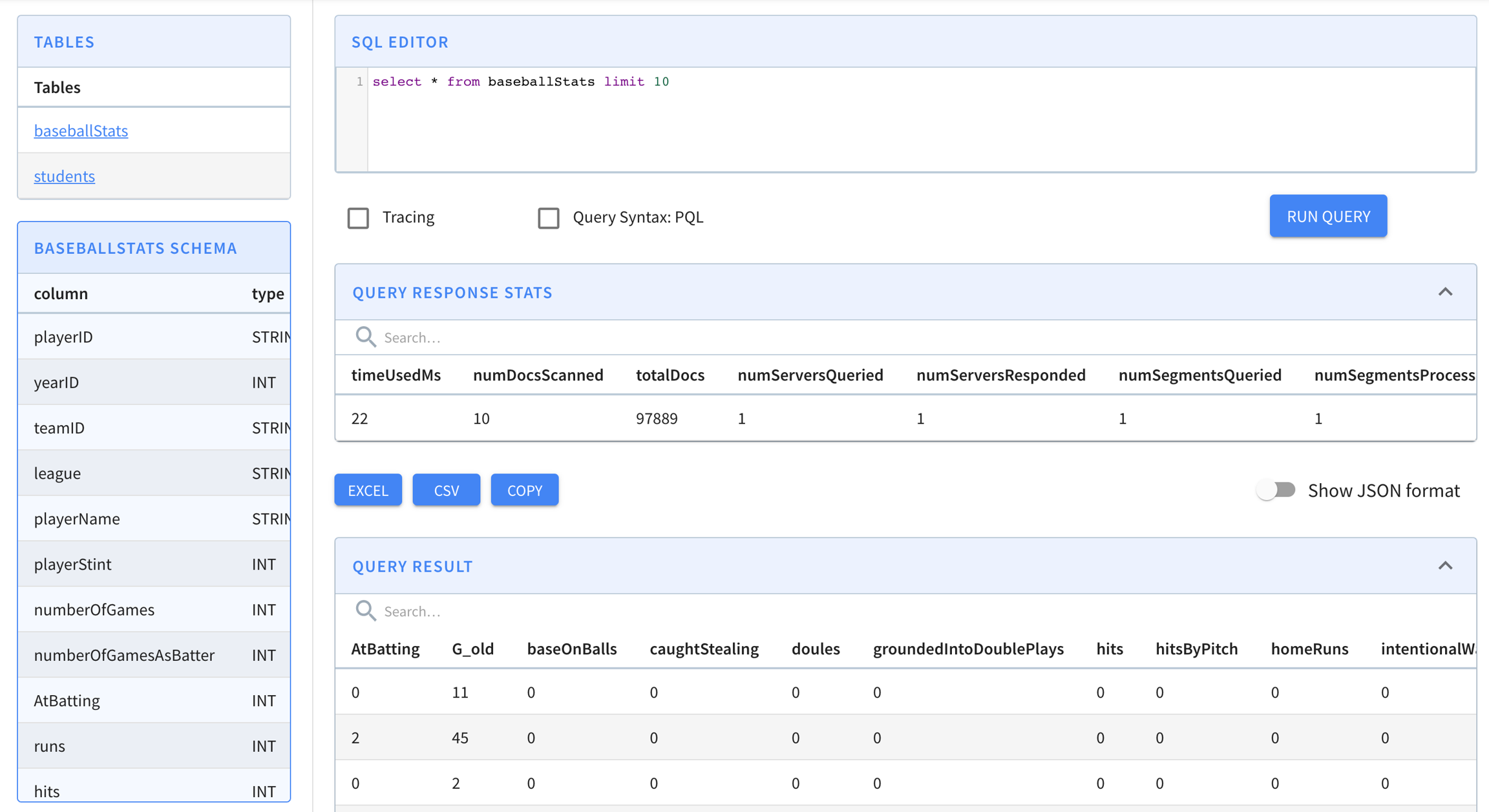
    "OFFLINE": {
        "tableName": "pinotTable", 
        "tableType": "OFFLINE", 
        "segmentsConfig": {
          ... 
        }, 
        "tableIndexConfig": { 
          ... 
        },  
        "tenants": {
          "broker": "myBrokerTenant", 
          "server": "myServerTenant"
        },
        "metadata": {
          ...
        }
      },
      "REALTIME": { 
        "tableName": "pinotTable", 
        "tableType": "REALTIME", 
        "segmentsConfig": {
          ...
        }, 
        "tableIndexConfig": { 
          ... 
          "streamConfigs": {
            ...
          },  
        },  
        "tenants": {
          "broker": "myBrokerTenant", 
          "server": "myServerTenant"
        },
        "metadata": {
        ...
        }
      }
    }

    Minion

    Explore the minion component in Apache Pinot, empowering efficient data movement and segment generation within Pinot clusters.

    A Pinot minion is an optional cluster component that executes background tasks on table data apart from the query processes performed by brokers and servers. Minions run on independent hardware resources, and are responsible for executing minion tasks as directed by the controller. Examples of minon tasks include converting batch data from a standard format like Avro or JSON into segment files to be loaded into an offline table, and rewriting existing segment files to purge records as required by data privacy laws like GDPR. Minion tasks can run once or be scheduled to run periodically.

    Minions isolate the computational burden of out-of-band data processing from the servers. Although a Pinot cluster can function with or without minions, they are typically present to support routine tasks like batch data ingest.

    Starting a minion

    Make sure you've . If you're using Docker, make sure to . To start a minion:

    Interfaces

    Pinot task generator

    The Pinot task generator interface defines the APIs for the controller to generate tasks for minions to execute.

    PinotTaskExecutorFactory

    Factory for PinotTaskExecutor which defines the APIs for Minion to execute the tasks.

    MinionEventObserverFactory

    Factory for MinionEventObserver which defines the APIs for task event callbacks on minion.

    Built-in tasks

    SegmentGenerationAndPushTask

    The PushTask can fetch files from an input folder e.g. from a S3 bucket and converts them into segments. The PushTask converts one file into one segment and keeps file name in segment metadata to avoid duplicate ingestion. Below is an example task config to put in TableConfig to enable this task. The task is scheduled every 10min to keep ingesting remaining files, with 10 parallel task at max and 1 file per task.

    NOTE: You may want to simply omit "tableMaxNumTasks" due to this caveat: the task generates one segment per file, and derives segment name based on the time column of the file. If two files happen to have same time range and are ingested by tasks from different schedules, there might be segment name conflict. To overcome this issue for now, you can omit “tableMaxNumTasks” and by default it’s Integer.MAX_VALUE, meaning to schedule as many tasks as possible to ingest all input files in a single batch. Within one batch, a sequence number suffix is used to ensure no segment name conflict. Because the sequence number suffix is scoped within one batch, tasks from different batches might encounter segment name conflict issue said above.

    When performing ingestion at scale remember that Pinot will list all of the files contained in the `inputDirURI` every time a `SegmentGenerationAndPushTask` job gets scheduled. This could become a bottleneck when fetching files from a cloud bucket like GCS. To prevent this make `inputDirURI` point to the least number of files possible.

    RealtimeToOfflineSegmentsTask

    See for details.

    MergeRollupTask

    See for details.

    Enable tasks

    Tasks are enabled on a per-table basis. To enable a certain task type (e.g. myTask) on a table, update the table config to include the task type:

    Under each enable task type, custom properties can be configured for the task type.

    There are also two task configs to be set as part of cluster configs like below. One controls task's overall timeout (1hr by default) and one for how many tasks to run on a single minion worker (1 by default).

    Schedule tasks

    Auto-schedule

    There are 2 ways to enable task scheduling:

    Controller level schedule for all minion tasks

    Tasks can be scheduled periodically for all task types on all enabled tables. Enable auto task scheduling by configuring the schedule frequency in the controller config with the key controller.task.frequencyPeriod. This takes period strings as values, e.g. 2h, 30m, 1d.

    Per table and task level schedule

    Tasks can also be scheduled based on cron expressions. The cron expression is set in the schedule config for each task type separately. This config in the controller config, controller.task.scheduler.enabled should be set to true to enable cron scheduling.

    As shown below, the RealtimeToOfflineSegmentsTask will be scheduled at the first second of every minute (following the syntax ).

    Manual schedule

    Tasks can be manually scheduled using the following controller rest APIs:

    Rest API
    Description

    Schedule task on specific instances

    Tasks can be scheduled on specific instances using the following config at task level:

    By default, the value is minion_untagged to have backward-compatibility. This will allow users to schedule tasks on specific nodes and isolate tasks among tables / task-types.

    Rest API
    Description

    Task level advanced configs

    allowDownloadFromServer

    When a task is executed on a segment, the minion node fetches the segment from deepstore. If the deepstore is not accessible, the minion node can download the segment from the server node. This is controlled by the allowDownloadFromServer config in the task config. By default, this is set to false.

    We can also set this config at a minion instance level pinot.minion.task.allow.download.from.server (default is false). This instance level config helps in enforcing this behaviour if the number of tables / tasks is pretty high and we want to enable for all. Note: task-level config will override instance-level config value.

    Plug-in custom tasks

    To plug in a custom task, implement PinotTaskGenerator, PinotTaskExecutorFactory and MinionEventObserverFactory (optional) for the task type (all of them should return the same string for getTaskType()), and annotate them with the following annotations:

    Implementation
    Annotation

    After annotating the classes, put them under the package of name org.apache.pinot.*.plugin.minion.tasks.*, then they will be auto-registered by the controller and minion.

    Example

    See where the TestTask is plugged-in.

    Task Manager UI

    In the Pinot UI, there is Minion Task Manager tab under Cluster Manager page. From that minion task manager tab, one can find a lot of task related info for troubleshooting. Those info are mainly collected from the Pinot controller that schedules tasks or Helix that tracks task runtime status. There are also buttons to schedule tasks in an ad hoc way. Below are some brief introductions to some pages under the minion task manager tab.

    This one shows which types of Minion Task have been used. Essentially which task types have created their task queues in Helix.

    Clicking into a task type, one can see the tables using that task. And a few buttons to stop the task queue, cleaning up ended tasks etc.

    Then clicking into any table in this list, one can see how the task is configured for that table. And the task metadata if there is one in ZK. For example, MergeRollupTask tracks a watermark in ZK. If the task is cron scheduled, the current and next schedules are also shown in this page like below.

    At the bottom of this page is a list of tasks generated for this table for this specific task type. Like here, one MergeRollup task has been generated and completed.

    Clicking into a task from that list, we can see start/end time for it, and the subtasks generated for that task (as context, one minion task can have multiple subtasks to process data in parallel). In this example, it happened to have one sub-task here, and it shows when it starts and stops and which minion worker it's running.

    Clicking into this subtask, one can see more details about it like the input task configs and error info if the task failed.

    Task-related metrics

    There is a controller job that runs every 5 minutes by default and emits metrics about Minion tasks scheduled in Pinot. The following metrics are emitted for each task type:

    • NumMinionTasksInProgress: Number of running tasks

    • NumMinionSubtasksRunning: Number of running sub-tasks

    • NumMinionSubtasksWaiting: Number of waiting sub-tasks (unassigned to a minion as yet)

    The controller also emits metrics about how tasks are cron scheduled:

    • cronSchedulerJobScheduled: Number of current cron schedules registered to be triggered regularly according their cron expressions. It's a Gauge.

    • cronSchedulerJobTrigger: Number of cron scheduled triggered, as a Meter.

    • cronSchedulerJobSkipped: Number of late cron scheduled skipped, as a Meter.

    For each task, the minion will emit these metrics:

    • TASK_QUEUEING: Task queueing time (task_dequeue_time - task_inqueue_time), assuming the time drift between helix controller and pinot minion is minor, otherwise the value may be negative

    • TASK_EXECUTION: Task execution time, which is the time spent on executing the task

    • NUMBER_OF_TASKS: number of tasks in progress on that minion. Whenever a Minion starts a task, increase the Gauge by 1, whenever a Minion completes (either succeeded or failed) a task, decrease it by 1

    NumMinionSubtasksError: Number of error sub-tasks (completed with an error/exception)
  • PercentMinionSubtasksInQueue: Percent of sub-tasks in waiting or running states

  • PercentMinionSubtasksInError: Percent of sub-tasks in error

  • cronSchedulerJobExecutionTimeMs: Time used to complete task generation, as a Timer.

    NUMBER_TASKS_EXECUTED: Number of tasks executed, as a Meter.

  • NUMBER_TASKS_COMPLETED: Number of tasks completed, as a Meter.

  • NUMBER_TASKS_CANCELLED: Number of tasks cancelled, as a Meter.

  • NUMBER_TASKS_FAILED: Number of tasks failed, as a Meter. Different from fatal failure, the task encountered an error which can not be recovered from this run, but it may still succeed by retrying the task.

  • NUMBER_TASKS_FATAL_FAILED: Number of tasks fatal failed, as a Meter. Different from failure, the task encountered an error, which will not be recoverable even with retrying the task.

  • POST /tasks/schedule

    Schedule tasks for all task types on all enabled tables

    POST /tasks/schedule?taskType=myTask

    Schedule tasks for the given task type on all enabled tables

    POST /tasks/schedule?tableName=myTable_OFFLINE

    Schedule tasks for all task types on the given table

    POST /tasks/schedule?taskType=myTask&tableName=myTable_OFFLINE

    Schedule tasks for the given task type on the given table

    POST /tasks/schedule?taskType=myTask&tableName=myTable_OFFLINE&minionInstanceTag=tag1_MINION

    Schedule tasks for the given task type of the given table on the minion nodes tagged as tag1_MINION.

    PinotTaskGenerator

    @TaskGenerator

    PinotTaskExecutorFactory

    @TaskExecutorFactory

    MinionEventObserverFactory

    @EventObserverFactory

    set up Zookeeper
    pull the Pinot Docker image
    docker run \
        --network=pinot-demo \
        --name pinot-minion \
        -d ${PINOT_IMAGE} StartMinion \
        -zkAddress pinot-zookeeper:2181
    bin/pinot-admin.sh StartMinion \
        -zkAddress localhost:2181
    Pinot managed Offline flows
    Minion merge rollup task
    defined here
    SimpleMinionClusterIntegrationTest
    Usage: StartMinion
        -help                                                   : Print this message. (required=false)
        -minionHost               <String>                      : Host name for minion. (required=false)
        -minionPort               <int>                         : Port number to start the minion at. (required=false)
        -zkAddress                <http>                        : HTTP address of Zookeeper. (required=false)
        -clusterName              <String>                      : Pinot cluster name. (required=false)
        -configFileName           <Config File Name>            : Minion Starter Config file. (required=false)
    public interface PinotTaskGenerator {
    
      /**
       * Initializes the task generator.
       */
      void init(ClusterInfoAccessor clusterInfoAccessor);
    
      /**
       * Returns the task type of the generator.
       */
      String getTaskType();
    
      /**
       * Generates a list of tasks to schedule based on the given table configs.
       */
      List<PinotTaskConfig> generateTasks(List<TableConfig> tableConfigs);
    
      /**
       * Returns the timeout in milliseconds for each task, 3600000 (1 hour) by default.
       */
      default long getTaskTimeoutMs() {
        return JobConfig.DEFAULT_TIMEOUT_PER_TASK;
      }
    
      /**
       * Returns the maximum number of concurrent tasks allowed per instance, 1 by default.
       */
      default int getNumConcurrentTasksPerInstance() {
        return JobConfig.DEFAULT_NUM_CONCURRENT_TASKS_PER_INSTANCE;
      }
    
      /**
       * Performs necessary cleanups (e.g. remove metrics) when the controller leadership changes.
       */
      default void nonLeaderCleanUp() {
      }
    }
    public interface PinotTaskExecutorFactory {
    
      /**
       * Initializes the task executor factory.
       */
      void init(MinionTaskZkMetadataManager zkMetadataManager);
    
      /**
       * Returns the task type of the executor.
       */
      String getTaskType();
    
      /**
       * Creates a new task executor.
       */
      PinotTaskExecutor create();
    }
    public interface PinotTaskExecutor {
    
      /**
       * Executes the task based on the given task config and returns the execution result.
       */
      Object executeTask(PinotTaskConfig pinotTaskConfig)
          throws Exception;
    
      /**
       * Tries to cancel the task.
       */
      void cancel();
    }
    public interface MinionEventObserverFactory {
    
      /**
       * Initializes the task executor factory.
       */
      void init(MinionTaskZkMetadataManager zkMetadataManager);
    
      /**
       * Returns the task type of the event observer.
       */
      String getTaskType();
    
      /**
       * Creates a new task event observer.
       */
      MinionEventObserver create();
    }
    public interface MinionEventObserver {
    
      /**
       * Invoked when a minion task starts.
       *
       * @param pinotTaskConfig Pinot task config
       */
      void notifyTaskStart(PinotTaskConfig pinotTaskConfig);
    
      /**
       * Invoked when a minion task succeeds.
       *
       * @param pinotTaskConfig Pinot task config
       * @param executionResult Execution result
       */
      void notifyTaskSuccess(PinotTaskConfig pinotTaskConfig, @Nullable Object executionResult);
    
      /**
       * Invoked when a minion task gets cancelled.
       *
       * @param pinotTaskConfig Pinot task config
       */
      void notifyTaskCancelled(PinotTaskConfig pinotTaskConfig);
    
      /**
       * Invoked when a minion task encounters exception.
       *
       * @param pinotTaskConfig Pinot task config
       * @param exception Exception encountered during execution
       */
      void notifyTaskError(PinotTaskConfig pinotTaskConfig, Exception exception);
    }
      "ingestionConfig": {
        "batchIngestionConfig": {
          "segmentIngestionType": "APPEND",
          "segmentIngestionFrequency": "DAILY",
          "batchConfigMaps": [
            {
              "input.fs.className": "org.apache.pinot.plugin.filesystem.S3PinotFS",
              "input.fs.prop.region": "us-west-2",
              "input.fs.prop.secretKey": "....",
              "input.fs.prop.accessKey": "....",
              "inputDirURI": "s3://my.s3.bucket/batch/airlineStats/rawdata/",
              "includeFileNamePattern": "glob:**/*.avro",
              "excludeFileNamePattern": "glob:**/*.tmp",
              "inputFormat": "avro"
            }
          ]
        }
      },
      "task": {
        "taskTypeConfigsMap": {
          "SegmentGenerationAndPushTask": {
            "schedule": "0 */10 * * * ?",
            "tableMaxNumTasks": "10"
          }
        }
      }
    {
      ...
      "task": {
        "taskTypeConfigsMap": {
          "myTask": {
            "myProperty1": "value1",
            "myProperty2": "value2"
          }
        }
      }
    }
    Using "POST /cluster/configs" API on CLUSTER tab in Swagger, with this payload
    {
    	"RealtimeToOfflineSegmentsTask.timeoutMs": "600000",
    	"RealtimeToOfflineSegmentsTask.numConcurrentTasksPerInstance": "4"
    }
      "task": {
        "taskTypeConfigsMap": {
          "RealtimeToOfflineSegmentsTask": {
            "bucketTimePeriod": "1h",
            "bufferTimePeriod": "1h",
            "schedule": "0 * * * * ?"
          }
        }
      },
      "task": {
        "taskTypeConfigsMap": {
          "RealtimeToOfflineSegmentsTask": {
            "bucketTimePeriod": "1h",
            "bufferTimePeriod": "1h",
            "schedule": "0 * * * * ?",
            "minionInstanceTag": "tag1_MINION"
          }
        }
      },