select homeRuns, baseOnBalls, ADD(homeRuns, baseOnBalls) AS total
from baseballStats
WHERE teamID = 'ML1'
AND yearID = 1956
AND playerName = 'Henry Louis'
select AVGMV(DivLongestGTimes) AS value
from airlineStats
where arraylength(DivLongestGTimes) > 1
Usage Examples
value
65
SELECT CODEPOINT('Apache Pinot') AS value
FROM ignoreMe
select DivWheelsOffs,
arrayConcatInt(DivWheelsOffs, DivWheelsOns) AS concatIds
from airlineStats
WHERE arraylength(DivWheelsOffs) >= 2
limit 5
select DivAirportIDs,
arrayReverseInt(DivAirportIDs) AS reversedIds
from airlineStats
WHERE arraylength(DivAirportIDs) >= 2
limit 5
select DivAirportIDs,
arrayRemoveInt(DivAirportIDs, 12892) AS value
from airlineStats
WHERE arraylength(DivAirportIDs) >= 2
AND arrayContainsInt(DivAirportIDs, 12892) = 1
limit 5
select DivAirportIDs,
arraySortInt(DivAirportIDs) AS sortedIds
from airlineStats
WHERE arraylength(DivAirportIDs) >= 2
limit 5
select DivTailNums,
arrayDistinctString(DivTailNums) AS unique
from airlineStats
WHERE arraylength(DivTailNums) >= 2
limit 5
select ago('P1D') AS oneDayAgo
FROM ignoreMe
SELECT *
FROM tableName
WHERE tsInMillis > ago('P1D')
select DivAirportIDs,
arrayContainsInt(DivAirportIDs, 14683) AS containsValue
from airlineStats
WHERE arraylength(DivAirportIDs) >= 2
limit 5
select DivAirportIDs,
arrayDistinctInt(DivAirportIDs) AS unique
from airlineStats
WHERE arraylength(DivAirportIDs) >= 2
limit 5
select DivTailNums,
arrayConcatString(DivTailNums, DivTailNums) AS concatIds
from airlineStats
WHERE arraylength(DivTailNums) >= 2
limit 5
EXPR_MIN / EXPR_MAX
This section contains reference documentation for the EXPR_MIN and EXPR_MAX function.
This function scans the given dataset to identify the maximum and minimum values in the specified measuring columns. Once these extreme values (the maxima and minima) are found, the function locates the corresponding entries in the projection column. These entries are associated with the rows where the extreme values were found in the measuring columns. The function then returns these projection column values, providing a way to link the extreme measurements with their corresponding data in another part of the dataset.
Prerequisite
This function has to be used with the following configuration on the broker:
Find the user with maximum activity. If there are multiple users, break the tie with their last_activity_date. If still a tie, break with user_id. And project user_id.
More useful is that this multiple such aggregation function can be used with GROUP BY
Note:
In cases where multiple rows share the same extreme values in the measuring columns, all such rows will be returned by the function.
If the goal is to project multiple different columns that correspond to the same set of measuring columns, you can achieve this by invoking the function multiple times, each time specifying a different projection column.
This impl does not work with AS clause (e.g. SELECT exprmin(longCol, doubleCol) AS exprmin won't work)
For more detailed examples, see:
arraySliceString
This section contains reference documentation for the arraySliceString function.
Returns the values in the array between the start and end positions.
Signature
arraySliceString('colName', start, end)
Usage Examples
These examples are based on the .
FlightNum
airports
RandomAirports
arrayRemoveString
This section contains reference documentation for the arrayRemoveString function.
Removes value from array of strings.
Signature
arrayRemoveString('colName', value)
Usage Examples
These examples are based on the .
DivAirportIDs
value
arrayReverseString
This section contains reference documentation for the arrayReverseString function.
Reverses array of strings.
Signature
arrayReverseString('colName')
Usage Examples
These examples are based on the .
FlightNum
reversedAirports
RandomAirports
COVAR_SAMP
This section contains reference documentation for the COVAR_SAMP function.
Returns the sample covariance between of 2 numerical columns.
This section contains reference documentation for the count function.
Get the count of rows in a group
Signature
COUNT(colName)
Usage Examples
These examples are based on the .
value
concat
This section contains reference documentation for the concat function.
Concatenate two input strings using the seperator
Signature
CONCAT(col1, col2, seperator)
Usage Examples
value
value
CHR
This section contains reference documentation for the CHR function.
the character corresponding to the Unicode codepoint
Signature
CHR(codepoint)
Usage Examples
value
exp
This section contains reference documentation for the exp function.
Euler’s number(e) raised to the power of col.
Signature
EXP(col1)
Usage Examples
value
value
min
This section contains reference documentation for the min function.
Get the minimum value in a group
Signature
MIN(colName)
Usage Examples
These examples are based on the .
value
arrayConcatFloat
This section contains reference documentation for the arrayConcatFloat function.
Concatenates two arrays of floats.
Signature
arrayConcatFloat('colName1', 'colName2')
Usage Examples
This example assumes the multiValueTable columns mvCol1 and mvCol2 are both of type FLOAT with singleValueField in the table schema set to false.
minmaxrange
This section contains reference documentation for the minmaxrange function.
Returns the max - min value in a group
Signature
MINMAXRANGE(colName)
Usage Examples
These examples are based on the .
value
max
This section contains reference documentation for the max function.
Get the maximum value in a group
Signature
MAX(colName)
Usage Examples
These examples are based on the .
value
MAXMV
This section contains reference documentation for the MAXMV function.
Get the maximum value in a group
Signature
MAXMV(colName)
Usage Examples
These examples are based on the .
value
lower
This section contains reference documentation for the lower function.
Converts string to lower case.
Signature
LOWER(col)
Usage Examples
name
ln
This section contains reference documentation for the ln function.
Natural log of value i.e. ln(col1)
Signature
LN(col1)
Usage Examples
value
value
length
This section contains reference documentation for the length function.
calculate length of the string
Signature
LENGTH(col)
Usage Examples
value
ltrim
This section contains reference documentation for the ltrim function.
trim spaces from left side of the string
Signature
LTRIM(col)
Usage Examples
notTrimmed
trimmed
Functions
This page contains reference documentation for functions in Apache Pinot.
This page contains reference documentation for functions in Apache Pinot.
ARRAYLENGTH
This section contains reference documentation for the ARRAYLENGTH function.
Returns the length of a multi-value column
Signature
ARRAYLENGTH('colName')
DISTINCTCOUNTBITMAPMV
This section contains reference documentation for the DISTINCTCOUNTHLLMV function.
Returns an approximate distinct count using HyperLogLog in a group.
Signature
DISTINCTCOUNTHLLMV(colName)
FromDateTime
This section contains reference documentation for the FromDateTime function.
Converts a formatted date-time string to milliseconds, based on the provided .
Signature
FromDateTime(dateTimeString, pattern)
DISTINCTCOUNTRAWHLLMV
This section contains reference documentation for the DISTINCTCOUNTRAWHLLMV function.
Returns HLL response serialized as string. The serialized HLL can be converted back into an HLL and then aggregated with other HLLs. A common use case may be to merge HLL responses from different Pinot tables, or to allow aggregation after client-side batching.
Signature
DISTINCTCOUNTRAWHLLMV(colName, log2m)
DISTINCTSUM
This section contains reference documentation for the DISTINCTSUM function.
Returns the sum of distinct row values in a group
Signature
DISTINCTSUM(colName) or sum(distinct col)
DISTINCTCOUNTHLLMV
This section contains reference documentation for the DISTINCTCOUNTBITMAPMV function.
Returns the count of distinct row values in a group. This function is accurate for an INT or dictionary encoded column, but approximate for other cases where hash codes are used in distinct counting and there may be hash collision.
Signature
DISTINCTCOUNTBITMAPMV(colName)
arrayContainsString
This section contains reference documentation for the arrayContainsString function.
Checks if string value exists in array.
Signature
arrayContainsString('colName', valueToFind)
arraySliceInt
This section contains reference documentation for the arraySliceInt function.
Returns the values in the array between the start and end positions.
Signature
arraySliceInt('colName', start, end)
FIRSTWITHTIME
This section contains reference documentation for the firstwithtime function.
Returns the value of dataColumn with the smallest timeColumn value where:
timeColumn is used to define the time of dataColumn, which can be of type TIMESTAMP, INT, LONG
JSONFORMAT
This section contains reference documentation for the JSONFORMAT function.
Extracts the object value from jsonField based on 'jsonPath', the result type is inferred based on JSON value. This function can only be used in an .
Signature
JSONFORMAT(object)
DISTINCTSUMMV
This section contains reference documentation for the DISTINCTSUMMV function.
Returns the sum of the distinct row values in a group
Signature
DISTINCTSUMMV(colName)
DISTINCTCOUNTMV
This section contains reference documentation for the DISTINCTCOUNTMV function.
Returns the count of distinct row values in a group
Signature
DISTINCTCOUNTMV(colName)
arrayIndexOfInt
This section contains reference documentation for the arrayIndexOfInt function.
Finds the last index of the given value in the array starting at the given index.
Signature
arrayIndexOfInt('colName', valueToFind)
FromEpoch
This section contains reference documentation for the fromEpoch functions.
Convert epoch to epoch milliseconds. The following time units are supported:
SECONDS
MINUTES
DIV
This section contains reference documentation for the DIV function.
Quotient of two values
Signature
DIV(col1, col2)
arrayUnionString
This section contains reference documentation for the arrayUnionString function.
Create a union of two arrays of strings.
Signature
arrayUnionString('colName1', 'colName2')
FLOOR
This section contains reference documentation for the FLOOR function.
Rounded down to the nearest integer.
Signature
FLOOR(col1)
LASTWITHTIME
This section contains reference documentation for the lastwithtime function.
Returns the value of dataColumn with the largest timeColumn value where:
timeColumn is used to define the time of dataColumn, which can be of type TIMESTAMP, INT, LONG
DISTINCTAVGMV
This section contains reference documentation for the DISTINCTAVGMV function.
Returns the average of distinct row values in a group
Signature
DISTINCTAVGMV(colName)
millisecond
This section contains reference documentation for the millisecond function.
Returns the millisecond of the second from the given epoch millis in UTC or specified timezone. The value ranges from 0 to 999.
Signature
millisecond(tsInMillis)
millisecond(tsInMillis, timeZoneId)
lpad
This section contains reference documentation for the LPAD function.
string padded from the left side with pad to reach final size
Signature
LPAD(col, size, pad)
arrayConcatLong
This section contains reference documentation for the arrayConcatLong function.
Concatenates two arrays of longs.
Signature
arrayConcatLong('colName1', 'colName2')
jsonextractkey
This section contains reference documentation for the JSONEXTRACTKEY function.
Extracts all matched JSON field keys based on 'jsonPath' into a STRING_ARRAY.
Signature
JSONEXTRACTKEY(jsonField, 'jsonPath')
Arguments
MD5
This section contains reference documentation for the MD5 function.
Return MD5 digest of binary column(bytes type) as hex string
Putting exprmin/exprmax column inside order by clause (e.g. SELECT intCol, exprmin(longCol, doubleCol) FROM table GROUP BY intCol ORDER BY exprmin(longCol, doubleCol)) is not supported as semantically ordering multi-column multi-row exprmin/exprmax results doesn't make sense
Currently projecting MV bytes column doesn't work for now due to an issue
select homeRuns, numberOfGames, DIV(homeRuns, numberOfGames) AS total
from baseballStats
WHERE teamID = 'ML1'
AND yearID = 1956
AND playerName = 'Henry Louis'
Usage Examples
value
12
value
-13
select FLOOR(12.1) AS value
from ignoreMe
select FLOOR(-12.1) AS value
from ignoreMe
dataType specifies the type for dataColumn, which can be BOOLEAN, INT, LONG, FLOAT, DOUBLE, STRING
The row returned will be different if you run this example as the data is ingested in real-time.
select event_id, location, MD5(location) AS hash
from meetupRsvp
limit 1
SELECT EXPR_MAX(user_id, activity, last_activity_date, user_id)
FROM userEngagmentTable
SELECT user_region, EXPR_MAX(user_id, activity, last_activity_date, user_id),
EXPR_MIN(user_id, user_satisfaction)
FROM userEngagmentTable
GROUP BY user_region
select FlightNum,
arraySliceString(RandomAirports, 0, 2) AS airports,
RandomAirports
from airlineStats
WHERE arraylength(RandomAirports) BETWEEN 2 AND 4
limit 5
select RandomAirports,
arrayRemoveString(RandomAirports, 'SEA') AS value
from airlineStats
WHERE arraylength(RandomAirports) BETWEEN 2 AND 4
limit 5
select FlightNum,
arrayReverseString(RandomAirports) AS reversedAirports,
RandomAirports
from airlineStats
WHERE arraylength(RandomAirports) BETWEEN 2 AND 4
limit 5
SELECT AVG(DISTINCT AtBatting) AS VALUE
FROM baseballStats
select dayOfYear(1639351800000, 'CET') AS dayOfYear
FROM ignoreMe
select doy(1639351800000) AS dayOfYear
FROM ignoreMe
select doy(1639351800000, 'CET') AS dayOfYear
FROM ignoreMe
select COUNTMV(DivTailNums) AS value
from airlineStats
where arraylength(DivTailNums) > 1
select ARRAYLENGTH(RandomAirports) AS length, count(*)
from airlineStats
GROUP BY length
ORDER BY count(*) DESC
LIMIT 5
SELECT FromDateTime('2019-08-07', 'yyyy-MM-dd') AS epochMillis
FROM ignoreMe
SELECT FromDateTime(
'2019-08-07 3:12:13 PM',
'yyyy-MM-dd hh:mm:ss a'
) AS epochMillis
FROM ignoreMe
SELECT FromDateTime(
'2019-08-07T15:12:13',
'yyyy-MM-dd''T''HH:mm:ss'
) AS epochMillis
FROM ignoreMe
SELECT FromDateTime(
'2019-08-07T07:12:13-0800',
'yyyy-MM-dd''T''HH:mm:ssZ'
) AS epochMillis
FROM ignoreMe
select DISTINCTCOUNTRAWHLLMV(DivAirports, 1) AS value
from airlineStats
where arraylength(DivAirports) > 1
select DISTINCTCOUNTBITMAPMV(DivTailNums) AS value
from airlineStats
where arraylength(DivTailNums) > 1
select FIRSTWITHTIME(group_name, __metadata$recordTimestamp, 'STRING')
from meetupRsvp
The usage examples are based on extracting fields from the following JSON documents:
Expression
Value
This function can be used in the to add northernHemisphere column:
DISTINCTCOUNTHLL
This section contains reference documentation for the DISTINCTCOUNTHLL function.
Returns an approximate distinct count using HyperLogLog. It also takes an optional second argument to configure the log2m for the HyperLogLog.
For accurate distinct counting, see DISTINCTCOUNT.
Signature
DISTINCTCOUNTHLL(colName, log2m)
Usage Examples
These examples are based on the .
value
value
arraySortString
This section contains reference documentation for the arraySortString function.
Sorts array of strings.
Signature
arraySortString('colName')
Usage Examples
These examples are based on the .
FlightNum
sortedAirports
RandomAirports
arrayUnionInt
This section contains reference documentation for the arrayUnionInt function.
Create a union of two arrays of ints.
Signature
arrayUnionInt('colName1', 'colName2')
Usage Examples
These examples are based on the .
DivWheelsOffs
DivWheelsOns
unionIds
DISTINCT
This section contains reference documentation for the DISTINCT function.
Returns the distinct row values in a group
Signature
DISTINCT(colName)
Usage Examples
These examples are based on the .
value
value
day
This section contains reference documentation for the day function.
Returns the day of the month from the given epoch millis in UTC or specified timezone. The value ranges from 1 to 31.
Signature
day(tsInMillis)
day(tsInMillis, timeZoneId)
dayOfMonth(tsInMillis)
dayOfMonth(tsInMillis, timeZoneId)
Usage Examples
day
day
day
day
FrequentLongsSketch
This section contains reference documentation for the FREQUENTLONGSSKETCH function.
FREQUENTLONGSSKETCH is an estimation data-sketch function which can be used to estimate the frequency of an item. It is based on Apache Datasketches library and returns a serialized sketch object which can be merged with other sketches.
column (required): Name of the column to aggregate on. Needs to be a type which can be cast into 'LONG'.
maxMapSize: This value specifies the maximum physical length of the internal hash map. The maxMapSize must be a power of 2 and the default value is 256.
Usage Example
frequentlongssketch(AirlineID)
Which can be used, for example in Java as:
For more examples on the sketch API, refer to the Datasketches .
DISTINCTCOUNT
This section contains reference documentation for the DISTINCTCOUNT function.
Returns the count of distinct row values in a group
Signature
DISTINCTCOUNT(colName)
Usage Examples
These examples are based on the .
value
value
FrequentStringsSketch
This section contains reference documentation for the FREQUENTSTRINGSSKETCH function.
FREQUENTSTRINGSSKETCH is an estimation data-sketch function which can be used to estimate the frequency of an item. It is based on Apache Datasketches library and returns a serialized sketch object which can be merged with other sketches.
column (required): Name of the column to aggregate on. Needs to be a type which can be cast into 'STRING'.
maxMapSize: This value specifies the maximum physical length of the internal hash map. The maxMapSize must be a power of 2 and the default value is 256.
Usage Example
frequentstringssketch(AirlineID)
Which can be used, for example in Java as:
For more examples on the sketch API, refer to the Datasketches .
isSubnetOf
This section contains reference documentation for the isSubnetOf function.
Takes 2 arguments of type STRING. The first argument is an ipPrefix, and the second argument is a single ipAddress. This function handles both IPv4 and IPv6 arguments.
Returns a boolean value checking if ipAddress is in the subnet of ipPrefix
Signatures
isSubnetOf(ipPrefix, ipAddress) -> boolean
Usage Examples
See the following sample queries where isSubnetOf is used in different parts of the query.
dayOfWeek
This section contains reference documentation for the dayOfWeek function.
Returns the day of the week from the given epoch millis in UTC timezone. The value ranges from 1(Monday) to 7(Sunday).
Signature
dayOfWeek(tsInMillis)
dayOfWeek(tsInMillis, timeZoneId)
dow(tsInMillis)
dow(tsInMillis, timeZoneId)
Usage Examples
dayOfWeek
dayOfWeek
dayOfWeek
dayOfWeek
DISTINCTCOUNTRAWHLL
This section contains reference documentation for the DISTINCTCOUNTRAWHLL function.
Returns HLL response serialized as string. The serialized HLL can be converted back into an HLL and then aggregated with other HLLs. A common use case may be to merge HLL responses from different Pinot tables, or to allow aggregation after client-side batching.
Signature
DISTINCTCOUNTRAWHLL(colName, log2m)
Usage Examples
These examples are based on the .
value
value
DISTINCTCOUNTBITMAP
This section contains reference documentation for the DISTINCTCOUNTBITMAP function.
Returns the count of distinct row values in a group. This function is accurate for INT column, but approximate for other cases where hash codes are used in distinct counting and there may be hash collisions.
For accurate distinct counting on all column types, see DISTINCTCOUNT.
Signature
DISTINCTCOUNTBITMAP(colName)
Usage Examples
These examples are based on the .
value
value
hour
This section contains reference documentation for the hour function.
Returns the hour of the day from the given epoch millis in UTC or specified timezone. The value ranges from 0 to 23.
Signature
hour(tsInMillis)
hour(tsInMillis, timeZoneId)
Usage Examples
hour
hour
FromEpochBucket
This section contains reference documentation for the fromEpochBucket functions.
Convert epoch to epoch milliseconds. e.g. 10 seconds since epoch or 5 minutes since Epoch. The following time units are supported:
SECONDS
MINUTES
Histogram
This section contains reference documentation for the HISTOGRAM function.
Returns the count of data points that fall within each bin as a vector. The bins are left-inclusive and right-exclusive, i.e. [a, b), except for the last one which is inclusive on both sides [a, b].
Signatures
JSONPATHDOUBLE
This section contains reference documentation for the JSONPATHDOUBLE function.
Extracts the Double value from jsonField based on 'jsonPath', use optional defaultValuefor null or parsing error. This function can only be used in an .
Signature
Base64
This section contains reference documentation for base64 encode and decode functions.
Encoding scheme follows
toBase64 returns Base64 encoded string of input binary data (bytes type).
fromBase64
MINMV
This section contains reference documentation for the MINMV function.
Get the minimum value in a group
Signature
MINMV(colName)
MINMAXRANGEMV
This section contains reference documentation for the MINMAXRANGEMV function.
Returns the max - min value in a group
Signature
MINMAXRANGEMV(colName)
select FlightNum,
arraySliceInt(DivAirportIDs, 0, 1) AS airports,
DivAirportIDs
from airlineStats
WHERE arraylength(DivAirportIDs) >= 2
limit 5
select DivTailNums,
DivAirports,
arrayUnionString(DivTailNums, DivAirports) AS unionIds
from airlineStats
WHERE arraylength(DivTailNums) >= 2
limit 5
select id, repo, JSONEXTRACTKEY(repo, '$.*') AS keys
from githubEvents
WHERE id = 7044874109
SELECT isSubnetOf('192.168.0.1/24', '192.168.0.225')
AS result
FROM myTable;
---> returns true
SELECT isSubnetOf('1.2.3.128/26', '1.2.5.1')
AS result
FROM myTable;
---> returns false
SELECT isSubnetOf('2001:4800:7825:103::/64', '2001:4800:7825:103::2050')
AS result
FROM myTable;
---> returns true
SELECT isSubnetOf('7890:db8:113::8a2e:370:7334/127', '7890:db8:113::8a2e:370:7336')
AS result
FROM myTable;
---> returns false
select dayOfWeek(1639351800000) AS dayOfWeek
FROM ignoreMe
7
1
7
1
select DISTINCTCOUNTRAWHLL(teamID) AS value
from baseballStats
returns binary data (represented as a Hex string) from Base64-encoded string.
Signature
toBase64(bytesCol)
fromBase64(stringCol)
Usage Examples
For better readability, the following examples converts string hello! into BYTES using toUtf8 function and converts the decoded BYTES into string using fromUtf8.
encoded
aGVsbG8h
decoded
hello!
Note that without UTF8 string conversion, returned BYTES will be represented as a Hex string following Pinot's BYTES column representation. See the example below.
decoded
68656c6c6f21
Note that the following query will throw compilation error as string is not a valid input type for toBase64.
select DISTINCTCOUNTHLL(teamID, 12) AS value
from baseballStats
select FlightNum,
arraySortString(RandomAirports) AS sortedAirports,
RandomAirports
from airlineStats
WHERE arraylength(RandomAirports) BETWEEN 2 AND 4
limit 5
select DivWheelsOffs,
DivWheelsOns,
arrayUnionInt(DivWheelsOffs, DivWheelsOns) AS unionIds
from airlineStats
WHERE arraylength(DivWheelsOffs) >= 2
limit 5
select DISTINCT league AS value
from baseballStats
select DISTINCT(league) AS value
from baseballStats
select day(1639351800000, 'CET') AS day
FROM ignoreMe
select dayOfMonth(1639351800000) AS day
FROM ignoreMe
select dayOfMonth(1639351800000, 'CET') AS day
FROM ignoreMe
select FREQUENTLONGSSKETCH(AirlineID, 16) from airlineStats
select FREQUENTSTRINGSSKETCH(AirlineID, 16) from airlineStats
byte[] byteArr = Base64.getDecoder().decode(encodedSketch);
ItemsSketch<String> sketch = ItemsSketch.getInstance(Memory.wrap(byteArr), new ArrayOfStringsSerDe());
ItemsSketch.Row[] items = sketch.getFrequentItems(ErrorType.NO_FALSE_NEGATIVES);
for (int i = 0; i < items.length; i++) {
ItemsSketch.Row item = items[i];
System.out.printf("Airline: %s, Frequency: %d %n", item.getItem(), item.getEstimate());
}
SELECT count(*)
FROM myTable
WHERE isSubnetOf('192.168.0.1/24', ipAddressCol);
SELECT count(*)
FROM myTable
WHERE isSubnetOf('192.168.0.1/24', ipAddressCol)
OR isSubnetOf(ipPrefixCol, '7890:db8:113::8a2e:370:7336');
SELECT
CASE
WHEN isSubnetOf('105.25.245.115/27', srcIPAddress) THEN 'case1'
WHEN isSubnetOf('105.25.245.115/27', dstIPAddress) THEN 'case2'
ELSE 'case3'
END AS differentFlow
FROM myTable;
select dayOfWeek(1639351800000, 'CET') AS dayOfWeek
FROM ignoreMe
select dow(1639351800000) AS dayOfWeek
FROM ignoreMe
select dow(1639351800000, 'CET') AS dayOfWeek
FROM ignoreMe
select DISTINCTCOUNTRAWHLL(teamID, 1) AS value
from baseballStats
select DISTINCTCOUNTBITMAP(teamID) AS value
from baseballStats
select FromEpochSecondsBucket(1613472303, 1) AS bucket
FROM ignoreMe
select FromEpochSecondsBucket(1613472303, 2) AS bucket
FROM ignoreMe
select FromEpochMinutesBucket(2689120, 10) AS bucket
FROM ignoreMe
select FromEpochHoursBucket(89637, 5) AS bucket
FROM ignoreMe
select FromEpochDaysBucket(1867, 10) AS bucket
FROM ignoreMe
SELECT HISTOGRAM(numberOfGames, 0, 200, 10) AS histogram
FROM baseballStats
select HISTOGRAM(AtBatting, Array['-Infinity', 1, 10, 50, 100, 500, 1000]) AS histogram
from baseballStats
SELECT toBase64(toUtf8('hello!')) AS encoded
FROM ignoreMe
SELECT fromUtf8(fromBase64('aGVsbG8h')) AS decoded
FROM ignoreMe
SELECT fromBase64('aGVsbG8h') AS decoded
FROM ignoreMe
SELECT toBase64('hello!') AS encoded
FROM ignoreMe
'jsonPath'` is a literal. Pinot uses single quotes to distinguish them from identifiers.
You can use the Jayway JsonPath Evaluator Tool to test JSON expressions before you import any data.
Usage Examples
The usage examples are based on extracting fields from the following JSON document:
Expression
Value
JSONPATHDOUBLE(data, '$.age')
24.0
This function can be used in the table config to extract the age property into the age column, as described below:
This section contains reference documentation for the JSONPATH function.
Extracts the object value from jsonField based on 'jsonPath', the result type is inferred based on JSON value. This function can only be used in an ingestion transformation function.
Signature
JSONPATH(jsonField, 'jsonPath')
Arguments
Description
'jsonPath'` is a literal. Pinot uses single quotes to distinguish them from identifiers.
You can use the to test JSON expressions before you import any data.
Usage Examples
The usage examples are based on extracting fields from the following JSON document:
Expression
Value
This function can be used in the to extract the name property into the name column and age property into the age column, as described below:
DISTINCTCOUNTRAWTHETASKETCH
This section contains reference documentation for the DISTINCTCOUNTRAWTHETASKETCH function.
The Theta Sketch framework enables set operations over a stream of data, and can also be used for cardinality estimation. Pinot leverages the Sketch Class and its extensions from the library org.apache.datasketches:datasketches-java:4.2.0 to perform distinct counting as well as evaluating set operations.
thetaSketchColumn (required): Name of the column to aggregate on.
thetaSketchParams (required): Semicolon-separated parameter string for constructing the intermediate theta-sketches.
The supported parameters are:
Usage Examples
These examples are based on the .
value
value
We can also provide predicates and a post aggregation expression to compute more complicated cardinalities:
value
JSONPATHLONG
This section contains reference documentation for the JSONPATHLONG function.
Extracts the Long value from jsonField based on 'jsonPath', use optional defaultValuefor null or parsing error. This function can only be used in an ingestion transformation function.
'jsonPath'` is a literal. Pinot uses single quotes to distinguish them from identifiers.
You can use the to test JSON expressions before you import any data.
Usage Examples
The usage examples are based on extracting fields from the following JSON document:
Expression
Value
This function can be used in the to extract the age property into the age column, as described below:
DATETRUNC
This section contains reference documentation for the DATETRUNC function.
(Presto) SQL compatible date truncation, equivalent to the Presto function date_trunc.
Converts the value into a specified output granularity seconds since UTC epoch that is bucketed on a unit in a specified timezone.
inputTimeUnitStr and outputTimeUnitStr support the following values:
NANOSECONDS
MICROSECONDS
MILLISECONDS
Usage Examples
Truncates an epoch in milliseconds at WEEK (where a Week starts at Monday UTC midnight):
or
ts
Truncates an epoch in milliseconds at WEEK (where a Week starts at Monday UTC midnight) in the UTC time zone, returning a result in epoch in seconds in UTC timezone:
ts
Truncates an epoch in milliseconds at WEEK (where a Week starts at Monday UTC midnight) in the CET time zone, returning a result in epoch in seconds in UTC timezone:
ts
Truncates an epoch in milliseconds at QUARTER in the Los Angeles time zone (where a Quarter begins on Jan 1st, April 1st, July 1st, October 1st in Los Angeles timezone), returning a result in hours since UTC epoch:
ts
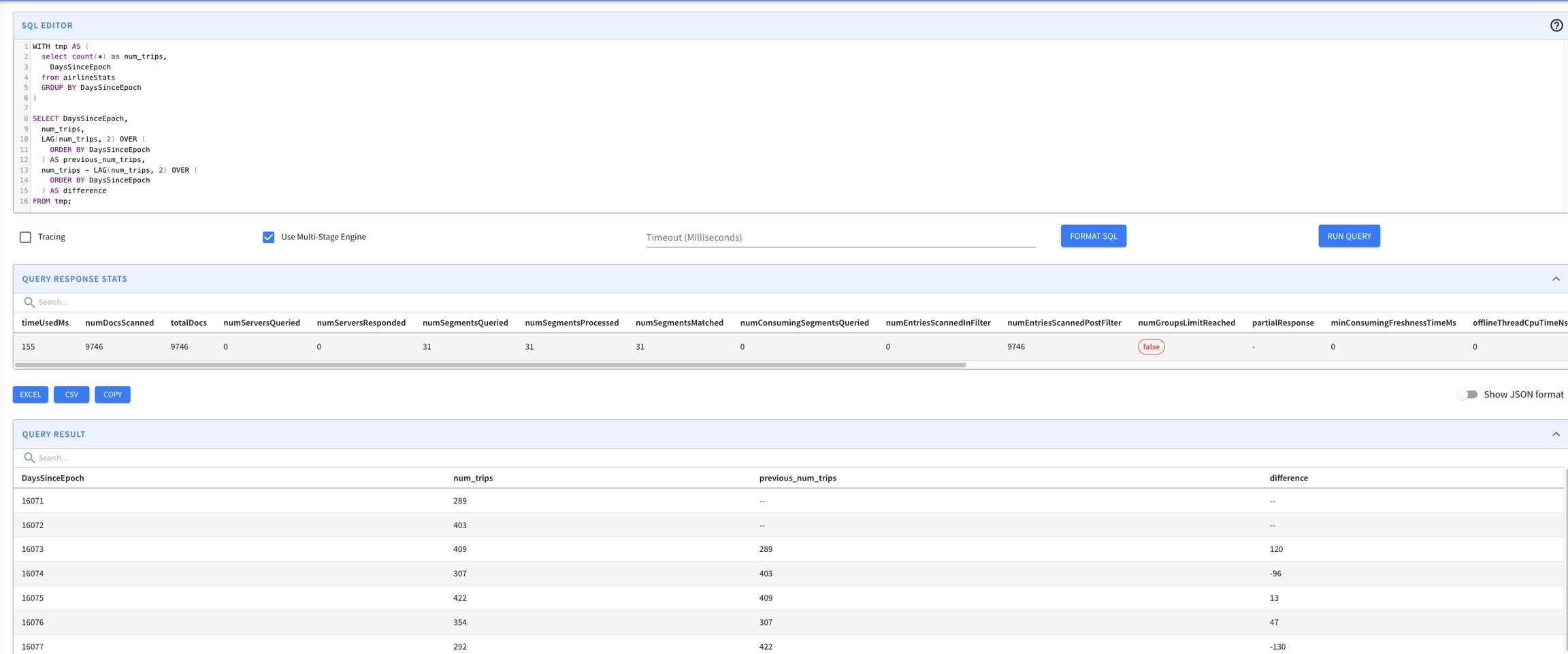
LAG
This section contains reference documentation for the LAG function.
Returns the value from a preceding row in the same result set, based on a specified physical offset. It can be used to compare values in the current row with values in a previous row.
Signature
Arguments
expression: The column or calculation from which the value is to be returned.
offset: The number of rows before the current row from which to retrieve the value. The default is 1 if not specified.
default: The value to return if the offset goes beyond the scope of the window. If not specified, NULL is returned.
Example
This example calculates the difference in sales between the current day and the previous day.
Retrieve the previous payment amount for comparison.
Identify trends by comparing current data with historical data.
Calculate the difference in sales between the current day and the previous day This example shows how to use the LAG function to find the sales difference between consecutive days.
Output:
sales_date
sales_amount
previous_day_sales
difference
Retrieve the previous payment amount for comparison This query retrieves the last payment amount for each payment to see if the amount is increasing or decreasing.
Output:
payment_date
amount
previous_amount
Identify trends by comparing current data with historical data Use the LAG function to compare the current month's data with the same month from the previous year to identify trends or significant changes.
Output:
month
year
data_value
previous_year_data
Use with CTE:
JSONPATHARRAYDEFAULTEMPTY
This section contains reference documentation for the JSONPATHARRAYDEFAULTEMPTY function.
Extracts an array from jsonField based on 'jsonPath', the result type is inferred based on JSON value. Returns empty array for null or parsing error. This function can only be used in an ingestion transformation function.
Signature
JSONPATHARRAYDEFAULTEMPTY(jsonField, 'jsonPath')
Arguments
Description
'jsonPath'` is a literal. Pinot uses single quotes to distinguish them from identifiers.
You can use the to test JSON expressions before you import any data.
Usage Examples
The usage examples are based on extracting fields from the following JSON document:
Expression
Value
This function can be used in the to extract the name, score, and second value of homework_grades into their respective columns , as described below:
JSONPATHARRAY
This section contains reference documentation for the JSONPATHARRAY function.
Extracts an array from jsonField based on 'jsonPath', the result type is inferred based on JSON value. This function can only be used in an ingestion transformation function.
Signature
JSONPATHARRAY(jsonField, 'jsonPath')
Arguments
Description
'jsonPath'` is a literal. Pinot uses single quotes to distinguish them from identifiers.
You can use the to test JSON expressions before you import any data.
Usage Examples
The usage examples are based on extracting fields from the following JSON document:
Expression
Value
This function can be used in the to extract the name, score, and second value of homework_grades into their respective columns , as described below:
DISTINCTCOUNTTHETASKETCH
This section contains reference documentation for the DISTINCTCOUNTTHETASKETCH function.
The framework enables set operations over a stream of data, and can also be used for cardinality estimation. Pinot leverages the and its extensions from the library org.apache.datasketches:datasketches-java:4.2.0 to perform distinct counting as well as evaluating set operations.
Signature
JSONPATHSTRING
This section contains reference documentation for the JSONPATHSTRING function.
Extracts the String value from jsonField based on 'jsonPath', use optional defaultValuefor null or parsing error. This function can only be used in an .
Signature
jsonextractscalar
This section contains reference documentation for the JSONEXTRACTSCALAR function.
Evaluates the 'jsonPath' on jsonField, returns the result as the type 'resultsType', use optional defaultValuefor null or parsing error.
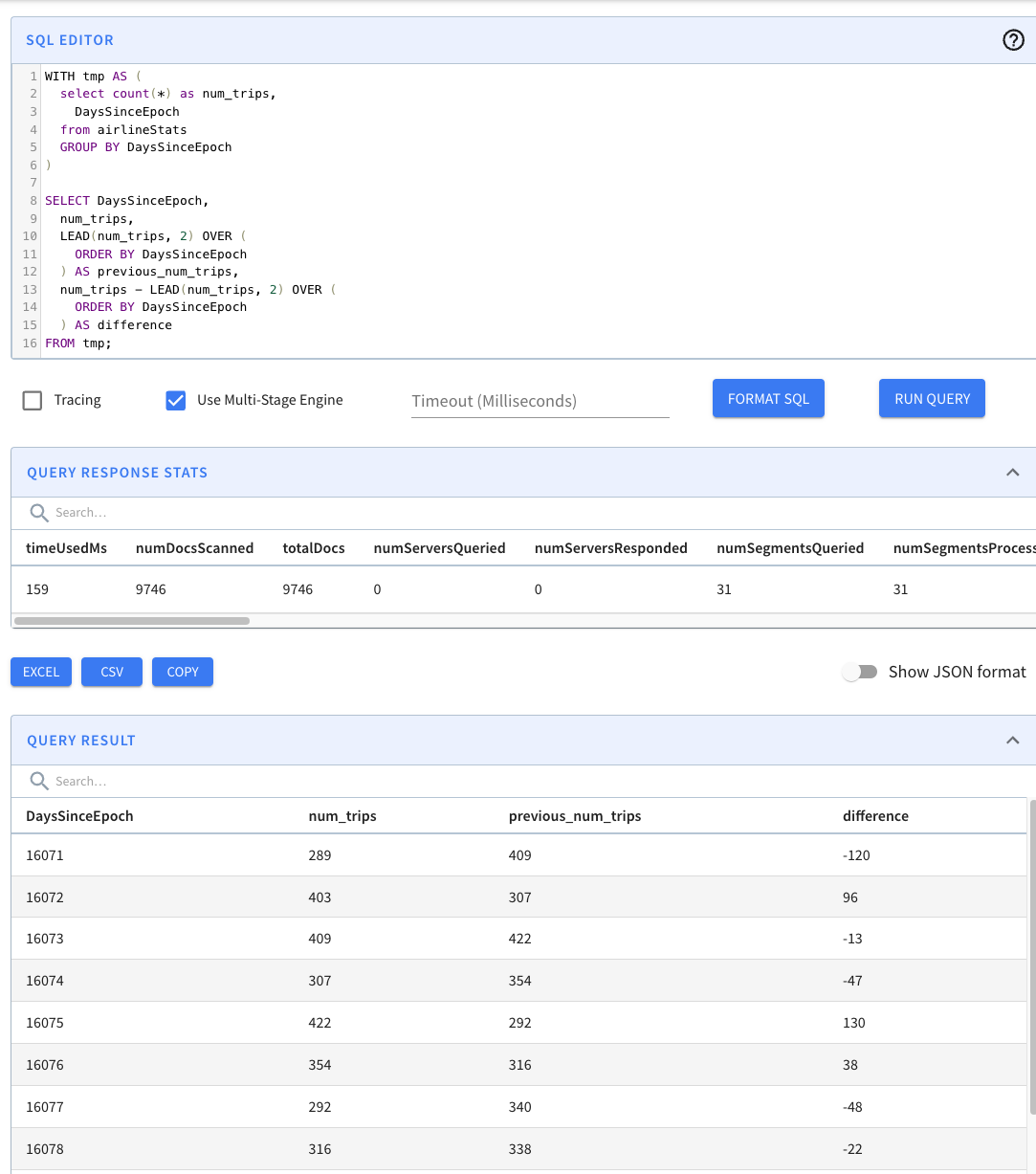
This section contains reference documentation for the LEAD function.
Returns the value from a following row in the same result set, based on a specified physical offset. It can be used to compare values in the current row with values in a subsequent row.
Signature
minute
This section contains reference documentation for the minute function.
Returns the minute of the hour from the given epoch millis in UTC or specified timezone. The value ranges from 0 to 59.
nominalEntries: The nominal entries used to create the sketch. (Default 4096)
samplingProbability: Sets the upfront uniform sampling probability, p. (Default 1.0)
accumulatorThreshold: How many sketches should be kept in memory before merging. (Default 2)
Currently, the only supported parameter is nominalEntries (defaults to 4096).
predicates (optional)_: _ These are individual predicates of form lhs <op> rhs which are applied on rows selected by the where clause. During intermediate sketch aggregation, sketches from the thetaSketchColumn that satisfies these predicates are unionized individually. For example, all filtered rows that match country=USA are unionized into a single sketch. Complex predicates that are created by combining (AND/OR) of individual predicates is supported.
postAggregationExpressionToEvaluate (required): The set operation to perform on the individual intermediate sketches for each of the predicates. Currently supported operations are SET_DIFF, SET_UNION, SET_INTERSECT , where DIFF requires two arguments and the UNION/INTERSECT allow more than two arguments.
thetaSketchColumn (required): Name of the column to aggregate on.
thetaSketchParams (required): Semicolon-separated parameter string for constructing the intermediate theta-sketches.
The supported parameters are:
nominalEntries: The nominal entries used to create the sketch. (Default 4096)
samplingProbability: Sets the upfront uniform sampling probability, p. (Default 1.0)
accumulatorThreshold: How many sketches should be kept in memory before merging. (Default 2)
predicates (optional)_: _ These are individual predicates of form lhs <op> rhs which are applied on rows selected by the where clause. During intermediate sketch aggregation, sketches from the thetaSketchColumn that satisfies these predicates are unionized individually. For example, all filtered rows that match country=USA are unionized into a single sketch. Complex predicates that are created by combining (AND/OR) of individual predicates is supported.
postAggregationExpressionToEvaluate (required): The set operation to perform on the individual intermediate sketches for each of the predicates. Currently supported operations are SET_DIFF, SET_UNION, SET_INTERSECT , where DIFF requires two arguments and the UNION/INTERSECT allow more than two arguments.
We can also provide predicates and a post aggregation expression to compute more complicated cardinalities. For example, we could can find the intersection of the following queries:
select distinctCountRawThetaSketch(teamID) AS value
from baseballStats
select distinctCountRawThetaSketch(teamID, 'nominalEntries=10') AS value
from baseballStats
select distinctCountRawThetaSketch(
yearID,
'nominalEntries=4096',
'teamID = ''SFN'' AND numberOfGames=28 AND homeRuns=1',
'teamID = ''CHN'' AND numberOfGames=28 AND homeRuns=1',
'SET_INTERSECT($1, $2)'
) AS value
from baseballStats
select distinctCountThetaSketch(teamID) AS value
from baseballStats
select distinctCountThetaSketch(teamID, 'nominalEntries=10') AS value
from baseballStats
select yearID
from baseballStats
where teamID = 'SFN' AND numberOfGames = 28 AND homeRuns = 1
select yearID
from baseballStats
where teamID = 'CHN' AND numberOfGames = 28 AND homeRuns = 1
select distinctCountThetaSketch(
yearID,
'nominalEntries=4096',
'teamID = ''SFN'' AND numberOfGames=28 AND homeRuns=1',
'teamID = ''CHN'' AND numberOfGames=28 AND homeRuns=1',
'SET_INTERSECT($1, $2)'
) AS value
from baseballStats
'jsonPath'` is a literal. Pinot uses single quotes to distinguish them from identifiers.
You can use the JSONPath Online Evaluator to test JSON expressions before you import any data.
Usage Examples
The usage examples are based on extracting fields from the following JSON document:
Expression
Value
JSONPATHSTRING(data, '$.age')
"24"
JSONPATHSTRING(data, '$.name["nick.name"]')
"Pete"
This function can be used in the table config to extract the age property into the age column, as described below:
The following examples show how to use the JSONEXTRACTSCALAR function:
id
name
7044874109
LimeVista/Tapes
id
name
7044874109
dummyValue
Arguments
expression: The column or calculation from which the value is to be returned.
offset: The number of rows before the current row from which to retrieve the value. The default is 1 if not specified.
default: The value to return if the offset goes beyond the scope of the window. If not specified, NULL is returned.
Example
Forecast next day's sales based on current data.
Anticipate the next payment amount for budget planning.
Identify potential increases in expenses or revenue.
Forecast next day's sales based on current data This example shows how to use the LEAD function to anticipate sales for the next day.
Output:
sales_date
sales_amount
next_day_sales
2023-02-14
200
180
2023-02-15
180
220
2023-02-16
220
NULL
Anticipate the next payment amount for budget planning This query retrieves the next payment amount for each transaction to assist in financial forecasting and budgeting.
Output:
transaction_id
payment_date
amount
next_payment_amount
416
2023-02-14 21:21:59.996577
2.99
4.99
516
2023-02-14 21:23:39.996577
4.99
4.99
239
2023-02-14 21:29:00.996577
4.99
Identify potential increases in expenses or revenue Utilize the LEAD function to examine monthly data and predict potential increases or trends in expenses or revenue for future planning.
select id, jsonextractscalar(repo, '$.foo', 'STRING', 'dummyValue') AS name
from githubEvents
WHERE id = 7044874109
LEAD(any expression [, bigint offset [, any default]])
SELECT
sales_date,
sales_amount,
LEAD(sales_amount, 1) OVER (ORDER BY sales_date) AS next_day_sales
FROM
daily_sales;
SELECT
transaction_id,
payment_date,
amount,
LEAD(amount, 1) OVER (ORDER BY payment_date) AS next_payment_amount
FROM
payments;
SELECT
month,
year,
expenses,
LEAD(expenses, 1) OVER (ORDER BY year, month) AS next_month_expenses
FROM
financials;
WITH tmp AS (
select count(*) as num_trips,
DaysSinceEpoch
from airlineStats
GROUP BY DaysSinceEpoch
)
SELECT DaysSinceEpoch,
num_trips,
LEAD(num_trips, 2) OVER (
ORDER BY DaysSinceEpoch
) AS previous_num_trips,
num_trips - LEAD(num_trips, 2) OVER (
ORDER BY DaysSinceEpoch
) AS difference
FROM tmp;
SELECT
sales_date,
sales_amount,
LAG(sales_amount, 1) OVER (ORDER BY sales_date) AS previous_day_sales,
sales_amount - LAG(sales_amount, 1) OVER (ORDER BY sales_date) AS difference
FROM
daily_sales;
SELECT
payment_date,
amount,
LAG(amount, 1) OVER (ORDER BY payment_date) AS previous_amount
FROM
payment;
SELECT
month,
year,
data_value,
LAG(data_value, 12) OVER (ORDER BY year, month) AS previous_year_data
FROM
monthly_data;
WITH tmp AS (
select count(*) as num_trips,
DaysSinceEpoch
from airlineStats
GROUP BY DaysSinceEpoch
)
SELECT DaysSinceEpoch,
num_trips,
LAG(num_trips, 2) OVER (
ORDER BY DaysSinceEpoch
) AS previous_num_trips,
num_trips - LAG(num_trips, 2) OVER (
ORDER BY DaysSinceEpoch
) AS difference
FROM tmp;
inputFormat and outputFormat are defined using the following structure:
<time size>:<time unit>:<time format>:<pattern>
where:
time size - size of the time unit eg: 1, 10
time unit - DAYS, HOURS, MINUTES, SECONDS, MILLISECONDS
granularity is specified in the format <time size>:<time unit>.
Usage Examples
These examples are based on the .
created_at_timestamp from milliseconds since epoch to days since epoch, bucketed to 1 day granularity:
id
created_at_timestamp
timeInMs
convertedTime
created_at_timestamp bucketed to 15 minutes granularity:
id
created_at_timestamp
timeInMs
convertedTime
created_at_timestamp to format yyyy-MM-dd, bucketed to 1 days granularity:
id
created_at_timestamp
timeInMs
convertedTime
created_at_timestamp to format yyyy-MM-dd HH:mm, in timezone Pacific/Kiritimati:
id
created_at_timestamp
timeInMs
convertedTime
created_at_timestamp to format yyyy-MM-dd, in timezone Pacific/Kiritimati and bucketed to 1 day granularity:
id
created_at_timestamp
timeInMs
convertedTime
,
MICROSECONDS
,
NANOSECONDS
time format
EPOCH
SIMPLE_DATE_FORMAT pattern - defined in case of SIMPLE_DATE_FORMAT e.g. yyyy-MM-dd. A specific timezone can be passed using tz(timezone). Timezone can be long or short string format timezone. e.g. Asia/Kolkata or PDT
select id,
created_at_timestamp,
cast(created_at_timestamp AS long) AS timeInMs,
DATETIMECONVERT(
created_at_timestamp,
'1:MILLISECONDS:EPOCH',
'1:DAYS:EPOCH',
'1:DAYS'
) AS convertedTime
from githubEvents
WHERE id = 7044874134
select id,
created_at_timestamp,
cast(created_at_timestamp AS long) AS timeInMs,
DATETIMECONVERT(
created_at_timestamp,
'1:MILLISECONDS:EPOCH',
'1:MILLISECONDS:EPOCH',
'15:MINUTES'
) AS convertedTime
from githubEvents
WHERE id = 7044874134
select id,
created_at_timestamp,
cast(created_at_timestamp AS long) AS timeInMs,
DATETIMECONVERT(
created_at_timestamp,
'1:MILLISECONDS:EPOCH',
'1:DAYS:SIMPLE_DATE_FORMAT:yyyy-MM-dd',
'1:DAYS'
) AS convertedTime
from githubEvents
WHERE id = 7044874134
select id,
created_at_timestamp,
cast(created_at_timestamp AS long) AS timeInMs,
DATETIMECONVERT(
created_at_timestamp,
'1:MILLISECONDS:EPOCH',
'1:MILLISECONDS:SIMPLE_DATE_FORMAT:yyyy-MM-dd HH:mm tz(Pacific/Kiritimati)',
'1:MILLISECONDS'
) AS convertedTime
from githubEvents
WHERE id = 7044874134
select id,
created_at_timestamp,
cast(created_at_timestamp AS long) AS timeInMs,
DATETIMECONVERT(
created_at_timestamp,
'1:MILLISECONDS:EPOCH',
'1:MILLISECONDS:SIMPLE_DATE_FORMAT:yyyy-MM-dd HH:mm tz(Pacific/Kiritimati)',
'1:DAYS'
) AS convertedTime
from githubEvents
WHERE id = 7044874134
FUNNELCOUNT
This section contains reference documentation for the FUNNELCOUNT function.
Funnel analytics aggregation function.
Returns array of distinct correlated counts for each funnel step.
Signature
FUNNEL_COUNT (
STEPS ( predicate1, predicate2 ... ),
CORRELATE_BY ( correlation_column ),
SETTINGS ( setting1, setting2 ... ) )
Parameter
Arguments
Description
STEPS
predicates 1...n
(required) These are individual predicates representing funnel steps which are applied on rows selected by the where clause. Distinct values from the correlation_column that satisfy these predicates are counted per step. For example, all filtered rows that match url = '/checkout' are unionized into a set. Sets are intersected with the sets resulted from the preceding steps, each step retaining only individuals present in previous steps. Finally, unique counts are returned for each step in the funnel.
CORRELATE_BY
correlation_column
(required) Column to leverage for funnel correlation, distinct values from this column are counted per step during aggregation. Only dictionary-encoded columns are supported.
SETTINGS
settings 1...n
(optional) Settings to select and configure a funnel counting strategy:
bitmap (default): This strategy is accurate for INT column, but approximate for other cases where hash codes are used in distinct counting and there may be hash collisions. For accurate distinct counting on all column types, use 'set' instead. See also .
set: This strategy uses hash sets. Use with care, unbounded memory cost. See also .
theta_sketch: This strategy leverages framework to provide an approximate funnel count with a small memory footprint. See also .
nominalEntries
Usage Examples
Many datasets are time series in nature, tracking events of an entity over time. An example of such a dataset could be a user analytics activity log from a commerce web application.
Example
user_id
event_time
url
U1
2021-10-01 09:01:00.000
/product/listing
U2
2021-10-01 09:17:00.000
/product/search
U1
2021-10-01 09:33:00.000
/product/details
U1
2021-10-01 09:47:00.000
Funnel
We want to analyse the following checkout funnel:
/cart/add
/checkout/start
/checkout/confirmation
Counts
We want to answer the following questions about the above funnel:
How many users entered the top of the funnel?
How many of these users proceeded to the second step?
How many users reached the bottom of the funnel after completing all steps?
Query
counts
3, 2, 2
Notes
Notice that although U1 user added to cart twice, it still counted as one conversion in the first step, as we report on unique counts rather than total events. Also notice that although U2 events were logged out of order, we still counted the user as converted.
Equivalence
The above query is equivalent to the below presto SQL query:
Settings
For a large dataset we could use for example a theta_sketch strategy, or furthermore, partition the data by user_id and leverage a partitioned strategy. It is also important to filter in the where clause so to aggregate only necessary rows.
counts
3, 2, 2
Another Example
We now want to learn how many users checkout after a text search; as opposed to other entry points such as browsing a product category listing. We want to then analyse the following funnel:
/product/search
/cart/add
/checkout/start
/checkout/confirmation
Query
counts
2, 2, 1, 1
Notes
Notice that U1 is not counted in this funnel, as the user did not perform any product search. Both U2 and U3 entered the top of the funnel and performed the second step, but only U2 converted to the bottom of the funnel.
FunnelMatchStep
The FunnelMatchStep function in Pinot is designed to track user progress through a predefined series of steps or stages in a funnel, such as user interactions on a website from page views to purchases. This function is particularly useful for analyzing how far users progress through a conversion process within a specified time window.
Syntax
Return
This function is similar to the function FunnelMaxStep, instead of returning the number of max step, it returns an array of the size 'number of steps', and marked the matched steps as 1, non-matching as 0.
E.g.
Arguments
timestampExpression:
Type: Expression in TIMESTAMP or LONG
Optional Mode Supported
STRICT_DEDUPLICATION
The STRICT_DEDUPLICATION mode ensures that repeating occurrences of the same event condition within a funnel sequence disrupt further processing of the funnel for that user session. This mode is crucial when it's important to identify and measure unique, non-repeated actions in a sequence, ensuring each step of the funnel represents a distinct action.
Practical Impact
Event Sequence Interruption: When an event that satisfies a current step condition occurs repeatedly without progression to the next step, strict_deduplication interrupts and essentially ends the analysis of the funnel for that sequence. This prevents the funnel from incorrectly advancing if the same action is merely repeated instead of moving through the intended steps.
Enhanced Accuracy in Funnel Progression: This mode is useful for scenarios where the continuity and progression of distinct steps are critical for accurate conversion analysis. It avoids the misinterpretation of user engagement where repeated similar actions might otherwise suggest a false progression through the funnel.
Example
For instance, if a funnel is designed to track user progression from a homepage visit, to a search, to adding an item to a cart, and then to checkout, the strict_deduplication mode would stop processing the funnel sequence if the user performs multiple searches without proceeding to add an item to the cart. This ensures that only a linear, non-repetitive progression through these steps is considered as valid funnel movement.
This mode helps maintain the integrity of each step in the user's journey, ensuring that the data reflects true user behavior without overcounting repetitive actions that do not lead to actual progression.
STRICT_ORDER
The strict_order mode enforces a stringent sequence order for events within a funnel. This mode ensures that the progression through the steps follows the exact specified order without any intervening events that are not part of the defined sequence.
Behavior of strict_order
Sequence Adherence: The strict_order mode requires that the events occur in the exact order specified without any other types of events intervening. If an event occurs that is not the next expected step in the defined sequence, the analysis of the funnel for that user session is halted.
Early Termination: In the presence of an out-of-sequence event, the analysis stops, and the maximum event level is determined as the last correct step in the sequence before the interruption. For instance, in a specified sequence of A -> B -> C, if the sequence is A -> B -> D, then the funnel analysis terminates after B because D is not the expected next step (C).
Practical Impact
Enhanced Precision in Path Analysis: This mode is particularly valuable when the precise order of actions is critical for the analysis, such as in strict process flows where each step must be followed in a specific order to be considered successful.
Avoids Misinterpretation: It prevents the misinterpretation of funnel progress where intervening or unordered events could suggest a misleading path through the funnel.
Example
Consider a scenario where a funnel is set up to track user progression through the following steps: logging in (A), searching for products (B), adding a product to the cart (C), and completing a purchase (D). Using the strict_order mode, if the sequence goes A -> B -> E -> C, the analysis will terminate after B because E (an unexpected event like viewing account details) intervenes before C, the expected next step. Therefore, the maximum step reached is reported as 2, representing the successful completion of steps A and B only.
This mode is crucial for scenarios requiring strict compliance to process steps, ensuring that only users who follow the exact intended sequence are counted in the funnel analysis.
STRICT_INCREASE
The strict_increase is designed to ensure that the sequence of events being analyzed has strictly increasing timestamps. This mode is crucial for accurately tracking and analyzing user behavior in scenarios where the chronological order of events directly impacts the interpretation of user actions within a funnel.
Behavior of strict_increase
Timestamp Order: This mode requires that each subsequent event in the funnel must have a timestamp greater than the previous event. It ensures that the user's actions are not only in the correct sequence but also follow a temporal progression without any backtracking or simultaneous actions.
Analysis Integrity: If any event in the sequence does not adhere to the strictly increasing order by timestamp, the analysis for that sequence either stops at that point or ignores the out-of-order event, depending on how critical the temporal sequence is to the funnel's logic.
Practical Impact
Temporal Validation: This mode is particularly useful in scenarios where the timing of events is crucial, such as in sessions where actions must follow one another in real-time to be considered valid. It validates the sequence not just by the type of event, but also by ensuring that these events are progressively happening over time.
Avoiding Data Errors: It helps in avoiding potential data errors or anomalies where timestamps might not have been recorded correctly, or events may appear out of order due to system errors or delays in logging events.
Example
Consider a funnel designed to analyze a user's journey from visiting a website to making a purchase, defined by the following steps: page visit (A), item addition (B), checkout initiation (C), and payment completion (D). Using the strict_increase mode, the funnel will only consider sequences where each action occurs later than the previous. If a user's sequence is A (t1) -> B (t2) -> A (t3) -> C (t4) with t3 being less than or equal to t2, then the analysis will ignore the second occurrence of A or terminate, depending on the specific implementation and requirements of the analysis.
This mode helps ensure that the funnel analysis reflects true, linear progress through the intended actions, with each step occurring in a timely, sequential manner.
KEEP_ALL
The KEEP_ALL mode is designed to ensure that all events in the data set are considered in the analysis, even if they do not match any of the specified step conditions in the funnel sequence. This mode is particularly useful for comprehensive data analysis where the context of non-matching events may still provide valuable insights about user behavior or system performance.
Behavior of KEEP_ALL
Inclusive Analysis: In the KEEP_ALL mode, the funnel function includes every event within the specified time window in the analysis, regardless of whether these events correspond to the predefined steps in the funnel. This allows for a more holistic view of the user's actions during the session.
Context Retention: By including all events, this mode helps retain the full context of a user's session, capturing activities that may not be directly related to the funnel but could influence or explain the user's behavior and decisions at other points.
Practical Impact
Enhanced Insight: This mode is invaluable for scenarios where understanding the entirety of user interactions is crucial, such as in complex user journeys where additional actions between the main funnel steps might influence the outcomes or indicate other patterns of interest.
Data Completeness: It prevents data loss from filtering out non-matching events, which can be important when analyzing sessions for comprehensive patterns, troubleshooting issues, or performing detailed user journey analysis.
Example
Consider a scenario where a funnel is set up to track user progress through steps like logging in, searching for a product, and making a purchase. With KEEP_ALL mode enabled, if a user performs additional actions such as updating profile information or viewing terms and conditions, these events are also included in the analysis. This comprehensive inclusion allows analysts to see a fuller picture of what the user did during their session, not just the actions that directly relate to the funnel. This can reveal if other activities are detracting from the main conversion goals, or if they are part of a broader user engagement that doesn't neatly fit into the primary funnel steps.
This mode helps to ensure that no potential insights are lost by excluding events, making it a powerful option for detailed analysis and understanding of user interactions beyond the strict confines of the predefined funnel steps.
Examples
Data Set
event_name
ts
user_id
Queries
Query funnels
Response
Query with funnel count analysis
The below query puts the above query in the CTE, then use sumArrayLong to show the funnel transitions for each steps.
Response
funnelCounts
select
ARRAY[
count_if(steps[1]),
count_if(steps[1] and steps[2]),
count_if(steps[1] and steps[2] and steps[3])
] as counts
from (
select
ARRAY[
bool_or(url = '/cart/add'),
bool_or(url = '/checkout/start'),
bool_or(url = '/checkout/confirmation')
] as steps
from user_log
group by user_id
)
select
FUNNEL_COUNT(
STEPS(
url = '/cart/add',
url = '/checkout/start',
url = '/checkout/confirmation'),
CORRELATE_BY(user_id)
) AS counts
from user_log
select
FUNNEL_COUNT(
STEPS(
url = '/cart/add',
url = '/checkout/start',
url = '/checkout/confirmation'),
CORRELATE_BY(user_id),
SETTINGS('theta_sketch', 'nominalEntries=4096')
) AS counts
from user_log
where url in ('/cart/add', '/checkout/start', '/checkout/confirmation')
: theta-sketch strategy parameter (defaults to 4096). Can only be used in conjunction with
theta_sketch
setting.
partitioned: This strategy counts funnel steps per segment, then sums up step counts across segments. Correlation column should be configured as partition column for this strategy. See also SEGMENTPARTITIONEDDISTINCTCOUNT.
sorted: This strategy counts funnel steps per segment with zero memory footprint. Correlation column should be configured as sort column for this strategy. Can only be used in conjunction with partitioned setting.
Description: This is an expression that evaluates to the timestamp of each event. It's used to determine the order of events for a particular user or session. The timestamp is crucial for evaluating whether subsequent actions fall within the specified window.
windowSize:
Type: LONG
Description: Specifies the size of the time window in which the sequence of funnel steps must occur. The window is defined in milliseconds. This parameter sets the maximum allowed time between the first and the last step in the funnel for them to be considered as part of the same user journey.
numberSteps:
Type: Integer
Description: Defines the total number of distinct steps in the funnel. This count should match the number of stepExpression parameters provided.
stepExpression:
Type: Boolean Expression
Description: These are expressions that define each step in the funnel. Typically, these are conditions that evaluate whether a specific event type or action has occurred. Multiple step expressions are separated by commas, with each expression corresponding to a step in the funnel sequence.
mode (optional):
Type: String
Description: Defines additional modes or options that alter how the funnel analysis is calculated. Common modes might include settings to handle overlapping events, reset the window upon each step, or other custom behaviors specific to the needs of the funnel analysis. If unspecified, the default behavior as defined by Pinot is used.
SELECT user_id,
funnelMatchStep(
ts,
'1000000',
4,
event_name = 'screen_viewed',
event_name = 'screen_clicked',
event_name = 'cart_viewed',
event_name = 'purchased'
) as matchedsteps
FROM clickstreamFunnel
GROUP BY user_id
ORDER BY user_id
WITH funnelMatchSteps AS (
SELECT user_id,
funnelMatchStep(
ts,
'1000000',
4,
event_name = 'screen_viewed',
event_name = 'screen_clicked',
event_name = 'cart_viewed',
event_name = 'purchased'
) as matchedsteps
FROM clickstreamFunnel
GROUP BY user_id
)
SELECT sumArrayLong(matchedsteps) as funnelCounts FROM funnelMatchSteps
FunnelMaxStep
The FunnelMaxStep function in Pinot is designed to track user progress through a predefined series of steps or stages in a funnel, such as user interactions on a website from page views to purchases. This function is particularly useful for analyzing how far users progress through a conversion process within a specified time window.
Syntax
Return
This function returns the Integer value of the max steps that window funnel could proceed forward.
Arguments
timestampExpression:
Type: Expression in TIMESTAMP or LONG
Optional Mode Supported
STRICT_DEDUPLICATION
The STRICT_DEDUPLICATION mode ensures that repeating occurrences of the same event condition within a funnel sequence disrupt further processing of the funnel for that user session. This mode is crucial when it's important to identify and measure unique, non-repeated actions in a sequence, ensuring each step of the funnel represents a distinct action.
Practical Impact
Event Sequence Interruption: When an event that satisfies a current step condition occurs repeatedly without progression to the next step, strict_deduplication interrupts and essentially ends the analysis of the funnel for that sequence. This prevents the funnel from incorrectly advancing if the same action is merely repeated instead of moving through the intended steps.
Enhanced Accuracy in Funnel Progression: This mode is useful for scenarios where the continuity and progression of distinct steps are critical for accurate conversion analysis. It avoids the misinterpretation of user engagement where repeated similar actions might otherwise suggest a false progression through the funnel.
Example
For instance, if a funnel is designed to track user progression from a homepage visit, to a search, to adding an item to a cart, and then to checkout, the strict_deduplication mode would stop processing the funnel sequence if the user performs multiple searches without proceeding to add an item to the cart. This ensures that only a linear, non-repetitive progression through these steps is considered as valid funnel movement.
This mode helps maintain the integrity of each step in the user's journey, ensuring that the data reflects true user behavior without overcounting repetitive actions that do not lead to actual progression.
STRICT_ORDER
The strict_order mode enforces a stringent sequence order for events within a funnel. This mode ensures that the progression through the steps follows the exact specified order without any intervening events that are not part of the defined sequence.
Behavior of strict_order
Sequence Adherence: The strict_order mode requires that the events occur in the exact order specified without any other types of events intervening. If an event occurs that is not the next expected step in the defined sequence, the analysis of the funnel for that user session is halted.
Early Termination: In the presence of an out-of-sequence event, the analysis stops, and the maximum event level is determined as the last correct step in the sequence before the interruption. For instance, in a specified sequence of A -> B -> C, if the sequence is A -> B -> D, then the funnel analysis terminates after B because D is not the expected next step (C).
Practical Impact
Enhanced Precision in Path Analysis: This mode is particularly valuable when the precise order of actions is critical for the analysis, such as in strict process flows where each step must be followed in a specific order to be considered successful.
Avoids Misinterpretation: It prevents the misinterpretation of funnel progress where intervening or unordered events could suggest a misleading path through the funnel.
Example
Consider a scenario where a funnel is set up to track user progression through the following steps: logging in (A), searching for products (B), adding a product to the cart (C), and completing a purchase (D). Using the strict_order mode, if the sequence goes A -> B -> E -> C, the analysis will terminate after B because E (an unexpected event like viewing account details) intervenes before C, the expected next step. Therefore, the maximum step reached is reported as 2, representing the successful completion of steps A and B only.
This mode is crucial for scenarios requiring strict compliance to process steps, ensuring that only users who follow the exact intended sequence are counted in the funnel analysis.
STRICT_INCREASE
The strict_increase is designed to ensure that the sequence of events being analyzed has strictly increasing timestamps. This mode is crucial for accurately tracking and analyzing user behavior in scenarios where the chronological order of events directly impacts the interpretation of user actions within a funnel.
Behavior of strict_increase
Timestamp Order: This mode requires that each subsequent event in the funnel must have a timestamp greater than the previous event. It ensures that the user's actions are not only in the correct sequence but also follow a temporal progression without any backtracking or simultaneous actions.
Analysis Integrity: If any event in the sequence does not adhere to the strictly increasing order by timestamp, the analysis for that sequence either stops at that point or ignores the out-of-order event, depending on how critical the temporal sequence is to the funnel's logic.
Practical Impact
Temporal Validation: This mode is particularly useful in scenarios where the timing of events is crucial, such as in sessions where actions must follow one another in real-time to be considered valid. It validates the sequence not just by the type of event, but also by ensuring that these events are progressively happening over time.
Avoiding Data Errors: It helps in avoiding potential data errors or anomalies where timestamps might not have been recorded correctly, or events may appear out of order due to system errors or delays in logging events.
Example
Consider a funnel designed to analyze a user's journey from visiting a website to making a purchase, defined by the following steps: page visit (A), item addition (B), checkout initiation (C), and payment completion (D). Using the strict_increase mode, the funnel will only consider sequences where each action occurs later than the previous. If a user's sequence is A (t1) -> B (t2) -> A (t3) -> C (t4) with t3 being less than or equal to t2, then the analysis will ignore the second occurrence of A or terminate, depending on the specific implementation and requirements of the analysis.
This mode helps ensure that the funnel analysis reflects true, linear progress through the intended actions, with each step occurring in a timely, sequential manner.
KEEP_ALL
The KEEP_ALL mode is designed to ensure that all events in the data set are considered in the analysis, even if they do not match any of the specified step conditions in the funnel sequence. This mode is particularly useful for comprehensive data analysis where the context of non-matching events may still provide valuable insights about user behavior or system performance.
Behavior of KEEP_ALL
Inclusive Analysis: In the KEEP_ALL mode, the funnel function includes every event within the specified time window in the analysis, regardless of whether these events correspond to the predefined steps in the funnel. This allows for a more holistic view of the user's actions during the session.
Context Retention: By including all events, this mode helps retain the full context of a user's session, capturing activities that may not be directly related to the funnel but could influence or explain the user's behavior and decisions at other points.
Practical Impact
Enhanced Insight: This mode is invaluable for scenarios where understanding the entirety of user interactions is crucial, such as in complex user journeys where additional actions between the main funnel steps might influence the outcomes or indicate other patterns of interest.
Data Completeness: It prevents data loss from filtering out non-matching events, which can be important when analyzing sessions for comprehensive patterns, troubleshooting issues, or performing detailed user journey analysis.
Example
Consider a scenario where a funnel is set up to track user progress through steps like logging in, searching for a product, and making a purchase. With KEEP_ALL mode enabled, if a user performs additional actions such as updating profile information or viewing terms and conditions, these events are also included in the analysis. This comprehensive inclusion allows analysts to see a fuller picture of what the user did during their session, not just the actions that directly relate to the funnel. This can reveal if other activities are detracting from the main conversion goals, or if they are part of a broader user engagement that doesn't neatly fit into the primary funnel steps.
This mode helps to ensure that no potential insights are lost by excluding events, making it a powerful option for detailed analysis and understanding of user interactions beyond the strict confines of the predefined funnel steps.
Examples
Data Set
event_name
ts
user_id
Queries
Query funnels
Response
Query with strict_order
Response
Query with strict_order and keep_all
Response
Query with longer window
Response
FunnelCompleteCount
The FunnelCompleteCount function in Pinot is designed to track user progress through a predefined series of steps or stages in a funnel, such as user interactions on a website from page views to purchases. This function is particularly useful for analyzing how many times users progress through the whole conversion processes within a specified time window.
Description: This is an expression that evaluates to the timestamp of each event. It's used to determine the order of events for a particular user or session. The timestamp is crucial for evaluating whether subsequent actions fall within the specified window.
windowSize:
Type: LONG
Description: Specifies the size of the time window in which the sequence of funnel steps must occur. The window is defined in milliseconds. This parameter sets the maximum allowed time between the first and the last step in the funnel for them to be considered as part of the same user journey.
numberSteps:
Type: Integer
Description: Defines the total number of distinct steps in the funnel. This count should match the number of stepExpression parameters provided.
stepExpression:
Type: Boolean Expression
Description: These are expressions that define each step in the funnel. Typically, these are conditions that evaluate whether a specific event type or action has occurred. Multiple step expressions are separated by commas, with each expression corresponding to a step in the funnel sequence.
mode (optional):
Type: String
Description: Defines additional modes or options that alter how the funnel analysis is calculated. Common modes might include settings to handle overlapping events, reset the window upon each step, or other custom behaviors specific to the needs of the funnel analysis. If unspecified, the default behavior as defined by Pinot is used.
screen_clicked
1718112406
1
purchased
1718112407
1
screen_viewed
1718112405
2
screen_clicked
1718112406
2
purchased
1718112407
2
screen_viewed
1718112404
3
screen_clicked
1718112405
3
cart_viewed
1718112406
3
purchased
1718112407
3
screen_viewed
1717939609
4
screen_clicked
1718112405
4
purchased
1718112405
4
screen_viewed
1718112402
1
screen_clicked
1718112403
1
purchased
1718112404
1
screen_viewed
1718112405
1
user_id
steps
1
2
2
2
3
4
4
2
user_id
steps
1
3
2
3
3
3
4
1
user_id
steps
1
3
2
3
3
2
4
1
user_id
steps
1
3
2
3
3
3
4
3
SELECT user_id,
funnelMaxStep(
ts,
'1000000',
4,
event_name = 'screen_viewed',
event_name = 'screen_clicked',
event_name = 'cart_viewed',
event_name = 'purchased'
) as steps
FROM clickstreamFunnel
GROUP BY user_id
ORDER BY user_id
SELECT user_id,
funnelMaxStep(
ts,
'100000',
3,
event_name = 'screen_viewed',
event_name = 'screen_clicked',
event_name = 'purchased',
'strict_order'
) as steps
FROM clickstreamFunnel
GROUP BY user_id
ORDER BY user_id
SELECT user_id,
funnelMaxStep(
ts,
'100000',
3,
event_name = 'screen_viewed',
event_name = 'screen_clicked',
event_name = 'purchased',
'strict_order',
'keep_all'
) as steps
FROM clickstreamFunnel
GROUP BY user_id
ORDER BY user_id
SELECT user_id,
funnelMaxStep(
ts,
'1000000',
3,
event_name = 'screen_viewed',
event_name = 'screen_clicked',
event_name = 'purchased',
'strict_order'
) as steps
FROM clickstreamFunnel
GROUP BY user_id
ORDER BY user_id
Return
This function returns how many times the funnel has been went through.
Arguments
timestampExpression:
Type: Expression in TIMESTAMP or LONG
Description: This is an expression that evaluates to the timestamp of each event. It's used to determine the order of events for a particular user or session. The timestamp is crucial for evaluating whether subsequent actions fall within the specified window.
windowSize:
Type: LONG
Description: Specifies the size of the time window in which the sequence of funnel steps must occur. The window is defined in milliseconds. This parameter sets the maximum allowed time between the first and the last step in the funnel for them to be considered as part of the same user journey.
numberSteps:
Type: Integer
Description: Defines the total number of distinct steps in the funnel. This count should match the number of stepExpression
stepExpression:
Type: Boolean Expression
Description: These are expressions that define each step in the funnel. Typically, these are conditions that evaluate whether a specific event type or action has occurred. Multiple step expressions are separated by commas, with each expression corresponding to a step in the funnel sequence.
mode (optional):
Type: String
Description: Defines additional modes or options that alter how the funnel analysis is calculated. Common modes might include settings to handle overlapping events, reset the window upon each step, or other custom behaviors specific to the needs of the funnel analysis. If unspecified, the default behavior as defined by Pinot is used.
Optional Mode Supported
STRICT_DEDUPLICATION
The STRICT_DEDUPLICATION mode ensures that repeating occurrences of the same event condition within a funnel sequence disrupt further processing of the funnel for that user session. This mode is crucial when it's important to identify and measure unique, non-repeated actions in a sequence, ensuring each step of the funnel represents a distinct action.
Practical Impact
Event Sequence Interruption: When an event that satisfies a current step condition occurs repeatedly without progression to the next step, strict_deduplication interrupts and essentially ends the analysis of the funnel for that sequence. This prevents the funnel from incorrectly advancing if the same action is merely repeated instead of moving through the intended steps.
Enhanced Accuracy in Funnel Progression: This mode is useful for scenarios where the continuity and progression of distinct steps are critical for accurate conversion analysis. It avoids the misinterpretation of user engagement where repeated similar actions might otherwise suggest a false progression through the funnel.
Example
For instance, if a funnel is designed to track user progression from a homepage visit, to a search, to adding an item to a cart, and then to checkout, the strict_deduplication mode would stop processing the funnel sequence if the user performs multiple searches without proceeding to add an item to the cart. This ensures that only a linear, non-repetitive progression through these steps is considered as valid funnel movement.
This mode helps maintain the integrity of each step in the user's journey, ensuring that the data reflects true user behavior without overcounting repetitive actions that do not lead to actual progression.
STRICT_ORDER
The strict_order mode enforces a stringent sequence order for events within a funnel. This mode ensures that the progression through the steps follows the exact specified order without any intervening events that are not part of the defined sequence.
Behavior of strict_order
Sequence Adherence: The strict_order mode requires that the events occur in the exact order specified without any other types of events intervening. If an event occurs that is not the next expected step in the defined sequence, the analysis of the funnel for that user session is halted.
Early Termination: In the presence of an out-of-sequence event, the analysis stops, and the maximum event level is determined as the last correct step in the sequence before the interruption. For instance, in a specified sequence of A -> B -> C, if the sequence is A -> B -> D, then the funnel analysis terminates after B because D is not the expected next step (C).
Practical Impact
Enhanced Precision in Path Analysis: This mode is particularly valuable when the precise order of actions is critical for the analysis, such as in strict process flows where each step must be followed in a specific order to be considered successful.
Avoids Misinterpretation: It prevents the misinterpretation of funnel progress where intervening or unordered events could suggest a misleading path through the funnel.
Example
Consider a scenario where a funnel is set up to track user progression through the following steps: logging in (A), searching for products (B), adding a product to the cart (C), and completing a purchase (D). Using the strict_order mode, if the sequence goes A -> B -> E -> C, the analysis will terminate after B because E (an unexpected event like viewing account details) intervenes before C, the expected next step. Therefore, the maximum step reached is reported as 2, representing the successful completion of steps A and B only.
This mode is crucial for scenarios requiring strict compliance to process steps, ensuring that only users who follow the exact intended sequence are counted in the funnel analysis.
STRICT_INCREASE
The strict_increase is designed to ensure that the sequence of events being analyzed has strictly increasing timestamps. This mode is crucial for accurately tracking and analyzing user behavior in scenarios where the chronological order of events directly impacts the interpretation of user actions within a funnel.
Behavior of strict_increase
Timestamp Order: This mode requires that each subsequent event in the funnel must have a timestamp greater than the previous event. It ensures that the user's actions are not only in the correct sequence but also follow a temporal progression without any backtracking or simultaneous actions.
Analysis Integrity: If any event in the sequence does not adhere to the strictly increasing order by timestamp, the analysis for that sequence either stops at that point or ignores the out-of-order event, depending on how critical the temporal sequence is to the funnel's logic.
Practical Impact
Temporal Validation: This mode is particularly useful in scenarios where the timing of events is crucial, such as in sessions where actions must follow one another in real-time to be considered valid. It validates the sequence not just by the type of event, but also by ensuring that these events are progressively happening over time.
Avoiding Data Errors: It helps in avoiding potential data errors or anomalies where timestamps might not have been recorded correctly, or events may appear out of order due to system errors or delays in logging events.
Example
Consider a funnel designed to analyze a user's journey from visiting a website to making a purchase, defined by the following steps: page visit (A), item addition (B), checkout initiation (C), and payment completion (D). Using the strict_increase mode, the funnel will only consider sequences where each action occurs later than the previous. If a user's sequence is A (t1) -> B (t2) -> A (t3) -> C (t4) with t3 being less than or equal to t2, then the analysis will ignore the second occurrence of A or terminate, depending on the specific implementation and requirements of the analysis.
This mode helps ensure that the funnel analysis reflects true, linear progress through the intended actions, with each step occurring in a timely, sequential manner.
KEEP_ALL
The KEEP_ALL mode is designed to ensure that all events in the data set are considered in the analysis, even if they do not match any of the specified step conditions in the funnel sequence. This mode is particularly useful for comprehensive data analysis where the context of non-matching events may still provide valuable insights about user behavior or system performance.
Behavior of KEEP_ALL
Inclusive Analysis: In the KEEP_ALL mode, the funnel function includes every event within the specified time window in the analysis, regardless of whether these events correspond to the predefined steps in the funnel. This allows for a more holistic view of the user's actions during the session.
Context Retention: By including all events, this mode helps retain the full context of a user's session, capturing activities that may not be directly related to the funnel but could influence or explain the user's behavior and decisions at other points.
Practical Impact
Enhanced Insight: This mode is invaluable for scenarios where understanding the entirety of user interactions is crucial, such as in complex user journeys where additional actions between the main funnel steps might influence the outcomes or indicate other patterns of interest.
Data Completeness: It prevents data loss from filtering out non-matching events, which can be important when analyzing sessions for comprehensive patterns, troubleshooting issues, or performing detailed user journey analysis.
Example
Consider a scenario where a funnel is set up to track user progress through steps like logging in, searching for a product, and making a purchase. With KEEP_ALL mode enabled, if a user performs additional actions such as updating profile information or viewing terms and conditions, these events are also included in the analysis. This comprehensive inclusion allows analysts to see a fuller picture of what the user did during their session, not just the actions that directly relate to the funnel. This can reveal if other activities are detracting from the main conversion goals, or if they are part of a broader user engagement that doesn't neatly fit into the primary funnel steps.
This mode helps to ensure that no potential insights are lost by excluding events, making it a powerful option for detailed analysis and understanding of user interactions beyond the strict confines of the predefined funnel steps.
SELECT user_id,
funnelCompleteCount(
ts,
'1000000',
4,
event_name = 'screen_viewed',
event_name = 'screen_clicked',
event_name = 'cart_viewed',
event_name = 'purchased'
) as rounds
FROM clickstreamFunnel
GROUP BY user_id
ORDER BY user_id
SELECT user_id,
funnelCompleteCount(
ts,
'1000000',
3,
event_name = 'screen_viewed',
event_name = 'screen_clicked',
event_name = 'purchased',
'strict_order'
) as rounds
FROM clickstreamFunnel
GROUP BY user_id
ORDER BY user_id
SELECT user_id,
funnelCompleteCount(
ts,
'100000',
3,
event_name = 'screen_viewed',
event_name = 'screen_clicked',
event_name = 'purchased',
'strict_order',
'keep_all'
) as rounds
FROM clickstreamFunnel
GROUP BY user_id
ORDER BY user_id
SELECT user_id,
funnelMaxStep(
ts,
'1000000',
3,
event_name = 'screen_viewed',
event_name = 'screen_clicked',
event_name = 'purchased',
'strict_order'
) as rounds
FROM clickstreamFunnel
GROUP BY user_id
ORDER BY user_id