
arrow-left

All pages
gitbookPowered by GitBook
1 of 4

Loading...

Loading...

Loading...

Loading...

Deep Store

Leverage Apache Pinot's deep store component for efficient large-scale data storage and management, enabling impactful data processing and analysis.

The deep store (or deep storage) is the permanent store for segment files.

It is used for backup and restore operations. New server nodes in a cluster will pull down a copy of segment files from the deep store. If the local segment files on a server gets damaged in some way (or accidentally deleted), a new copy will be pulled down from the deep store on server restart.

The deep store stores a compressed version of the segment files and it typically won't include any indexes. These compressed files can be stored on a local file system or on a variety of other file systems. For more details on supported file systems, see File Systems.

Note: Deep store by itself is not sufficient for restore operations. Pinot stores metadata such as table config, schema, segment metadata in Zookeeper. For restore operations, both Deep Store as well as Zookeeper metadata are required.

hashtag
How do segments get into the deep store?

There are several different ways that segments are persisted in the deep store.

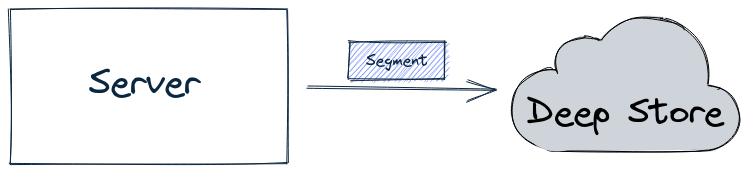
For offline tables, the batch ingestion job writes the segment directly into the deep store, as shown in the diagram below:

The ingestion job then sends a notification about the new segment to the controller, which in turn notifies the appropriate server to pull down that segment.

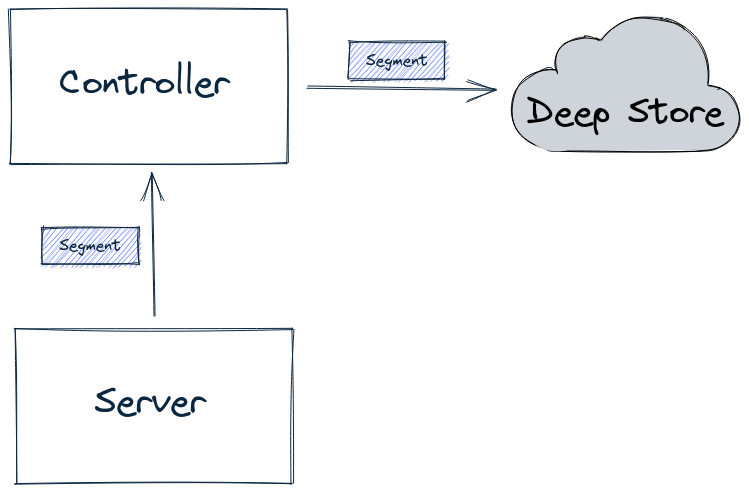
For real-time tables, by default, a segment is first built-in memory by the server. It is then uploaded to the lead controller (as part of the Segment Completion Protocol sequence), which writes the segment into the deep store, as shown in the diagram below:

Having all segments go through the controller can become a system bottleneck under heavy load, in which case you can use the peer download policy, as described in .

When using this configuration, the server will directly write a completed segment to the deep store, as shown in the diagram below:

hashtag
Configuring the deep store

For hands-on examples of how to configure the deep store, see the following tutorials:

Segment

Discover the segment component in Apache Pinot for efficient data storage and querying within Pinot clusters, enabling optimized data processing and analysis.

Pinot tables are stored in one or more independent shards called segments. A small table may be contained by a single segment, but Pinot lets tables grow to an unlimited number of segments. There are different processes for creating segments (see ). Segments have time-based partitions of table data, and are stored on Pinot that scale horizontally as needed for both storage and computation.

Pinot achieves this by breaking the data into smaller chunks known as segments (similar to shards/partitions in relational databases). Segments can be seen as time-based partitions.

A segment is a horizontal shard representing a chunk of table data with some number of rows. The segment stores data for all columns of the table. Each segment packs the data in a columnar fashion, along with the dictionaries and indices for the columns. The segment is laid out in a columnar format so that it can be directly mapped into memory for serving queries.

Columns can be single or multi-valued and the following types are supported: STRING, BOOLEAN, INT, LONG, FLOAT, DOUBLE, TIMESTAMP or BYTES. Only single-valued BIG_DECIMAL data type is supported.

Columns may be declared to be metric or dimension (or specifically as a time dimension) in the schema. Columns can have default null values. For example, the default null value of a integer column can be 0. The default value for bytes columns must be hex-encoded before it's added to the schema.

Pinot uses dictionary encoding to store values as a dictionary ID. Columns may be configured to be “no-dictionary” column in which case raw values are stored. Dictionary IDs are encoded using minimum number of bits for efficient storage (e.g. a column with a cardinality of 3 will use only 2 bits for each dictionary ID).

A forward index is built for each column and compressed for efficient memory use. In addition, you can optionally configure inverted indices for any set of columns. Inverted indices take up more storage, but improve query performance. Specialized indexes like Star-Tree index are also supported. For more details, see Indexing.

hashtag
Creating a segment

Once the table is configured, we can load some data. Loading data involves generating pinot segments from raw data and pushing them to the pinot cluster. Data can be loaded in batch mode or streaming mode. For more details, see the ingestion overview page.

hashtag
Load data in batch

hashtag
Prerequisites

  1. Set up a cluster

  2. Create broker and server tenants

  3. Create an offline table

Below are instructions to generate and push segments to Pinot via standalone scripts. For a production setup, you should use frameworks such as Hadoop or Spark. For more details on setting up data ingestion jobs, see Import Data.arrow-up-right

hashtag
Job Spec YAML

To generate a segment, we need to first create a job spec YAML file. This file contains all the information regarding data format, input data location, and pinot cluster coordinates. Note that this assumes that the controller is RUNNING to fetch the table config and schema. If not, you will have to configure the spec to point at their location. For full configurations, see Ingestion Job Spec.

hashtag
Create and push segment

To create and push the segment in one go, use the following:

Sample Console Output

Alternately, you can separately create and then push, by changing the jobType to SegmentCreation or SegmenTarPush.

hashtag
Templating Ingestion Job Spec

The Ingestion job spec supports templating with Groovy Syntax.

This is convenient if you want to generate one ingestion job template file and schedule it on a daily basis with extra parameters updated daily.

e.g. you could set inputDirURI with parameters to indicate the date, so that the ingestion job only processes the data for a particular date. Below is an example that templates the date for input and output directories.

You can pass in arguments containing values for ${year}, ${month}, ${day} when kicking off the ingestion job: -values $param=value1 $param2=value2...

This ingestion job only generates segments for date 2014-01-03

hashtag
Load data in streaming

Prerequisites

  1. Set up a cluster

  2. Create broker and server tenants

  3. Create a real-time table and set up a real-time stream

Below is an example of how to publish sample data to your stream. As soon as data is available to the real-time stream, it starts getting consumed by the real-time servers.

hashtag
Kafka

Run below command to stream JSON data into Kafka topic: flights-realtime

Run below command to stream JSON data into Kafka topic: flights-realtime

ingestionarrow-up-right
serversarrow-up-right
docker run \
    --network=pinot-demo \
    --name pinot-data-ingestion-job \
    ${PINOT_IMAGE} LaunchDataIngestionJob \
    -jobSpecFile examples/docker/ingestion-job-specs/airlineStats.yaml
SegmentGenerationJobSpec:
!!org.apache.pinot.spi.ingestion.batch.spec.SegmentGenerationJobSpec
excludeFileNamePattern: null
executionFrameworkSpec: {extraConfigs: null, name: standalone, segmentGenerationJobRunnerClassName: org.apache.pinot.plugin.ingestion.batch.standalone.SegmentGenerationJobRunner,
  segmentTarPushJobRunnerClassName: org.apache.pinot.plugin.ingestion.batch.standalone.SegmentTarPushJobRunner,
  segmentUriPushJobRunnerClassName: org.apache.pinot.plugin.ingestion.batch.standalone.SegmentUriPushJobRunner}
includeFileNamePattern: glob:**/*.avro
inputDirURI: examples/batch/airlineStats/rawdata
jobType: SegmentCreationAndTarPush
outputDirURI: examples/batch/airlineStats/segments
overwriteOutput: true
pinotClusterSpecs:
- {controllerURI: 'http://pinot-controller:9000'}
pinotFSSpecs:
- {className: org.apache.pinot.spi.filesystem.LocalPinotFS, configs: null, scheme: file}
pushJobSpec: {pushAttempts: 2, pushParallelism: 1, pushRetryIntervalMillis: 1000,
  segmentUriPrefix: null, segmentUriSuffix: null}
recordReaderSpec: {className: org.apache.pinot.plugin.inputformat.avro.AvroRecordReader,
  configClassName: null, configs: null, dataFormat: avro}
segmentNameGeneratorSpec: null
tableSpec: {schemaURI: 'http://pinot-controller:9000/tables/airlineStats/schema',
  tableConfigURI: 'http://pinot-controller:9000/tables/airlineStats', tableName: airlineStats}

Trying to create instance for class org.apache.pinot.plugin.ingestion.batch.standalone.SegmentGenerationJobRunner
Initializing PinotFS for scheme file, classname org.apache.pinot.spi.filesystem.LocalPinotFS
Finished building StatsCollector!
Collected stats for 403 documents
Created dictionary for INT column: FlightNum with cardinality: 386, range: 14 to 7389
Using fixed bytes value dictionary for column: Origin, size: 294
Created dictionary for STRING column: Origin with cardinality: 98, max length in bytes: 3, range: ABQ to VPS
Created dictionary for INT column: Quarter with cardinality: 1, range: 1 to 1
Created dictionary for INT column: LateAircraftDelay with cardinality: 50, range: -2147483648 to 303
......
......
Pushing segment: airlineStats_OFFLINE_16085_16085_29 to location: http://pinot-controller:9000 for table airlineStats
Sending request: http://pinot-controller:9000/v2/segments?tableName=airlineStats to controller: a413b0013806, version: Unknown
Response for pushing table airlineStats segment airlineStats_OFFLINE_16085_16085_29 to location http://pinot-controller:9000 - 200: {"status":"Successfully uploaded segment: airlineStats_OFFLINE_16085_16085_29 of table: airlineStats"}
Pushing segment: airlineStats_OFFLINE_16084_16084_30 to location: http://pinot-controller:9000 for table airlineStats
Sending request: http://pinot-controller:9000/v2/segments?tableName=airlineStats to controller: a413b0013806, version: Unknown
Response for pushing table airlineStats segment airlineStats_OFFLINE_16084_16084_30 to location http://pinot-controller:9000 - 200: {"status":"Successfully uploaded segment: airlineStats_OFFLINE_16084_16084_30 of table: airlineStats"}
bin/pinot-admin.sh LaunchDataIngestionJob \
    -jobSpecFile examples/batch/airlineStats/ingestionJobSpec.yaml
docker run \
    --network=pinot-demo \
    --name pinot-data-ingestion-job \
    ${PINOT_IMAGE} LaunchDataIngestionJob \
    -jobSpecFile examples/docker/ingestion-job-specs/airlineStats.yaml
    -values year=2014 month=01 day=03
docker run \
  --network pinot-demo \
  --name=loading-airlineStats-data-to-kafka \
  ${PINOT_IMAGE} StreamAvroIntoKafka \
  -avroFile examples/stream/airlineStats/sample_data/airlineStats_data.avro \
  -kafkaTopic flights-realtime -kafkaBrokerList kafka:9092 -zkAddress pinot-zookeeper:2181/kafka
bin/pinot-admin.sh StreamAvroIntoKafka \
  -avroFile examples/stream/airlineStats/sample_data/airlineStats_data.avro \
  -kafkaTopic flights-realtime -kafkaBrokerList localhost:19092 -zkAddress localhost:2191/kafka
job-spec.yml
executionFrameworkSpec:
  name: 'standalone'
  segmentGenerationJobRunnerClassName: 'org.apache.pinot.plugin.ingestion.batch.standalone.SegmentGenerationJobRunner'
  segmentTarPushJobRunnerClassName: 'org.apache.pinot.plugin.ingestion.batch.standalone.SegmentTarPushJobRunner'
  segmentUriPushJobRunnerClassName: 'org.apache.pinot.plugin.ingestion.batch.standalone.SegmentUriPushJobRunner'

jobType: SegmentCreationAndTarPush
inputDirURI: 'examples/batch/baseballStats/rawdata'
includeFileNamePattern: 'glob:**/*.csv'
excludeFileNamePattern: 'glob:**/*.tmp'
outputDirURI: 'examples/batch/baseballStats/segments'
overwriteOutput: true

pinotFSSpecs:
  - scheme: file
    className: org.apache.pinot.spi.filesystem.LocalPinotFS

recordReaderSpec:
  dataFormat: 'csv'
  className: 'org.apache.pinot.plugin.inputformat.csv.CSVRecordReader'
  configClassName: 'org.apache.pinot.plugin.inputformat.csv.CSVRecordReaderConfig'
  configs:

tableSpec:
  tableName: 'baseballStats'
  schemaURI: 'http://localhost:9000/tables/baseballStats/schema'
  tableConfigURI: 'http://localhost:9000/tables/baseballStats'
  
segmentNameGeneratorSpec:

pinotClusterSpecs:
  - controllerURI: 'http://localhost:9000'

pushJobSpec:
  pushParallelism: 2
  pushAttempts: 2
  pushRetryIntervalMillis: 1000
inputDirURI: 'examples/batch/airlineStats/rawdata/${year}/${month}/${day}'
outputDirURI: 'examples/batch/airlineStats/segments/${year}/${month}/${day}'
Decoupling Controller from the Data Path
Use OSS as Deep Storage for Pinot
Use S3 as Deep Storage for Pinot
Batch job writing a segment into the deep store
Server sends segment to Controller, which writes segments into the deep store
Server writing a segment into the deep store

Segment threshold

Learn how segment thresholds work in Pinot.

The segment threshold determines when a segment is committed in real-time tables.

When data is first ingested from a streaming provider like Kafka, Pinot stores the data in a consuming segment.

This segment is on the disk of the server(s) processing a particular partition from the streaming provider.

However, it's not until a segment is committed that the segment is written to the deep storearrow-up-right. The segment threshold decides when that should happen.

hashtag
Why is the segment threshold important?

The segment threshold is important because it ensures segments are a reasonable size.

When queries are processed, smaller segments may increase query latency due to more overhead (number of threads spawned, meta data processing, and so on).

Larger segments may cause servers to run out of memory. When a server is restarted, the consuming segment must start consuming from the first row again, causing a lag between Pinot and the streaming provider.

Mark Needham explains the segment threshold

Segment retention

In this Apache Pinot concepts guide, we'll learn how segment retention works.

Segments in Pinot tables have a retention time, after which the segments are deleted. Typically, offline tables retain segments for a longer period of time than real-time tables.

The removal of segments is done by the retention manager. By default, the retention manager runs once every 6 hours.

The retention manager purges two types of segments:

  • Expired segments: Segments whose end time has exceeded the retention period.

  • Replaced segments: Segments that have been replaced as part of the

There are a couple of scenarios where segments in offline tables won't be purged:

  • If the segment doesn't have an end time. This would happen if the segment doesn't contain a time column.

  • If the segment's table has a segmentIngestionType of REFRESH.

If the retention period isn't specified, segments aren't purged from tables.

The retention manager initially moves these segments into a Deleted Segments area, from where they will eventually be permanently removed.

merge rollup task. arrow-up-right