arrow-left

All pages
gitbookPowered by GitBook
1 of 6

Loading...

Loading...

Loading...

Loading...

Loading...

Loading...

Cluster

Learn to build and manage Apache Pinot clusters, uncovering key components for efficient data processing and optimized analysis.

A Pinot cluster is a collection of the software processes and hardware resources required to ingest, store, and process data. For detail about Pinot cluster components, see Physical architecture.

A Pinot cluster consists of the following processes, which are typically deployed on separate hardware resources in production. In development, they can fit comfortably into Docker containers on a typical laptop:

  • Controller: Maintains cluster metadata and manages cluster resources.

  • Zookeeper: Manages the Pinot cluster on behalf of the controller. Provides fault-tolerant, persistent storage of metadata, including table configurations, schemas, segment metadata, and cluster state.

  • Broker: Accepts queries from client processes and forwards them to servers for processing.

  • Server: Provides storage for segment files and compute for query processing.

  • (Optional) Minion: Computes background tasks other than query processing, minimizing impact on query latency. Optimizes segments, and builds additional indexes to ensure performance (even if data is deleted).

The simplest possible Pinot cluster consists of four components: a server, a broker, a controller, and a Zookeeper node. In production environments, these components typically run on separate server instances, and scale out as needed for data volume, load, availability, and latency. Pinot clusters in production range from fewer than ten total instances to more than 1,000.

Pinot uses as a distributed metadata store and for cluster management.

Helix is a cluster management solution that maintains a persistent, fault-tolerant map of the intended state of the Pinot cluster. Helix constantly monitors the cluster to ensure that the right hardware resources are allocated for the present configuration. When the configuration changes, Helix schedules or decommissions hardware resources to reflect the new configuration. When elements of the cluster change state catastrophically, Helix schedules hardware resources to keep the actual cluster consistent with the ideal represented in the metadata. From a physical perspective, Helix takes the form of a controller process plus agents running on servers and brokers.

hashtag
Cluster configuration

For details of cluster configuration settings, see .

hashtag
Cluster components

Helix divides nodes into logical components based on their responsibilities:

hashtag
Participant

Participants are the nodes that host distributed, partitioned resources

Pinot servers are modeled as participants. For details about server nodes, see .

hashtag
Spectator

Spectators are the nodes that observe the current state of each participant and use that information to access the resources. Spectators are notified of state changes in the cluster (state of a participant, or that of a partition in a participant).

Pinot brokers are modeled as spectators. For details about broker nodes, see .

hashtag
Controller

The node that observes and controls the Participant nodes. It is responsible for coordinating all transitions in the cluster and ensuring that state constraints are satisfied while maintaining cluster stability.

Pinot controllers are modeled as controllers. For details about controller nodes, see .

hashtag
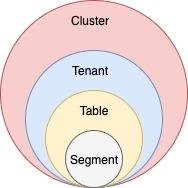
Logical view

Another way to visualize the cluster is a logical view, where:

  • A cluster contains

  • Tenants contain

  • Tables contain

hashtag
Set up a Pinot cluster

Typically, there is only one cluster per environment/data center. There is no need to create multiple Pinot clusters because Pinot supports .

To set up a cluster, see one of the following guides:

Broker

Discover how Apache Pinot's broker component optimizes query processing, data retrieval, and enhances data-driven applications.

Pinot brokers take query requests from client processes, scatter them to applicable servers, gather the results, and return results to the client. The controller shares cluster metadata with the brokers, which allows the brokers to create a plan for executing the query involving a minimal subset of servers with the source data and, when required, other servers to shuffle and consolidate results.

A production Pinot cluster contains many brokers. In general, the more brokers, the more concurrent queries a cluster can process, and the lower latency it can deliver on queries.

Broker interaction with other components

Pinot brokers are modeled as Helix spectators. They need to know the location of each segment of a table (and each replica of the segments) and route requests to the appropriate server that hosts the segments of the table being queried.

The broker ensures that all the rows of the table are queried exactly once so as to return correct, consistent results for a query. The brokers may optimize to prune some of the segments as long as accuracy is not sacrificed.

Helix provides the framework by which spectators can learn the location in which each partition of a resource (i.e. participant) resides. The brokers use this mechanism to learn the servers that host specific segments of a table.

In the case of hybrid tables, the brokers ensure that the overlap between real-time and offline segment data is queried exactly once, by performing offline and real-time federation.

Let's take this example, we have real-time data for five days - March 23 to March 27, and offline data has been pushed until Mar 25, which is two days behind real-time. The brokers maintain this time boundary.

Suppose, we get a query to this table : select sum(metric) from table. The broker will split the query into 2 queries based on this time boundary – one for offline and one for real-time. This query becomes select sum(metric) from table_REALTIME where date >= Mar 25 and select sum(metric) from table_OFFLINE where date < Mar 25

The broker merges results from both these queries before returning the result to the client.

hashtag
Starting a broker

Make sure you've . If you're using Docker, make sure to . To start a broker:

Server

Uncover the efficient data processing and storage capabilities of Apache Pinot's server component, optimizing performance for data-driven applications.

Pinot servers provide the primary storage for and perform the computation required to execute queries. A production Pinot cluster contains many servers. In general, the more servers, the more data the cluster can retain in tables, the lower latency the cluster can deliver on queries, and the more concurrent queries the cluster can process.

Servers are typically segregated into real-time and offline workloads, with "real-time" servers hosting only real-time tables, and "offline" servers hosting only offline tables. This is a ubiquitous operational convention, not a difference or an explicit configuration in the server process itself. There are two types of servers:

hashtag
Offline

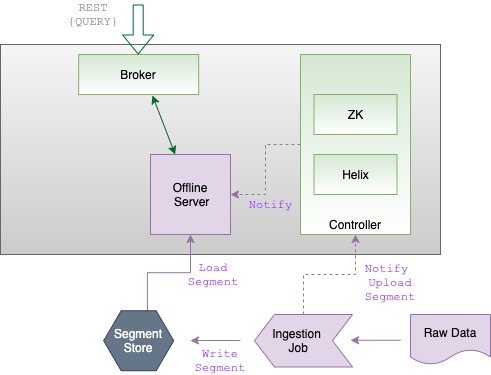
Offline servers are responsible for downloading segments from the segment store, to host and serve queries off. When a new segment is uploaded to the controller, the controller decides the servers (as many as replication) that will host the new segment and notifies them to download the segment from the segment store. On receiving this notification, the servers download the segment file and load the segment onto the server, to server queries off them.

hashtag
Real-time

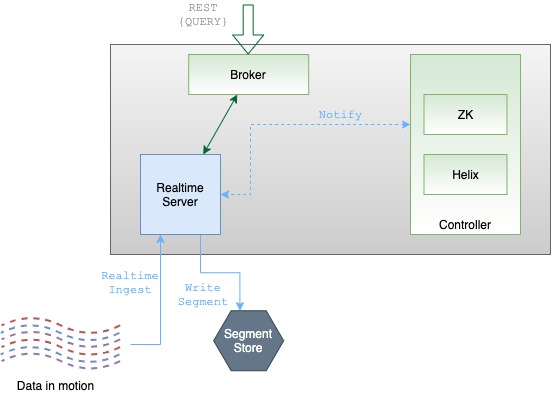
Real-time servers directly ingest from a real-time stream (such as Kafka or EventHubs). Periodically, they make segments of the in-memory ingested data, based on certain thresholds. This segment is then persisted onto the segment store.

Pinot servers are modeled as Helix participants, hosting Pinot tables (referred to as resources in Helix terminology). Segments of a table are modeled as Helix partitions (of a resource). Thus, a Pinot server hosts one or more Helix partitions of one or more helix resources (i.e. one or more segments of one or more tables).

hashtag
Starting a server

Make sure you've set up Zookeeper. If you're using Docker, make sure to pull the Pinot Docker image. To start a server:

segments
set up Zookeeper
pull the
Pinot Docker image
Apache Zookeeperarrow-up-right
Apache Helixarrow-up-right
Cluster configuration referencearrow-up-right
Server
Broker
Controller
tenants
tables
segments
tenants
Running Pinot in Docker
Running Pinot locally

Tenant

Discover the tenant component of Apache Pinot, which facilitates efficient data isolation and resource management within Pinot clusters.

Every table is associated with a tenant, or a logical namespace that restricts where the cluster processes queries on the table. A Pinot tenant takes the form of a text tag in the logical tenant namespace. Physical cluster hardware resources (i.e., and ) are also associated with a tenant tag in the common tenant namespace. Tables of a particular tenant tag will only be scheduled for storage and query processing on hardware resources that belong to the same tenant tag. This lets Pinot cluster operators assign specified workloads to certain hardware resources, preventing data in separate workloads from being stored or processed on the same physical hardware.

By default, all tables, brokers, and servers belong to a tenant called DefaultTenant, but you can configure multiple tenants in a Pinot cluster.

To support multi-tenancy, Pinot has first-class support for tenants. Every table is associated with a server tenant and a broker tenant, which controls the nodes used by the table as servers and brokers. Multi-tenancy lets Pinot group all tables belonging to a particular use case under a single tenant name.

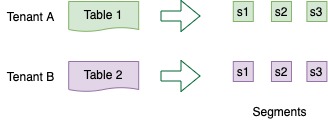
The concept of tenants is very important when the multiple use cases are using Pinot and there is a need to provide quotas or some sort of isolation across tenants. For example, consider we have two tables

docker run \
    --network=pinot-demo \
    --name pinot-server \
    -d ${PINOT_IMAGE} StartServer \
    -zkAddress pinot-zookeeper:2181
bin/pinot-admin.sh StartServer \
    -zkAddress localhost:2181
Usage: StartServer
	-serverHost               <String>                      : Host name for controller. (required=false)
	-serverPort               <int>                         : Port number to start the server at. (required=false)
	-serverAdminPort          <int>                         : Port number to serve the server admin API at. (required=false)
	-dataDir                  <string>                      : Path to directory containing data. (required=false)
	-segmentDir               <string>                      : Path to directory containing segments. (required=false)
	-zkAddress                <http>                        : Http address of Zookeeper. (required=false)
	-clusterName              <String>                      : Pinot cluster name. (required=false)
	-configFileName           <Config File Name>            : Broker Starter Config file. (required=false)
	-help                                                   : Print this message. (required=false)
docker run \
    --network=pinot-demo \
    --name pinot-broker \
    -d ${PINOT_IMAGE} StartBroker \
    -zkAddress pinot-zookeeper:2181
bin/pinot-admin.sh StartBroker \
  -zkAddress localhost:2181 \
  -clusterName PinotCluster \
  -brokerPort 7000
Table A
and
Table B
in the same Pinot cluster.
Defining tenants for tables

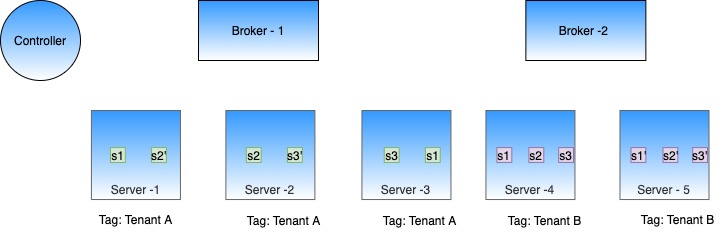
We can configure Table A with server tenant Tenant A and Table B with server tenant Tenant B. We can tag some of the server nodes for Tenant A and some for Tenant B. This will ensure that segments of Table A only reside on servers tagged with Tenant A, and segment of Table B only reside on servers tagged with Tenant B. The same isolation can be achieved at the broker level, by configuring broker tenants to the tables.

Table isolation using tenants

No need to create separate clusters for every table or use case!

hashtag
Tenant configuration

This tenant is defined in the tenants section of the table config.

This section contains two main fields broker and server , which decide the tenants used for the broker and server components of this table.

In the above example:

  • The table will be served by brokers that have been tagged as brokerTenantName_BROKER in Helix.

  • If this were an offline table, the offline segments for the table will be hosted in Pinot servers tagged in Helix as serverTenantName_OFFLINE

  • If this were a real-time table, the real-time segments (both consuming as well as completed ones) will be hosted in pinot servers tagged in Helix as serverTenantName_REALTIME.

hashtag
Create a tenant

hashtag
Broker tenant

Here's a sample broker tenant config. This will create a broker tenant sampleBrokerTenant by tagging three untagged broker nodes as sampleBrokerTenant_BROKER.

To create this tenant use the following command. The creation will fail if number of untagged broker nodes is less than numberOfInstances.

Follow instructions in Getting Pinot to get Pinot locally, and then

Check out the table config in the Rest APIarrow-up-right to make sure it was successfully uploaded.

hashtag
Server tenant

Here's a sample server tenant config. This will create a server tenant sampleServerTenant by tagging 1 untagged server node as sampleServerTenant_OFFLINE and 1 untagged server node as sampleServerTenant_REALTIME.

To create this tenant use the following command. The creation will fail if number of untagged server nodes is less than offlineInstances + realtimeInstances.

Follow instructions in Getting Pinot to get Pinot locally, and then

Check out the table config in the Rest APIarrow-up-right to make sure it was successfully uploaded.

brokersarrow-up-right
serversarrow-up-right

Controller

Discover the controller component of Apache Pinot, enabling efficient data and query management.

The Pinot controller schedules and reschedules resources in a Pinot cluster when metadata changes or a node fails. As an Apache Helix Controller, the Pinot controller schedules the resources that comprise the cluster and orchestrates connections between certain external processes and cluster components (for example, ingest of real-time tables and offline tables). The Pinot controller can be deployed as a single process on its own server or as a group of redundant servers in an active/passive configuration.

The controller exposes a REST API endpointarrow-up-right for cluster-wide administrative operations as well as a web-based query console to execute interactive SQL queries and perform simple administrative tasks.

The Pinot controller is responsible for the following:

  • Maintaining global metadata (e.g., configs and schemas) of the system with the help of Zookeeper which is used as the persistent metadata store.

  • Hosting the Helix Controller and managing other Pinot components (brokers, servers, minions)

  • Maintaining the mapping of which servers are responsible for which segments. This mapping is used by the servers to download the portion of the segments that they are responsible for. This mapping is also used by the broker to decide which servers to route the queries to.

  • Serving admin endpoints for viewing, creating, updating, and deleting configs, which are used to manage and operate the cluster.

  • Serving endpoints for segment uploads, which are used in offline data pushes. They are responsible for initializing real-time consumption and coordination of persisting real-time segments into the segment store periodically.

  • Undertaking other management activities such as managing retention of segments, validations.

For redundancy, there can be multiple instances of Pinot controllers. Pinot expects that all controllers are configured with the same back-end storage system so that they have a common view of the segments (e.g. NFS). Pinot can use other storage systems such as HDFS or .

hashtag
Running the periodic task manually

The controller runs several periodic tasks in the background, to perform activities such as management and validation. Each periodic task has to define the run frequency and default frequency. Each task runs at its own schedule or can also be triggered manually if needed. The task runs on the lead controller for each table.

For period task configuration details, see .

Use the GET /periodictask/names API to fetch the names of all the periodic tasks running on your Pinot cluster.

To manually run a named periodic task, use the GET /periodictask/run API:

The Log Request Id (api-09630c07) can be used to search through pinot-controller log file to see log entries related to execution of the Periodic task that was manually run.

If tableName (and its type OFFLINE or REALTIME) is not provided, the task will run against all tables.

hashtag
Starting a controller

Make sure you've . If you're using Docker, make sure to . To start a controller:

bin/pinot-admin.sh AddTenant \
    -name sampleBrokerTenant 
    -role BROKER 
    -instanceCount 3 -exec
curl -i -X POST -H 'Content-Type: application/json' -d @sample-broker-tenant.json localhost:9000/tenants
bin/pinot-admin.sh AddTenant \
    -name sampleServerTenant \
    -role SERVER \
    -offlineInstanceCount 1 \
    -realtimeInstanceCount 1 -exec
curl -i -X POST -H 'Content-Type: application/json' -d @sample-server-tenant.json localhost:9000/tenants
"tenants": {
  "broker": "brokerTenantName",
  "server": "serverTenantName"
}
sample-broker-tenant.json
{
     "tenantRole" : "BROKER",
     "tenantName" : "sampleBrokerTenant",
     "numberOfInstances" : 3
}
sample-server-tenant.json
{
     "tenantRole" : "SERVER",
     "tenantName" : "sampleServerTenant",
     "offlineInstances" : 1,
     "realtimeInstances" : 1
}
ADLSarrow-up-right
its own configurationarrow-up-right
Controller configuration referencearrow-up-right
set up Zookeeper
pull the Pinot Docker image
curl -X GET "http://localhost:9000/periodictask/names" -H "accept: application/json"

[
  "RetentionManager",
  "OfflineSegmentIntervalChecker",
  "RealtimeSegmentValidationManager",
  "BrokerResourceValidationManager",
  "SegmentStatusChecker",
  "SegmentRelocator",
  "StaleInstancesCleanupTask",
  "TaskMetricsEmitter"
]
curl -X GET "http://localhost:9000/periodictask/run?taskname=SegmentStatusChecker&tableName=jsontypetable&type=OFFLINE" -H "accept: application/json"

{
  "Log Request Id": "api-09630c07",
  "Controllers notified": true
}
docker run \
    --network=pinot-demo \
    --name pinot-controller \
    -p 9000:9000 \
    -d ${PINOT_IMAGE} StartController \
    -zkAddress pinot-zookeeper:2181
bin/pinot-admin.sh StartController \
  -zkAddress localhost:2181 \
  -clusterName PinotCluster \
  -controllerPort 9000
Minion

Explore the minion component in Apache Pinot, empowering efficient data movement and segment generation within Pinot clusters.

A Pinot minion is an optional cluster component that executes background tasks on table data apart from the query processes performed by brokers and servers. Minions run on independent hardware resources, and are responsible for executing minion tasks as directed by the controller. Examples of minon tasks include converting batch data from a standard format like Avro or JSON into segment files to be loaded into an offline table, and rewriting existing segment files to purge records as required by data privacy laws like GDPR. Minion tasks can run once or be scheduled to run periodically.

Minions isolate the computational burden of out-of-band data processing from the servers. Although a Pinot cluster can function with or without minions, they are typically present to support routine tasks like batch data ingest.

hashtag
Starting a minion

Make sure you've . If you're using Docker, make sure to . To start a minion:

hashtag
Interfaces

hashtag
Pinot task generator

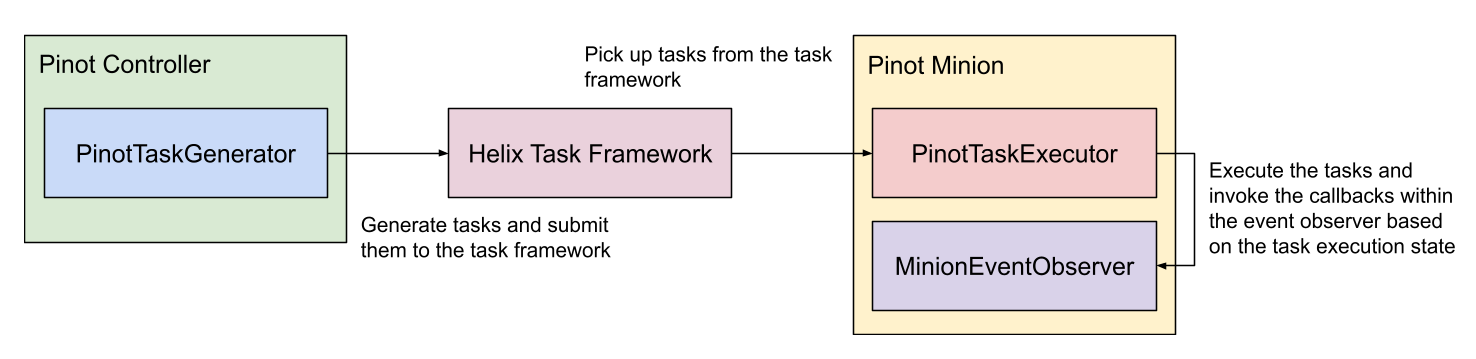
The Pinot task generator interface defines the APIs for the controller to generate tasks for minions to execute.

hashtag
PinotTaskExecutorFactory

Factory for PinotTaskExecutor which defines the APIs for Minion to execute the tasks.

hashtag
MinionEventObserverFactory

Factory for MinionEventObserver which defines the APIs for task event callbacks on minion.

hashtag
Built-in tasks

hashtag
SegmentGenerationAndPushTask

The PushTask can fetch files from an input folder e.g. from a S3 bucket and converts them into segments. The PushTask converts one file into one segment and keeps file name in segment metadata to avoid duplicate ingestion. Below is an example task config to put in TableConfig to enable this task. The task is scheduled every 10min to keep ingesting remaining files, with 10 parallel task at max and 1 file per task.

NOTE: You may want to simply omit "tableMaxNumTasks" due to this caveat: the task generates one segment per file, and derives segment name based on the time column of the file. If two files happen to have same time range and are ingested by tasks from different schedules, there might be segment name conflict. To overcome this issue for now, you can omit “tableMaxNumTasks” and by default it’s Integer.MAX_VALUE, meaning to schedule as many tasks as possible to ingest all input files in a single batch. Within one batch, a sequence number suffix is used to ensure no segment name conflict. Because the sequence number suffix is scoped within one batch, tasks from different batches might encounter segment name conflict issue said above.

circle-info

When performing ingestion at scale remember that Pinot will list all of the files contained in the `inputDirURI` every time a `SegmentGenerationAndPushTask` job gets scheduled. This could become a bottleneck when fetching files from a cloud bucket like GCS. To prevent this make `inputDirURI` point to the least number of files possible.

hashtag
RealtimeToOfflineSegmentsTask

See for details.

hashtag
MergeRollupTask

See for details.

hashtag
Enable tasks

Tasks are enabled on a per-table basis. To enable a certain task type (e.g. myTask) on a table, update the table config to include the task type:

Under each enable task type, custom properties can be configured for the task type.

There are also two task configs to be set as part of cluster configs like below. One controls task's overall timeout (1hr by default) and one for how many tasks to run on a single minion worker (1 by default).

hashtag
Schedule tasks

hashtag
Auto-schedule

There are 2 ways to enable task scheduling:

hashtag
Controller level schedule for all minion tasks

Tasks can be scheduled periodically for all task types on all enabled tables. Enable auto task scheduling by configuring the schedule frequency in the controller config with the key controller.task.frequencyPeriod. This takes period strings as values, e.g. 2h, 30m, 1d.

hashtag
Per table and task level schedule

Tasks can also be scheduled based on cron expressions. The cron expression is set in the schedule config for each task type separately. This config in the controller config, controller.task.scheduler.enabled should be set to true to enable cron scheduling.

As shown below, the RealtimeToOfflineSegmentsTask will be scheduled at the first second of every minute (following the syntax ).

hashtag
Manual schedule

Tasks can be manually scheduled using the following controller rest APIs:

Rest API
Description

hashtag
Schedule task on specific instances

Tasks can be scheduled on specific instances using the following config at task level:

By default, the value is minion_untagged to have backward-compatibility. This will allow users to schedule tasks on specific nodes and isolate tasks among tables / task-types.

Rest API
Description

hashtag
Task level advanced configs

hashtag
allowDownloadFromServer

When a task is executed on a segment, the minion node fetches the segment from deepstore. If the deepstore is not accessible, the minion node can download the segment from the server node. This is controlled by the allowDownloadFromServer config in the task config. By default, this is set to false.

We can also set this config at a minion instance level pinot.minion.task.allow.download.from.server (default is false). This instance level config helps in enforcing this behaviour if the number of tables / tasks is pretty high and we want to enable for all. Note: task-level config will override instance-level config value.

hashtag
Plug-in custom tasks

To plug in a custom task, implement PinotTaskGenerator, PinotTaskExecutorFactory and MinionEventObserverFactory (optional) for the task type (all of them should return the same string for getTaskType()), and annotate them with the following annotations:

Implementation
Annotation

After annotating the classes, put them under the package of name org.apache.pinot.*.plugin.minion.tasks.*, then they will be auto-registered by the controller and minion.

hashtag
Example

See where the TestTask is plugged-in.

hashtag
Task Manager UI

In the Pinot UI, there is Minion Task Manager tab under Cluster Manager page. From that minion task manager tab, one can find a lot of task related info for troubleshooting. Those info are mainly collected from the Pinot controller that schedules tasks or Helix that tracks task runtime status. There are also buttons to schedule tasks in an ad hoc way. Below are some brief introductions to some pages under the minion task manager tab.

This one shows which types of Minion Task have been used. Essentially which task types have created their task queues in Helix.

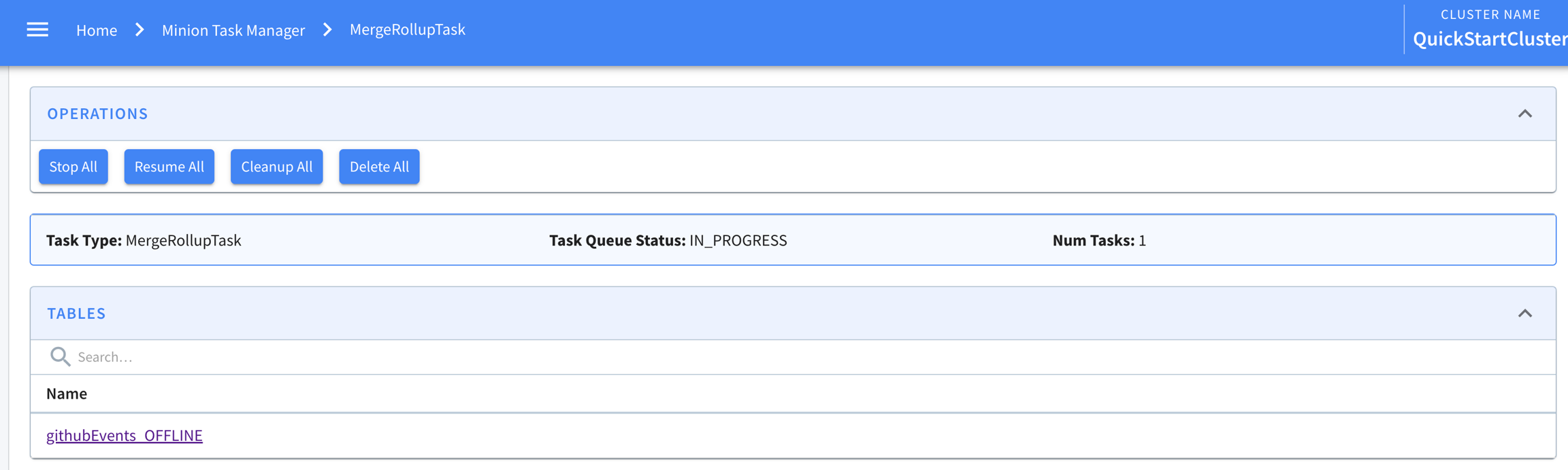
Clicking into a task type, one can see the tables using that task. And a few buttons to stop the task queue, cleaning up ended tasks etc.

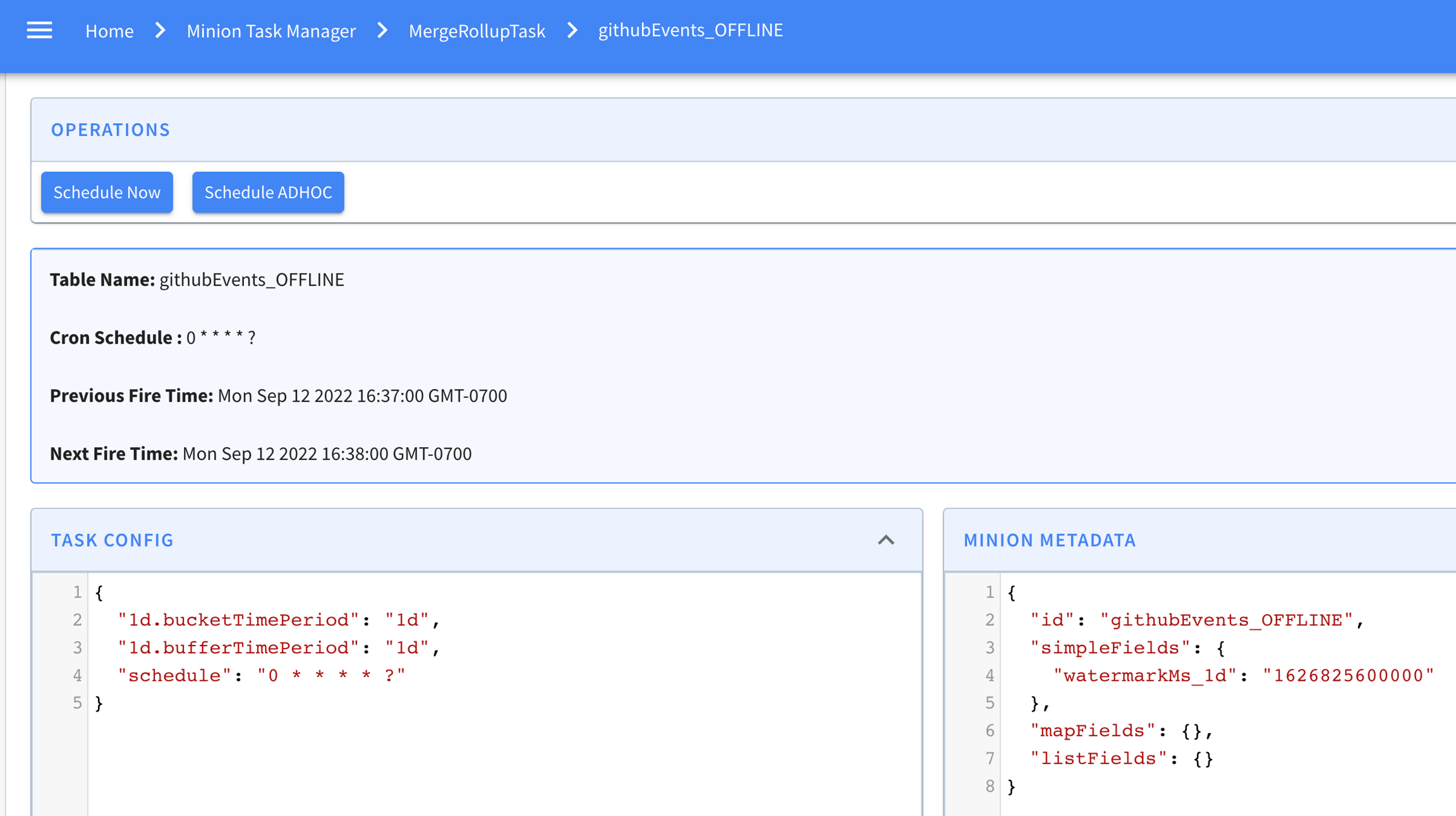
Then clicking into any table in this list, one can see how the task is configured for that table. And the task metadata if there is one in ZK. For example, MergeRollupTask tracks a watermark in ZK. If the task is cron scheduled, the current and next schedules are also shown in this page like below.

At the bottom of this page is a list of tasks generated for this table for this specific task type. Like here, one MergeRollup task has been generated and completed.

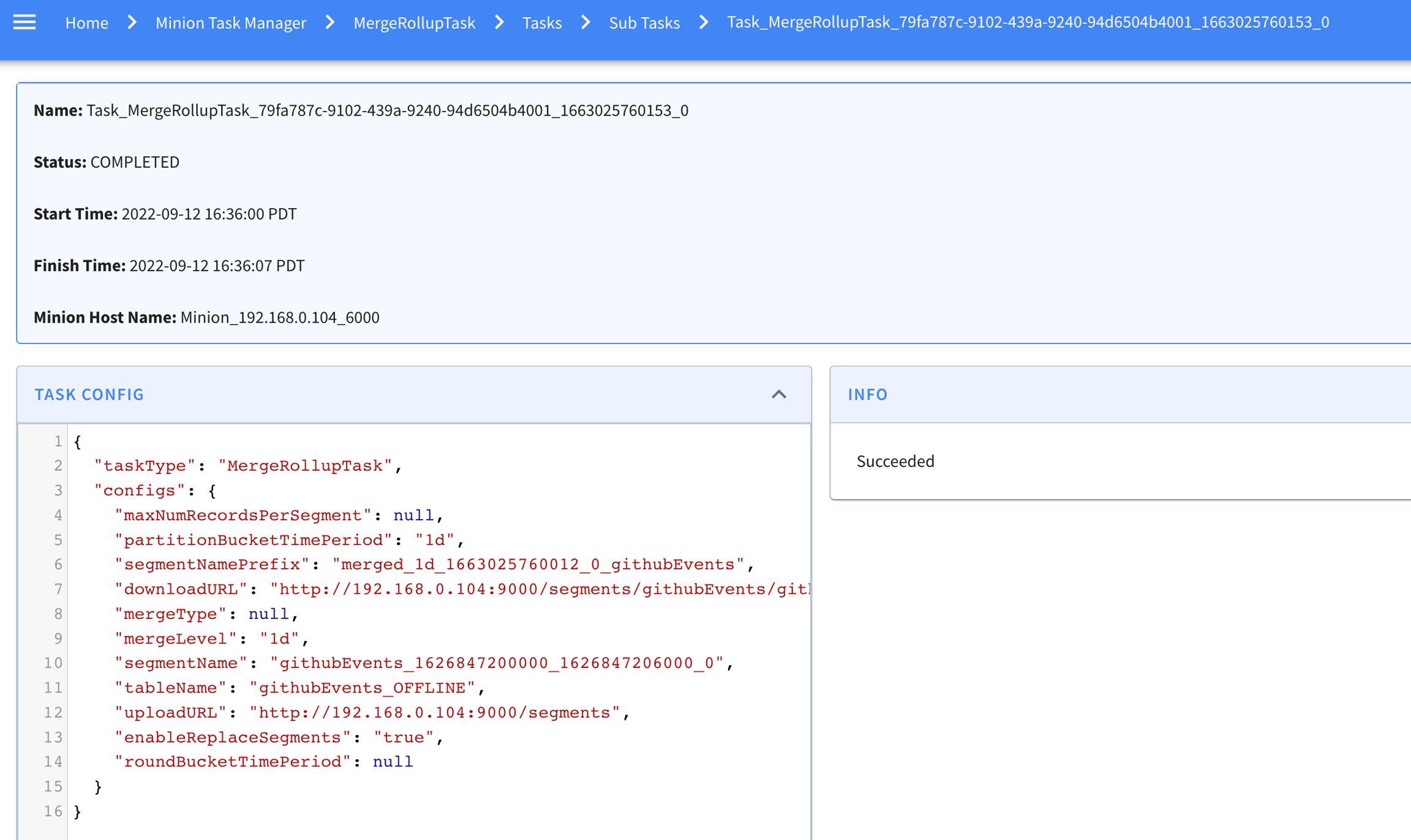
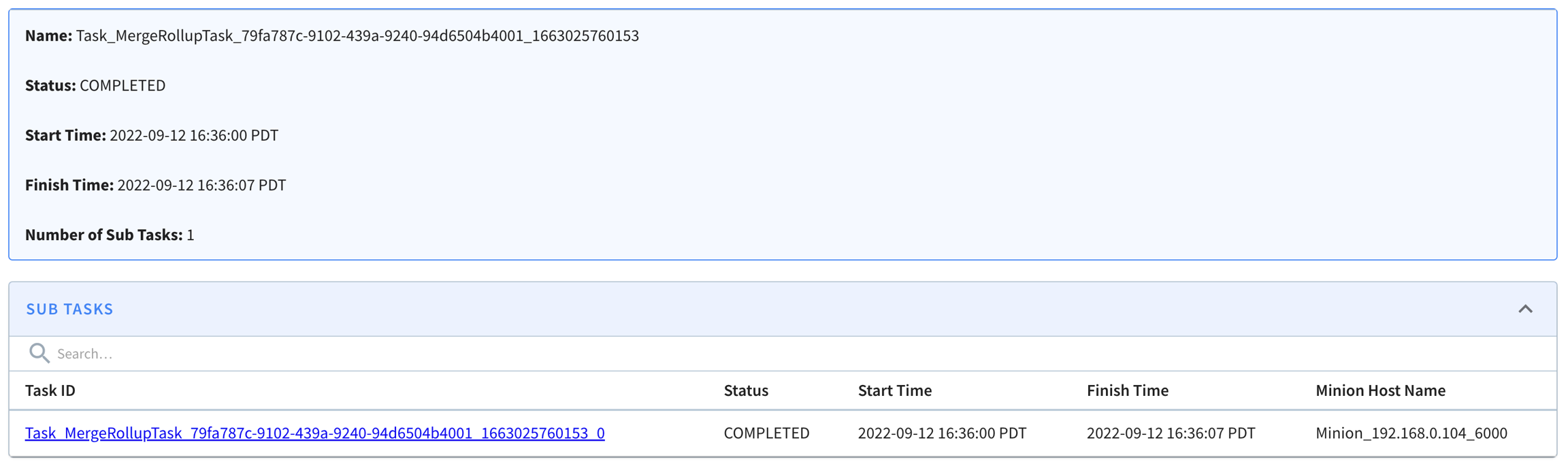
Clicking into a task from that list, we can see start/end time for it, and the subtasks generated for that task (as context, one minion task can have multiple subtasks to process data in parallel). In this example, it happened to have one sub-task here, and it shows when it starts and stops and which minion worker it's running.

Clicking into this subtask, one can see more details about it like the input task configs and error info if the task failed.

hashtag
Task-related metrics

There is a controller job that runs every 5 minutes by default and emits metrics about Minion tasks scheduled in Pinot. The following metrics are emitted for each task type:

  • NumMinionTasksInProgress: Number of running tasks

  • NumMinionSubtasksRunning: Number of running sub-tasks

  • NumMinionSubtasksWaiting: Number of waiting sub-tasks (unassigned to a minion as yet)

The controller also emits metrics about how tasks are cron scheduled:

  • cronSchedulerJobScheduled: Number of current cron schedules registered to be triggered regularly according their cron expressions. It's a Gauge.

  • cronSchedulerJobTrigger: Number of cron scheduled triggered, as a Meter.

  • cronSchedulerJobSkipped: Number of late cron scheduled skipped, as a Meter.

For each task, the minion will emit these metrics:

  • TASK_QUEUEING: Task queueing time (task_dequeue_time - task_inqueue_time), assuming the time drift between helix controller and pinot minion is minor, otherwise the value may be negative

  • TASK_EXECUTION: Task execution time, which is the time spent on executing the task

  • NUMBER_OF_TASKS: number of tasks in progress on that minion. Whenever a Minion starts a task, increase the Gauge by 1, whenever a Minion completes (either succeeded or failed) a task, decrease it by 1

NumMinionSubtasksError: Number of error sub-tasks (completed with an error/exception)

  • PercentMinionSubtasksInQueue: Percent of sub-tasks in waiting or running states

  • PercentMinionSubtasksInError: Percent of sub-tasks in error

  • cronSchedulerJobExecutionTimeMs: Time used to complete task generation, as a Timer.

  • NUMBER_TASKS_EXECUTED: Number of tasks executed, as a Meter.

  • NUMBER_TASKS_COMPLETED: Number of tasks completed, as a Meter.

  • NUMBER_TASKS_CANCELLED: Number of tasks cancelled, as a Meter.

  • NUMBER_TASKS_FAILED: Number of tasks failed, as a Meter. Different from fatal failure, the task encountered an error which can not be recovered from this run, but it may still succeed by retrying the task.

  • NUMBER_TASKS_FATAL_FAILED: Number of tasks fatal failed, as a Meter. Different from failure, the task encountered an error, which will not be recoverable even with retrying the task.

  • POST /tasks/schedule

    Schedule tasks for all task types on all enabled tables

    POST /tasks/schedule?taskType=myTask

    Schedule tasks for the given task type on all enabled tables

    POST /tasks/schedule?tableName=myTable_OFFLINE

    Schedule tasks for all task types on the given table

    POST /tasks/schedule?taskType=myTask&tableName=myTable_OFFLINE

    Schedule tasks for the given task type on the given table

    POST /tasks/schedule?taskType=myTask&tableName=myTable_OFFLINE&minionInstanceTag=tag1_MINION

    Schedule tasks for the given task type of the given table on the minion nodes tagged as tag1_MINION.

    PinotTaskGenerator

    @TaskGenerator

    PinotTaskExecutorFactory

    @TaskExecutorFactory

    MinionEventObserverFactory

    @EventObserverFactory

    docker run \
        --network=pinot-demo \
        --name pinot-minion \
        -d ${PINOT_IMAGE} StartMinion \
        -zkAddress pinot-zookeeper:2181
    bin/pinot-admin.sh StartMinion \
        -zkAddress localhost:2181
    set up Zookeeper
    pull the Pinot Docker image
    Pinot managed Offline flows
    Minion merge rollup task
    defined herearrow-up-right
    SimpleMinionClusterIntegrationTestarrow-up-right
    Usage: StartMinion
        -help                                                   : Print this message. (required=false)
        -minionHost               <String>                      : Host name for minion. (required=false)
        -minionPort               <int>                         : Port number to start the minion at. (required=false)
        -zkAddress                <http>                        : HTTP address of Zookeeper. (required=false)
        -clusterName              <String>                      : Pinot cluster name. (required=false)
        -configFileName           <Config File Name>            : Minion Starter Config file. (required=false)
    public interface PinotTaskGenerator {
    
      /**
       * Initializes the task generator.
       */
      void init(ClusterInfoAccessor clusterInfoAccessor);
    
      /**
       * Returns the task type of the generator.
       */
      String getTaskType();
    
      /**
       * Generates a list of tasks to schedule based on the given table configs.
       */
      List<PinotTaskConfig> generateTasks(List<TableConfig> tableConfigs);
    
      /**
       * Returns the timeout in milliseconds for each task, 3600000 (1 hour) by default.
       */
      default long getTaskTimeoutMs() {
        return JobConfig.DEFAULT_TIMEOUT_PER_TASK;
      }
    
      /**
       * Returns the maximum number of concurrent tasks allowed per instance, 1 by default.
       */
      default int getNumConcurrentTasksPerInstance() {
        return JobConfig.DEFAULT_NUM_CONCURRENT_TASKS_PER_INSTANCE;
      }
    
      /**
       * Performs necessary cleanups (e.g. remove metrics) when the controller leadership changes.
       */
      default void nonLeaderCleanUp() {
      }
    }
    public interface PinotTaskExecutorFactory {
    
      /**
       * Initializes the task executor factory.
       */
      void init(MinionTaskZkMetadataManager zkMetadataManager);
    
      /**
       * Returns the task type of the executor.
       */
      String getTaskType();
    
      /**
       * Creates a new task executor.
       */
      PinotTaskExecutor create();
    }
    public interface PinotTaskExecutor {
    
      /**
       * Executes the task based on the given task config and returns the execution result.
       */
      Object executeTask(PinotTaskConfig pinotTaskConfig)
          throws Exception;
    
      /**
       * Tries to cancel the task.
       */
      void cancel();
    }
    public interface MinionEventObserverFactory {
    
      /**
       * Initializes the task executor factory.
       */
      void init(MinionTaskZkMetadataManager zkMetadataManager);
    
      /**
       * Returns the task type of the event observer.
       */
      String getTaskType();
    
      /**
       * Creates a new task event observer.
       */
      MinionEventObserver create();
    }
    public interface MinionEventObserver {
    
      /**
       * Invoked when a minion task starts.
       *
       * @param pinotTaskConfig Pinot task config
       */
      void notifyTaskStart(PinotTaskConfig pinotTaskConfig);
    
      /**
       * Invoked when a minion task succeeds.
       *
       * @param pinotTaskConfig Pinot task config
       * @param executionResult Execution result
       */
      void notifyTaskSuccess(PinotTaskConfig pinotTaskConfig, @Nullable Object executionResult);
    
      /**
       * Invoked when a minion task gets cancelled.
       *
       * @param pinotTaskConfig Pinot task config
       */
      void notifyTaskCancelled(PinotTaskConfig pinotTaskConfig);
    
      /**
       * Invoked when a minion task encounters exception.
       *
       * @param pinotTaskConfig Pinot task config
       * @param exception Exception encountered during execution
       */
      void notifyTaskError(PinotTaskConfig pinotTaskConfig, Exception exception);
    }
      "ingestionConfig": {
        "batchIngestionConfig": {
          "segmentIngestionType": "APPEND",
          "segmentIngestionFrequency": "DAILY",
          "batchConfigMaps": [
            {
              "input.fs.className": "org.apache.pinot.plugin.filesystem.S3PinotFS",
              "input.fs.prop.region": "us-west-2",
              "input.fs.prop.secretKey": "....",
              "input.fs.prop.accessKey": "....",
              "inputDirURI": "s3://my.s3.bucket/batch/airlineStats/rawdata/",
              "includeFileNamePattern": "glob:**/*.avro",
              "excludeFileNamePattern": "glob:**/*.tmp",
              "inputFormat": "avro"
            }
          ]
        }
      },
      "task": {
        "taskTypeConfigsMap": {
          "SegmentGenerationAndPushTask": {
            "schedule": "0 */10 * * * ?",
            "tableMaxNumTasks": "10"
          }
        }
      }
    {
      ...
      "task": {
        "taskTypeConfigsMap": {
          "myTask": {
            "myProperty1": "value1",
            "myProperty2": "value2"
          }
        }
      }
    }
    Using "POST /cluster/configs" API on CLUSTER tab in Swagger, with this payload
    {
    	"RealtimeToOfflineSegmentsTask.timeoutMs": "600000",
    	"RealtimeToOfflineSegmentsTask.numConcurrentTasksPerInstance": "4"
    }
      "task": {
        "taskTypeConfigsMap": {
          "RealtimeToOfflineSegmentsTask": {
            "bucketTimePeriod": "1h",
            "bufferTimePeriod": "1h",
            "schedule": "0 * * * * ?"
          }
        }
      },
      "task": {
        "taskTypeConfigsMap": {
          "RealtimeToOfflineSegmentsTask": {
            "bucketTimePeriod": "1h",
            "bufferTimePeriod": "1h",
            "schedule": "0 * * * * ?",
            "minionInstanceTag": "tag1_MINION"
          }
        }
      },