arrow-left

All pages
gitbookPowered by GitBook
1 of 8

Loading...

Loading...

Loading...

Loading...

Loading...

Loading...

Loading...

Loading...

Advanced

Data Ingestion Overview

hashtag
Ingesting Offline data

Segments for offline tables are constructed outside of Pinot, typically in Hadoop via map-reduce jobs and ingested into Pinot via REST API provided by the Controller. Pinot provides libraries to create Pinot segments out of input files in AVRO, JSON or CSV formats in a hadoop job, and push the constructed segments to the controllers via REST APIs.

When an Offline segment is ingested, the controller looks up the table’s configuration and assigns the segment to the servers that host the table. It may assign multiple servers for each segment depending on the number of replicas configured for that table.

Pinot supports different segment assignment strategies that are optimized for various use cases.

Once segments are assigned, Pinot servers get notified via Helix to “host” the segment. The segments are downloaded from the remote segment store to the local storage, untarred, and memory-mapped.

Once the server has loaded (memory-mapped) the segment, Helix notifies brokers of the availability of these segments. The brokers start to include the new segments for queries. Brokers support different routing strategies depending on the type of table, the segment assignment strategy, and the use case.

Data in offline segments are immutable (Rows cannot be added, deleted, or modified). However, segments may be replaced with modified data.

Starting from release-0.11.0, Pinot supports uploading offline segments to real-time tables. This is useful when user wants to bootstrap a real-time table with some initial data, or add some offline data to a real-time table without changing the data stream. Note that this is different from the setup, and no time boundary is maintained between the offline segments and the real-time segments.

hashtag
Ingesting Real-time Data

Segments for real-time tables are constructed by Pinot servers with rows ingested from data streams such as Kafka. Rows ingested from streams are made available for query processing as soon as they are ingested, thus enabling applications such as those that need real-time charts on analytics.

In large scale installations, data in streams is typically split across multiple stream partitions. The underlying stream may provide consumer implementations that allow applications to consume data from any subset of partitions, including all partitions (or, just from one partition).

A pinot table can be configured to consume from streams in one of two modes:

  • LowLevel: This is the preferred mode of consumption. Pinot creates independent partition-level consumers for each partition. Depending on the the configured number of replicas, multiple consumers may be created for each partition, taking care that no two replicas exist on the same server host. Therefore you need to provision at least as many hosts as the number of replicas configured.

  • HighLevel: Pinot creates one stream-level consumer that consumes from all partitions. Each message consumed could be from any of the partitions of the stream. Depending on the configured number of replicas, multiple stream-level consumers are created, taking care that no two replicas exist on the same server host. Therefore you need to provision exactly as many hosts as the number of replicas configured.

Of course, the underlying stream should support either mode of consumption in order for a Pinot table to use that mode. Kafka has support for both of these modes. See for more information on the support of other data streams in Pinot.

In either mode, Pinot servers store the ingested rows in volatile memory until either one of the following conditions are met:

  1. A certain number of rows are consumed

  2. The consumption has gone on for a certain length of time

(See on how to set these values, or have pinot compute them for you)

Upon reaching either one of these limits, the servers do the following:

  • Pause consumption

  • Persist the rows consumed so far into non-volatile storage

  • Continue consuming new rows into volatile memory again.

The persisted rows form what we call a completed segment (as opposed to a consuming segment that resides in volatile memory).

In LowLevel mode, the completed segments are persisted the into local non-volatile store of pinot server as well as the segment store of the pinot cluster (See ). This allows for easy and automated mechanisms for replacing pinot servers, or expanding capacity, etc. Pinot has that ensure that the completed segment is equivalent across all replicas.

During segment completion, one winner is chosen by the controller from all the replicas as the committer server. The committer server builds the segment and uploads it to the controller. All the other non-committer servers follow one of these two paths:

  1. If the in-memory segment is equivalent to the committed segment, the non-committer server also builds the segment locally and replaces the in-memory segment

  2. If the in-memory segment is non equivalent to the committed segment, the non-committer server downloads the segment from the controller.

For more details on this protocol, refer to .

In HighLevel mode, the servers persist the consumed rows into local store (and not the segment store). Since consumption of rows can be from any partition, it is not possible to guarantee equivalence of segments across replicas.

See for details.

hybrid table
Stream ingestion
StreamConfigs Section
Pinot Architecture Overview
special mechanismsarrow-up-right
this docarrow-up-right
Consuming and Indexing rows in Realtimearrow-up-right

Ingestion Aggregations

Many data analytics use-cases only need aggregated data. For example, data used in charts can be aggregated down to one row per time bucket per dimension combination.

Doing this results in much less storage and better query performance. Configuring this for a table is done via the Aggregation Config in the table config.

hashtag
Aggregation Config

The aggregation config controls the aggregations that happen during real-time data ingestion. Offline aggregations must be handled separately.

Below is a description of the config, which is defined in the ingestion config of the table config.

hashtag
Requirements

The following are required for ingestion aggregation to work:

  • Ingestion aggregation config is effective only for real-time tables. (There is no ingestion time aggregation support for offline tables. We need use or pre-process aggregations in the offline data flow using batch processing engines like Spark/MapReduce).

  • type must be lowLevel.

  • All metrics must have aggregation configs.

hashtag
Example Scenario

Here is an example of sales data, where only the daily sales aggregates per product are needed.

hashtag
Example Input Data

hashtag
Schema

Note that the schema only reflects the final table structure.

hashtag
Table Config

From the below aggregation config example, note that price exists in the input data while total_sales exists in the Pinot Schema.

hashtag
Example Final Table

product_name
sales_count
total_sales
daysSinceEpoch

hashtag
Allowed Aggregation Functions

function name
notes

hashtag
Frequently Asked Questions

hashtag
Why not use a Startree?

Startrees can only be added to real-time segments after the segments has sealed, and creating startrees is CPU-intensive. Ingestion Aggregation works for consuming segments and uses no additional CPU.

Startrees take additional memory to store, while ingestion aggregation stores less data than the original dataset.

hashtag
When to not use ingestion aggregation?

If the original rows in non-aggregated form are needed, then ingestion-aggregation cannot be used.

hashtag
I already use the aggregateMetrics setting?

The aggregateMetrics works the same as Ingestion Aggregation, but only allows for the SUM function.

The current changes are backward compatible, so no need to change your table config unless you need a different aggregation function.

hashtag
Does this config work for offline data?

Ingestion Aggregation only works for real-time ingestion. For offline data, the offline process needs to generate the aggregates separately.

hashtag
Why do all metrics need to be aggregated?

If a metric isn't aggregated then it will result in more than one row per unique set of dimensions.

Ingestion Transformations

Raw source data often needs to undergo some transformations before it is pushed to Pinot.

Transformations include extracting records from nested objects, applying simple transform functions on certain columns, filtering out unwanted columns, as well as more advanced operations like joining between datasets.

A preprocessing job is usually needed to perform these operations. In streaming data sources you might write a Samza job and create an intermediate topic to store the transformed data.

For simple transformations, this can result in inconsistencies in the batch/stream data source and increase maintenance and operator overhead.

To make things easier, Pinot supports transformations that can be applied via the .

All metrics must be noDictionaryColumns.

  • aggregatedFieldName must be in the Pinot schema and originalFieldName must not exist in Pinot schema

  • 700.00

    18199

    car

    2

    3300.00

    18200

    truck

    1

    800.00

    18202

    car

    3

    3700.00

    18202

    car

    2

    2800.00

    18193

    truck

    1

    2200.00

    18193

    truck

    MAX

    MIN

    SUM

    COUNT

    Specify as COUNT(*)

    DISTINCTCOUNTHLL

    Not available yet, but coming soon

    Merge/Rollup Task
    Stream ingestion

    1

    {
      "tableConfig": {
        "tableName": "...",
        "ingestionConfig": {
          "aggregationConfigs": [{
            "columnName": "aggregatedFieldName",
            "aggregationFunction": "<aggregationFunction>(<originalFieldName>)"
          }]
        }
      }
    }
    {"customerID":205,"product_name": "car","price":"1500.00","timestamp":1571900400000}
    {"customerID":206,"product_name": "truck","price":"2200.00","timestamp":1571900400000}
    {"customerID":207,"product_name": "car","price":"1300.00","timestamp":1571900400000}
    {"customerID":208,"product_name": "truck","price":"700.00","timestamp":1572418800000}
    {"customerID":209,"product_name": "car","price":"1100.00","timestamp":1572505200000}
    {"customerID":210,"product_name": "car","price":"2100.00","timestamp":1572505200000}
    {"customerID":211,"product_name": "truck","price":"800.00","timestamp":1572678000000}
    {"customerID":212,"product_name": "car","price":"800.00","timestamp":1572678000000}
    {"customerID":213,"product_name": "car","price":"1900.00","timestamp":1572678000000}
    {"customerID":214,"product_name": "car","price":"1000.00","timestamp":1572678000000}
    {
      "schemaName": "daily_sales_schema",
      "dimensionFieldSpecs": [
        {
          "name": "product_name",
          "dataType": "STRING"
        }
      ],
      "metricSpecs": [
        {
          "name": "sales_count",
          "dataType": "LONG"
        },
        {
          "name": "total_sales",
          "dataType": "DOUBLE"
        }
      ],
      "dateTimeFieldSpecs": [
        {
          "name": "daysSinceEpoch",
          "dataType": "LONG",
          "format": "1:MILLISECONDS:EPOCH",
          "granularity": "1:MILLISECONDS"
        }
      ]
    }
    {
      "tableName": "daily_sales",
      "ingestionConfig": {
        "transformConfigs": [
          {
            "columnName": "daysSinceEpoch",
            "transformFunction": "toEpochDays(timestamp)"
          }
        ],
        "aggregationConfigs": [
          {
            "columnName": "total_sales",
            "aggregationFunction": "SUM(price)"
          },
          {
            "columnName": "sales_count", 
            "aggregationFunction": "COUNT(*)"
          }
        ]
      }
      "tableIndexConfig": {
        "noDictionaryColumns": [
          "sales_count",
          "total_sales"
        ]
      }
    }
    hashtag
    Transformation Functions

    Pinot supports the following functions:

    1. Groovy functions

    2. Inbuilt functions

    circle-exclamation

    A transformation function cannot mix Groovy and built-in functions - you can only use one type of function at a time.

    hashtag
    Groovy functions

    Groovy functions can be defined using the syntax:

    Any valid Groovy expression can be used.

    ⚠️ Enabling Groovy

    Allowing execuatable Groovy in ingestion transformation can be a security vulnerability. If you would like to enable Groovy for ingestion, you can set the following controller config.

    controller.disable.ingestion.groovy=false

    If not set, Groovy for ingestion transformation is disabled by default.

    hashtag
    Inbuilt Pinot functions

    All the functions defined in this directoryarrow-up-right annotated with @ScalarFunction (e.g. toEpochSecondsarrow-up-right) are supported ingestion transformation functions.

    Below are some commonly used built-in Pinot functions for ingestion transformations.

    hashtag
    DateTime functions

    These functions enable time transformations.

    toEpochXXX

    Converts from epoch milliseconds to a higher granularity.

    Function name
    Description

    toEpochSeconds

    Converts epoch millis to epoch seconds.

    Usage:"toEpochSeconds(millis)"

    toEpochMinutes

    Converts epoch millis to epoch minutes

    Usage: "toEpochMinutes(millis)"

    toEpochHours

    Converts epoch millis to epoch hours

    Usage: "toEpochHours(millis)"

    toEpochDays

    Converts epoch millis to epoch days

    Usage: "toEpochDays(millis)"

    toEpochXXXRounded

    Converts from epoch milliseconds to another granularity, rounding to the nearest rounding bucket. For example, 1588469352000 (2020-05-01 42:29:12) is 26474489 minutesSinceEpoch. `toEpochMinutesRounded(1588469352000) = 26474480 (2020-05-01 42:20:00)

    Function Name
    Description

    toEpochSecondsRounded

    Converts epoch millis to epoch seconds, rounding to nearest rounding bucket"toEpochSecondsRounded(millis, 30)"

    toEpochMinutesRounded

    Converts epoch millis to epoch seconds, rounding to nearest rounding bucket"toEpochMinutesRounded(millis, 10)"

    toEpochHoursRounded

    Converts epoch millis to epoch seconds, rounding to nearest rounding bucket"toEpochHoursRounded(millis, 6)"

    toEpochDaysRounded

    Converts epoch millis to epoch seconds, rounding to nearest rounding bucket"toEpochDaysRounded(millis, 7)"

    fromEpochXXX

    Converts from an epoch granularity to milliseconds.

    Function Name
    Description

    fromEpochSeconds

    Converts from epoch seconds to milliseconds

    "fromEpochSeconds(secondsSinceEpoch)"

    fromEpochMinutes

    Converts from epoch minutes to milliseconds

    "fromEpochMinutes(minutesSinceEpoch)"

    fromEpochHours

    Converts from epoch hours to milliseconds

    "fromEpochHours(hoursSinceEpoch)"

    fromEpochDays

    Converts from epoch days to milliseconds

    "fromEpochDays(daysSinceEpoch)"

    Simple date format

    Converts simple date format strings to milliseconds and vice-a-versa, as per the provided pattern string.

    Function name
    Description

    Converts from milliseconds to a formatted date time string, as per the provided pattern

    "toDateTime(millis, 'yyyy-MM-dd')"

    Converts a formatted date time string to milliseconds, as per the provided pattern

    "fromDateTime(dateTimeStr, 'EEE MMM dd HH:mm:ss ZZZ yyyy')"

    circle-info

    Note

    Letters that are not part of Simple Date Time legend (https://docs.oracle.com/javase/8/docs/api/java/text/SimpleDateFormat.htmlarrow-up-right) need to be escaped. For example:

    "transformFunction": "fromDateTime(dateTimeStr, 'yyyy-MM-dd''T''HH:mm:ss')"

    hashtag
    JSON functions

    Function name
    Description

    json_format

    Converts a JSON/AVRO complex object to a string. This json map can then be queried using function.

    "json_format(jsonMapField)"

    hashtag
    Types of transformation

    hashtag
    Filtering

    Records can be filtered as they are being ingested. A filter function can be specified in the filterConfigs in the ingestionConfigs of the table config.

    If the expression evaluates to true, the record will be filtered out. The expressions can use any of the transform functions described in the previous section.

    Consider a table that has a column timestamp. If you want to filter out records that are older than timestamp 1589007600000, you could apply the following function:

    Consider a table that has a string column campaign and a multi-value column double column prices. If you want to filter out records where campaign = 'X' or 'Y' and sum of all elements in prices is less than 100, you could apply the following function:

    Filter config also supports SQL-like expression of built-in scalar functions for filtering records (starting v 0.11.0+). Example:

    hashtag
    Column Transformation

    Transform functions can be defined on columns in the ingestion config of the table config.

    For example, imagine that our source data contains the prices and timestamp fields. We want to extract the maximum price and store that in the maxPrices field and convert the timestamp into the number of hours since the epoch and store it in the hoursSinceEpoch field. You can do this by applying the following transformation:

    Below are some examples of commonly used functions.

    hashtag
    String concatenation

    Concat firstName and lastName to get fullName

    hashtag
    Find an element in an array

    Find max value in array bids

    hashtag
    Time transformation

    Convert timestamp from MILLISECONDS to HOURS

    hashtag
    Column name change

    Change name of the column from user_id to userId

    hashtag
    Extract value from a column containing space

    Pinot doesn't support columns that have spaces, so if a source data column has a space, we'll need to store that value in a column with a supported name. To extract the value from first Name into the column firstName, run the following:

    hashtag
    Ternary operation

    If eventType is IMPRESSION set impression to 1. Similar for CLICK.

    hashtag
    AVRO Map

    Store an AVRO Map in Pinot as two multi-value columns. Sort the keys, to maintain the mapping. 1) The keys of the map as map_keys 2) The values of the map as map_values

    hashtag
    Chaining transformations

    Transformations can be chained. This means that you can use a field created by a transformation in another transformation function.

    For example, we might have the following JSON document in the data field of our source data:

    We can apply one transformation to extract the userId and then another one to pull out the numerical part of the identifier:

    hashtag
    Flattening

    There are 2 kinds of flattening:

    hashtag
    One record into many

    This is not natively supported as of yet. You can write a custom Decoder/RecordReader if you want to use this. Once the Decoder generates the multiple GenericRows from the provided input record, a List<GenericRow> should be set into the destination GenericRow, with the key $MULTIPLE_RECORDS_KEY$. The segment generation drivers will treat this as a special case and handle the multiple records case.

    hashtag
    Extract attributes from complex objects

    Feature TBD

    table config

    Use the multi-stage query engine (v2)

    To query using distributed joins, window functions, and other multi-stage operators in real time, turn on the multi-stage query engine (v2).

    To query using distributed joins, window functions, and other multi-stage operators in real time, you must enable the multi-stage query engine (v2). To enable v2, do any of the following:

    • Enable the multi-stage query engine in the Query Console

    • Programmatically access the multi-stage query engine:

      • Query

      • Query outside of the APIs

    To learn more about what the multi-stage query engine is, see .

    hashtag
    Enable the multi-stage query engine in the Query Console

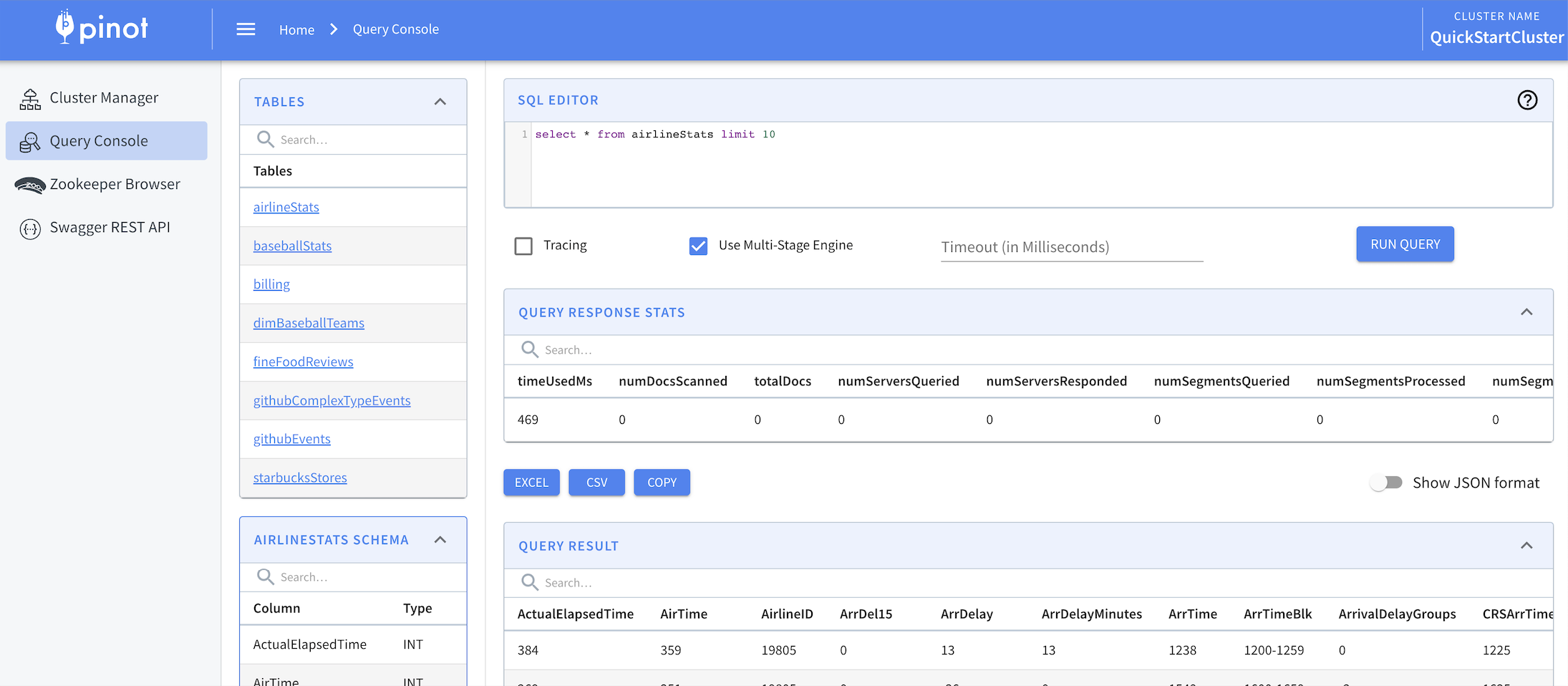
    • To enable the multi-stage query engine, in the Pinot Query Console, select the Use Multi-Stage Engine check box.

    hashtag
    Programmatically access the multi-stage query engine

    To query the Pinot multi-stage query engine, use REST APIs or the query option:

    hashtag
    Use REST APIs

    The Controller admin API and the Broker query API allow optional JSON payload for configuration. For example:

    hashtag
    Use the query option

    To enable the multi-stage engine via a query outside of the API, add the useMultistageEngine=true option to the top of your query.

    For example:

    Groovy({groovy script}, argument1, argument2...argumentN)
    "tableConfig": {
        "tableName": ...,
        "tableType": ...,
        "ingestionConfig": {
            "filterConfig": {
                "filterFunction": "<expression>"
            }
        }
    }
    "ingestionConfig": {
        "filterConfig": {
            "filterFunction": "Groovy({timestamp < 1589007600000}, timestamp)"
        }
    }
    "ingestionConfig": {
        "filterConfig": {
            "filterFunction": "Groovy({(campaign == \"X\" || campaign == \"Y\") && prices.sum() < 100}, prices, campaign)"
        }
    }
    "ingestionConfig": {
        "filterConfig": {
            "filterFunction": "strcmp(campaign, 'X') = 0 OR strcmp(campaign, 'Y') = 0 OR timestamp < 1589007600000"
        }
    }
    { "tableConfig": {
        "tableName": ...,
        "tableType": ...,
        "ingestionConfig": {
            "transformConfigs": [{
              "columnName": "fieldName",
              "transformFunction": "<expression>"
            }]
        },
        ...
    }
    pinot-table-offline.json
    {
    "tableName": "myTable",
    ...
    "ingestionConfig": {
        "transformConfigs": [{
          "columnName": "maxPrice",
          "transformFunction": "Groovy({prices.max()}, prices)" // groovy function
        },
        {
          "columnName": "hoursSinceEpoch",
          "transformFunction": "toEpochHours(timestamp)" // built-in function
        }]
      }
    }
    "ingestionConfig": {
        "transformConfigs": [{
          "columnName": "fullName",
          "transformFunction": "Groovy({firstName+' '+lastName}, firstName, lastName)"
        }]
    }
    "ingestionConfig": {
        "transformConfigs": [{
          "columnName": "maxBid",
          "transformFunction": "Groovy({bids.max{ it.toBigDecimal() }}, bids)"
        }]
    }
    "ingestionConfig": {
        "transformConfigs": [{
          "columnName": "hoursSinceEpoch",
          "transformFunction": "Groovy({timestamp/(1000*60*60)}, timestamp)"
        }]
    }
    "ingestionConfig": {
        "transformConfigs": [{
          "columnName": "userId",
          "transformFunction": "Groovy({user_id}, user_id)"
        }]
    }
    "ingestionConfig": {
        "transformConfigs": [{
          "columnName": "firstName",
          "transformFunction": "\"first Name \""
        }]
    }
    "ingestionConfig": {
        "transformConfigs": [{
          "columnName": "impressions",
          "transformFunction": "Groovy({eventType == 'IMPRESSION' ? 1: 0}, eventType)"
        },
        {
          "columnName": "clicks",
          "transformFunction": "Groovy({eventType == 'CLICK' ? 1: 0}, eventType)"
        }]
    }
    "ingestionConfig": {
        "transformConfigs": [{
          "columnName": "map2_keys",
          "transformFunction": "Groovy({map2.sort()*.key}, map2)"
        },
        {
          "columnName": "map2_values",
          "transformFunction": "Groovy({map2.sort()*.value}, map2)"
        }]
    }
    {
      "userId": "12345678__foo__othertext"
    }
    "ingestionConfig": {
        "transformConfigs": [
          {
            "columnName": "userOid",
            "transformFunction": "jsonPathString(data, '$.userId')"
          },
          {
            "columnName": "userId",
            "transformFunction": "Groovy({Long.valueOf(userOid.substring(0, 8))}, userOid)"
          }
       ]
    }
    ToDateTime
    FromDateTime
    jsonExtractScalararrow-up-right
    using REST APIs
    using the query option
    Multi-stage query engine (v2)
    For Controller Admin API
    For Broker Query API
    Pinot Query Console with Use Multi Stage Engine enabled
    curl -X POST http://localhost:9000/sql -d 
    '
    {
      "sql": "select * from baseballStats limit 10",
      "trace": false,
      "queryOptions": "useMultistageEngine=true"
    }
    '
    curl -X POST http://localhost:8000/query/sql -d '
    {
      "sql": "select * from baseballStats limit 10",
      "trace": false,
      "queryOptions": "useMultistageEngine=true"
    }
    '
    SET useMultistageEngine=true; -- indicator to enable the multi-stage engine.
    SELECT * from baseballStats limit 10

    Null value support

    triangle-exclamation

    Multi-stage engine warning

    This document describes null handling for the single-stage query engine. At this time, the multi-stage query engine (v2) does not support null handling. Queries involving null values in a multi-stage environment may return unexpected results.

    Null handling is defined in two different parts: at ingestion and at query time.

    • means that you have enabled null handling at ingestion.

    • means that you have also enabled null handling at query time.

    hashtag
    Basic null handling support

    By default, null handling is disabled (nullHandlingEnabled=false) in the Table index configuration (). When null support is disabled, IS NOT NULL evaluates to true, and IS NULL evaluates to false. For example, the predicate in the query below matches all records.

    hashtag
    Enable basic null support

    To enable basic null support (IS NULL and IS NOT NULL) and generate the null index, in the Table index configuration (), set nullHandlingEnabled=true.

    When null support is enabled, IS NOT NULL and IS NULL evaluate to true or false according to whether a null is detected.

    circle-info

    Important

    You MUST SET enableNullHandling=true; before you query. Just having "nullHandlingEnabled: true," set in your table config does not automatically provide enableNullHandling=true when you execute a query. Basic null handling supports IS NOT NULL and IS NULL predicates. Advanced null handling adds SQL compatibility.

    hashtag
    Example workarounds to handle null values

    If you're not able to generate the null index for your use case, you may filter for null values using a default value specified in your schema or a specific value included in your query.

    circle-info

    The following example queries work when the null value is not used in a dataset. Errors may occur if the specified null value is a valid value in the dataset.

    hashtag
    Filter for default null value(s) specified in your schema

    1. Specify a default null value (defaultNullValue) in your for dimension fields, (dimensionFieldSpecs), metric fields (metricFieldSpecs), and date time fields (dateTimeFieldSpecs).

    2. To filter out the specified default null value, for example, you could write a query like the following:

    hashtag
    Filter for a specific value in your query

    Filter for a specific value in your query that will not be included in the dataset. For example, to calculate the average age, use -1 to indicate the value of Age is null.

    • Rewrite the following query:

    • To cover null values as follows:

    hashtag
    Advanced null handling support

    Under development to improve performance for advanced null handling.

    Pinot provides advanced null handling support similar to standard SQL null handling. Because this feature carries a notable performance impact (even queries without null values), this feature is not enabled by default. For optimal query latency, we recommend .

    hashtag
    Enable advanced null handling

    To enable NULL handling, do the following:

    1. To enable null handling during ingestion, in , set**nullHandlingEnabled=true**.

    2. To enable null handling for queries, set the**enableNullHandling** .

    circle-info

    Important

    You MUST SET enableNullHandling=true; before you query. Just having "nullHandlingEnabled: true," set in your table config does not automatically provide enableNullHandling=true when you execute a query. Basic null handling supports IS NOT NULL and IS NULL predicates. Advanced null handling adds SQL compatibility.

    hashtag
    Ingestion time

    To store the null values in a segment, you must enable the nullHandlingEnabled in before ingesting the data.

    During real-time or offline ingestion, Pinot checks to see if null handling is enabled, and stores null values in the segment itself. Data ingested when null handling is disabled does not store null values, and should be ingested again.

    The nullHandlingEnabled configuration affects all columns in a Pinot table.

    circle-info

    Column-level null support is under development.

    hashtag
    Query time

    By default, null usage in the predicate is disabled.

    For handling nulls in aggregation functions, explicitly enable the null support by setting the query option enableNullHandling to true. Configure this option in one of the following ways:

    1. Set enableNullHandling=true at the beginning of the query.

    2. If using JDBC, set the connection option enableNullHandling=true (either in the URL or as a property).

    When this option is enabled, the Pinot query engine uses a different execution path that checks null predicates. Therefore, some indexes may not be usable, and the query is significantly more expensive. This is the main reason why null handling is not enabled by default.

    If the query includes a IS NULL or IS NOT NULL predicate, Pinot fetches the NULL value vector for the corresponding column within FilterPlanNode and retrieves the corresponding bitmap that represents all document IDs containing NULL values for that column. This bitmap is then used to create a BitmapBasedFilterOperator to do the filtering operation.

    hashtag
    Examples queries

    hashtag
    Select Query

    hashtag
    Filter Query

    hashtag
    Aggregate Query

    hashtag
    Aggregate Filter Query

    hashtag
    Group By Query

    hashtag
    Order By Query

    hashtag
    Transform Query

    Troubleshoot issues with the multi-stage query engine (v2)

    Troubleshoot issues with the multi-stage query engine (v2).

    Learn how to when using the multi-stage query engine (v2), and see .

    Find instructions on , or see a high-level overview of .

    hashtag
    Limitations of the multi-stage query engine

    We are continuously improving the v2 multi-stage query engine. A few limitations to call out:

    hashtag
    Support for multi-value columns is limited

    Support for multi-value columns is limited to projections, and predicates must use the arrayToMv function. For example, to successfully run the following query:

    You must include arrayToMv in the query as follows:

    hashtag
    Schema and other prefixes are not supported

    Schema and other prefixes are not supported in queries. For example, the following queries are not supported:

    Queries without prefixes are supported:

    hashtag
    Modifying query behavior based on the cluster config is not supported

    Modifying query behavior based on the cluster configuration is not supported. distinctcounthll, distinctcounthllmv, distinctcountrawhll, and `distinctcountrawhllmv` use a different default value of log2mParam in the multi-stage v2 engine. In v2, this value can no longer be configured. Therefore, the following query may produce different results in v1 and v2 engine:

    To ensure v2 returns the same result, specify the log2mParam value in your query:

    hashtag
    Ambiguous reference to a projected column in statement clauses

    If a column is repeated more than once in SELECT statement, that column requires disambiguate aliasing. For example, in the following query, the reference to colA is ambiguous whether it's to the first or second projected colA:

    The solution is to rewrite the query either use aliasing:

    Or use index-based referencing:

    hashtag
    Tightened restriction on function naming

    Pinot single-stage query engine automatically removes the underscore _ character from function names. So co_u_n_t()is equivalent to count().

    In v2, function naming restrictions were tightened, so the underscore(_) character is only allowed to separate word boundaries in a function name. Also camel case is supported in function names. For example, the following function names are allowed:

    hashtag
    Tightened restriction on function signature and type matching

    Pinot single-stage query engine automatically do implicit type casts in many of the situations, for example when running the following:

    it will automatically convert both values to long datatypes before comparison. This behavior however could cause issues and thus it is not so widely applied in the v2 engine. In the v2 engine, a stricter datatype conformance is enforced. the example above should be explicitly written as:

    hashtag
    Default names for projections with function calls

    Default names for projections with function calls are different between v1 and v2.

    • For example, in v1, the following query:

    Returns the following result:

    • In v2, the following function:

    Returns the following result:

    hashtag
    Table names and column names are case sensitive

    In v2, table and column names and are case sensitive. In v1 they were not. For example, the following two queries are not equivalent in v2:

    select * from myTable

    select * from mytable

    circle-info

    Note: Function names are not case sensitive in v2 or v1.

    hashtag
    Arbitrary number of arguments isn't supported

    An arbitrary number of arguments is no longer supported in v2. For example, in v1, the following query worked:

    In v2, this query must be rewritten as follows:

    hashtag
    NULL function support

    • IS NULL and IS NOT NULL functions do not work correctly in v2.

    • Using the COUNT function on a NULL column does not work correctly in v2.

    hashtag
    Custom transform function support

    • The histogram function is not supported in v2.

    • The timeConvert function is not supported in v2, see dateTimeConvert for more details.

    • The dateTimeConvertWindowHop function is not supported in v2.

    • Array & Map-related functions are not supported in v2.

    hashtag
    Custom aggregate function support

    • aggregate function that requires literal input (such as percentile, firstWithTime) might result in a non-compilable query plan when used in v2.

    hashtag
    Troubleshoot errors

    Troubleshoot semantic/runtime errors and timeout errors.

    hashtag
    Semantic/runtime errors

    • Try downloading the latest docker image or building from the latest master commit.

      • We continuously push bug fixes for the multi-stage engine so bugs you encountered might have already been fixed in the latest master build.

    • Try rewriting your query.

      • Some functions previously supported in the single-stage query engine (v1) may have a new way to express in the multi-stage engine (v2). Check and see if you are using any non-standard SQL functions or semantics.

    hashtag
    Timeout errors

    • Try reducing the size of the table(s) used.

      • Add higher selectivity filters to the tables.

    • Try executing part of the subquery or a simplified version of the query first.

      • This helps to determine the selectivity and scale of the query being executed.

    • Try adding more servers.

      • The new multi-stage engine runs distributed across the entire cluster, so adding more servers to partitioned queries such as GROUP BY aggregates, and equality JOINs help speed up the query runtime.

    hashtag

    troubleshoot errors
    multi-stage query engine limitations
    how to enable the multi-stage query engine
    how the multi-stage query engine works
    -- example 1: used in GROUP-BY
    SELECT count(*), RandomAirports FROM airlineStats 
    GROUP BY RandomAirports
    
    -- example 2: used in PREDICATE
    SELECT * FROM airlineStats WHERE RandomAirports IN ('SFO', 'JFK')
    
    -- example 3: used in ORDER-BY
    SELECT count(*), RandomAirports FROM airlineStats 
    GROUP BY RandomAirports
    ORDER BY RandomAirports DESC
    -- example 1: used in GROUP-BY
    SELECT count(*), arrayToMv(RandomAirports) FROM airlineStats 
    GROUP BY arrayToMv(RandomAirports)
    
    -- example 2: used in PREDICATE
    SELECT * FROM airlineStats WHERE arrayToMv(RandomAirports) IN ('SFO', 'JFK')
    
    -- example 3: used in ORDER-BY
    SELECT count(*), arrayToMV(RandomAirports) FROM airlineStats 
    GROUP BY arrayToMV(RandomAirports)
    ORDER BY arrayToMV(RandomAirports) DESC
    SELECT* from default.myTable;
    SELECT * from schemaName.myTable;
    SELECT * from myTable;
    select distinctcounthll(col) from myTable
    select distinctcounthll(col, 8) from myTable
    SELECT colA, colA, COUNT(*)
    FROM myTable GROUP BY colA ORDER BY colA
    SELECT colA AS tmpA, colA as tmpB, COUNT(*) 
    FROM myTable GROUP BY tmpA, tmpB ORDER BY tmpA
    SELECT colA, colA, COUNT(*) 
    FROM myTable GROUP BY 1, 2 ORDER BY 1
    is_distinct_from(...)
    isDistinctFrom(...)
    timestampCol >= longCol
    CAST(timestampCol AS BITINT) >= longCol 
      SELECT count(*) from mytable 
        "columnNames": [
            "EXPR$0"
          ],
      SELECT count(*) from mytable
          "columnNames": [
            "count(*)"
          ],
    select add(1,2,3,4,5) from table
    select add(1, add(2,add(3, add(4,5)))) from table
    Basic null handling support
    Advanced null support
    tableIndexConfigarrow-up-right
    tableIndexConfigarrow-up-right
    schemaarrow-up-right
    enabling basic null support
    tableIndexConfigarrow-up-right
    query optionarrow-up-right
    tableIndexConfig sectionarrow-up-right
    select count(*) from my_table where column IS NOT NULL
        select count(*) from my_table where column <> 'default_null_value'
        select avg(Age) from my_table
        select avg(Age) from my_table WHERE Age <> -1

    Advanced Pinot Setup

    hashtag
    Start Pinot components (scripts or docker images)

    Set up Pinot by starting each component individually

    Start Pinot Components using docker

    Prerequisites

    circle-info

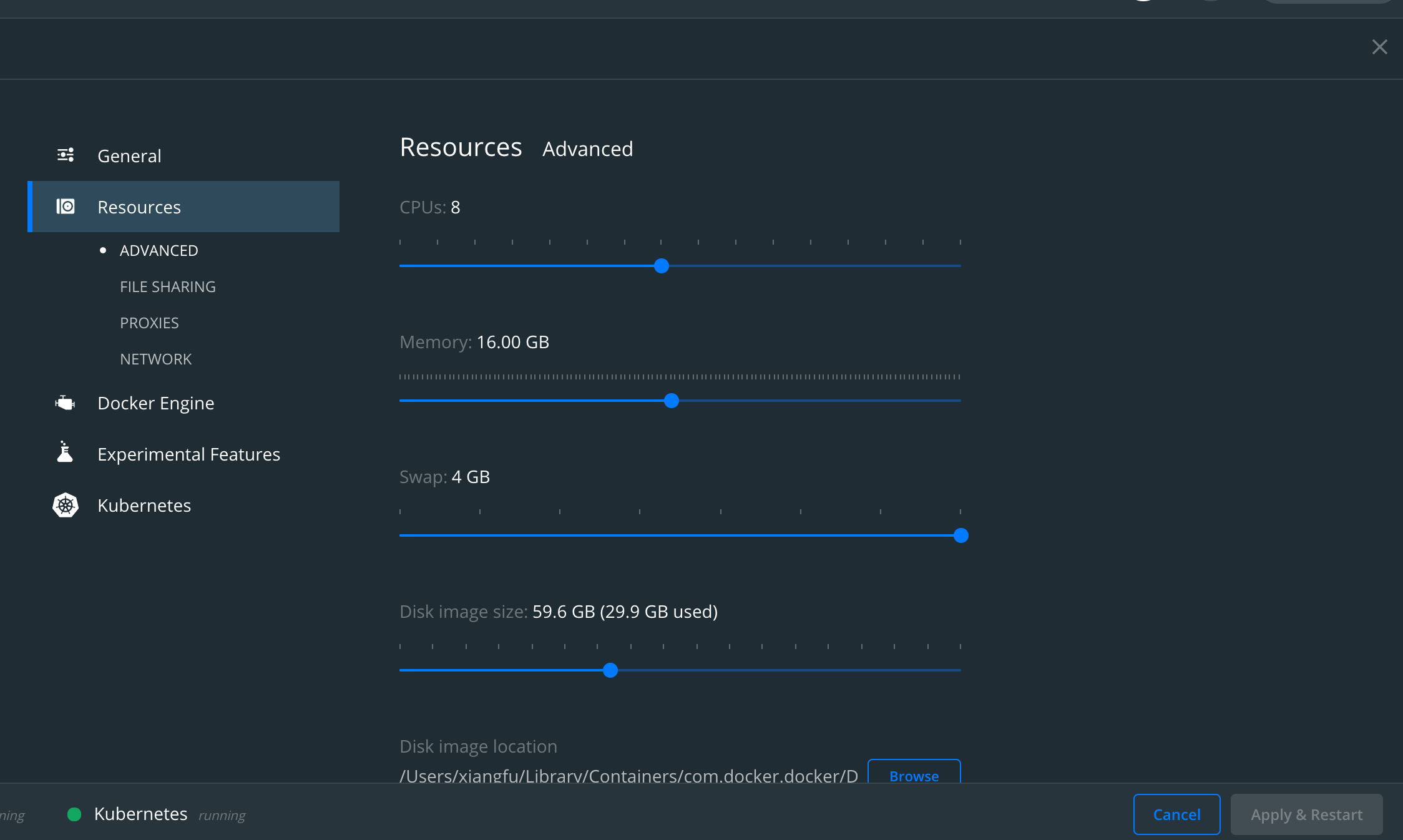
    If running locally, ensure your docker cluster has enough resources, below is a sample config.

    Pull Docker image

    You can try out pre-built Pinot all-in-one Docker image.

    (Optional) You can also follow the instructions to build your own images.

    0. Create a network

    Create an isolated bridge network in Docker.

    1. Start Zookeeper

    Start Zookeeper in daemon.

    Start to browse Zookeeper data at .

    2. Start Pinot Controller

    Start Pinot Controller in daemon and connect to Zookeeper.

    3. Start Pinot Broker

    Start Pinot Broker in daemon and connect to Zookeeper.

    4. Start Pinot Server

    Start Pinot Server in daemon and connect to Zookeeper.

    Now all Pinot related components are started as an empty cluster.

    You can run below command to check container status.

    Sample Console Output

    Download Pinot Distribution from

    Start Pinot components via launcher scripts

    Start Zookeeper

    Start Pinot Controller

    See for more details .

    Start Pinot Broker

    hashtag
    Start Pinot Using Config Files

    Often times we need to customized the setup of Pinot components. Hence user can compile a config file and use it to start Pinot components.

    Below are the examples config files and sample command to start Pinot.

    hashtag
    Pinot Controller

    Below is a sample pinot-controller.conf used in HelmChart setup.

    In order to run Pinot Controller, the command is:

    hashtag
    Configure Controller

    Below are some configurations you can set in Pinot Controller. You can head over to for complete list of available configs.

    Config Name
    Description
    Default Value

    hashtag
    Pinot Broker

    Below is a sample pinot-broker.conf used in HelmChart setup.

    In order to run Pinot Broker, the command is:

    hashtag
    Configure Broker

    Below are some configurations you can set in Pinot Broker. You can head over to for complete list of available configs.

    Config Name
    Description
    Default Value

    hashtag
    Pinot Server

    Below is a sample pinot-server.conf used in HelmChart setup.

    In order to run Pinot Server, the command is:

    hashtag
    Configure Server

    Below are some outstanding configurations you can set in Pinot Server. You can head over to for complete list of available configs.

    Config Name
    Description
    Default Value

    hashtag
    Create and Configure table

    A TABLE in regular database world is represented as <TABLE>_OFFLINE and/or <TABLE>_REALTIME in Pinot depending on the ingestion mode (batch, real-time, hybrid)

    See for all possible batch/streaming tables.

    hashtag
    Batch Table Creation

    See for table configuration details and how to customize it.

    Sample Console Output

    hashtag
    Automatically add an inverted index to your batch table

    By default, the inverted index type is the only type of index that isn't created automatically during segment generation. Instead, they are generated when the segments are loaded on the server. But, waiting to build indexes until load time increases the startup time and takes up resources with every new segment push, which increases the time for other operations such as rebalance.

    To automatically create an inverted index during segment generation, add an entry to your in the table configuration file.

    This setting works with .

    When set to true, Pinot creates an inverted index for the columns that you specify in the invertedIndexColumns list in the table configuration.

    This setting is false by default.

    Set createInvertedIndexDuringSegmentGeneration to true in your table config, as follows:

    When you update this setting in your table configuration, you must to apply the inverted index to all existing segments.

    hashtag
    Streaming Table Creation

    See for table configuration details and how to customize it.

    Start Kafka

    Create a Kafka Topic

    Create a Streaming table

    Sample output

    Start Kafka-Zookeeper

    Start Kafka

    hashtag
    Use sortedColumn with streaming tables

    For tables, you can use a sorted index with sortedColumn to sort data when generating segments as the segment is created. See for more information.

    A sorted forward index can be used as an inverted index with better performance, but with the limitation that the search is only applied to one column per table. See to learn more.

    hashtag
    Load Data

    Now that the table is configured, let's load some data. Data can be loaded in batch mode or streaming mode. See page for details. Loading data involves generating pinot segments from raw data and pushing them to the pinot cluster.

    hashtag
    Load Data in Batch

    User can always generate and push segments to Pinot via standalone scripts or using frameworks such as Hadoop or Spark. See this for more details on setting up Data Ingestion Jobs.

    Below example goes with the standalone mode.

    Sample Console Output

    JobSpec yaml file has all the information regarding data format, input data location and pinot cluster coordinates. Note that this assumes that the controller is RUNNING to fetch the table config and schema. If not, you will have to configure the spec to point at their location. See for more details.

    hashtag
    Load Data in Streaming

    hashtag
    Kafka

    Run below command to stream JSON data into Kafka topic: flights-realtime

    Run below command to stream JSON data into Kafka topic: flights-realtime

    Start Pinot Controller

    Pinot Controller Port

    9000

    controller.vip.host

    The VIP hostname used to set the download URL for segments

    ${controller.host}

    controller.vip.port

    The VIP port used to set the download URL for segments

    ${controller.port}

    controller.data.dir

    Directory to host segment data

    ${java.io.tmpdir}/PinotController

    controller.zk.str

    Zookeeper URL

    localhost:2181

    cluster.tenant.isolation.enable

    Enable Tenant Isolation, default is single tenant cluster

    true

    Timeout for Broker Query in Milliseconds

    10000

    pinot.broker.enable.query.limit.override

    Configuration to enable Query LIMIT Override to protect Pinot Broker and Server from fetch too many records back.

    false

    pinot.broker.query.response.limit

    When config pinot.broker.enable.query.limit.override is enabled, reset limit for selection query if it exceeds this value.

    2147483647

    pinot.broker.startup.minResourcePercent

    Configuration to consider the broker ServiceStatus as being STARTED if the percent of resources (tables) that are ONLINE for this this broker has crossed the threshold percentage of the total number of tables that it is expected to serve

    100.0

    Port for Pinot Server Admin UI

    8097

    pinot.server.instance.dataDir

    Directory to hold all the data

    ${java.io.tmpDir}/PinotServer/index

    pinot.server.instance.segmentTarDir

    Directory to hold temporary segments downloaded from Controller or Deep Store

    ${java.io.tmpDir}/PinotServer/segmentTar

    pinot.server.query.executor.timeout

    Timeout for Server to process Query in Milliseconds

    15000

    Create stream table

    controller.helix.cluster.name

    Pinot Cluster name

    PinotCluster

    controller.host

    Pinot Controller Host

    Required if config pinot.set.instance.id.to.hostname is false.

    pinot.set.instance.id.to.hostname

    When enabled, use server hostname to infer controller.host

    false

    instanceId

    Unique id to register Pinot Broker in the cluster.

    BROKER_${BROKER_HOST}_${pinot.broker.client.queryPort}

    pinot.set.instance.id.to.hostname

    When enabled, use server hostname to set ${BROKER_HOST} in above config, else use IP address.

    false

    pinot.broker.client.queryPort

    Port to query Pinot Broker

    8099

    instanceId

    Unique id to register Pinot Server in the cluster.

    Server_${SERVER_HOST}_${pinot.server.netty.port}

    pinot.set.instance.id.to.hostname

    When enabled, use server hostname to set ${SERVER_HOST} in above config, else use IP address.

    false

    pinot.server.netty.port

    Port to query Pinot Server

    8098

    here
    ZKUIarrow-up-right
    http://localhost:9090arrow-up-right
    http://pinot.apache.org/download/arrow-up-right
    controller page
    Controller
    Broker
    Server
    examplesarrow-up-right
    Batch Tables
    table index config
    batch (offline) tables
    reload the table segment
    Streaming Tables
    streaming
    Real-time tables
    Sorted inverted index
    ingestion overview
    page
    Pinot Ingestion Job
    Sample Docker resources

    controller.port

    pinot.broker.timeoutMs

    pinot.server.adminapi.port

    export PINOT_VERSION=0.10.0
    export PINOT_IMAGE=apachepinot/pinot:${PINOT_VERSION}
    docker pull ${PINOT_IMAGE}
    docker network create -d bridge pinot-demo
    docker run \
        --network=pinot-demo \
        --name  pinot-zookeeper \
        --restart always \
        -p 2181:2181 \
        -d zookeeper:3.5.6
    docker run \
        --network pinot-demo --name=zkui \
        -p 9090:9090 \
        -e ZK_SERVER=pinot-zookeeper:2181 \
        -d qnib/plain-zkui:latest
    docker run \
        --network=pinot-demo \
        --name pinot-controller \
        -p 9000:9000 \
        -d ${PINOT_IMAGE} StartController \
        -zkAddress pinot-zookeeper:2181
    docker run \
        --network=pinot-demo \
        --name pinot-broker \
        -d ${PINOT_IMAGE} StartBroker \
        -zkAddress pinot-zookeeper:2181
    export PINOT_IMAGE=apachepinot/pinot:0.3.0-SNAPSHOT
    docker run \
        --network=pinot-demo \
        --name pinot-server \
        -d ${PINOT_IMAGE} StartServer \
        -zkAddress pinot-zookeeper:2181
    docker container ls -a
    CONTAINER ID        IMAGE                              COMMAND                  CREATED              STATUS                PORTS                                                  NAMES
    9e80c3fcd29b        apachepinot/pinot:0.3.0-SNAPSHOT   "./bin/pinot-admin.s…"   18 seconds ago       Up 17 seconds         8096-8099/tcp, 9000/tcp                                pinot-server
    f4c42a5865c7        apachepinot/pinot:0.3.0-SNAPSHOT   "./bin/pinot-admin.s…"   21 seconds ago       Up 21 seconds         8096-8099/tcp, 9000/tcp                                pinot-broker
    a413b0013806        apachepinot/pinot:0.3.0-SNAPSHOT   "./bin/pinot-admin.s…"   26 seconds ago       Up 25 seconds         8096-8099/tcp, 0.0.0.0:9000->9000/tcp                  pinot-controller
    9d3b9c4d454b        zookeeper:3.5.6                    "/docker-entrypoint.…"   About a minute ago   Up About a minute     2888/tcp, 3888/tcp, 0.0.0.0:2181->2181/tcp, 8080/tcp   pinot-zookeeper
    $ export PINOT_VERSION=0.10.0
    $ tar -xvf apache-pinot-${PINOT_VERSION}-bin.tar.gz
    
    $ cd apache-pinot-${PINOT_VERSION}-bin
    $ ls
    DISCLAIMER    LICENSE        NOTICE        bin        conf        lib        licenses    query_console    sample_data
    
    $ PINOT_INSTALL_DIR=`pwd`
    cd apache-pinot-${PINOT_VERSION}-bin
    bin/pinot-admin.sh StartZookeeper
    bin/pinot-admin.sh StartController \
        -zkAddress localhost:2181
    bin/pinot-admin.sh StartBroker \
        -zkAddress localhost:2181
    controller.helix.cluster.name=pinot-quickstart
    controller.port=9000
    controller.vip.host=pinot-controller
    controller.vip.port=9000
    controller.data.dir=/var/pinot/controller/data
    controller.zk.str=pinot-zookeeper:2181
    pinot.set.instance.id.to.hostname=true
    bin/pinot-admin.sh StartController -configFileName config/pinot-controller.conf
    pinot.broker.client.queryPort=8099
    pinot.broker.routing.table.builder.class=random
    pinot.set.instance.id.to.hostname=true
    bin/pinot-admin.sh StartBroker -clusterName pinot-quickstart -zkAddress pinot-zookeeper:2181 -configFileName config/pinot-broker.conf
    pinot.server.netty.port=8098
    pinot.server.adminapi.port=8097
    pinot.server.instance.dataDir=/var/pinot/server/data/index
    pinot.server.instance.segmentTarDir=/var/pinot/server/data/segment
    pinot.set.instance.id.to.hostname=true
    bin/pinot-admin.sh StartServer -clusterName pinot-quickstart -zkAddress pinot-zookeeper:2181 -configFileName config/pinot-server.conf
    docker run \
        --network=pinot-demo \
        --name pinot-batch-table-creation \
        ${PINOT_IMAGE} AddTable \
        -schemaFile examples/batch/airlineStats/airlineStats_schema.json \
        -tableConfigFile examples/batch/airlineStats/airlineStats_offline_table_config.json \
        -controllerHost pinot-controller \
        -controllerPort 9000 \
        -exec
    Executing command: AddTable -tableConfigFile examples/batch/airlineStats/airlineStats_offline_table_config.json -schemaFile examples/batch/airlineStats/airlineStats_schema.json -controllerHost pinot-controller -controllerPort 9000 -exec
    Sending request: http://pinot-controller:9000/schemas to controller: a413b0013806, version: Unknown
    {"status":"Table airlineStats_OFFLINE succesfully added"}
    bin/pinot-admin.sh AddTable \
        -schemaFile examples/batch/airlineStats/airlineStats_schema.json \
        -tableConfigFile examples/batch/airlineStats/airlineStats_offline_table_config.json \
        -exec
    ...
    "tableIndexConfig": {
        ...
        "createInvertedIndexDuringSegmentGeneration": true,
        ...
    }
    ...
    docker run \
        --network pinot-demo --name=kafka \
        -e KAFKA_ZOOKEEPER_CONNECT=pinot-zookeeper:2181/kafka \
        -e KAFKA_BROKER_ID=0 \
        -e KAFKA_ADVERTISED_HOST_NAME=kafka \
        -d wurstmeister/kafka:latest
    docker exec \
      -t kafka \
      /opt/kafka/bin/kafka-topics.sh \
      --zookeeper pinot-zookeeper:2181/kafka \
      --partitions=1 --replication-factor=1 \
      --create --topic flights-realtime
    docker run \
        --network=pinot-demo \
        --name pinot-streaming-table-creation \
        ${PINOT_IMAGE} AddTable \
        -schemaFile examples/stream/airlineStats/airlineStats_schema.json \
        -tableConfigFile examples/docker/table-configs/airlineStats_realtime_table_config.json \
        -controllerHost pinot-controller \
        -controllerPort 9000 \
        -exec
    Executing command: AddTable -tableConfigFile examples/docker/table-configs/airlineStats_realtime_table_config.json -schemaFile examples/stream/airlineStats/airlineStats_schema.json -controllerHost pinot-controller -controllerPort 9000 -exec
    Sending request: http://pinot-controller:9000/schemas to controller: 8fbe601012f3, version: Unknown
    {"status":"Table airlineStats_REALTIME succesfully added"}
    bin/pinot-admin.sh StartZookeeper -zkPort 2191
    bin/pinot-admin.sh  StartKafka -zkAddress=localhost:2191/kafka -port 19092
    docker run \
        --network=pinot-demo \
        --name pinot-data-ingestion-job \
        ${PINOT_IMAGE} LaunchDataIngestionJob \
        -jobSpecFile examples/docker/ingestion-job-specs/airlineStats.yaml
    SegmentGenerationJobSpec:
    !!org.apache.pinot.spi.ingestion.batch.spec.SegmentGenerationJobSpec
    excludeFileNamePattern: null
    executionFrameworkSpec: {extraConfigs: null, name: standalone, segmentGenerationJobRunnerClassName: org.apache.pinot.plugin.ingestion.batch.standalone.SegmentGenerationJobRunner,
      segmentTarPushJobRunnerClassName: org.apache.pinot.plugin.ingestion.batch.standalone.SegmentTarPushJobRunner,
      segmentUriPushJobRunnerClassName: org.apache.pinot.plugin.ingestion.batch.standalone.SegmentUriPushJobRunner}
    includeFileNamePattern: glob:**/*.avro
    inputDirURI: examples/batch/airlineStats/rawdata
    jobType: SegmentCreationAndTarPush
    outputDirURI: examples/batch/airlineStats/segments
    overwriteOutput: true
    pinotClusterSpecs:
    - {controllerURI: 'http://pinot-controller:9000'}
    pinotFSSpecs:
    - {className: org.apache.pinot.spi.filesystem.LocalPinotFS, configs: null, scheme: file}
    pushJobSpec: {pushAttempts: 2, pushParallelism: 1, pushRetryIntervalMillis: 1000,
      segmentUriPrefix: null, segmentUriSuffix: null}
    recordReaderSpec: {className: org.apache.pinot.plugin.inputformat.avro.AvroRecordReader,
      configClassName: null, configs: null, dataFormat: avro}
    segmentNameGeneratorSpec: null
    tableSpec: {schemaURI: 'http://pinot-controller:9000/tables/airlineStats/schema',
      tableConfigURI: 'http://pinot-controller:9000/tables/airlineStats', tableName: airlineStats}
    
    Trying to create instance for class org.apache.pinot.plugin.ingestion.batch.standalone.SegmentGenerationJobRunner
    Initializing PinotFS for scheme file, classname org.apache.pinot.spi.filesystem.LocalPinotFS
    Finished building StatsCollector!
    Collected stats for 403 documents
    Created dictionary for INT column: FlightNum with cardinality: 386, range: 14 to 7389
    Using fixed bytes value dictionary for column: Origin, size: 294
    Created dictionary for STRING column: Origin with cardinality: 98, max length in bytes: 3, range: ABQ to VPS
    Created dictionary for INT column: Quarter with cardinality: 1, range: 1 to 1
    Created dictionary for INT column: LateAircraftDelay with cardinality: 50, range: -2147483648 to 303
    ......
    ......
    Pushing segment: airlineStats_OFFLINE_16085_16085_29 to location: http://pinot-controller:9000 for table airlineStats
    Sending request: http://pinot-controller:9000/v2/segments?tableName=airlineStats to controller: a413b0013806, version: Unknown
    Response for pushing table airlineStats segment airlineStats_OFFLINE_16085_16085_29 to location http://pinot-controller:9000 - 200: {"status":"Successfully uploaded segment: airlineStats_OFFLINE_16085_16085_29 of table: airlineStats"}
    Pushing segment: airlineStats_OFFLINE_16084_16084_30 to location: http://pinot-controller:9000 for table airlineStats
    Sending request: http://pinot-controller:9000/v2/segments?tableName=airlineStats to controller: a413b0013806, version: Unknown
    Response for pushing table airlineStats segment airlineStats_OFFLINE_16084_16084_30 to location http://pinot-controller:9000 - 200: {"status":"Successfully uploaded segment: airlineStats_OFFLINE_16084_16084_30 of table: airlineStats"}
    bin/pinot-admin.sh LaunchDataIngestionJob \
        -jobSpecFile examples/batch/airlineStats/ingestionJobSpec.yaml
    docker run \
      --network pinot-demo \
      --name=loading-airlineStats-data-to-kafka \
      ${PINOT_IMAGE} StreamAvroIntoKafka \
      -avroFile examples/stream/airlineStats/sample_data/airlineStats_data.avro \
      -kafkaTopic flights-realtime -kafkaBrokerList kafka:9092 -zkAddress pinot-zookeeper:2181/kafka
    bin/pinot-admin.sh StreamAvroIntoKafka \
      -avroFile examples/stream/airlineStats/sample_data/airlineStats_data.avro \
      -kafkaTopic flights-realtime -kafkaBrokerList localhost:19092 -zkAddress localhost:2191/kafka
    bin/pinot-admin.sh StartServer \
        -zkAddress localhost:2181
    bin/pinot-admin.sh AddTable \
        -schemaFile examples/stream/airlineStats/airlineStats_schema.json \
        -tableConfigFile examples/stream/airlineStats/airlineStats_realtime_table_config.json \
        -exec