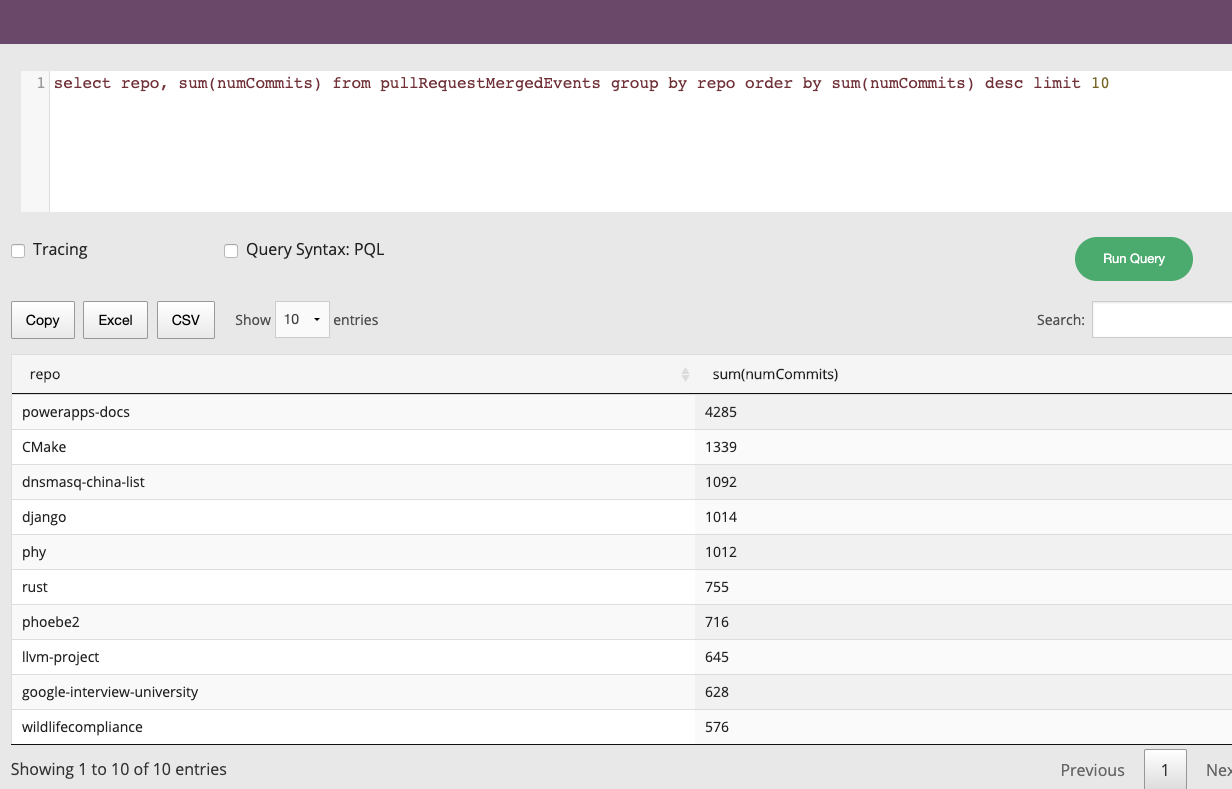
Here you will find a collection of ready-made sample applications and examples for real-world data
export PINOT_VERSION=latest
export PINOT_IMAGE=apachepinot/pinot:${PINOT_VERSION}
docker pull ${PINOT_IMAGE}docker exec \
-t kafka \
$ cd kubernetes/helm
$ kubectl apply -f pinot-github-realtime-events.yml{
"schemaName": "pullRequestMergedEvents",
"dimensionFieldSpecs": [
{
"name": "title",
"dataType": "STRING",
"defaultNullValue": ""
},
{
"name": "labels",
"dataType": "STRING",
"singleValueField": false,
"defaultNullValue": ""
},
{
"name": "userId",
"dataType": "STRING",
"defaultNullValue": ""
},
{
"name": "userType",
"dataType": "STRING",
"defaultNullValue": ""
},
{
"name": "authorAssociation",
"dataType": "STRING",
"defaultNullValue": ""
},
{
"name": "mergedBy",
"dataType": "STRING",
"defaultNullValue": ""
},
{
"name": "assignees",
"dataType": "STRING",
"singleValueField": false,
"defaultNullValue": ""
},
{
"name": "authors",
"dataType": "STRING",
"singleValueField": false,
"defaultNullValue": ""
},
{
"name": "committers",
"dataType": "STRING",
"singleValueField": false,
"defaultNullValue": ""
},
{
"name": "requestedReviewers",
"dataType": "STRING",
"singleValueField": false,
"defaultNullValue": ""
},
{
"name": "requestedTeams",
"dataType": "STRING",
"singleValueField": false,
"defaultNullValue": ""
},
{
"name": "reviewers",
"dataType": "STRING",
"singleValueField": false,
"defaultNullValue": ""
},
{
"name": "commenters",
"dataType": "STRING",
"singleValueField": false,
"defaultNullValue": ""
},
{
"name": "repo",
"dataType": "STRING",
"defaultNullValue": ""
},
{
"name": "organization",
"dataType": "STRING",
"defaultNullValue": ""
}
],
"metricFieldSpecs": [
{
"name": "count",
"dataType": "LONG",
"defaultNullValue": 1
},
{
"name": "numComments",
"dataType": "LONG"
},
{
"name": "numReviewComments",
"dataType": "LONG"
},
{
"name": "numCommits",
"dataType": "LONG"
},
{
"name": "numLinesAdded",
"dataType": "LONG"
},
{
"name": "numLinesDeleted",
"dataType": "LONG"
},
{
"name": "numFilesChanged",
"dataType": "LONG"
},
{
"name": "numAuthors",
"dataType": "LONG"
},
{
"name": "numCommitters",
"dataType": "LONG"
},
{
"name": "numReviewers",
"dataType": "LONG"
},
{
"name": "numCommenters",
"dataType": "LONG"
},
{
"name": "createdTimeMillis",
"dataType": "LONG"
},
{
"name": "elapsedTimeMillis",
"dataType": "LONG"
}
],
"dateTimeFieldSpecs": [
{
"name": "mergedTimeMillis",
"dataType": "TIMESTAMP",
"format": "1:MILLISECONDS:TIMESTAMP",
"granularity": "1:MILLISECONDS"
}
]
}{
"tableName": "pullRequestMergedEvents",
"tableType": "REALTIME",
"segmentsConfig": {
"timeColumnName": "mergedTimeMillis",
"timeType": "MILLISECONDS",
"retentionTimeUnit": "DAYS",
"retentionTimeValue": "60",
"schemaName": "pullRequestMergedEvents",
"replication": "1",
"replicasPerPartition": "1"
},
"tenants": {},
"tableIndexConfig": {
"loadMode": "MMAP",
"invertedIndexColumns": [
"organization",
"repo"
],
"streamConfigs": {
"streamType": "kafka",
"stream.kafka.consumer.type": "simple",
"stream.kafka.topic.name": "pullRequestMergedEvents",
"stream.kafka.decoder.class.name": "org.apache.pinot.plugin.stream.kafka.KafkaJSONMessageDecoder",
"stream.kafka.consumer.factory.class.name": "org.apache.pinot.plugin.stream.kafka20.KafkaConsumerFactory",
"stream.kafka.zk.broker.url": "pinot-zookeeper:2181/kafka",
"stream.kafka.broker.list": "kafka:9092",
"realtime.segment.flush.threshold.time": "12h",
"realtime.segment.flush.threshold.rows": "100000",
"stream.kafka.consumer.prop.auto.offset.reset": "smallest"
}
},
"metadata": {
"customConfigs": {}
}
}$ docker run \
--network=pinot-demo \
--name pinot-streaming-table-creation \
${PINOT_IMAGE} AddTable \
-schemaFile examples/stream/githubEvents/pullRequestMergedEvents_schema.json \
-tableConfigFile examples/stream/githubEvents/docker/pullRequestMergedEvents_realtime_table_config.json \
-controllerHost pinot-controller \
-controllerPort 9000 \
-exec
Executing command: AddTable -tableConfigFile examples/stream/githubEvents/docker/pullRequestMergedEvents_realtime_table_config.json -schemaFile examples/stream/githubEvents/pullRequestMergedEvents_schema.json -controllerHost pinot-controller -controllerPort 9000 -exec
Sending request: http://pinot-controller:9000/schemas to controller: 20c241022a96, version: Unknown
{"status":"Table pullRequestMergedEvents_REALTIME succesfully added"}$ docker run --rm -ti \
--network=pinot-demo \
--name pinot-github-events-into-kafka \
-d ${PINOT_IMAGE} StreamGitHubEvents \
-schemaFile examples/stream/githubEvents/pullRequestMergedEvents_schema.json \
-topic pullRequestMergedEvents \
-personalAccessToken <your_github_personal_access_token> \
-kafkaBrokerList kafka:9092$ docker run --rm -ti \
--network=pinot-demo \
--name pinot-github-events-quick-start \
${PINOT_IMAGE} GitHubEventsQuickStart \
-personalAccessToken <your_github_personal_access_token> version: '3.7'
services:
zookeeper:
image: zookeeper:3.5.6
container_name: "zookeeper-wiki"
ports:
- "2181:2181"
environment:
ZOOKEEPER_CLIENT_PORT: 2181
ZOOKEEPER_TICK_TIME: 2000
kafka:
image: wurstmeister/kafka:latest
restart: unless-stopped
container_name: "kafka-wiki"
ports:
- "9092:9092"
expose:
- "9093"
depends_on:
- zookeeper
environment:
KAFKA_ZOOKEEPER_CONNECT: zookeeper-wiki:2181/kafka
KAFKA_BROKER_ID: 0
KAFKA_ADVERTISED_HOST_NAME: kafka-wiki
KAFKA_ADVERTISED_LISTENERS: PLAINTEXT://kafka-wiki:9093,OUTSIDE://localhost:9092
KAFKA_LISTENERS: PLAINTEXT://0.0.0.0:9093,OUTSIDE://0.0.0.0:9092
KAFKA_LISTENER_SECURITY_PROTOCOL_MAP: PLAINTEXT:PLAINTEXT,OUTSIDE:PLAINTEXT
pinot-controller:
image: apachepinot/pinot:0.10.0
command: "StartController -zkAddress zookeeper-wiki:2181 -dataDir /data"
container_name: "pinot-controller-wiki"
volumes:
- ./config:/config
- ./data:/data
restart: unless-stopped
ports:
- "9000:9000"
depends_on:
- zookeeper
pinot-broker:
image: apachepinot/pinot:0.10.0
command: "StartBroker -zkAddress zookeeper-wiki:2181"
restart: unless-stopped
container_name: "pinot-broker-wiki"
volumes:
- ./config:/config
ports:
- "8099:8099"
depends_on:
- pinot-controller
pinot-server:
image: apachepinot/pinot:0.10.0
command: "StartServer -zkAddress zookeeper-wiki:2181"
restart: unless-stopped
container_name: "pinot-server-wiki"
volumes:
- ./config:/config
depends_on:
- pinot-brokerdocker-compose uppip install sseclient-pyimport json
import pprint
import sseclient
import requests
def with_requests(url, headers):
"""Get a streaming response for the given event feed using requests."""
return requests.get(url, stream=True, headers=headers)
url = 'https://stream.wikimedia.org/v2/stream/recentchange'
headers = {'Accept': 'text/event-stream'}
response = with_requests(url, headers)
client = sseclient.SSEClient(response)
for event in client.events():
stream = json.loads(event.data)
pprint.pprint(stream)python wiki.py{'$schema': '/mediawiki/recentchange/1.0.0',
'bot': False,
'comment': '[[:File:Storemyr-Fagerbakken landskapsvernområde HVASSER '
'Oslofjorden Norway (Protected coastal forest Recreational area '
'hiking trails) Rituell-kultisk steinstreng sørøst i skogen (small '
'archeological stone string) Vår (spring) 2021-04-24.jpg]] removed '
'from category',
'id': 1923506287,
'meta': {'domain': 'commons.wikimedia.org',
'dt': '2022-05-12T09:57:00Z',
'id': '3800228e-43d8-440d-8034-c68977742653',
'offset': 3855767440,
'partition': 0,
'request_id': '930b17cc-f14a-4656-afa1-d15b79a8f666',
'stream': 'mediawiki.recentchange',
'topic': 'eqiad.mediawiki.recentchange',
'uri': 'https://commons.wikimedia.org/wiki/Category:Iron_Age_in_Norway'},
'namespace': 14,
'parsedcomment': '<a '
'href="/wiki/File:Storemyr-Fagerbakken_landskapsvernomr%C3%A5de_HVASSER_Oslofjorden_Norway_(Protected_coastal_forest_Recreational_area_hiking_trails)_Rituell-kultisk_steinstreng_s%C3%B8r%C3%B8st_i_skogen_(small_archeological_stone_string)_V%C3%A5r_(spring)_2021-04-24.jpg" '
'title="File:Storemyr-Fagerbakken landskapsvernområde '
'HVASSER Oslofjorden Norway (Protected coastal forest '
'Recreational area hiking trails) Rituell-kultisk '
'steinstreng sørøst i skogen (small archeological stone '
'string) Vår (spring) '
'2021-04-24.jpg">File:Storemyr-Fagerbakken '
'landskapsvernområde HVASSER Oslofjorden Norway (Protected '
'coastal forest Recreational area hiking trails) '
'Rituell-kultisk steinstreng sørøst i skogen (small '
'archeological stone string) Vår (spring) 2021-04-24.jpg</a> '
'removed from category',
'server_name': 'commons.wikimedia.org',
'server_script_path': '/w',
'server_url': 'https://commons.wikimedia.org',
'timestamp': 1652349420,
'title': 'Category:Iron Age in Norway',
'type': 'categorize',
'user': 'Krg',
'wiki': 'commonswiki'}
{'$schema': '/mediawiki/recentchange/1.0.0',
'bot': False,
'comment': '[[:File:Storemyr-Fagerbakken landskapsvernområde HVASSER '
'Oslofjorden Norway (Protected coastal forest Recreational area '
'hiking trails) Rituell-kultisk steinstreng sørøst i skogen (small '
'archeological stone string) Vår (spring) 2021-04-24.jpg]] removed '
'from category',
'id': 1923506289,
'meta': {'domain': 'commons.wikimedia.org',
'dt': '2022-05-12T09:57:00Z',
'id': '2b819d20-beca-46a5-8ce3-b2f3b73d2cbe',
'offset': 3855767441,
'partition': 0,
'request_id': '930b17cc-f14a-4656-afa1-d15b79a8f666',
'stream': 'mediawiki.recentchange',
'topic': 'eqiad.mediawiki.recentchange',
'uri': 'https://commons.wikimedia.org/wiki/Category:Cultural_heritage_monuments_in_F%C3%A6rder'},
'namespace': 14,
'parsedcomment': '<a '
'href="/wiki/File:Storemyr-Fagerbakken_landskapsvernomr%C3%A5de_HVASSER_Oslofjorden_Norway_(Protected_coastal_forest_Recreational_area_hiking_trails)_Rituell-kultisk_steinstreng_s%C3%B8r%C3%B8st_i_skogen_(small_archeological_stone_string)_V%C3%A5r_(spring)_2021-04-24.jpg" '
'title="File:Storemyr-Fagerbakken landskapsvernområde '
'HVASSER Oslofjorden Norway (Protected coastal forest '
'Recreational area hiking trails) Rituell-kultisk '
'steinstreng sørøst i skogen (small archeological stone '
'string) Vår (spring) '
'2021-04-24.jpg">File:Storemyr-Fagerbakken '
'landskapsvernområde HVASSER Oslofjorden Norway (Protected '
'coastal forest Recreational area hiking trails) '
'Rituell-kultisk steinstreng sørøst i skogen (small '
'archeological stone string) Vår (spring) 2021-04-24.jpg</a> '
'removed from category',
'server_name': 'commons.wikimedia.org',
'server_script_path': '/w',
'server_url': 'https://commons.wikimedia.org',
'timestamp': 1652349420,
'title': 'Category:Cultural heritage monuments in Færder',
'type': 'categorize',
'user': 'Krg',
'wiki': 'commonswiki'}docker exec -it kafka-wiki kafka-topics.sh \
--bootstrap-server localhost:9092 \
--create \
--topic wiki_events \
--partitions 5import json
import sseclient
import datetime
import requests
import time
from confluent_kafka import Producerdef with_requests(url, headers):
"""Get a streaming response for the given event feed using requests."""
return requests.get(url, stream=True, headers=headers)
def acked(err, msg):
if err is not None:
print("Failed to deliver message: {0}: {1}"
.format(msg.value(), err.str()))
def json_serializer(obj):
if isinstance(obj, (datetime.datetime, datetime.date)):
return obj.isoformat()
raise "Type %s not serializable" % type(obj)producer = Producer({'bootstrap.servers': 'localhost:9092'})
url = 'https://stream.wikimedia.org/v2/stream/recentchange'
headers = {'Accept': 'text/event-stream'}
response = with_requests(url, headers)
client = sseclient.SSEClient(response)
events_processed = 0
while True:
try:
for event in client.events():
stream = json.loads(event.data)
payload = json.dumps(stream, default=json_serializer, ensure_ascii=False).encode('utf-8')
producer.produce(topic='wiki_events',
key=str(stream['meta']['id']), value=payload, callback=acked)
events_processed += 1
if events_processed % 100 == 0:
print(f"{str(datetime.datetime.now())} Flushing after {events_processed} events")
producer.flush()
except Exception as ex:
print(f"{str(datetime.datetime.now())} Got error:" + str(ex))
response = with_requests(url, headers)
client = sseclient.SSEClient(response)
time.sleep(2)python wiki_to_kafka.py2022-05-12 10:58:34.449326 Flushing after 100 events
2022-05-12 10:58:39.151599 Flushing after 200 events
2022-05-12 10:58:43.399528 Flushing after 300 events
2022-05-12 10:58:47.350277 Flushing after 400 events
2022-05-12 10:58:50.847959 Flushing after 500 events
2022-05-12 10:58:54.768228 Flushing after 600 eventsdocker exec -it kafka-wiki kafka-run-class.sh kafka.tools.GetOffsetShell \
--broker-list localhost:9092 \
--topic wiki_eventswiki_events:0:42
wiki_events:1:61
wiki_events:2:52
wiki_events:3:56
wiki_events:4:58docker exec -it kafka-wiki kafka-console-consumer.sh \
--bootstrap-server localhost:9092 \
--topic wiki_events \
--from-beginning...
{"$schema": "/mediawiki/recentchange/1.0.0", "meta": {"uri": "https://en.wikipedia.org/wiki/Super_Wings", "request_id": "6f82e64d-220f-41f4-88c3-2e15f03ae504", "id": "c30cd735-1ead-405e-94d1-49fbe7c40411", "dt": "2022-05-12T10:05:36Z", "domain": "en.wikipedia.org", "stream": "mediawiki.recentchange", "topic": "eqiad.mediawiki.recentchange", "partition": 0, "offset": 3855779703}, "type": "log", "namespace": 0, "title": "Super Wings", "comment": "", "timestamp": 1652349936, "user": "2001:448A:50E0:885B:FD1D:2D04:233E:7647", "bot": false, "log_id": 0, "log_type": "abusefilter", "log_action": "hit", "log_params": {"action": "edit", "filter": "550", "actions": "tag", "log": 32575794}, "log_action_comment": "2001:448A:50E0:885B:FD1D:2D04:233E:7647 triggered [[Special:AbuseFilter/550|filter 550]], performing the action \"edit\" on [[Super Wings]]. Actions taken: Tag ([[Special:AbuseLog/32575794|details]])", "server_url": "https://en.wikipedia.org", "server_name": "en.wikipedia.org", "server_script_path": "/w", "wiki": "enwiki", "parsedcomment": ""}
{"$schema": "/mediawiki/recentchange/1.0.0", "meta": {"uri": "https://no.wikipedia.org/wiki/Brukerdiskusjon:Haros", "request_id": "a20c9692-f301-4faf-9373-669bebbffff4", "id": "566ee63e-8e86-4a7e-a1f3-562704306509", "dt": "2022-05-12T10:05:36Z", "domain": "no.wikipedia.org", "stream": "mediawiki.recentchange", "topic": "eqiad.mediawiki.recentchange", "partition": 0, "offset": 3855779714}, "id": 84572581, "type": "edit", "namespace": 3, "title": "Brukerdiskusjon:Haros", "comment": "/* Stor forbokstav / ucfirst */", "timestamp": 1652349936, "user": "Asav", "bot": false, "minor": false, "patrolled": true, "length": {"old": 110378, "new": 110380}, "revision": {"old": 22579494, "new": 22579495}, "server_url": "https://no.wikipedia.org", "server_name": "no.wikipedia.org", "server_script_path": "/w", "wiki": "nowiki", "parsedcomment": "<span dir=\"auto\"><span class=\"autocomment\"><a href=\"/wiki/Brukerdiskusjon:Haros#Stor_forbokstav_/_ucfirst\" title=\"Brukerdiskusjon:Haros\">→Stor forbokstav / ucfirst</a></span></span>"}
{"$schema": "/mediawiki/recentchange/1.0.0", "meta": {"uri": "https://es.wikipedia.org/wiki/Campo_de_la_calle_Industria", "request_id": "d45bd9af-3e2c-4aac-ae8f-e16d3340da76", "id": "7fb3956e-9bd2-4fa5-8659-72b266cdb45b", "dt": "2022-05-12T10:05:35Z", "domain": "es.wikipedia.org", "stream": "mediawiki.recentchange", "topic": "eqiad.mediawiki.recentchange", "partition": 0, "offset": 3855779718}, "id": 266270269, "type": "edit", "namespace": 0, "title": "Campo de la calle Industria", "comment": "/* Historia */", "timestamp": 1652349935, "user": "Raimon will", "bot": false, "minor": false, "length": {"old": 7566, "new": 7566}, "revision": {"old": 143485393, "new": 143485422}, "server_url": "https://es.wikipedia.org", "server_name": "es.wikipedia.org", "server_script_path": "/w", "wiki": "eswiki", "parsedcomment": "<span dir=\"auto\"><span class=\"autocomment\"><a href=\"/wiki/Campo_de_la_calle_Industria#Historia\" title=\"Campo de la calle Industria\">→Historia</a></span></span>"}
^CProcessed a total of 269 messages{
"schemaName": "wikipedia",
"dimensionFieldSpecs": [
{
"name": "id",
"dataType": "STRING"
},
{
"name": "wiki",
"dataType": "STRING"
},
{
"name": "user",
"dataType": "STRING"
},
{
"name": "title",
"dataType": "STRING"
},
{
"name": "comment",
"dataType": "STRING"
},
{
"name": "stream",
"dataType": "STRING"
},
{
"name": "domain",
"dataType": "STRING"
},
{
"name": "topic",
"dataType": "STRING"
},
{
"name": "type",
"dataType": "STRING"
},
{
"name": "uri",
"dataType": "STRING"
},
{
"name": "bot",
"dataType": "BOOLEAN"
},
{
"name": "metaJson",
"dataType": "STRING"
}
],
"dateTimeFieldSpecs": [
{
"name": "ts",
"dataType": "TIMESTAMP",
"format": "1:MILLISECONDS:EPOCH",
"granularity": "1:MILLISECONDS"
}
]
}{
"tableName": "wikievents",
"tableType": "REALTIME",
"segmentsConfig": {
"timeColumnName": "ts",
"schemaName": "wikipedia",
"replication": "1",
"replicasPerPartition": "1"
},
"tableIndexConfig": {
"invertedIndexColumns": [],
"rangeIndexColumns": [],
"autoGeneratedInvertedIndex": false,
"createInvertedIndexDuringSegmentGeneration": false,
"sortedColumn": [],
"bloomFilterColumns": [],
"loadMode": "MMAP",
"streamConfigs": {
"streamType": "kafka",
"stream.kafka.topic.name": "wiki_events",
"stream.kafka.broker.list": "kafka-wiki:9093",
"stream.kafka.consumer.type": "lowlevel",
"stream.kafka.consumer.prop.auto.offset.reset": "smallest",
"stream.kafka.consumer.factory.class.name": "org.apache.pinot.plugin.stream.kafka20.KafkaConsumerFactory",
"stream.kafka.decoder.class.name": "org.apache.pinot.plugin.stream.kafka.KafkaJSONMessageDecoder",
"realtime.segment.flush.threshold.rows": "1000",
"realtime.segment.flush.threshold.time": "24h",
"realtime.segment.flush.segment.size": "100M"
},
"tenants": {
"broker": "DefaultTenant",
"server": "DefaultTenant",
"tagOverrideConfig": {}
},
"noDictionaryColumns": [],
"onHeapDictionaryColumns": [],
"varLengthDictionaryColumns": [],
"enableDefaultStarTree": false,
"enableDynamicStarTreeCreation": false,
"aggregateMetrics": false,
"nullHandlingEnabled": false
},
"metadata": {},
"quota": {},
"routing": {},
"query": {},
"ingestionConfig": {
"transformConfigs": [
{
"columnName": "metaJson",
"transformFunction": "JSONFORMAT(meta)"
},
{
"columnName": "id",
"transformFunction": "JSONPATH(metaJson, '$.id')"
},
{
"columnName": "stream",
"transformFunction": "JSONPATH(metaJson, '$.stream')"
},
{
"columnName": "domain",
"transformFunction": "JSONPATH(metaJson, '$.domain')"
},
{
"columnName": "topic",
"transformFunction": "JSONPATH(metaJson, '$.topic')"
},
{
"columnName": "uri",
"transformFunction": "JSONPATH(metaJson, '$.uri')"
},
{
"columnName": "ts",
"transformFunction": "\"timestamp\" * 1000"
}
]
},
"isDimTable": false
}docker exec -it pinot-controller-wiki bin/pinot-admin.sh AddTable \
-tableConfigFile /config/table.json \
-schemaFile /config/schema.json \
-execselect domain, count(*)
from wikievents
group by domain
order by count(*) DESC
limit 10pip install streamlit pinotdb plotly pandasimport pandas as pd
import streamlit as st
from pinotdb import connect
import plotly.express as px
st.set_page_config(layout="wide")
st.header("Wikipedia Recent Changes")conn = connect(host='localhost', port=8099, path='/query/sql', scheme='http')
query = """select
count(*) FILTER(WHERE ts > ago('PT1M')) AS events1Min,
count(*) FILTER(WHERE ts <= ago('PT1M') AND ts > ago('PT2M')) AS events1Min2Min,
distinctcount(user) FILTER(WHERE ts > ago('PT1M')) AS users1Min,
distinctcount(user) FILTER(WHERE ts <= ago('PT1M') AND ts > ago('PT2M')) AS users1Min2Min,
distinctcount(domain) FILTER(WHERE ts > ago('PT1M')) AS domains1Min,
distinctcount(domain) FILTER(WHERE ts <= ago('PT1M') AND ts > ago('PT2M')) AS domains1Min2Min
from wikievents
where ts > ago('PT2M')
limit 1
"""
curs = conn.cursor()
curs.execute(query)
df_summary = pd.DataFrame(curs, columns=[item[0] for item in curs.description])metric1, metric2, metric3 = st.columns(3)
metric1.metric(label="Changes", value=df_summary['events1Min'].values[0],
delta=float(df_summary['events1Min'].values[0] - df_summary['events1Min2Min'].values[0]))
metric2.metric(label="Users", value=df_summary['users1Min'].values[0],
delta=float(df_summary['users1Min'].values[0] - df_summary['users1Min2Min'].values[0]))
metric3.metric(label="Domains", value=df_summary['domains1Min'].values[0],
delta=float(df_summary['domains1Min'].values[0] - df_summary['domains1Min2Min'].values[0]))streamlit run app.pyquery = """
select ToDateTime(DATETRUNC('minute', ts), 'yyyy-MM-dd hh:mm:ss') AS dateMin, count(*) AS changes,
distinctcount(user) AS users,
distinctcount(domain) AS domains
from wikievents
where ts > ago('PT1H')
group by dateMin
order by dateMin desc
LIMIT 30
"""
curs.execute(query)
df_ts = pd.DataFrame(curs, columns=[item[0] for item in curs.description])
df_ts_melt = pd.melt(df_ts, id_vars=['dateMin'], value_vars=['changes', 'users', 'domains'])
fig = px.line(df_ts_melt, x='dateMin', y="value", color='variable', color_discrete_sequence =['blue', 'red', 'green'])
fig['layout'].update(margin=dict(l=0,r=0,b=0,t=40), title="Changes/Users/Domains per minute")
fig.update_yaxes(range=[0, df_ts["changes"].max() * 1.1])
st.plotly_chart(fig, use_container_width=True)if not "sleep_time" in st.session_state:
st.session_state.sleep_time = 2
if not "auto_refresh" in st.session_state:
st.session_state.auto_refresh = True
auto_refresh = st.checkbox('Auto Refresh?', st.session_state.auto_refresh)
if auto_refresh:
number = st.number_input('Refresh rate in seconds', value=st.session_state.sleep_time)
st.session_state.sleep_time = numberif auto_refresh:
time.sleep(number)
st.experimental_rerun()import pandas as pd
import streamlit as st
from pinotdb import connect
from datetime import datetime
import plotly.express as px
import time
st.set_page_config(layout="wide")
conn = connect(host='localhost', port=8099, path='/query/sql', scheme='http')
st.header("Wikipedia Recent Changes")
now = datetime.now()
dt_string = now.strftime("%d %B %Y %H:%M:%S")
st.write(f"Last update: {dt_string}")
# Use session state to keep track of whether we need to auto refresh the page and the refresh frequency
if not "sleep_time" in st.session_state:
    st.session_state.sleep_time = 2

if not "auto_refresh" in st.session_state:
    st.session_state.auto_refresh = True

auto_refresh = st.checkbox('Auto Refresh?', st.session_state.auto_refresh)

if auto_refresh:
    number = st.number_input('Refresh rate in seconds', value=st.session_state.sleep_time)
    st.session_state.sleep_time = number
# Find changes that happened in the last 1 minute
# Find changes that happened between 1 and 2 minutes ago
query = """
select count(*) FILTER(WHERE ts > ago('PT1M')) AS events1Min,
count(*) FILTER(WHERE ts <= ago('PT1M') AND ts > ago('PT2M')) AS events1Min2Min,
distinctcount(user) FILTER(WHERE ts > ago('PT1M')) AS users1Min,
distinctcount(user) FILTER(WHERE ts <= ago('PT1M') AND ts > ago('PT2M')) AS users1Min2Min,
distinctcount(domain) FILTER(WHERE ts > ago('PT1M')) AS domains1Min,
distinctcount(domain) FILTER(WHERE ts <= ago('PT1M') AND ts > ago('PT2M')) AS domains1Min2Min
from wikievents
where ts > ago('PT2M')
limit 1
"""
curs = conn.cursor()
curs.execute(query)
df_summary = pd.DataFrame(curs, columns=[item[0] for item in curs.description])
metric1, metric2, metric3 = st.columns(3)
metric1.metric(
label="Changes",
value=df_summary['events1Min'].values[0],
delta=float(df_summary['events1Min'].values[0] - df_summary['events1Min2Min'].values[0])
)
metric2.metric(
label="Users",
value=df_summary['users1Min'].values[0],
delta=float(df_summary['users1Min'].values[0] - df_summary['users1Min2Min'].values[0])
)
metric3.metric(
label="Domains",
value=df_summary['domains1Min'].values[0],
delta=float(df_summary['domains1Min'].values[0] - df_summary['domains1Min2Min'].values[0])
)
# Find all the changes by minute in the last hour
query = """
select ToDateTime(DATETRUNC('minute', ts), 'yyyy-MM-dd hh:mm:ss') AS dateMin, count(*) AS changes,
distinctcount(user) AS users,
distinctcount(domain) AS domains
from wikievents
where ts > ago('PT10M')
group by dateMin
order by dateMin desc
LIMIT 30
"""
curs.execute(query)
df_ts = pd.DataFrame(curs, columns=[item[0] for item in curs.description])
df_ts_melt = pd.melt(df_ts, id_vars=['dateMin'], value_vars=['changes', 'users', 'domains'])
fig = px.line(df_ts_melt, x='dateMin', y="value", color='variable', color_discrete_sequence =['blue', 'red', 'green'])
fig['layout'].update(margin=dict(l=0,r=0,b=0,t=40), title="Changes/Users/Domains per minute")
fig.update_yaxes(range=[0, df_ts["changes"].max() * 1.1])
st.plotly_chart(fig, use_container_width=True)
# Refresh the page
if auto_refresh:
    time.sleep(number)
st.experimental_rerun()$ bin/kafka-topics.sh \
--create \
--bootstrap-server localhost:19092 \
--replication-factor 1 \
--partitions 1 \
--topic pullRequestMergedEvents{
"schemaName": "pullRequestMergedEvents",
"dimensionFieldSpecs": [
{
"name": "title",
"dataType": "STRING",
"defaultNullValue": ""
},
{
"name": "labels",
"dataType": "STRING",
"singleValueField": false,
"defaultNullValue": ""
},
{
"name": "userId",
"dataType": "STRING",
"defaultNullValue": ""
},
{
"name": "userType",
"dataType": "STRING",
"defaultNullValue": ""
},
{
"name": "authorAssociation",
"dataType": "STRING",
"defaultNullValue": ""
},
{
"name": "mergedBy",
"dataType": "STRING",
"defaultNullValue": ""
},
{
"name": "assignees",
"dataType": "STRING",
"singleValueField": false,
"defaultNullValue": ""
},
{
"name": "authors",
"dataType": "STRING",
"singleValueField": false,
"defaultNullValue": ""
},
{
"name": "committers",
"dataType": "STRING",
"singleValueField": false,
"defaultNullValue": ""
},
{
"name": "requestedReviewers",
"dataType": "STRING",
"singleValueField": false,
"defaultNullValue": ""
},
{
"name": "requestedTeams",
"dataType": "STRING",
"singleValueField": false,
"defaultNullValue": ""
},
{
"name": "reviewers",
"dataType": "STRING",
"singleValueField": false,
"defaultNullValue": ""
},
{
"name": "commenters",
"dataType": "STRING",
"singleValueField": false,
"defaultNullValue": ""
},
{
"name": "repo",
"dataType": "STRING",
"defaultNullValue": ""
},
{
"name": "organization",
"dataType": "STRING",
"defaultNullValue": ""
}
],
"metricFieldSpecs": [
{
"name": "count",
"dataType": "LONG",
"defaultNullValue": 1
},
{
"name": "numComments",
"dataType": "LONG"
},
{
"name": "numReviewComments",
"dataType": "LONG"
},
{
"name": "numCommits",
"dataType": "LONG"
},
{
"name": "numLinesAdded",
"dataType": "LONG"
},
{
"name": "numLinesDeleted",
"dataType": "LONG"
},
{
"name": "numFilesChanged",
"dataType": "LONG"
},
{
"name": "numAuthors",
"dataType": "LONG"
},
{
"name": "numCommitters",
"dataType": "LONG"
},
{
"name": "numReviewers",
"dataType": "LONG"
},
{
"name": "numCommenters",
"dataType": "LONG"
},
{
"name": "createdTimeMillis",
"dataType": "LONG"
},
{
"name": "elapsedTimeMillis",
"dataType": "LONG"
}
],
"timeFieldSpec": {
"incomingGranularitySpec": {
"timeType": "MILLISECONDS",
"timeFormat": "EPOCH",
"dataType": "LONG",
"name": "mergedTimeMillis"
}
}
}{
"tableName": "pullRequestMergedEvents",
"tableType": "REALTIME",
"segmentsConfig": {
"timeColumnName": "mergedTimeMillis",
"timeType": "MILLISECONDS",
"retentionTimeUnit": "DAYS",
"retentionTimeValue": "60",
"schemaName": "pullRequestMergedEvents",
"replication": "1",
"replicasPerPartition": "1"
},
"tenants": {},
"tableIndexConfig": {
"loadMode": "MMAP",
"invertedIndexColumns": [
"organization",
"repo"
],
"streamConfigs": {
"streamType": "kafka",
"stream.kafka.consumer.type": "simple",
"stream.kafka.topic.name": "pullRequestMergedEvents",
"stream.kafka.decoder.class.name": "org.apache.pinot.plugin.stream.kafka.KafkaJSONMessageDecoder",
"stream.kafka.consumer.factory.class.name": "org.apache.pinot.plugin.stream.kafka20.KafkaConsumerFactory",
"stream.kafka.zk.broker.url": "localhost:2191/kafka",
"stream.kafka.broker.list": "localhost:19092",
"realtime.segment.flush.threshold.time": "12h",
"realtime.segment.flush.threshold.rows": "100000",
"stream.kafka.consumer.prop.auto.offset.reset": "smallest"
}
},
"metadata": {
"customConfigs": {}
}
}
$ bin/pinot-admin.sh AddTable \
  -tableConfigFile $PATH_TO_CONFIGS/examples/stream/githubEvents/pullRequestMergedEvents_realtime_table_config.json \
  -schemaFile $PATH_TO_CONFIGS/examples/stream/githubEvents/pullRequestMergedEvents_schema.json \
-exec$ bin/pinot-admin.sh StreamGitHubEvents \
-topic pullRequestMergedEvents \
-personalAccessToken <your_github_personal_access_token> \
-kafkaBrokerList localhost:19092 \
-schemaFile $PATH_TO_CONFIGS/examples/stream/githubEvents/pullRequestMergedEvents_schema.json$ bin/pinot-admin.sh GitHubEventsQuickStart \
-personalAccessToken <your_github_personal_access_token>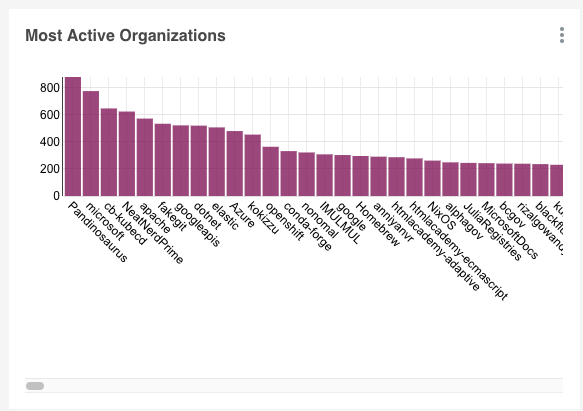
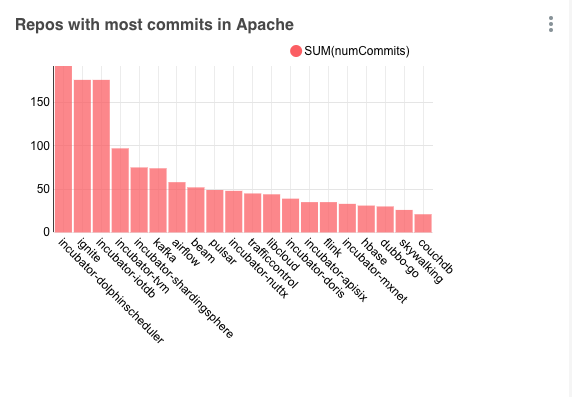
docker exec -it redash_worker_1 /bin/sh
pip install pinotdbdocker run \
--name pinot-quickstart \
-p 2123:2123 \
-p 9000:9000 \
-p 8000:8000 \
apachepinot/pinot:0.9.3 QuickStart -type batchfrom pinotdb import connect
conn = connect(host='host.docker.internal', port=8000, path='/query/sql', scheme='http')
curs = conn.cursor()
curs.execute("""
select
playerName, sum(runs) as total_runs
from baseballStats
group by playerName
order by total_runs desc
limit 10
""")
result = {}
result['columns'] = [
{
"name": "player_name",
"type": "string",
"friendly_name": "playerName"
},
{
"name": "total_runs",
"type": "integer",
"friendly_name": "total_runs"
}
]
rows = []
for row in curs:
record = {}
record['player_name'] = row[0]
record['total_runs'] = row[1]
rows.append(record)
result["rows"] = rowsfrom pinotdb import connect
conn = connect(host='host.docker.internal', port=8000, path='/query/sql', scheme='http')
curs = conn.cursor()
curs.execute("""
select
teamID, sum(runs) as total_runs
from baseballStats
group by teamID
order by total_runs desc
limit 10
""")
result = {}
result['columns'] = [
{
"name": "teamID",
"type": "string",
"friendly_name": "Team"
},
{
"name": "total_runs",
"type": "integer",
"friendly_name": "Total Runs"
}
]
rows = []
for row in curs:
record = {}
record['teamID'] = row[0]
record['total_runs'] = row[1]
rows.append(record)
result["rows"] = rowsfrom pinotdb import connect
conn = connect(host='host.docker.internal', port=8000, path='/query/sql', scheme='http')
curs = conn.cursor()
curs.execute("""
select
yearID, sum(strikeouts) as total_so
from baseballStats
group by yearID
order by yearID asc
limit 1000
""")
result = {}
result['columns'] = [
{
"name": "yearID",
"type": "integer",
"friendly_name": "Year"
},
{
"name": "total_so",
"type": "integer",
"friendly_name": "Total Strikeouts"
}
]
rows = []
for row in curs:
record = {}
record['yearID'] = row[0]
record['total_so'] = row[1]
rows.append(record)
result["rows"] = rowsversion: '3.7'
services:
zookeeper:
image: zookeeper:3.5.6
container_name: "zookeeper-wiki"
ports:
- "2181:2181"
environment:
ZOOKEEPER_CLIENT_PORT: 2181
ZOOKEEPER_TICK_TIME: 2000
kafka:
image: wurstmeister/kafka:latest
restart: unless-stopped
container_name: "kafka-wiki"
ports:
- "9092:9092"
expose:
- "9093"
depends_on:
- zookeeper
environment:
KAFKA_ZOOKEEPER_CONNECT: zookeeper-wiki:2181/kafka
KAFKA_BROKER_ID: 0
KAFKA_ADVERTISED_HOST_NAME: kafka-wiki
KAFKA_ADVERTISED_LISTENERS: PLAINTEXT://kafka-wiki:9093,OUTSIDE://localhost:9092
KAFKA_LISTENERS: PLAINTEXT://0.0.0.0:9093,OUTSIDE://0.0.0.0:9092
KAFKA_LISTENER_SECURITY_PROTOCOL_MAP: PLAINTEXT:PLAINTEXT,OUTSIDE:PLAINTEXT
pinot-controller:
image: apachepinot/pinot:0.10.0
command: "StartController -zkAddress zookeeper-wiki:2181 -dataDir /data"
container_name: "pinot-controller-wiki"
volumes:
- ./config:/config
- ./data:/data
restart: unless-stopped
ports:
- "9000:9000"
depends_on:
- zookeeper
pinot-broker:
image: apachepinot/pinot:0.10.0
command: "StartBroker -zkAddress zookeeper-wiki:2181"
restart: unless-stopped
container_name: "pinot-broker-wiki"
volumes:
- ./config:/config
ports:
- "8099:8099"
depends_on:
- pinot-controller
pinot-server:
image: apachepinot/pinot:0.10.0
command: "StartServer -zkAddress zookeeper-wiki:2181"
restart: unless-stopped
container_name: "pinot-server-wiki"
volumes:
- ./config:/config
depends_on:
- pinot-brokerdocker-compose uppip install sseclient-pyimport json
import pprint
import sseclient
import requests
def with_requests(url, headers):
"""Get a streaming response for the given event feed using requests."""
return requests.get(url, stream=True, headers=headers)
url = 'https://stream.wikimedia.org/v2/stream/recentchange'
headers = {'Accept': 'text/event-stream'}
response = with_requests(url, headers)
client = sseclient.SSEClient(response)
for event in client.events():
stream = json.loads(event.data)
pprint.pprint(stream)python wiki.py{'$schema': '/mediawiki/recentchange/1.0.0',
'bot': False,
'comment': '[[:File:Storemyr-Fagerbakken landskapsvernområde HVASSER '
'Oslofjorden Norway (Protected coastal forest Recreational area '
'hiking trails) Rituell-kultisk steinstreng sørøst i skogen (small '
'archeological stone string) Vår (spring) 2021-04-24.jpg]] removed '
'from category',
'id': 1923506287,
'meta': {'domain': 'commons.wikimedia.org',
'dt': '2022-05-12T09:57:00Z',
'id': '3800228e-43d8-440d-8034-c68977742653',
'offset': 3855767440,
'partition': 0,
'request_id': '930b17cc-f14a-4656-afa1-d15b79a8f666',
'stream': 'mediawiki.recentchange',
'topic': 'eqiad.mediawiki.recentchange',
'uri': 'https://commons.wikimedia.org/wiki/Category:Iron_Age_in_Norway'},
'namespace': 14,
'parsedcomment': '<a '
'href="/wiki/File:Storemyr-Fagerbakken_landskapsvernomr%C3%A5de_HVASSER_Oslofjorden_Norway_(Protected_coastal_forest_Recreational_area_hiking_trails)_Rituell-kultisk_steinstreng_s%C3%B8r%C3%B8st_i_skogen_(small_archeological_stone_string)_V%C3%A5r_(spring)_2021-04-24.jpg" '
'title="File:Storemyr-Fagerbakken landskapsvernområde '
'HVASSER Oslofjorden Norway (Protected coastal forest '
'Recreational area hiking trails) Rituell-kultisk '
'steinstreng sørøst i skogen (small archeological stone '
'string) Vår (spring) '
'2021-04-24.jpg">File:Storemyr-Fagerbakken '
'landskapsvernområde HVASSER Oslofjorden Norway (Protected '
'coastal forest Recreational area hiking trails) '
'Rituell-kultisk steinstreng sørøst i skogen (small '
'archeological stone string) Vår (spring) 2021-04-24.jpg</a> '
'removed from category',
'server_name': 'commons.wikimedia.org',
'server_script_path': '/w',
'server_url': 'https://commons.wikimedia.org',
'timestamp': 1652349420,
'title': 'Category:Iron Age in Norway',
'type': 'categorize',
'user': 'Krg',
'wiki': 'commonswiki'}
{'$schema': '/mediawiki/recentchange/1.0.0',
'bot': False,
'comment': '[[:File:Storemyr-Fagerbakken landskapsvernområde HVASSER '
'Oslofjorden Norway (Protected coastal forest Recreational area '
'hiking trails) Rituell-kultisk steinstreng sørøst i skogen (small '
'archeological stone string) Vår (spring) 2021-04-24.jpg]] removed '
'from category',
'id': 1923506289,
'meta': {'domain': 'commons.wikimedia.org',
'dt': '2022-05-12T09:57:00Z',
'id': '2b819d20-beca-46a5-8ce3-b2f3b73d2cbe',
'offset': 3855767441,
'partition': 0,
'request_id': '930b17cc-f14a-4656-afa1-d15b79a8f666',
'stream': 'mediawiki.recentchange',
'topic': 'eqiad.mediawiki.recentchange',
'uri': 'https://commons.wikimedia.org/wiki/Category:Cultural_heritage_monuments_in_F%C3%A6rder'},
'namespace': 14,
'parsedcomment': '<a '
'href="/wiki/File:Storemyr-Fagerbakken_landskapsvernomr%C3%A5de_HVASSER_Oslofjorden_Norway_(Protected_coastal_forest_Recreational_area_hiking_trails)_Rituell-kultisk_steinstreng_s%C3%B8r%C3%B8st_i_skogen_(small_archeological_stone_string)_V%C3%A5r_(spring)_2021-04-24.jpg" '
'title="File:Storemyr-Fagerbakken landskapsvernområde '
'HVASSER Oslofjorden Norway (Protected coastal forest '
'Recreational area hiking trails) Rituell-kultisk '
'steinstreng sørøst i skogen (small archeological stone '
'string) Vår (spring) '
'2021-04-24.jpg">File:Storemyr-Fagerbakken '
'landskapsvernområde HVASSER Oslofjorden Norway (Protected '
'coastal forest Recreational area hiking trails) '
'Rituell-kultisk steinstreng sørøst i skogen (small '
'archeological stone string) Vår (spring) 2021-04-24.jpg</a> '
'removed from category',
'server_name': 'commons.wikimedia.org',
'server_script_path': '/w',
'server_url': 'https://commons.wikimedia.org',
'timestamp': 1652349420,
'title': 'Category:Cultural heritage monuments in Færder',
'type': 'categorize',
'user': 'Krg',
'wiki': 'commonswiki'}docker exec -it kafka-wiki kafka-topics.sh \
--bootstrap-server localhost:9092 \
--create \
--topic wiki_events \
--partitions 5import json
import sseclient
import datetime
import requests
import time
from confluent_kafka import Producerdef with_requests(url, headers):
"""Get a streaming response for the given event feed using requests."""
return requests.get(url, stream=True, headers=headers)
def acked(err, msg):
if err is not None:
print("Failed to deliver message: {0}: {1}"
.format(msg.value(), err.str()))
def json_serializer(obj):
if isinstance(obj, (datetime.datetime, datetime.date)):
return obj.isoformat()
raise "Type %s not serializable" % type(obj)producer = Producer({'bootstrap.servers': 'localhost:9092'})
url = 'https://stream.wikimedia.org/v2/stream/recentchange'
headers = {'Accept': 'text/event-stream'}
response = with_requests(url, headers)
client = sseclient.SSEClient(response)
events_processed = 0
while True:
try:
for event in client.events():
stream = json.loads(event.data)
payload = json.dumps(stream, default=json_serializer, ensure_ascii=False).encode('utf-8')
producer.produce(topic='wiki_events',
key=str(stream['meta']['id']), value=payload, callback=acked)
events_processed += 1
if events_processed % 100 == 0:
print(f"{str(datetime.datetime.now())} Flushing after {events_processed} events")
producer.flush()
except Exception as ex:
print(f"{str(datetime.datetime.now())} Got error:" + str(ex))
response = with_requests(url, headers)
client = sseclient.SSEClient(response)
time.sleep(2)python wiki_to_kafka.py2022-05-12 10:58:34.449326 Flushing after 100 events
2022-05-12 10:58:39.151599 Flushing after 200 events
2022-05-12 10:58:43.399528 Flushing after 300 events
2022-05-12 10:58:47.350277 Flushing after 400 events
2022-05-12 10:58:50.847959 Flushing after 500 events
2022-05-12 10:58:54.768228 Flushing after 600 eventsdocker exec -it kafka-wiki kafka-run-class.sh kafka.tools.GetOffsetShell \
--broker-list localhost:9092 \
--topic wiki_eventswiki_events:0:42
wiki_events:1:61
wiki_events:2:52
wiki_events:3:56
wiki_events:4:58docker exec -it kafka-wiki kafka-console-consumer.sh \
--bootstrap-server localhost:9092 \
--topic wiki_events \
--from-beginning...
{"$schema": "/mediawiki/recentchange/1.0.0", "meta": {"uri": "https://en.wikipedia.org/wiki/Super_Wings", "request_id": "6f82e64d-220f-41f4-88c3-2e15f03ae504", "id": "c30cd735-1ead-405e-94d1-49fbe7c40411", "dt": "2022-05-12T10:05:36Z", "domain": "en.wikipedia.org", "stream": "mediawiki.recentchange", "topic": "eqiad.mediawiki.recentchange", "partition": 0, "offset": 3855779703}, "type": "log", "namespace": 0, "title": "Super Wings", "comment": "", "timestamp": 1652349936, "user": "2001:448A:50E0:885B:FD1D:2D04:233E:7647", "bot": false, "log_id": 0, "log_type": "abusefilter", "log_action": "hit", "log_params": {"action": "edit", "filter": "550", "actions": "tag", "log": 32575794}, "log_action_comment": "2001:448A:50E0:885B:FD1D:2D04:233E:7647 triggered [[Special:AbuseFilter/550|filter 550]], performing the action \"edit\" on [[Super Wings]]. Actions taken: Tag ([[Special:AbuseLog/32575794|details]])", "server_url": "https://en.wikipedia.org", "server_name": "en.wikipedia.org", "server_script_path": "/w", "wiki": "enwiki", "parsedcomment": ""}
{"$schema": "/mediawiki/recentchange/1.0.0", "meta": {"uri": "https://no.wikipedia.org/wiki/Brukerdiskusjon:Haros", "request_id": "a20c9692-f301-4faf-9373-669bebbffff4", "id": "566ee63e-8e86-4a7e-a1f3-562704306509", "dt": "2022-05-12T10:05:36Z", "domain": "no.wikipedia.org", "stream": "mediawiki.recentchange", "topic": "eqiad.mediawiki.recentchange", "partition": 0, "offset": 3855779714}, "id": 84572581, "type": "edit", "namespace": 3, "title": "Brukerdiskusjon:Haros", "comment": "/* Stor forbokstav / ucfirst */", "timestamp": 1652349936, "user": "Asav", "bot": false, "minor": false, "patrolled": true, "length": {"old": 110378, "new": 110380}, "revision": {"old": 22579494, "new": 22579495}, "server_url": "https://no.wikipedia.org", "server_name": "no.wikipedia.org", "server_script_path": "/w", "wiki": "nowiki", "parsedcomment": "<span dir=\"auto\"><span class=\"autocomment\"><a href=\"/wiki/Brukerdiskusjon:Haros#Stor_forbokstav_/_ucfirst\" title=\"Brukerdiskusjon:Haros\">→Stor forbokstav / ucfirst</a></span></span>"}
{"$schema": "/mediawiki/recentchange/1.0.0", "meta": {"uri": "https://es.wikipedia.org/wiki/Campo_de_la_calle_Industria", "request_id": "d45bd9af-3e2c-4aac-ae8f-e16d3340da76", "id": "7fb3956e-9bd2-4fa5-8659-72b266cdb45b", "dt": "2022-05-12T10:05:35Z", "domain": "es.wikipedia.org", "stream": "mediawiki.recentchange", "topic": "eqiad.mediawiki.recentchange", "partition": 0, "offset": 3855779718}, "id": 266270269, "type": "edit", "namespace": 0, "title": "Campo de la calle Industria", "comment": "/* Historia */", "timestamp": 1652349935, "user": "Raimon will", "bot": false, "minor": false, "length": {"old": 7566, "new": 7566}, "revision": {"old": 143485393, "new": 143485422}, "server_url": "https://es.wikipedia.org", "server_name": "es.wikipedia.org", "server_script_path": "/w", "wiki": "eswiki", "parsedcomment": "<span dir=\"auto\"><span class=\"autocomment\"><a href=\"/wiki/Campo_de_la_calle_Industria#Historia\" title=\"Campo de la calle Industria\">→Historia</a></span></span>"}
^CProcessed a total of 269 messages{
"schemaName": "wikipedia",
"dimensionFieldSpecs": [
{
"name": "id",
"dataType": "STRING"
},
{
"name": "wiki",
"dataType": "STRING"
},
{
"name": "user",
"dataType": "STRING"
},
{
"name": "title",
"dataType": "STRING"
},
{
"name": "comment",
"dataType": "STRING"
},
{
"name": "stream",
"dataType": "STRING"
},
{
"name": "domain",
"dataType": "STRING"
},
{
"name": "topic",
"dataType": "STRING"
},
{
"name": "type",
"dataType": "STRING"
},
{
"name": "uri",
"dataType": "STRING"
},
{
"name": "bot",
"dataType": "BOOLEAN"
},
{
"name": "metaJson",
"dataType": "STRING"
}
],
"dateTimeFieldSpecs": [
{
"name": "ts",
"dataType": "TIMESTAMP",
"format": "1:MILLISECONDS:EPOCH",
"granularity": "1:MILLISECONDS"
}
]
}{
"tableName": "wikievents",
"tableType": "REALTIME",
"segmentsConfig": {
"timeColumnName": "ts",
"schemaName": "wikipedia",
"replication": "1",
"replicasPerPartition": "1"
},
"tableIndexConfig": {
"invertedIndexColumns": [],
"rangeIndexColumns": [],
"autoGeneratedInvertedIndex": false,
"createInvertedIndexDuringSegmentGeneration": false,
"sortedColumn": [],
"bloomFilterColumns": [],
"loadMode": "MMAP",
"streamConfigs": {
"streamType": "kafka",
"stream.kafka.topic.name": "wiki_events",
"stream.kafka.broker.list": "kafka-wiki:9093",
"stream.kafka.consumer.type": "lowlevel",
"stream.kafka.consumer.prop.auto.offset.reset": "smallest",
"stream.kafka.consumer.factory.class.name": "org.apache.pinot.plugin.stream.kafka20.KafkaConsumerFactory",
"stream.kafka.decoder.class.name": "org.apache.pinot.plugin.stream.kafka.KafkaJSONMessageDecoder",
"realtime.segment.flush.threshold.rows": "1000",
"realtime.segment.flush.threshold.time": "24h",
"realtime.segment.flush.segment.size": "100M"
},
"tenants": {
"broker": "DefaultTenant",
"server": "DefaultTenant",
"tagOverrideConfig": {}
},
"noDictionaryColumns": [],
"onHeapDictionaryColumns": [],
"varLengthDictionaryColumns": [],
"enableDefaultStarTree": false,
"enableDynamicStarTreeCreation": false,
"aggregateMetrics": false,
"nullHandlingEnabled": false
},
"metadata": {},
"quota": {},
"routing": {},
"query": {},
"ingestionConfig": {
"transformConfigs": [
{
"columnName": "metaJson",
"transformFunction": "JSONFORMAT(meta)"
},
{
"columnName": "id",
"transformFunction": "JSONPATH(metaJson, '$.id')"
},
{
"columnName": "stream",
"transformFunction": "JSONPATH(metaJson, '$.stream')"
},
{
"columnName": "domain",
"transformFunction": "JSONPATH(metaJson, '$.domain')"
},
{
"columnName": "topic",
"transformFunction": "JSONPATH(metaJson, '$.topic')"
},
{
"columnName": "uri",
"transformFunction": "JSONPATH(metaJson, '$.uri')"
},
{
"columnName": "ts",
"transformFunction": "\"timestamp\" * 1000"
}
]
},
"isDimTable": false
}docker exec -it pinot-controller-wiki bin/pinot-admin.sh AddTable \
-tableConfigFile /config/table.json \
-schemaFile /config/schema.json \
-execselect domain, count(*)
from wikievents
group by domain
order by count(*) DESC
limit 10pip install dash pinotdb plotly pandasimport pandas as pd
from dash import Dash, html, dcc
import plotly.graph_objects as go
from pinotdb import connect
import plotly.express as px
external_stylesheets = ['https://codepen.io/chriddyp/pen/bWLwgP.css']
app = Dash(__name__, external_stylesheets=external_stylesheets)
app.title = "Wiki Recent Changes Dashboard"conn = connect(host='localhost', port=8099, path='/query/sql', scheme='http')
query = """select
count(*) FILTER(WHERE ts > ago('PT1M')) AS events1Min,
count(*) FILTER(WHERE ts <= ago('PT1M') AND ts > ago('PT2M')) AS events1Min2Min,
distinctcount(user) FILTER(WHERE ts > ago('PT1M')) AS users1Min,
distinctcount(user) FILTER(WHERE ts <= ago('PT1M') AND ts > ago('PT2M')) AS users1Min2Min,
distinctcount(domain) FILTER(WHERE ts > ago('PT1M')) AS domains1Min,
distinctcount(domain) FILTER(WHERE ts <= ago('PT1M') AND ts > ago('PT2M')) AS domains1Min2Min
from wikievents
where ts > ago('PT2M')
limit 1
"""
curs = conn.cursor()
curs.execute(query)
df_summary = pd.DataFrame(curs, columns=[item[0] for item in curs.description])from dash import html, dash_table
import plotly.graph_objects as go
def add_delta_trace(fig, title, value, last_value, row, column):
fig.add_trace(go.Indicator(
mode = "number+delta",
title= {'text': title},
value = value,
delta = {'reference': last_value, 'relative': True},
domain = {'row': row, 'column': column})
)
def add_trace(fig, title, value, row, column):
fig.add_trace(go.Indicator(
mode = "number",
title= {'text': title},
value = value,
domain = {'row': row, 'column': column})
)from dash_utils import add_delta_trace, add_tracefig = go.Figure(layout=go.Layout(height=300))
if df_summary["events1Min"][0] > 0:
if df_summary["events1Min"][0] > 0:
add_delta_trace(fig, "Changes", df_summary["events1Min"][0], df_summary["events1Min2Min"][0], 0, 0)
add_delta_trace(fig, "Users", df_summary["users1Min"][0], df_summary["users1Min2Min"][0], 0, 1)
add_delta_trace(fig, "Domain", df_summary["domains1Min"][0], df_summary["domains1Min2Min"][0], 0, 2)
else:
add_trace(fig, "Changes", df_summary["events1Min"][0], 0, 0)
add_trace(fig, "Users", df_summary["users1Min2Min"][0], 0, 1)
add_trace(fig, "Domains", df_summary["domains1Min2Min"][0], 0, 2)
fig.update_layout(grid = {"rows": 1, "columns": 3, 'pattern': "independent"},)
else:
fig.update_layout(annotations = [{"text": "No events found", "xref": "paper", "yref": "paper", "showarrow": False, "font": {"size": 28}}])
app.layout = html.Div([
html.H1("Wiki Recent Changes Dashboard", style={'text-align': 'center'}),
html.Div(id='content', children=[
dcc.Graph(figure=fig)
])
])
if __name__ == '__main__':
app.run_server(debug=True) python dashboard.pyquery = """
select ToDateTime(DATETRUNC('minute', ts), 'yyyy-MM-dd hh:mm:ss') AS dateMin, count(*) AS changes,
distinctcount(user) AS users,
distinctcount(domain) AS domains
from wikievents
where ts > ago('PT2M')
group by dateMin
order by dateMin desc
LIMIT 30
"""
curs.execute(query)
df_ts = pd.DataFrame(curs, columns=[item[0] for item in curs.description])
df_ts_melt = pd.melt(df_ts, id_vars=['dateMin'], value_vars=['changes', 'users', 'domains'])
line_chart = px.line(df_ts_melt, x='dateMin', y="value", color='variable', color_discrete_sequence =['blue', 'red', 'green'])
line_chart['layout'].update(margin=dict(l=0,r=0,b=0,t=40), title="Changes/Users/Domains per minute")
line_chart.update_yaxes(range=[0, df_ts["changes"].max() * 1.1])
app.layout = html.Div([
html.H1("Wiki Recent Changes Dashboard", style={'text-align': 'center'}),
html.Div(id='content', children=[
dcc.Graph(figure=fig),
dcc.Graph(figure=line_chart),
])
])app.layout = html.Div([
html.H1("Wiki Recent Changes Dashboard", style={'text-align': 'center'}),
html.Div(id='latest-timestamp', style={"padding": "5px 0", "text-align": "center"}),
dcc.Interval(
id='interval-component',
interval=1 * 1000,
n_intervals=0
),
html.Div(id='content', children=[
dcc.Graph(id="indicators"),
dcc.Graph(id="time-series"),
])
])@app.callback(
Output(component_id='latest-timestamp', component_property='children'),
Input('interval-component', 'n_intervals'))
def timestamp(n):
return html.Span(f"Last updated: {datetime.datetime.now()}")@app.callback(Output(component_id='indicators', component_property='figure'),
Input('interval-component', 'n_intervals'))
def indicators(n):
query = """
select count(*) FILTER(WHERE ts > ago('PT1M')) AS events1Min,
count(*) FILTER(WHERE ts <= ago('PT1M') AND ts > ago('PT2M')) AS events1Min2Min,
distinctcount(user) FILTER(WHERE ts > ago('PT1M')) AS users1Min,
distinctcount(user) FILTER(WHERE ts <= ago('PT1M') AND ts > ago('PT2M')) AS users1Min2Min,
distinctcount(domain) FILTER(WHERE ts > ago('PT1M')) AS domains1Min,
distinctcount(domain) FILTER(WHERE ts <= ago('PT1M') AND ts > ago('PT2M')) AS domains1Min2Min
from wikievents
where ts > ago('PT2M')
limit 1
"""
curs = connection.cursor()
curs.execute(query)
df_summary = pd.DataFrame(curs, columns=[item[0] for item in curs.description])
curs.close()
fig = go.Figure(layout=go.Layout(height=300))
if df_summary["events1Min"][0] > 0:
if df_summary["events1Min"][0] > 0:
add_delta_trace(fig, "Changes", df_summary["events1Min"][0], df_summary["events1Min2Min"][0], 0, 0)
add_delta_trace(fig, "Users", df_summary["users1Min"][0], df_summary["users1Min2Min"][0], 0, 1)
add_delta_trace(fig, "Domain", df_summary["domains1Min"][0], df_summary["domains1Min2Min"][0], 0, 2)
else:
add_trace(fig, "Changes", df_summary["events1Min"][0], 0, 0)
add_trace(fig, "Users", df_summary["users1Min2Min"][0], 0, 1)
add_trace(fig, "Domains", df_summary["domains1Min2Min"][0], 0, 2)
fig.update_layout(grid = {"rows": 1, "columns": 3, 'pattern': "independent"},)
else:
fig.update_layout(annotations = [{"text": "No events found", "xref": "paper", "yref": "paper", "showarrow": False, "font": {"size": 28}}])
return fig@app.callback(Output(component_id='time-series', component_property='figure'),
Input('interval-component', 'n_intervals'))
def time_series(n):
query = """
select ToDateTime(DATETRUNC('minute', ts), 'yyyy-MM-dd hh:mm:ss') AS dateMin, count(*) AS changes,
distinctcount(user) AS users,
distinctcount(domain) AS domains
from wikievents
where ts > ago('PT1H')
group by dateMin
order by dateMin desc
LIMIT 30
"""
curs = connection.cursor()
curs.execute(query)
df_ts = pd.DataFrame(curs, columns=[item[0] for item in curs.description])
curs.close()
df_ts_melt = pd.melt(df_ts, id_vars=['dateMin'], value_vars=['changes', 'users', 'domains'])
line_chart = px.line(df_ts_melt, x='dateMin', y="value", color='variable', color_discrete_sequence =['blue', 'red', 'green'])
line_chart['layout'].update(margin=dict(l=0,r=0,b=0,t=40), title="Changes/Users/Domains per minute")
line_chart.update_yaxes(range=[0, df_ts["changes"].max() * 1.1])
return line_chartimport pandas as pd
from dash import Dash, html, dash_table, dcc, Input, Output
import plotly.graph_objects as go
from pinotdb import connect
from dash_utils import add_delta_trace, add_trace
import plotly.express as px
import datetime
external_stylesheets = ['https://codepen.io/chriddyp/pen/bWLwgP.css']
app = Dash(__name__, external_stylesheets=external_stylesheets)
app.title = "Wiki Recent Changes Dashboard"
connection = connect(host="localhost", port="8099", path="/query/sql", scheme=( "http"))
@app.callback(Output(component_id='indicators', component_property='figure'),
Input('interval-component', 'n_intervals'))
def indicators(n):
query = """
select count(*) FILTER(WHERE ts > ago('PT1M')) AS events1Min,
count(*) FILTER(WHERE ts <= ago('PT1M') AND ts > ago('PT2M')) AS events1Min2Min,
distinctcount(user) FILTER(WHERE ts > ago('PT1M')) AS users1Min,
distinctcount(user) FILTER(WHERE ts <= ago('PT1M') AND ts > ago('PT2M')) AS users1Min2Min,
distinctcount(domain) FILTER(WHERE ts > ago('PT1M')) AS domains1Min,
distinctcount(domain) FILTER(WHERE ts <= ago('PT1M') AND ts > ago('PT2M')) AS domains1Min2Min
from wikievents
where ts > ago('PT2M')
limit 1
"""
curs = connection.cursor()
curs.execute(query)
df_summary = pd.DataFrame(curs, columns=[item[0] for item in curs.description])
curs.close()
fig = go.Figure(layout=go.Layout(height=300))
if df_summary["events1Min"][0] > 0:
if df_summary["events1Min"][0] > 0:
add_delta_trace(fig, "Changes", df_summary["events1Min"][0], df_summary["events1Min2Min"][0], 0, 0)
add_delta_trace(fig, "Users", df_summary["users1Min"][0], df_summary["users1Min2Min"][0], 0, 1)
add_delta_trace(fig, "Domain", df_summary["domains1Min"][0], df_summary["domains1Min2Min"][0], 0, 2)
else:
add_trace(fig, "Changes", df_summary["events1Min"][0], 0, 0)
add_trace(fig, "Users", df_summary["users1Min2Min"][0], 0, 1)
add_trace(fig, "Domains", df_summary["domains1Min2Min"][0], 0, 2)
fig.update_layout(grid = {"rows": 1, "columns": 3, 'pattern': "independent"},)
else:
fig.update_layout(annotations = [{"text": "No events found", "xref": "paper", "yref": "paper", "showarrow": False, "font": {"size": 28}}])
return fig
@app.callback(Output(component_id='time-series', component_property='figure'),
Input('interval-component', 'n_intervals'))
def time_series(n):
query = """
select ToDateTime(DATETRUNC('minute', ts), 'yyyy-MM-dd hh:mm:ss') AS dateMin, count(*) AS changes,
distinctcount(user) AS users,
distinctcount(domain) AS domains
from wikievents
where ts > ago('PT1H')
group by dateMin
order by dateMin desc
LIMIT 30
"""
curs = connection.cursor()
curs.execute(query)
df_ts = pd.DataFrame(curs, columns=[item[0] for item in curs.description])
curs.close()
df_ts_melt = pd.melt(df_ts, id_vars=['dateMin'], value_vars=['changes', 'users', 'domains'])
line_chart = px.line(df_ts_melt, x='dateMin', y="value", color='variable', color_discrete_sequence =['blue', 'red', 'green'])
line_chart['layout'].update(margin=dict(l=0,r=0,b=0,t=40), title="Changes/Users/Domains per minute")
line_chart.update_yaxes(range=[0, df_ts["changes"].max() * 1.1])
return line_chart
@app.callback(
Output(component_id='latest-timestamp', component_property='children'),
Input('interval-component', 'n_intervals'))
def timestamp(n):
return html.Span(f"Last updated: {datetime.datetime.now()}")
app.layout = html.Div([
    html.H1("Wiki Recent Changes Dashboard", style={'text-align': 'center'}),
    html.Div(id='latest-timestamp', style={"padding": "5px 0", "text-align": "center"}),
    dcc.Interval(
            id='interval-component',
            interval=1 * 1000,
            n_intervals=0
        ),
    html.Div(id='content', children=[
        dcc.Graph(id="indicators"),
        dcc.Graph(id="time-series"),
    ])
])
if __name__ == '__main__':
app.run_server(debug=True)


