Step-by-step guide for pushing your own data into the Pinot cluster
This example assumes you have set up your cluster using Pinot in Docker.
Preparing your data
Let's gather our data files and put them in pinot-quick-start/rawdata.
Supported file formats are CSV, JSON, AVRO, PARQUET, THRIFT, ORC. If you don't have sample data, you can use this sample CSV.
Creating a schema
Schema is used to define the columns and data types of the Pinot table. A detailed overview of the schema can be found in .
Columns are categorized into 3 types:
Column Type
Description
In our example transcript-schema, the studentID,firstName,lastName,gender,subject columns are the dimensions, the score column is the metric and timestampInEpoch is the time column.
Once you have identified the dimensions, metrics and time columns, create a schema for your data, using the following reference.
Creating a table configuration
A table configuration is used to define the configuration related to the Pinot table. A detailed overview of the table can be found in .
Here's the table configuration for the sample CSV file. You can use this as a reference to build your own table configuration. Edit the tableName and schemaName.
Uploading your table configuration and schema
Review the directory structure so far.
Upload the table configuration using the following command.
Use the that is running on your Pinot instance to review the table configuration and schema and make sure it was successfully uploaded. This link uses localhost as an example.
Creating a segment
Pinot table data is stored as Pinot segments. A detailed overview of segments can be found in .
To generate a segment, first create a job specification (JobSpec) yaml file. A JobSpec yaml file contains all the information regarding data format, input data location, and pinot cluster coordinates. Copy the following job specification file (example from Pinot quickstart file). If you're using your own data, be sure to do the following:
Replace transcript with your table name
Here is some sample output.
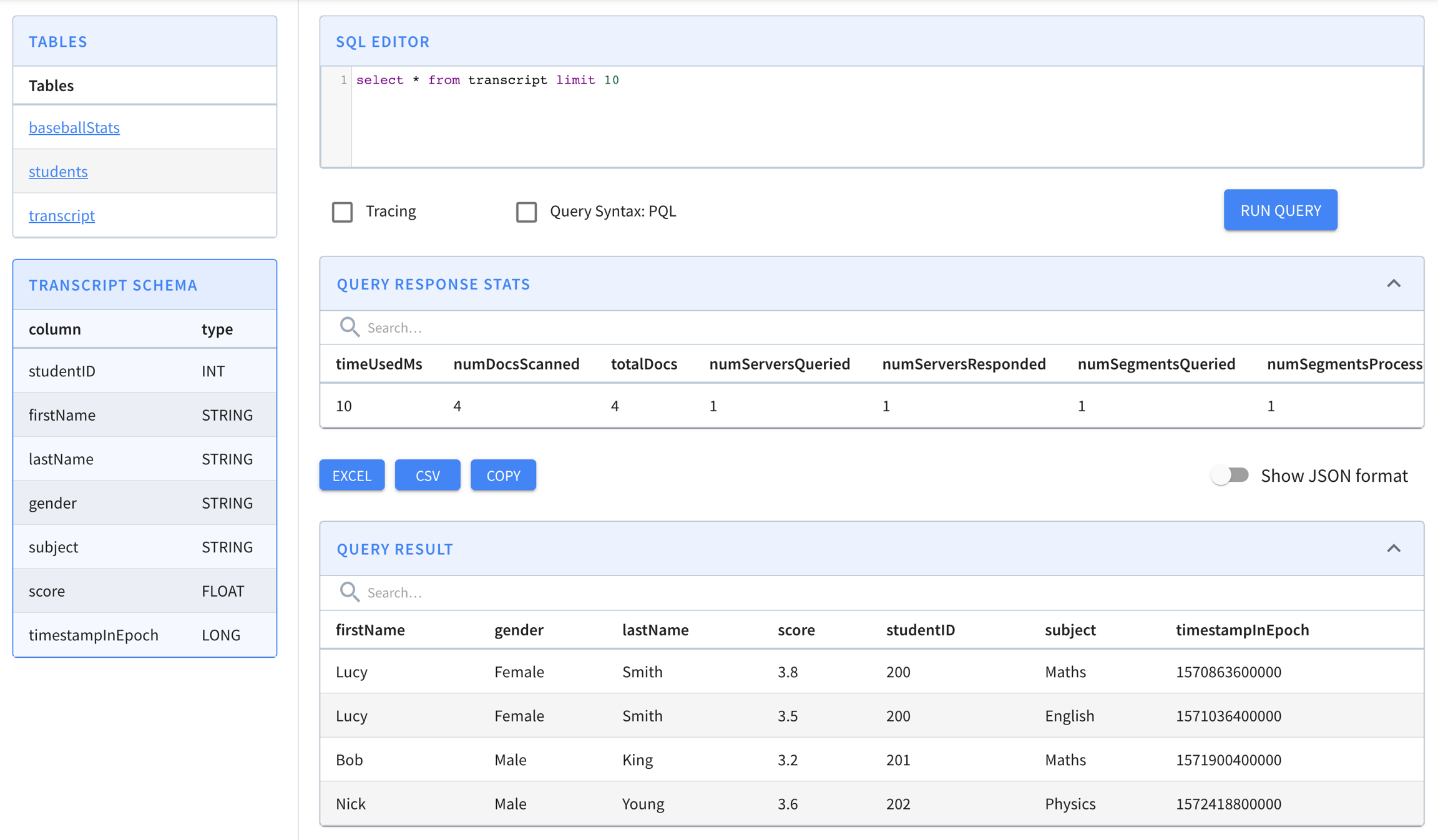
Querying your data
If everything worked, find your table in the to run queries against it.
mkdir -p /tmp/pinot-quick-start/rawdata
Set the correct recordReaderSpec
Depending if you're using Docker or a launcher script, choose one of the following commands to generate a segment to upload to Pinot:
Dimensions
Typically used in filters and group by, for slicing and dicing into data
Metrics
Typically used in aggregations, represents the quantitative data
Time
Optional column, represents the timestamp associated with each row
SegmentGenerationJobSpec:
!!org.apache.pinot.spi.ingestion.batch.spec.SegmentGenerationJobSpec
excludeFileNamePattern: null
executionFrameworkSpec: {extraConfigs: null, name: standalone, segmentGenerationJobRunnerClassName: org.apache.pinot.plugin.ingestion.batch.standalone.SegmentGenerationJobRunner,
  segmentTarPushJobRunnerClassName: org.apache.pinot.plugin.ingestion.batch.standalone.SegmentTarPushJobRunner,
  segmentUriPushJobRunnerClassName: org.apache.pinot.plugin.ingestion.batch.standalone.SegmentUriPushJobRunner}
includeFileNamePattern: glob:**\/*.csv
inputDirURI: /tmp/pinot-quick-start/rawdata/
jobType: SegmentCreationAndTarPush
outputDirURI: /tmp/pinot-quick-start/segments
overwriteOutput: true
pinotClusterSpecs:
- {controllerURI: 'http://localhost:9000'}
pinotFSSpecs:
- {className: org.apache.pinot.spi.filesystem.LocalPinotFS, configs: null, scheme: file}
pushJobSpec: null
recordReaderSpec: {className: org.apache.pinot.plugin.inputformat.csv.CSVRecordReader,
  configClassName: org.apache.pinot.plugin.inputformat.csv.CSVRecordReaderConfig,
  configs: null, dataFormat: csv}
segmentNameGeneratorSpec: null
tableSpec: {schemaURI: 'http://localhost:9000/tables/transcript/schema', tableConfigURI: 'http://localhost:9000/tables/transcript',
  tableName: transcript}

Trying to create instance for class org.apache.pinot.plugin.ingestion.batch.standalone.SegmentGenerationJobRunner
Initializing PinotFS for scheme file, classname org.apache.pinot.spi.filesystem.LocalPinotFS
Finished building StatsCollector!
Collected stats for 4 documents
Using fixed bytes value dictionary for column: studentID, size: 9
Created dictionary for STRING column: studentID with cardinality: 3, max length in bytes: 3, range: 200 to 202
Using fixed bytes value dictionary for column: firstName, size: 12
Created dictionary for STRING column: firstName with cardinality: 3, max length in bytes: 4, range: Bob to Nick
Using fixed bytes value dictionary for column: lastName, size: 15
Created dictionary for STRING column: lastName with cardinality: 3, max length in bytes: 5, range: King to Young
Created dictionary for FLOAT column: score with cardinality: 4, range: 3.2 to 3.8
Using fixed bytes value dictionary for column: gender, size: 12
Created dictionary for STRING column: gender with cardinality: 2, max length in bytes: 6, range: Female to Male
Using fixed bytes value dictionary for column: subject, size: 21
Created dictionary for STRING column: subject with cardinality: 3, max length in bytes: 7, range: English to Physics
Created dictionary for LONG column: timestampInEpoch with cardinality: 4, range: 1570863600000 to 1572418800000
Start building IndexCreator!
Finished records indexing in IndexCreator!
Finished segment seal!
Converting segment: /var/folders/3z/qn6k60qs6ps1bb6s2c26gx040000gn/T/pinot-1583443148720/output/transcript_OFFLINE_1570863600000_1572418800000_0 to v3 format
v3 segment location for segment: transcript_OFFLINE_1570863600000_1572418800000_0 is /var/folders/3z/qn6k60qs6ps1bb6s2c26gx040000gn/T/pinot-1583443148720/output/transcript_OFFLINE_1570863600000_1572418800000_0/v3
Deleting files in v1 segment directory: /var/folders/3z/qn6k60qs6ps1bb6s2c26gx040000gn/T/pinot-1583443148720/output/transcript_OFFLINE_1570863600000_1572418800000_0
Starting building 1 star-trees with configs: [StarTreeV2BuilderConfig[splitOrder=[studentID, firstName],skipStarNodeCreation=[],functionColumnPairs=[org.apache.pinot.core.startree.v2.AggregationFunctionColumnPair@3a48efdc],maxLeafRecords=1]] using OFF_HEAP builder
Starting building star-tree with config: StarTreeV2BuilderConfig[splitOrder=[studentID, firstName],skipStarNodeCreation=[],functionColumnPairs=[org.apache.pinot.core.startree.v2.AggregationFunctionColumnPair@3a48efdc],maxLeafRecords=1]
Generated 3 star-tree records from 4 segment records
Finished constructing star-tree, got 9 tree nodes and 4 records under star-node
Finished creating aggregated documents, got 6 aggregated records
Finished building star-tree in 10ms
Finished building 1 star-trees in 27ms
Computed crc = 3454627653, based on files [/var/folders/3z/qn6k60qs6ps1bb6s2c26gx040000gn/T/pinot-1583443148720/output/transcript_OFFLINE_1570863600000_1572418800000_0/v3/columns.psf, /var/folders/3z/qn6k60qs6ps1bb6s2c26gx040000gn/T/pinot-1583443148720/output/transcript_OFFLINE_1570863600000_1572418800000_0/v3/index_map, /var/folders/3z/qn6k60qs6ps1bb6s2c26gx040000gn/T/pinot-1583443148720/output/transcript_OFFLINE_1570863600000_1572418800000_0/v3/metadata.properties, /var/folders/3z/qn6k60qs6ps1bb6s2c26gx040000gn/T/pinot-1583443148720/output/transcript_OFFLINE_1570863600000_1572418800000_0/v3/star_tree_index, /var/folders/3z/qn6k60qs6ps1bb6s2c26gx040000gn/T/pinot-1583443148720/output/transcript_OFFLINE_1570863600000_1572418800000_0/v3/star_tree_index_map]
Driver, record read time : 0
Driver, stats collector time : 0
Driver, indexing time : 0
Tarring segment from: /var/folders/3z/qn6k60qs6ps1bb6s2c26gx040000gn/T/pinot-1583443148720/output/transcript_OFFLINE_1570863600000_1572418800000_0 to: /var/folders/3z/qn6k60qs6ps1bb6s2c26gx040000gn/T/pinot-1583443148720/output/transcript_OFFLINE_1570863600000_1572418800000_0.tar.gz
Size for segment: transcript_OFFLINE_1570863600000_1572418800000_0, uncompressed: 6.73KB, compressed: 1.89KB
Trying to create instance for class org.apache.pinot.plugin.ingestion.batch.standalone.SegmentTarPushJobRunner
Initializing PinotFS for scheme file, classname org.apache.pinot.spi.filesystem.LocalPinotFS
Start pushing segments: [/tmp/pinot-quick-start/segments/transcript_OFFLINE_1570863600000_1572418800000_0.tar.gz]... to locations: [org.apache.pinot.spi.ingestion.batch.spec.PinotClusterSpec@243c4f91] for table transcript
Pushing segment: transcript_OFFLINE_1570863600000_1572418800000_0 to location: http://localhost:9000 for table transcript
Sending request: http://localhost:9000/v2/segments?tableName=transcript to controller: nehas-mbp.hsd1.ca.comcast.net, version: Unknown
Response for pushing table transcript segment transcript_OFFLINE_1570863600000_1572418800000_0 to location http://localhost:9000 - 200: {"status":"Successfully uploaded segment: transcript_OFFLINE_1570863600000_1572418800000_0 of table: transcript"}