> For the complete documentation index, see [llms.txt](https://docs.pinot.apache.org/llms.txt). Markdown versions of documentation pages are available by appending `.md` to page URLs; this page is available as [Markdown](https://docs.pinot.apache.org/release-1.5.1/users/user-guide-query/time-series-queries.md).
# Time Series Queries
Pinot has a "Time Series Engine" that can be used to support any Time Series Query Language, provided an appropriate Time Series Language Plugin is implemented.
Languages such as PromQL, Uber's M3QL, and many more can be implemented using the Plugin. A toy language plugin, intended only for demo/testing purposes, is included in the apache/pinot repo.
{% hint style="info" %}
**Status:** The Time Series Engine is in **Beta** as of Pinot 1.4 and is slated to be **Generally Available** in Pinot 1.5.
{% endhint %}
## Running Time Series Queries with Quickstart
You can use the `time_series` Quickstart type to run Pinot with the Time Series Engine enabled. The Quickstart uses the toy language implementation included in the apache/pinot repo.
You can refer to our [Quick Start Examples](/release-1.5.1/basics/getting-started/quick-start.md) page for more information.
## Running Time Series Queries in Production
Assuming you have implemented your own Timeseries Language Plugin, with the code-name "mytsql", you can set the following configurations in each of Controller, Broker and Server configs. The class and series builder factory names are hypothetical. Note that the key of the planner and series builder configs contain the language code.
```properties
pinot.timeseries.languages=mytsql
pinot.timeseries.mytsql.logical.planner.class=com.example.mytsql.MyTSLogicalPlanner
pinot.timeseries.mytsql.series.builder.factory=com.example.mytsql.MyTSQLSeriesBuilderFactory
```
Pinot even allows running multiple Time Series Query Languages. For instance, if you had another query language plugin for `promql` and you wanted to run it alongside `mytsql`, the configs would look like:
```properties
pinot.timeseries.languages=mytsql,promql
pinot.timeseries.mytsql.logical.planner.class=com.example.mytsql.MyTSLogicalPlanner
pinot.timeseries.mytsql.series.builder.factory=com.example.mytsql.MyTSQLSeriesBuilderFactory
pinot.timeseries.promql.logical.planner.class=com.example.promql.PromQLLogicalPlanner
pinot.timeseries.promql.series.builder.factory=com.example.promql.PromQLSeriesBuilderFactory
```
## Time Series Features
### Controller UI
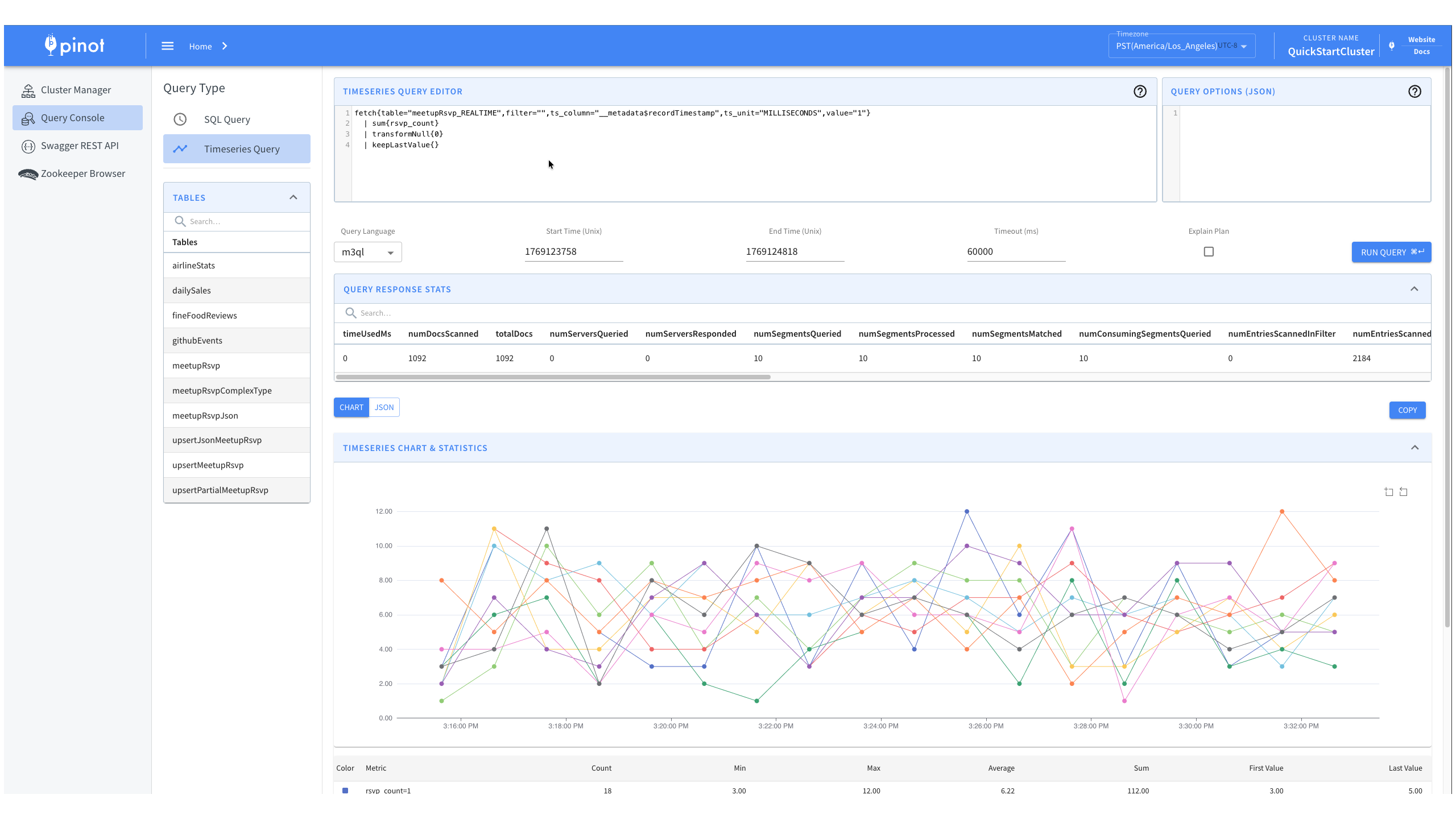
Pinot includes a Time Series Query page in the Controller UI for easy querying and visualization at `http://localhost:9000`.
Time Series Query UI showing the query editor, time controls, and visualization options
The UI includes a query editor with language selector (compatible with custom language plugins) and visualizes results as both an interactive time series chart and raw JSON. It also displays query statistics and supports explain plans and query options for enhanced control.
### Broker-Compatible API
The time series API `POST /query/timeseries` returns responses in the standard `BrokerResponse` format, allowing existing Pinot client libraries to work without modification. The response includes familiar query statistics like `numDocsScanned`, `numSegmentsQueried`, and `totalDocs`, along with the same exception handling structure as SQL queries.
Time series data is returned in a `ResultTable` with the following key columns:
* `ts` - Array of timestamps for each time bucket
* `values` - Array of metric values corresponding to each timestamp
* `__name__` - Serialized tag key-value pairs identifying the series
* Additional columns for each tag/label in the series
### Other Features
* **Auth Support** - Time series queries support the same authentication and authorization mechanisms as SQL queries (user roles and table-level permissions).
* **Query Options** - Custom query options can be passed as part of the request to modify query execution behavior (both for your custom plugin and the underlying Pinot engine).
* **Query Event Listeners** - Time series queries trigger the same query event listeners as SQL queries, enabling logging, auditing, and custom metrics.
* **Explain Plans** - Explain plans help visualize the logical query plan generated by your custom language plugin.
---
# Agent Instructions
This documentation is published with GitBook. GitBook is the documentation platform designed so that both humans and AI agents can read, navigate, and reason over technical content effectively. Learn more at gitbook.com.
## Querying This Documentation
If you need additional information that is not directly available in this page, you can query the documentation by asking a question.
Perform an HTTP GET request on the following URL with the `ask` and `goal` query parameters:
```
GET https://docs.pinot.apache.org/release-1.5.1/users/user-guide-query/time-series-queries.md?ask=&goal=
```
`ask` is the immediate question: it should be specific, self-contained, and written in natural language.
`goal` is what the user is ultimately trying to achieve, the reason they need the answer. Sharing it helps GitBook give you a better, more relevant answer. A goal is most helpful when it describes the outcome the user wants rather than restating the question. For example, with `ask=how do I create an API token`, a goal like `automate deployments from our CI pipeline` lets GitBook tailor the answer to that use case.
The response will contain a direct answer to the question and relevant excerpts and sources from the documentation.
Use this mechanism when the answer is not explicitly present in the current page, you need clarification or additional context, or you want to retrieve related documentation sections.