# Query using Cursors

Cursors allow Pinot clients to consume query results in smaller chunks. With this approach,

* clients use less memory because client-side caching of results is not required.&#x20;
* application logic is simpler. For example an app that paginates through results in a table or a graph can get the required slice of results when a page refreshes.

Features of the cursor implementation in Apache Pinot are:

* A query is run once and its results are stored in a temporary location. The results are cleaned up after a configurable period of time.
* The first page of results is returned in the response.&#x20;
* A client can iterate through the rest of the result set by using the responseStore API.
* The client can seek forward and backward as well as change the number of rows in the repsonse.
* Cursors can be used with Single-Stage and Multi-Stage Query Engines.

## Concepts

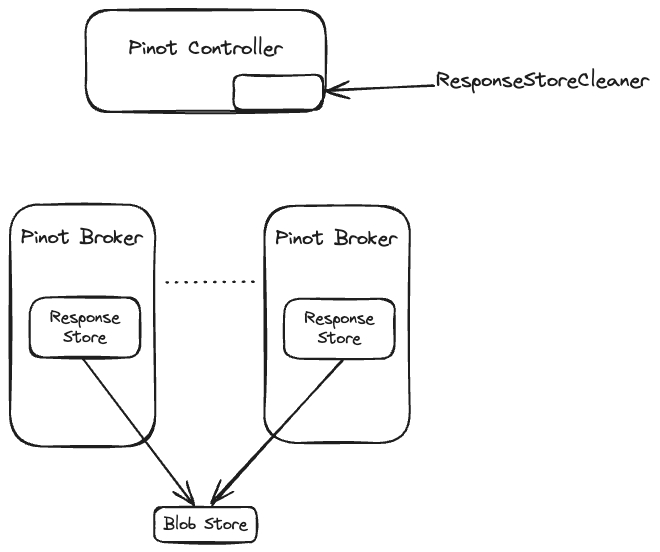
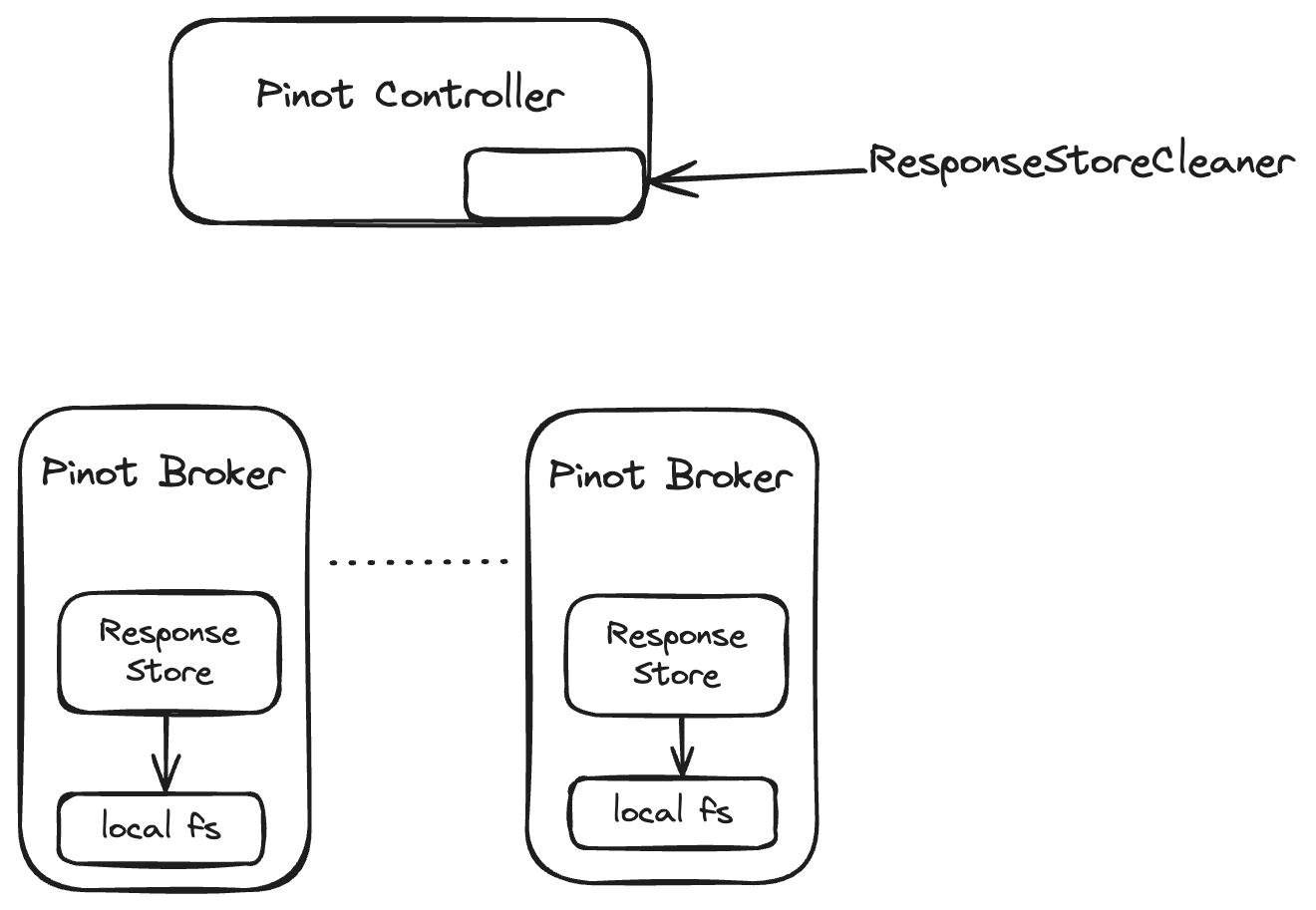
<figure><img src="/files/d5rAAsIO3VHQLGRDeqTn" alt=""><figcaption><p>System Diagram of Cursor Components</p></figcaption></figure>

### Response Store

A ResponseStore stores the results of a query. The ResponseStore is created and managed by the broker which executes the query.&#x20;

*A client should access a response store from the same broker where it submitted a query.*

Clients can determine the broker host & port from the client response. An error is thrown if clients try to access ResponseStores from another broker.&#x20;

A ResponseStore is identified by the requestId of the query.

Any user that has READ permissions on all tables in the query can read from the response store.&#x20;

New implementations of ResponseStore can be added by implementing the ResponseStore SPI. A specific implementation of the ResponseStore can be chosen at startup by specifying the  config parameter *pinot.broker.cursor.response.store.type.*&#x20;

*Note that only ONE implementation of the ResponseStore can be used in a cluster.*&#x20;

#### FsResponseStore

*FsResponseStore* is the default implementation of the ResponseStore. Internally it uses *PinotFileSystem.* FsResponseStore can be configured to use any filesystem supported by PinotFileSystem such as HDFS, Amazon S3, Google Cloud Storage or Azure DataLake.&#x20;

*By default, the broker's local storage is used to store responses.*

```
# Example configuration for file using local storage

pinot.broker.cursor.response.store.type=file
pinot.broker.cursor.response.store.file.temp.dir=/home/pinot/broker/data/cursors/temp
pinot.broker.cursor.response.store.file.data.dir=file:///home/pinot/data/cursors/data

#Example configuration for file using S3

pinot.broker.cursor.response.store.type=file
pinot.broker.storage.factory.s3.region=us-west-2
pinot.broker.storage.factory.class.s3=org.apache.pinot.plugin.filesystem.S3PinotFS
pinot.broker.cursor.response.store.file.temp.dir=/home/pinot/broker/data/cursors/temp
pinot.broker.cursor.response.store.file.data.dir.data.dir=s3://bucket/dir/query-results/

```

<figure><img src="/files/7C1RCdkbqZDrxoZ5rLCF" alt=""><figcaption><p>ResponseStore using Blob Store like AWS S3</p></figcaption></figure>

### ResponseStoreCleaner

This is a periodic job that runs on the controller. A ResponseStore has an expiration time. The ResponseStoreCleaner sends a DELETE request to brokers to delete expired ResponseStores.

## User APIs

### POST /query/sql

A new  API parameter has been added to trigger pagination.&#x20;

The API accepts the following new optional query parameters:

* getCursor(boolean):&#x20;
* numRows (int): The number of rows to return in the first page.

```sh

curl --request POST http://localhost:8000/query/sql?getCursor=true&numRows=1 \
  --data '{"sql":"SELECT * FROM nation limit 100"}' | jq

Response:
{
  "resultTable": {
    "dataSchema": {
      "columnNames": [
        "n_comment",
        "n_name",
        "n_nationkey",
        "n_regionkey"
      ],
      "columnDataTypes": [
        "STRING",
        "STRING",
        "INT",
        "INT"
      ]
    },
    "rows": [
      [
        " haggle. carefully final deposits detect slyly agai",
        "ALGERIA",
        0,
        0
      ]
    ]
  },
  "numRowsResultSet": 25,
  "requestId": "236490978000000006",
  "offset": 0,
  "numRows": 1,
  "cursorResultWriteTimeMs": 4,
  "submissionTimeMs": 1734928302801,
  "expirationTimeMs": 1734931902801,
  "brokerHost": "127.0.0.1",
  "brokerPort": 8000,
  "bytesWritten": 2489,
  "cursorFetchTimeMs": 0,
}
```

The output above shows response fields that are specific to cursor responses. Other than  numRowsResultSet and requestId, fields common with BrokerResponse are not shown for brevity.

| Field                   | Description                                                                                                                             |
| ----------------------- | --------------------------------------------------------------------------------------------------------------------------------------- |
| numRowsResultSet        | Total numbers of rows in the result set. Same as in default BrokerResponse                                                              |
| requestId               | The unique ID for the query. It has to be used in subsequent calls to cursor API. Same as in default BrokerResponse                     |
| offset                  | The offset of the first row in the resultTable.                                                                                         |
| numRows                 | The number of rows in the resultTable.                                                                                                  |
| cursorResultWriteTimeMs | Time in milliseconds to write the response to ResponseStore. It is applicable only for the query submission API.                        |
| submissionTimeMs        | Unix timestamp in milliseconds when the query was submitted.                                                                            |
| expirationTimeMs        | Expiration time of the ResponseStore in unix timestamp in milliseconds.                                                                 |
| brokerHost              | Hostname or IP address of the broker that manages the ResponseStore. All subsequent cursor API calls should be directed to this broker. |
| brokerPort              | The port of the broker that manages the ResponseStore                                                                                   |
| bytesWritten            | The number of bytes written to ResponseStore when storing the result set.                                                               |
| cursorFetchTimeMs       | Time in milliseconds to fetch the cursor from ResponseStore. It is applicable for cursor fetch API.                                     |

### GET /responseStore/{requestId}/results

This is broker API that can be used to iterate over the result set of a query in a ResponseStore.&#x20;

The API accepts the following query parameters:

* offset (int) (required): Offset of the first row to be fetched. Offset starts from 0 for the first row in the resultset.
* numRows (int) (optional): The number of rows in the page. If not specified, the value specified by the config parameter "pinot.broker.cursor.fetch.rows" is used.

```sh
curl -X GET http://localhost:8000/responseStore/236490978000000006/results\?offset\=1\&numRows\=1 | jq

{
  "resultTable": {
    "dataSchema": {
      "columnNames": [
        "n_comment",
        "n_name",
        "n_nationkey",
        "n_regionkey"
      ],
      "columnDataTypes": [
        "STRING",
        "STRING",
        "INT",
        "INT"
      ]
    },
    "rows": [
      [
        "al foxes promise slyly according to the regular accounts. bold requests alon",
        "ARGENTINA",
        1,
        1
      ]
    ]
  },
  "numRowsResultSet": 25,
  "requestId": "236490978000000006",
  "offset": 1,
  "numRows": 1,
  "cursorResultWriteTimeMs": 0,
  "submissionTimeMs": 1734928302801,
  "expirationTimeMs": 1734931902801,
  "brokerHost": "127.0.0.1",
  "brokerPort": 8000,
  "bytesWritten": 2489,
  "cursorFetchTimeMs": 1,
}
```

### GET /responseStore/{requestId}/

Returns the BrokerResponse metadata of the query.

The API accepts the following URL parameters:

* requestId (required)

## Admin APIs

### GET /responseStore

Returns a list of ResponseStores. Only the response metadata is returned.

```sh
curl -X GET http://localhost:8000/responseStore | jq

[
  {
    "requestId": "236490978000000005",
    ...
  },
  {
    "requestId": "236490978000000006",
    ...
  }
]
```

### DELETE /responseStore/{requestId}/

Delete the results of a query.

The API accepts the following URL parameters:

* requestId (required)

## Configuration

Configuration parameters with *pinot.broker* prefix are Broker configuration parameters.

Configuration parameters with *controller* prefix are Controller configuration parameters.

<table><thead><tr><th width="319">Configuration</th><th>Default</th><th>Description</th></tr></thead><tbody><tr><td>pinot.broker.cursor.response.store.type</td><td>file</td><td>Specifies the ResponseStore type to instantiate.</td></tr><tr><td>pinot.broker.cursor.response.store.file.data.dir</td><td>{java.io.tmpdir}/broker/responseStore/data</td><td>Directory where the responses will be stored.</td></tr><tr><td>pinot.broker.cursor.response.store.file.temp.dir</td><td>{java.io.tmpdir}/broker/responseStore/temp</td><td>Directory where temporary files will be stored.</td></tr><tr><td>pinot.broker.cursor.response.store.expiration</td><td>1h</td><td>Time To Live for a response store.</td></tr><tr><td>pinot.broker.cursor.fetch.rows</td><td>10000</td><td>The default number of rows in a cursor response.</td></tr><tr><td>controller.cluster.response.store.cleaner.frequencyPeriod</td><td>1h</td><td>The frequency of ResponseStoreCleaner</td></tr><tr><td>controller.cluster.response.store.cleaner.initialDelay</td><td>random delay between 0-300 seconds</td><td>The initial delay before the first run of the periodic task.</td></tr></tbody></table>


---

# Agent Instructions: Querying This Documentation

If you need additional information that is not directly available in this page, you can query the documentation dynamically by asking a question.

Perform an HTTP GET request on the current page URL with the `ask` query parameter:

```
GET https://docs.pinot.apache.org/release-1.4.0/for-users/user-guide-query/query-using-cursors.md?ask=<question>
```

The question should be specific, self-contained, and written in natural language.
The response will contain a direct answer to the question and relevant excerpts and sources from the documentation.

Use this mechanism when the answer is not explicitly present in the current page, you need clarification or additional context, or you want to retrieve related documentation sections.