# Multistage Lite Mode

{% hint style="warning" %}
MSE Lite Mode is included in Pinot 1.4 and is currently in Beta.
{% endhint %}

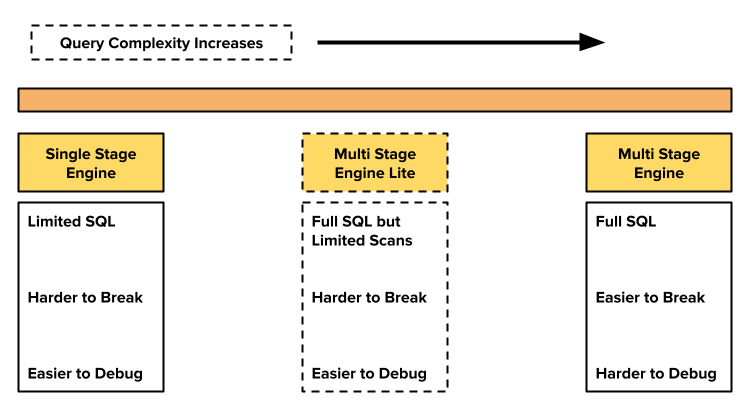
<figure><img src="https://content.gitbook.com/content/ty6SYllypxp3MTxsZRrb/blobs/XvmVkS4uVuzEi69eeXTL/lite-mode-idea.png" alt="" width="563"><figcaption></figcaption></figure>

Multistage Engine (MSE) Lite Mode is a new Query Mode that aims to enable safe access to the MSE for all Pinot users. One of the risks with running regular MSE queries is that users can easily write queries that scan a lot of records or run significantly expensive operations. Such queries can impact the reliability of a tenant and create friction in onboarding new use-cases. Lite Mode aims to address this problem.

It is based on the observation that most of the users need access to advanced SQL features like Window Functions, Subqueries, etc., and aren't interested in scanning a lot of data or running fully Distributed Joins.

### Overview

MSE Lite Mode has the following key characteristics:

* Users can still use all MSE query features like Window Functions, Subqueries, Joins, etc.
* But, the maximum number of rows returned by a Leaf Stage will be set to a user configurable value. The default value is `100,000`.
* Query execution follows a scatter-gather paradigm, similar to the Single-stage Engine. This is different from regular MSE that uses shuffles across Pinot Servers.
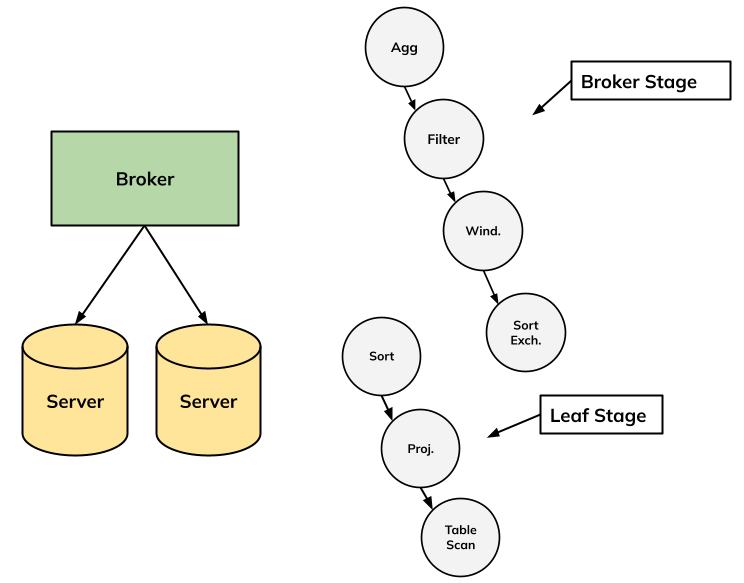
* Leaf stage(s) are run in the Servers, and all other operators are run using a single thread in the Broker.

Leaf Stage in a Multistage Engine query usually refers to Table Scan, an optional Project, an optional Filter and an optional Aggregate Plan Node.

At present, all joins in MSE Lite Mode are run in the Broker. This may change with the next release, since Colocated Joins can theoretically be run in the Servers.

### Example

To illustrate how MSE Lite Mode can be safely enabled without significant reliability risks, consider the query below based on the `colocated_join` Quickstart. If this query were allowed in production with the regular MSE, it would scan all the rows of the `userFactEvents` table. With Lite Mode, the full scan will be prevented because Lite Mode will automatically add a Sort to the leaf stage with a configurable limit (aka "fetch") value.

```sql
SET useMultistageEngine = true;
SET usePhysicalOptimizer = true;
SET useLiteMode = true;

EXPLAIN PLAN FOR WITH ordered_events AS (
  SELECT 
    cityName,
    tripAmount,
    ROW_NUMBER() OVER (
      ORDER BY ts DESC
    ) as row_num
  FROM userFactEvents
),
filtered_events AS (
  SELECT 
    *
  FROM ordered_events
  WHERE row_num < 1000
)
SELECT 
  cityName,
  SUM(tripAmount) as cityTotal
FROM filtered_events
GROUP BY cityName
```

The query plan for this query would be as follows. The window function, the filter in the filtered-events table, and the aggregation would be run in the Pinot Broker using a single thread. We assume that the Pinot Broker is configured with the lite mode limit value of 100k records:

<figure><img src="https://content.gitbook.com/content/ty6SYllypxp3MTxsZRrb/blobs/sMT2hRMpgnJhmilFKGsM/image.png" alt="" width="558"><figcaption></figcaption></figure>

```iecst
PhysicalAggregate(group=[{0}], agg#0=[$SUM0($1)], aggType=[DIRECT])
  PhysicalFilter(condition=[<($3, 1000)])
    PhysicalWindow(window#0=[window(order by [2 DESC] rows between UNBOUNDED PRECEDING and CURRENT ROW aggs [ROW_NUMBER()])])
      PhysicalExchange(exchangeStrategy=[SINGLETON_EXCHANGE], collation=[[2 DESC]])
        PhysicalSort(fetch=[100000], collation=[[2 DESC]])  <== added by Lite Mode
          PhysicalProject(cityName=[$3], tripAmount=[$7], ts=[$9])
            PhysicalTableScan(table=[[default, userFactEvents]])
```

### Enabling Lite Mode

To use Lite Mode, you can use the following query options.

```sql
SET useMultistageEngine=true;
SET usePhysicalOptimizer=true;  -- enables the new Physical MSE Query Optimizer
SET useLiteMode=true;           -- enables Lite Mode
```

### Running Non-Leaf Stages in Pinot Servers

By default Lite Mode will run the non-leaf stage in the Broker. If you want to run the non-leaf stages in Pinot Servers, you can set the following query option to false. In this case, a random server will be picked for the non-leaf stage.

```sql
SET runInBroker=false;
```

### Configuration

You can set the following configs in your Pinot Broker.

<table><thead><tr><th width="244.4921875">Configuration Key</th><th width="128.515625">Default</th><th>Description</th></tr></thead><tbody><tr><td>pinot.broker.multistage.lite.mode.leaf.stage.limit</td><td>100000</td><td>The maximum number of records that a given Leaf Stage instance on a server is allowed to return. Recommended value is 100k records or lower.</td></tr><tr><td>pinot.broker.multistage.use.lite.mode</td><td>false</td><td>Default value of the query option <code>useLiteMode</code>.</td></tr><tr><td>pinot.broker.multistage.run.in.broker</td><td>true</td><td>Whether to run the non-leaf stages in the broker by default. This controls the default value of the query option <code>runInBroker</code>.</td></tr></tbody></table>

### FAQ

#### Q1: What is the Lite Mode intended for?

Lite Mode was contributed by Uber and is inspired from [their Presto over Pinot architecture](https://www.uber.com/blog/serving-millions-of-apache-pinot-queries-with-neutrino/). Lite Mode is for use-cases where users are interested in Advanced SQL features but are not interested in distributed execution of joins, CTEs, etc. One can think of this as an advanced version of the Single-Stage Engine.

#### Q2: Why use a single thread in the broker for the non-leaf stages?

Using a single thread, or more importantly a single Operator Chain, means that the entire stage can be run without any Exchange. It also keeps the design simple and makes it easy to reason about performance and debugging.

#### Q3: Can Lite Mode be used in tandem with server/segment pruning for high QPS use-cases?

Yes, if you setup `segmentPrunerTypes` as [described here](https://docs.pinot.apache.org/release-1.4.0/for-operators/operating-pinot/tuning/routing) in your Table Config, then segments and servers will be pruned. You can use this to scale out Read QPS.
