arrow-left

All pages
gitbookPowered by GitBook
1 of 4

Loading...

Loading...

Loading...

Loading...

Rebalance Brokers

Rebalance operation is used to recompute assignment of brokers or servers in the cluster. This is not a single command, but more of a series of steps that need to be taken.

In case of brokers, rebalance operation is used to recalculate the broker assignment to the tables. This is typically done after capacity changes.

hashtag
Capacity changes

These are typically done when downsizing/uplifting a cluster, or replacing nodes of a cluster.

hashtag
Tenants and tags

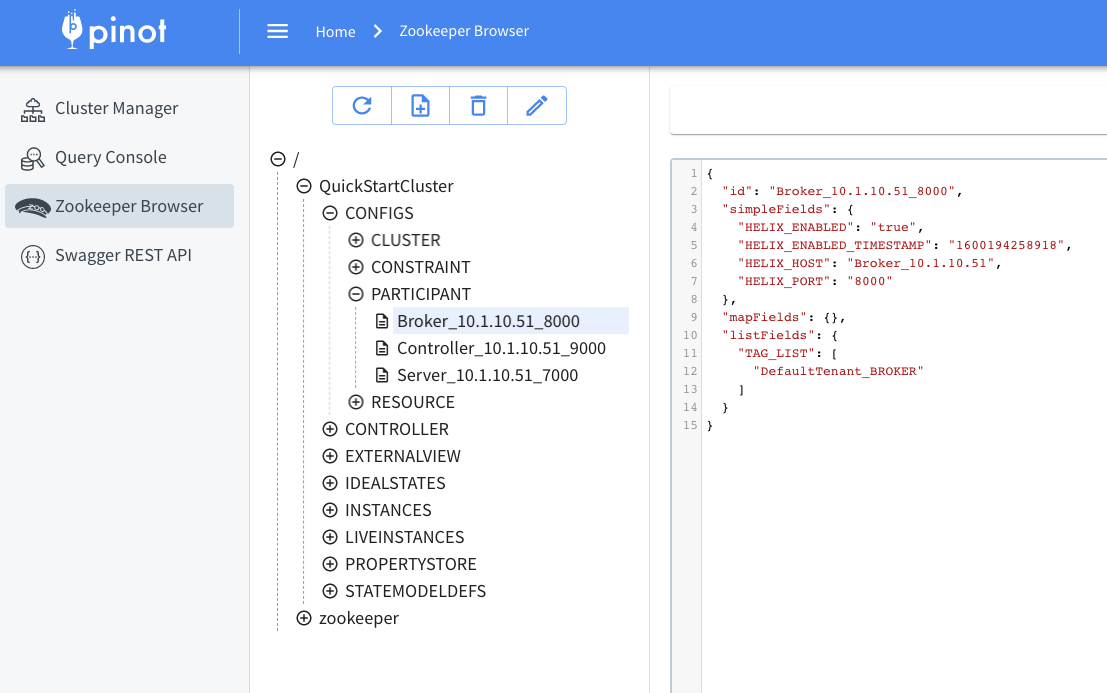
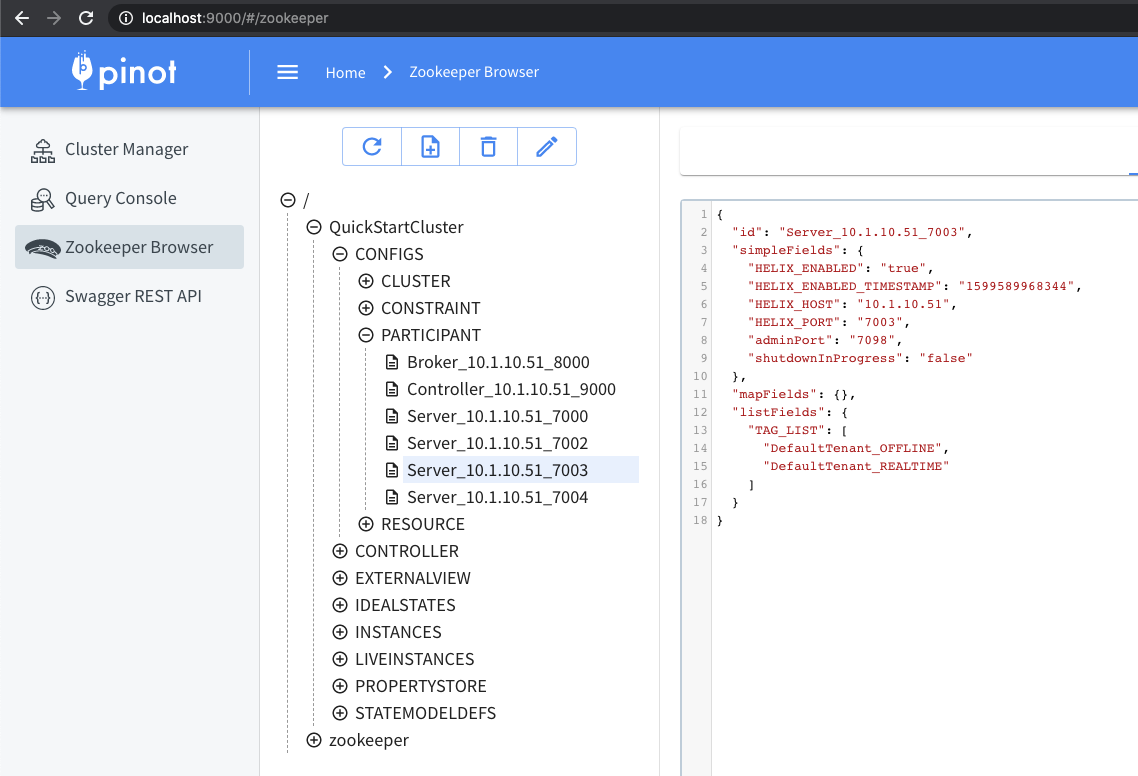
Every broker added to the Pinot cluster, has tags associated with it. A group of brokers with the same tag forms a Broker Tenant. By default, a broker in the cluster gets added to the DefaultTenant i.e. gets tagged as DefaultTenant_BROKER. Below is an example of how this tag looks in the znode, as seen in ZooInspector.

A Pinot table config has a tenants section, to define the tenant to be used by the table. More details about this in the section.

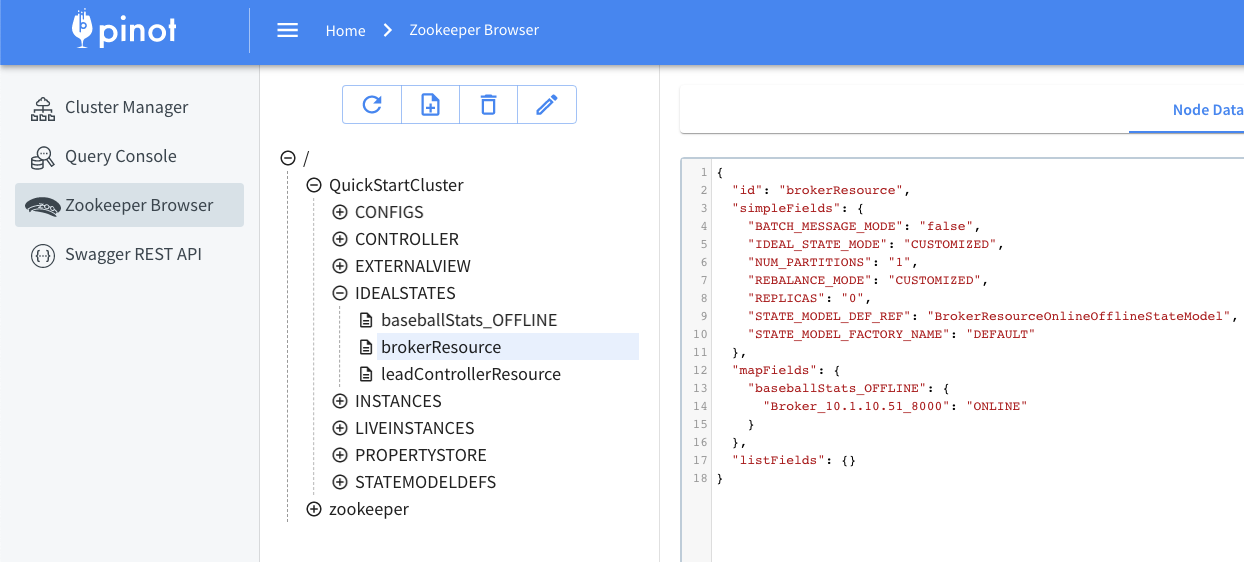
Using the tenant defined above, a mapping is created, from table name to brokers and stored in the IDEALSTATES/brokerResource. This mapping can be used by external services that need to pick a broker for querying.

hashtag
Updating tags

If you want to scale up brokers, add new brokers to the cluster, and then tag them based on the tenant used by the table. If you're using DefaultTenant, no tagging needs to be done, as every broker node by default joins with tag DefaultTenant_BROKER.

If you want to scale down brokers, untag the brokers you wish to remove.

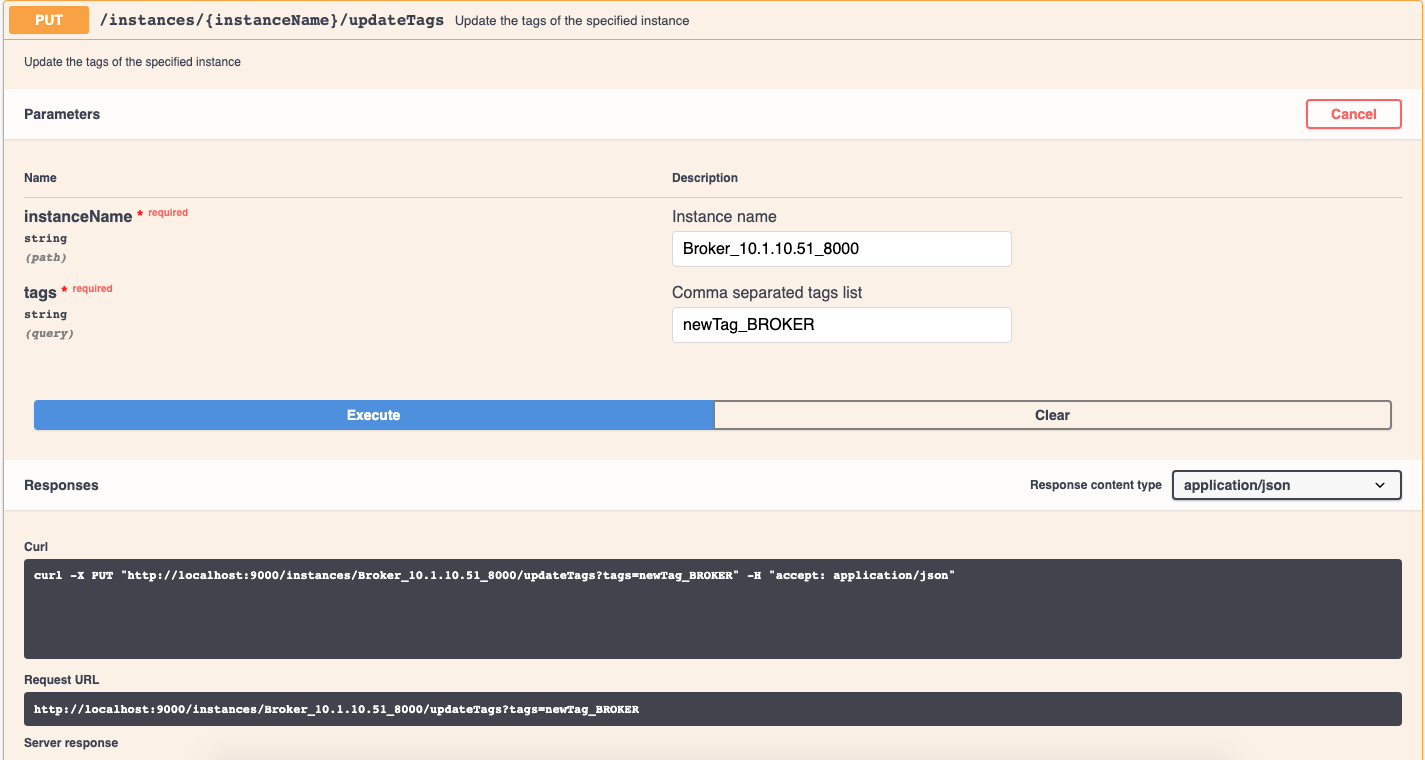
To update the tags on the broker, use the following API:

PUT /instances/{instanceName}/updateTags?tags=<comma separated tags>

Example for tagging the broker as per your custom tenant:

PUT /instances/Broker_10.20.151.8_8000/updateTags?tags=customTenant_BROKER

Example for untagging a broker:

PUT /instances/Broker_10.20.151.8_8000/updateTags?tags=untagged_BROKER

hashtag
Rebuild broker resource

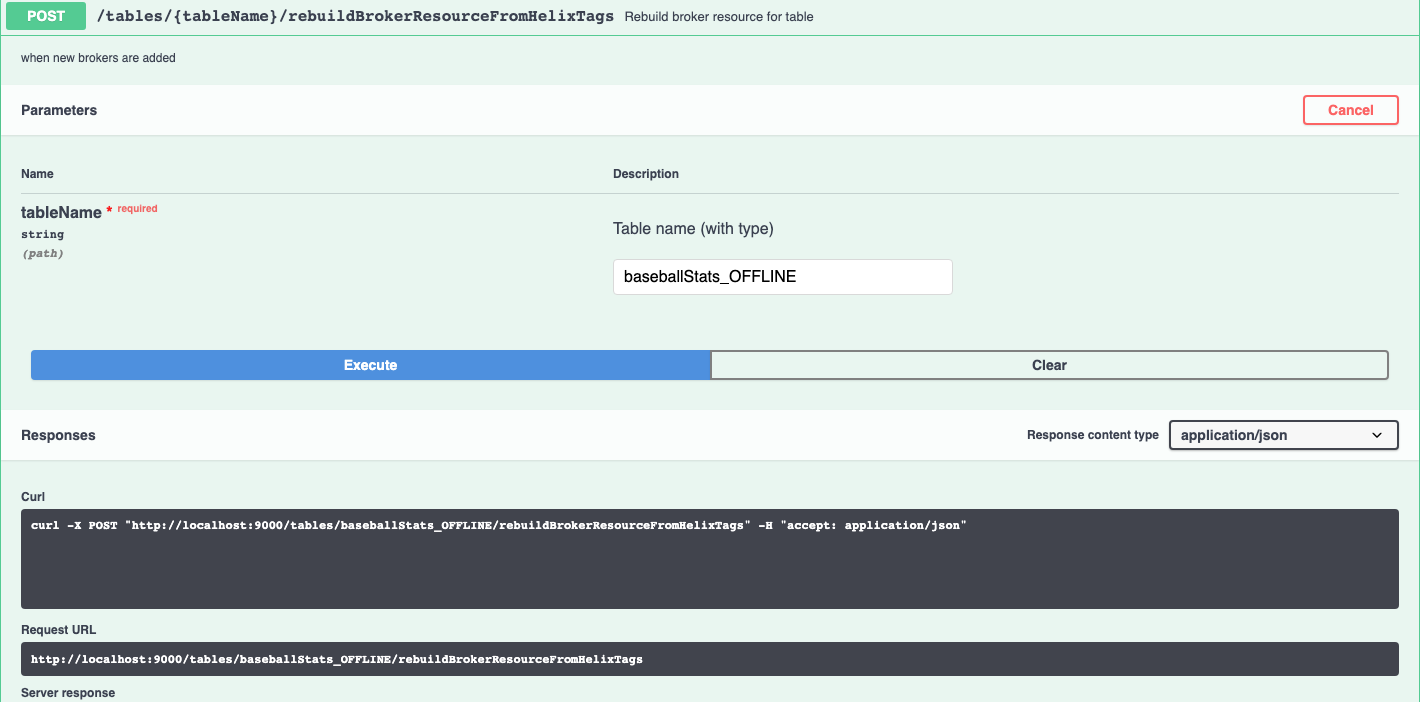
After making any capacity changes to the broker, the brokerResource needs to be rebuilt. This can be done with the below API:

POST /tables/{tableNameWithType}/rebuildBrokerResourceFromHelixTags

hashtag
Drop nodes

This is when you untagged and now want to remove the node from the cluster.

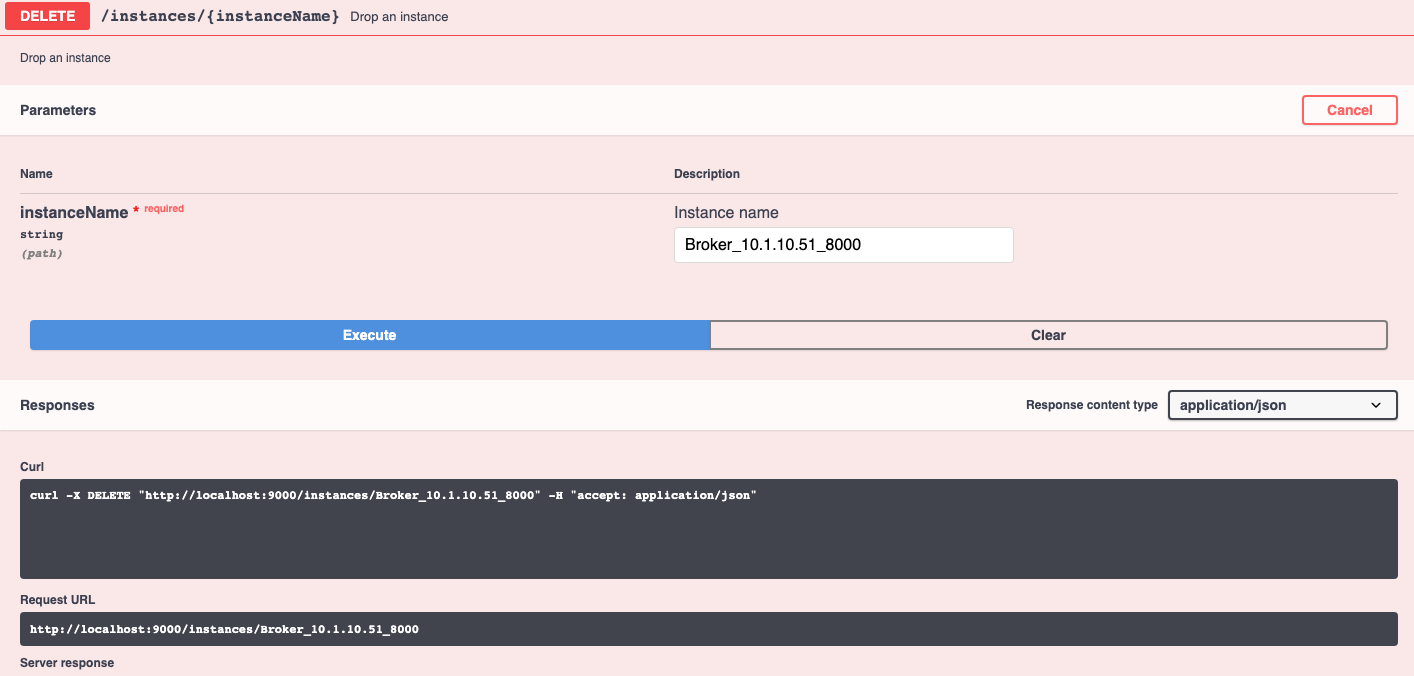
First, shutdown the broker. Then, use API below to remove the node from the cluster.

DELETE /instances/{instanceName}

hashtag
Troubleshooting

If you encounter the below message when dropping, it means the broker process hasn't been shut down.

If you encounter below message, it means the broker has not been removed from the ideal state. Check the untagging and rebuild steps went through successfully.

Tenants
Broker tag
brokerResource IDEALSTATE
updateTags API
rebuildBrokerResource API
 {   
    "tableName": "myTable_OFFLINE",
    "tenants" : {
      "broker":"DefaultTenant",
      "server":"DefaultTenant"
    }
  }
Failed to drop instance Broker_10.1.10.51_8000 - 
    Instance Broker_10.1.10.51_8000 is still live
Failed to drop instance Broker_172.17.0.2_8099 - 
    Instance Broker_172.17.0.2_8099 exists in ideal state for brokerResource

Rebalance

This page describes how to rebalance a table

Rebalance operation is used to recompute assignment of brokers or servers in the cluster. This is not a single command, but more of a series of steps that need to be taken.

In case of servers, rebalance operation is used to balance the distribution of the segments amongst the servers being used by a Pinot table. This is typically done after capacity changes, or config changes such as replication or segment assignment strategies.

In case of brokers, rebalance operation is used to recalculate the broker assignment to the tables. This is typically done after capacity changes (scale up/down brokers).

In few cases such as when a server is tagged or untagged to a tenant i.e. server is added or removed from a tenant we need to rebalance all the tables that belong to that tenant.

Rebalance Serverschevron-rightRebalance Brokerschevron-rightRebalance Tenantchevron-right

hashtag

Rebalance Servers

The rebalance operation is used to recompute the assignment of brokers or servers in the cluster. This is not a single command, but rather a series of steps that need to be taken.

In the case of servers, rebalance operation is used to balance the distribution of the segments amongst the servers being used by a Pinot table. This is typically done after capacity changes or config changes such as replication or segment assignment strategies or table migration to a different tenant.

hashtag
Changes that require a rebalance

Below are changes that need to be followed by a rebalance.

  1. Capacity changes

  2. Increasing/decreasing replication for a table

  3. Changing segment assignment for a table

hashtag
Capacity changes

These are typically done when downsizing/uplifting a cluster or replacing nodes of a cluster.

hashtag
Tenants and tags

Every server added to the Pinot cluster has tags associated with it. A group of servers with the same tag forms a server tenant.

By default, a server in the cluster gets added to the DefaultTenant i.e. gets tagged as DefaultTenant_OFFLINE and DefaultTenant_REALTIME.

Below is an example of how this looks in the znode, as seen in ZooInspector.

A Pinot table config has a tenants section, to define the tenant to be used by the table. The Pinot table will use all the servers which belong to the tenant as described in this config. For more details about this, see the section.

hashtag
Updating tags

0.6.0 onwards

In order to change the server tags, use the following API.

PUT /instances/{instanceName}/updateTags?tags=<comma separated tags>

0.5.0 and prior

UpdateTags API is not available in 0.5.0 and prior. Instead, use this API to update the Instance.

PUT /instances/{instanceName}

For example,

triangle-exclamation

NOTE

The output of GET and input of PUT don't match for this API. Make sure to use the right payload as shown in example above. Particularly, notice that the instance name "Server_host_port" gets split up into separate fields in this PUT API.

When upsizing/downsizing a cluster, you will need to make sure that the host names of servers are consistent. You can do this by setting the following config parameter:

hashtag
Replication changes

In order to change the replication factor of a table, update the table config as follows:

OFFLINE table - update the replication field

REALTIME table - update the replicasPerPartition field

hashtag
Segment Assignment changes

The most common segment assignment change is moving from the default segment assignment to replica group segment assignment. Discussing the details of the segment assignment is beyond the scope of this page. More details can be found in and in this .

hashtag
Table Migration to a different tenant

In a scenario where you need to move table across tenants, for e.g table was assigned earlier to a different Pinot tenant and now you want to move it to a separate one, then you need to call the rebalance API with reassignInstances set to true.

To move a table to other tenants, modify the following configs in both realtime and offline tables:

hashtag
Rebalance Algorithms

Currently, two rebalance algorithms are supported; one is the default algorithm and the other one is minimal data movement algorithm.

hashtag
The Default Algorithm

This algorithm is used for most of the cases. When reassignInstances parameter is set to true, the final lists of instance assignment will be re-computed, and the list of instances is sorted per partition per replica group. Whenever the table rebalance is run, segment assignment will respect the sequence in the sorted list and pick up the relevant instances.

hashtag
Minimal Data Movement Algorithm

This algorithm focuses more on minimizing the data movement during table rebalance. When reassignInstances parameter is set to true and this algorithm gets enabled, the position of instances which are still alive remains the same, and vacant seats are filled with newly added instances or last instances in the existing alive instance candidate. So only the instances which change the position will involve in data movement.

In order to switch to this table rebalance algorithm, just simply set the following config to the table config before triggering table rebalance:

When instanceAssignmentConfigMap is not explicitly configured, minimizeDataMovement flag can also be set into the segmentsConfig:

hashtag
Running a Rebalance

After any of the above described changes are done, a rebalance is needed to make those changes take effect.

To run a rebalance, use the following API.

POST /tables/{tableName}/rebalance?type=<OFFLINE/REALTIME>

This API has a lot of parameters to control its behavior. Make sure to go over them and change the defaults as needed.

circle-exclamation

Note

Typically, the flags that need to be changed from the default values are

includeConsuming=true for REALTIME

hashtag
Rebalance Parameters

Query param
Default value
Description

hashtag
Checking status

The following API is used to check the progress of a rebalance Job. The API takes the jobId of the rebalance job. The API to see the jobIds of rebalance Jobs for a table is shown next.

circle-exclamation

Note that rebalanceStatus API is available from this

Below is the API to get the jobIds of rebalance jobs for a given table. The API takes the table name and jobType which is TABLE_REBALANCE.

Rebalance Tenant

Usually when we tag/untag servers to a tenant it gets tedious to rebalance each table under that tenant. This operation becomes impossible to handle if the tenant has large number of tables. The tenant rebalance operation allows us to do server rebalance on all the tables on a tenant and track the individual table rebalance progress with minimal operational overhead.

hashtag
Changes that require a rebalance

Basically all the factors which require server rebalance apply here. The only difference with this operation is it can address those changes over multiple tables with a single operation.

hashtag
How the tenant rebalance works

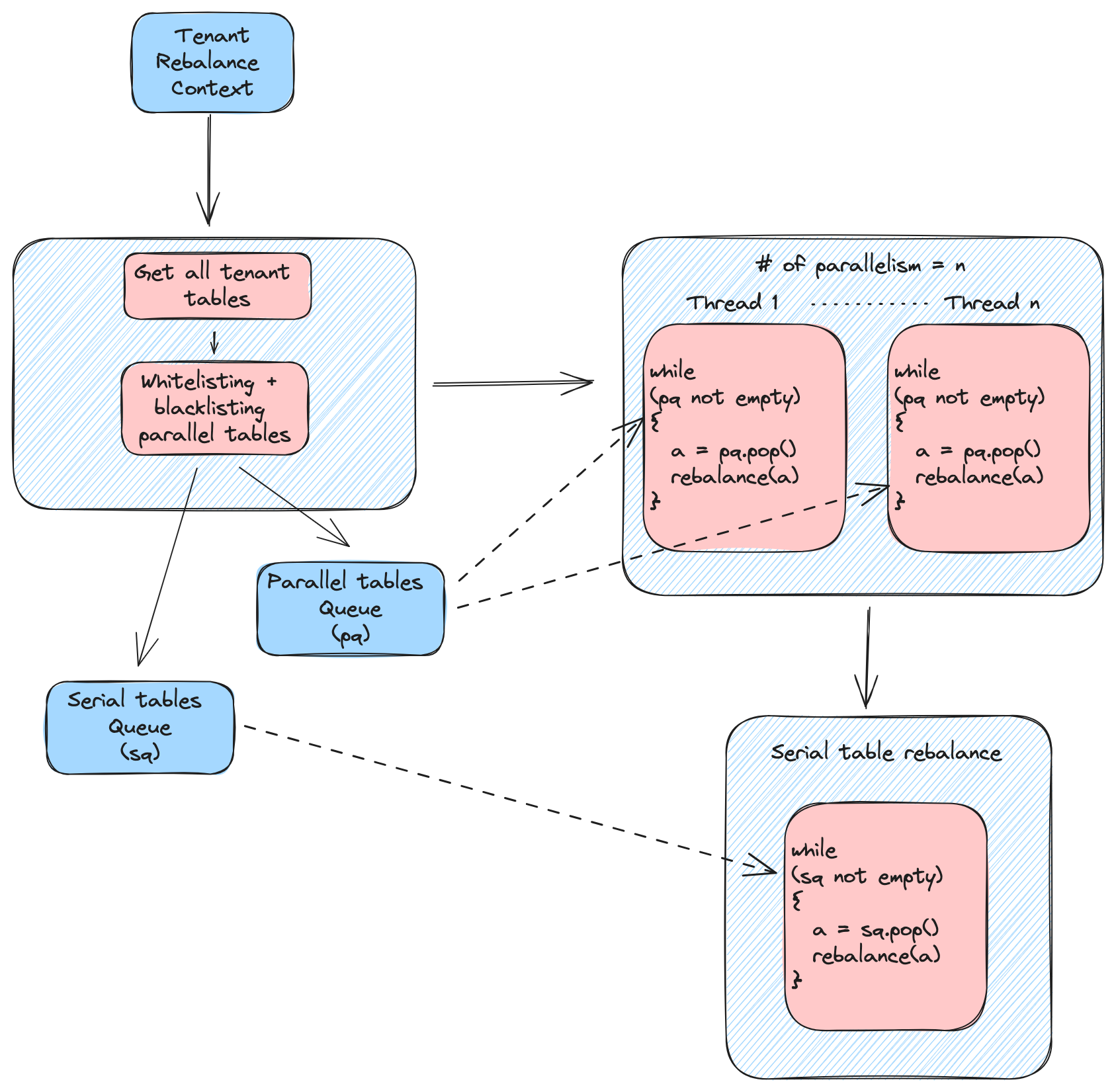
The tenant rebalance operation just provides a tunable orchestration of server rebalancing on multiple tables. Under the hood it leverages the existing server rebalance operation to perform the actual rebalance on each table. It provides the user a way to perform server rebalance on tables selectively in series and parallel. This is achieved using additional tuning parameters on top of usual .

hashtag
Tuning parameters

The rebalance API for tenant will take the same set of as the server rebalance API. In addition to that the tenant rebalance API will also take the below parameters

Request param
Default vale
Description

hashtag
Running a Rebalance

To run a tenant rebalance, use the following API. POST /tenants/{tenantName}/rebalance

Sample payload:

Sample response:

hashtag
Observability

On tenant rebalance job submission it will return the job id for the tenant rebalance job to track the tenant rebalance progress along with all the individual table server rebalance job ids to track individual table rebalance progress.

hashtag
Tenant rebalance progress

To track the tenant rebalance progress use the below API GET /tenants/rebalanceStatus/{jobId} Sample response:

hashtag
Table rebalance progress

Use the same API mentioned in

Moving table from one tenant to a different tenant
downtime=true if you have only 1 replica, or prefer a faster rebalance at the cost of a momentary downtime

lowDiskMode

false

Applicable for rebalance with downtime=false. When enabled, segments will first be offloaded from servers, then added to servers after offload is done. It may increase the total time of the rebalance, but can be useful when servers are low on disk space, and we want to scale up the cluster and rebalance the table to more servers.

bestEfforts

false

Applicable for rebalance with downtime=false.

If a no-downtime rebalance cannot be performed successfully, this flag controls whether to fail the rebalance or do a best-effort rebalance.

reassignInstances

false

Applicable to tables where the instance assignment has been persisted to zookeeper. Setting this to true will make the rebalance first update the instance assignment, and then rebalance the segments.

bootstrap

false

Rebalances all segments again, as if adding segments to an empty table. If this is false, then the rebalance will try to minimize segment movements.

dryRun

false

If set to true, rebalance is run as a dry-run so that you can see the expected changes to the ideal state and instance partition assignment.

includeConsuming

false

Applicable for REALTIME tables.

CONSUMING segments are rebalanced only if this is set to true. Moving a CONSUMING segment involves dropping the data consumed so far on old server, and re-consuming on the new server. If an application is sensitive to increased memory utilization due to re-consumption or to a momentary data staleness, they may choose to not include consuming in the rebalance. Whenever the CONSUMING segment completes, the completed segment will be assigned to the right instances, and the new CONSUMING segment will also be started on the correct instances. If you choose to includeConsuming=false and let the segments move later on, any downsized nodes need to remain untagged in the cluster, until the segment completion happens.

downtime

false

This controls whether Pinot allows downtime while rebalancing. If downtime = true, all replicas of a segment can be moved around in one go, which could result in a momentary downtime for that segment (time gap between ideal state updated to new servers and new servers downloading the segments). If downtime = false, Pinot will make sure to keep certain number of replicas (config in next row) always up. The rebalance will be done in multiple iterations under the hood, in order to fulfill this constraint.

Note: If you have only 1 replica for your table, rebalance with downtime=false is not possible.

minAvailableReplicas

1

Tenants
Routing
FAQ question
commitarrow-up-right

Applicable for rebalance with downtime=false.

This is the minimum number of replicas that are expected to stay alive through the rebalance.

verboseResult

false

When set to true it will return all the server rebalance output for each table. When set to false it will only return the server rebalance job tracking id and status

tenantName

null

The tenant to rebalance

degreeOfParallelism

1

Number of tables to rebalance in parallel at a time

parallelWhitelist

{}

Set of tables that can be rebalanced in parallel with other tables in this set. If the set is empty and degree of parallelism is > 1 then all the tables under the tenant are considered as whitelist

parallelBlacklist

{}

rebalance parameters
parameters
server rebalance status tracking
img.png

Set of tables which should not be rebalanced in parallel with other tables in the tenant. This list takes priority over whitelist tables, i.e. if a table is present in both the lists its considered as blacklisted and hence not rebalanced in parallel

 {   
    "tableName": "myTable_OFFLINE",
    "tenants" : {
      "broker":"DefaultTenant",
      "server":"DefaultTenant"
    }
  }
curl -X PUT "http://localhost:9000/instances/Server_10.1.10.51_7000" 
    -H "accept: application/json" 
    -H "Content-Type: application/json" 
    -d "{ \"host\": \"10.1.10.51\", \"port\": \"7000\", \"type\": \"SERVER\", \"tags\": [ \"newName_OFFLINE\", \"DefaultTenant_REALTIME\" ]}"
pinot.set.instance.id.to.hostname=true
"REALTIME": {
  ...
  "tenants": {
    ...
    "server": "<tenant_name>",
    ...
  },
  ...
  "instanceAssignmentConfigMap": {
    ...
    "CONSUMING": {
      ...
      "tagPoolConfig": {
        ...
        "tag": "<tenant_name>_REALTIME",
        ...
      },
      ...
    },
    ...
    "COMPLETED": {
      ...
      "tagPoolConfig": {
        ...
        "tag": "<tenant_name>_REALTIME",
        ...
      },
      ...
    },
    ...
  },
  ...
}
"OFFLINE": {
  ...
  "tenants": {
    ...
    "server": "<tenant_name>",
    ...
  },
  ...
  "instanceAssignmentConfigMap": {
    ...
    "OFFLINE": {
      ...
      "tagPoolConfig": {
        ...
        "tag": "<tenant_name>_OFFLINE",
        ...
      },
      ...
    },
    ...
  },
  ...
}
"instanceAssignmentConfigMap": {
  ...
  "OFFLINE": {
    ...
    "replicaGroupPartitionConfig": {
      ...
      "minimizeDataMovement": true,
      ...
    },
    ...
  },
  ...
}
"segmentsConfig": {
    ...
    "minimizeDataMovement": true,
    ...
}
curl -X GET "https://localhost:9000/rebalanceStatus/ffb38717-81cf-40a3-8f29-9f35892b01f9" -H "accept: application/json"
{"tableRebalanceProgressStats": {
    "startTimeMs": 1679073157779,
    "status": "DONE", // IN_PROGRESS/DONE/FAILED    
    "timeToFinishInSeconds": 0, // Time it took for the rebalance job after it completes/fails 
    "completionStatusMsg": "Finished rebalancing table: airlineStats_OFFLINE with minAvailableReplicas: 1, enableStrictReplicaGroup: false, bestEfforts: false in 44 ms."
     
     // The total amount of work required for rebalance 
    "initialToTargetStateConvergence": {
      "_segmentsMissing": 0, // Number of segments missing in the current state but present in the target state
      "_segmentsToRebalance": 31, // Number of segments that needs to be assigned to hosts so that the current state can get to the target state.
      "_percentSegmentsToRebalance": 100, // Total number of replicas that needs to be assigned to hosts so that the current state can get to the target state.
      "_replicasToRebalance": 279 // Remaining work to be done in %
    },
    
    // The pending work for rebalance
    "externalViewToIdealStateConvergence": {
      "_segmentsMissing": 0,
      "_segmentsToRebalance": 0,
      "_percentSegmentsToRebalance": 0,
      "_replicasToRebalance": 0
    },
    
    // Additional work to catch up with the new ideal state, when the ideal 
    // state shifts since rebalance started. 
    "currentToTargetConvergence": {
      "_segmentsMissing": 0,
      "_segmentsToRebalance": 0,
      "_percentSegmentsToRebalance": 0,
      "_replicasToRebalance": 0
    },
  },
  "timeElapsedSinceStartInSeconds": 28 // If rebalance is IN_PROGRESS, this gives the time elapsed since it started
  }
curl -X GET "https://localhost:9000/table/airlineStats_OFFLINE/jobstype=OFFLINE&jobTypes=TABLE_REBALANCE" -H "accept: application/json"
 "ffb38717-81cf-40a3-8f29-9f35892b01f9": {
    "jobId": "ffb38717-81cf-40a3-8f29-9f35892b01f9",
    "submissionTimeMs": "1679073157804",
    "jobType": "TABLE_REBALANCE",
    "REBALANCE_PROGRESS_STATS": "{\"initialToTargetStateConvergence\":{\"_segmentsMissing\":0,\"_segmentsToRebalance\":31,\"_percentSegmentsToRebalance\":100.0,\"_replicasToRebalance\":279},\"externalViewToIdealStateConvergence\":{\"_segmentsMissing\":0,\"_segmentsToRebalance\":0,\"_percentSegmentsToRebalance\":0.0,\"_replicasToRebalance\":0},\"currentToTargetConvergence\":{\"_segmentsMissing\":0,\"_segmentsToRebalance\":0,\"_percentSegmentsToRebalance\":0.0,\"_replicasToRebalance\":0},\"startTimeMs\":1679073157779,\"status\":\"DONE\",\"timeToFinishInSeconds\":0,\"completionStatusMsg\":\"Finished rebalancing table: airlineStats_OFFLINE with minAvailableReplicas: 1, enableStrictReplicaGroup: false, bestEfforts: false in 44 ms.\"}",
    "tableName": "airlineStats_OFFLINE"
{
  "tenantName": "DefaultTenant",
  "degreeOfParallelism": 2,
  "parallelWhitelist": [
    "airlineStats1_OFFLINE",
    "airlineStats2_OFFLINE"
  ],
  "parallelBlacklist": [
    "airlineStats1_REALTIME"
  ],
  "verboseResult": false,
  "dryRun": false,
  "downtime": false,
  "reassignInstances": false,
  "includeConsuming": false,
  "bootstrap": false,
  "minAvailableReplicas": 1,
  "bestEfforts": false,
  "updateTargetTier": false,
  "externalViewCheckIntervalInMs": 1000,
  "externalViewStabilizationTimeoutInMs": 3600000
}
{
  "jobId": "dfbbebb7-1f62-497d-82a7-ded6e0d855e1",
  "rebalanceTableResults": {
    "airlineStats1_OFFLINE": {
      "jobId": "2d4dc2da-1071-42b5-a20c-ac38a6d53fc4",
      "status": "IN_PROGRESS",
      "description": "In progress, check controller task status for the progress"
    },
    "airlineStats2_OFFLINE": {
      "jobId": "2d4dc2da-497d-82a7-a20c-a113dfbbebb7",
      "status": "IN_PROGRESS",
      "description": "In progress, check controller task status for the progress"
    },
    "airlineStats1_REALTIME": {
      "jobId": "9284f137-29c1-4c5a-a113-17b90a484403",
      "status": "NO_OP",
      "description": "Table is already balanced"
    }
  }
}
{
  "tenantRebalanceProgressStats": {
    "startTimeMs": 1689679866904,
    "timeToFinishInSeconds": 2345,
    "completionStatusMsg": "Successfully rebalanced tenant DefaultTenant.",
    "tableStatusMap": {
      "airlineStats1_OFFLINE": "Table is already balanced",
      "airlineStats2_OFFLINE": "Table rebalance in progress",
      "airlineStats1_REALTIME": "Table is already balanced"
    },
    "totalTables": 3,
    "remainingTables": 1,
    "tableRebalanceJobIdMap": {
      "airlineStats1_OFFLINE": "2d4dc2da-1071-42b5-a20c-ac38a6d53fc4",
      "airlineStats2_OFFLINE": "2d4dc2da-497d-82a7-a20c-a113dfbbebb7",
      "airlineStats1_REALTIME": "9284f137-29c1-4c5a-a113-17b90a484403"
    }
  },
  "timeElapsedSinceStartInSeconds": 12345
}