There are multiple different sections in the documentation to help you get started with operating a Pinot cluster. If you are new to Pinot, start with the basics.
To get started with operating a Pinot cluster, first look at the tutorials in Getting Started on how to run a basic pinot cluster in various environments.
Here are some related blog posts from the Apache Pinot community. You can find all of our blog posts on our .
Server Startup Status Checkers
Overview
When operating Pinot in a production environment, it's not always ideal to have servers immediately available for querying when they have started up. This is especially so for real-time servers that may have to re-consume some amount of data before they are "caught up". Pinot offers several strategies for determining when a server is up, healthy, and available for querying.
Segment Assignment
This page introduces all the segment assignment strategies, when to use them, and how to configure them.
Segment assignment refers to the strategy of assigning each segment from a table to the servers hosting the table. Picking the best segment assignment strategy can help reduce the overhead of the query routing, thus providing better performance.
Balanced Segment Assignment
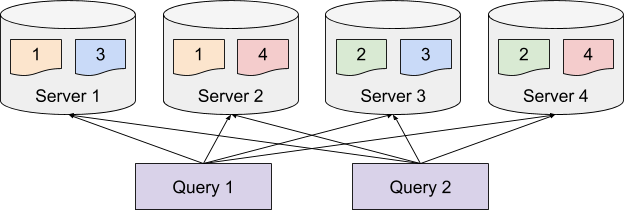
Balanced Segment Assignment is the default assignment strategy, where each segment is assigned to the server with the least segments already assigned. With this strategy, each server will have balanced query load, and each query will be routed to all the servers. It requires minimum configuration, and works well for small use cases.
Rebalance
This page describes how to rebalance a table
Rebalance operation is used to recompute assignment of brokers or servers in the cluster. This is not a single command, but more of a series of steps that need to be taken.
In case of servers, rebalance operation is used to balance the distribution of the segments amongst the servers being used by a Pinot table. This is typically done after capacity changes, or config changes such as replication or segment assignment strategies.
In case of brokers, rebalance operation is used to recalculate the broker assignment to the tables. This is typically done after capacity changes (scale up/down brokers).
Pinot servers have several endpoints for determining the health of the servers.
GET /health/liveness answers "is this server up." This only ensures that the server was able to start, and you can connect to it.
GET /health/readiness answers "is this server up and ready to server data." The checkers below determine if the "readiness" aspect returns OK.
GET /health performs the same check as the readiness endpoint.
No Consuming Status Check (Default Behavior)
It's possible to operate Pinot with no checkers at all by disabling the following configurations, but this is not recommended. Instead, the defaults here are the following:
Pinot will wait up to 10 minutes for all server startup operations to complete. This will wait for the server's Ideal State to match its External State before marking the server as healthy. This could be mean downloading segments, building indices, and creating consumption streams. It is recommended to start with the default time and add more time as needed.
Waiting for Ideal State to match External State is not configurable. If enableServiceStatusCheck=true, this will always be one of the checks.
Static Consumption Wait
The most basic startup check is the static one. It is configured by the following:
In the above example, a Pinot server will wait 60 seconds for all consuming segments before becoming healthy and available for serving queries. This gives the servers 1 minute to consume data un-throttled before being marked as healthy. Overall, the server will still only wait 10 minutes for all startup actions to complete. So make sure realtimeConsumptionCatchupWaitMs < timeoutMs.
Offset Based Segment Checker
The first option to determine fresher real-time data is the offset based status checker. This checker will determine the end offset of each consuming segment at the time of Pinot startup. It will then consume to that offset before marking the segment as healthy. Once all segments are healthy, this checker will return healthy.
There are some caveats to note here:
realtimeConsumptionCatchupWaitMs must still be set. This checker will only wait as long as the value for realtimeConsumptionCatchupWaitMs.
This checker will not ever recompute end offsets after it starts. With high real-time volume, you will still be behind. This means if your server takes 8 minutes to startup and have this checker become healthy, you will be 8 minutes behind and rapidly consuming data once the server starts serving queries.
Freshness Based Segment Checker
The strictest checker Pinot offers is the freshness based one. This works similarly to the offset checker but with an extra condition. The actual events in that stream must meet a minimum freshness before the server is marked as healthy. This checker provides the best freshness guarantees for real-time data at the expense of longer startup time.
In the example above, the Pinot server will wait up to 1 minute for all consuming streams to have data within 10 seconds of the current system time. This is re-evaluated for each pass of the checker, so this checker gives the best guarantee of having fresh data before a server starts. This checker also checks the current offset a segment is at compared to the max offset of the stream, and it will mark the segment as healthy when those are equal. This is useful when you have a low volume stream where there may never be data fresher than realtimeConsumptionCatchupWaitMs.
There are still some caveats that apply here:
realtimeConsumptionCatchupWaitMs must still be set. This checker will only wait as long as the value for realtimeConsumptionCatchupWaitMs.
your events must implement getMetadataAtIndex to pass the event timestamp correctly. The current kafka, kinesis, and pulsar implementations already do this using the event ingestion time. But if your data takes multiple hops, it will only count the freshness from the last hop.
Recommend Configurations
QA
The recommended configurations in QA attempt to balance performing valid checks with fast and successful startup. We do not exit the server if startup status is failing to avoid crashloops, but we also do not wait indefinitely to catch up if events are not being consumed. A stuck partition will lead to ingestion lag here.
Production
The recommended configurations in production optimize for the highest availability, correctness, and lowest ingestion lag. We wait indefinitely for segment freshness to match the minimum criteria, and we stop the server if status checks are not met by the timeout.
It is important to get your timeout configuration correct, otherwise servers will indefinitely stop if they cannot meet the freshness threshold in the allotted time.
# this is the default, 10 minutes.
pinot.server.startup.timeoutMs=600000
# this is the default. you do not have to specify this.
pinot.server.startup.enableServiceStatusCheck=true
# this is the default, 10 minutes.
pinot.server.startup.timeoutMs=600000
# this is the default. you do not have to specify this.
pinot.server.startup.enableServiceStatusCheck=true
# the default is 0, and the server will not wait
pinot.server.starter.realtimeConsumptionCatchupWaitMs=60000
# this is the default, 10 minutes.
pinot.server.startup.timeoutMs=600000
# this is the default. you do not have to specify this.
pinot.server.startup.enableServiceStatusCheck=true
# the default is 0, and the server will not wait
pinot.server.starter.realtimeConsumptionCatchupWaitMs=60000
# this is disabled by default.
pinot.server.starter.enableRealtimeOffsetBasedConsumptionStatusChecker=true
# this is the default, 10 minutes.
pinot.server.startup.timeoutMs=600000

# this is the default. you do not have to specify this.
pinot.server.startup.enableServiceStatusCheck=true

# the default is 0, and the server will not wait
pinot.server.starter.realtimeConsumptionCatchupWaitMs=60000

# this is disabled by default.
pinot.server.starter.enableRealtimeFreshnessBasedConsumptionStatusChecker=true

# this is the default. The server wants events to be no more than 10
# seconds old.
pinot.server.starter.realtimeMinFreshnessMs=10000

# this is the default. the server will keep waiting for segments to catch up
# even if they are not making progress.
pinot.server.starter.realtimeFreshnessIdleTimeoutMs=0

# the server will still start and serve queries if it not caught up
pinot.server.starter.exitServerOnStartupStatusFailure=false
pinot.server.startup.enableServiceStatusCheck=true
pinot.server.starter.enableRealtimeFreshnessBasedConsumptionStatusChecker=true

# these should be set to your environment based on how long
# catching up typically takes.
pinot.server.startup.timeoutMs=<your_timeout_ms>
pinot.server.starter.realtimeConsumptionCatchupWaitMs=<your_timeout_ms>
pinot.server.starter.realtimeMinFreshnessMs=<your_desired_freshness>

pinot.server.starter.realtimeFreshnessIdleTimeoutMs=1000
pinot.server.startup.exitOnServiceStatusCheckFailure=false
pinot.server.startup.enableServiceStatusCheck=true
pinot.server.starter.enableRealtimeFreshnessBasedConsumptionStatusChecker=true

# these should be set to your environment based on how long
# catching up typically takes.
pinot.server.startup.timeoutMs=<your_timeout_ms>
pinot.server.starter.realtimeConsumptionCatchupWaitMs=<your_timeout_ms>
pinot.server.starter.realtimeMinFreshnessMs=<your_desired_freshness>

pinot.server.starter.realtimeFreshnessIdleTimeoutMs=0
pinot.server.startup.exitOnServiceStatusCheckFailure=true
Replica-Group Segment Assignment
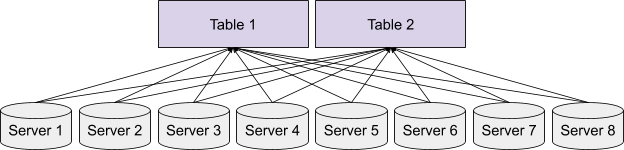
Balanced Segment Assignment is ideal for small use cases with a small number of servers, but as the number of servers increases, routing each query to all the servers could harm the query performance due to the overhead of the increased fanout.
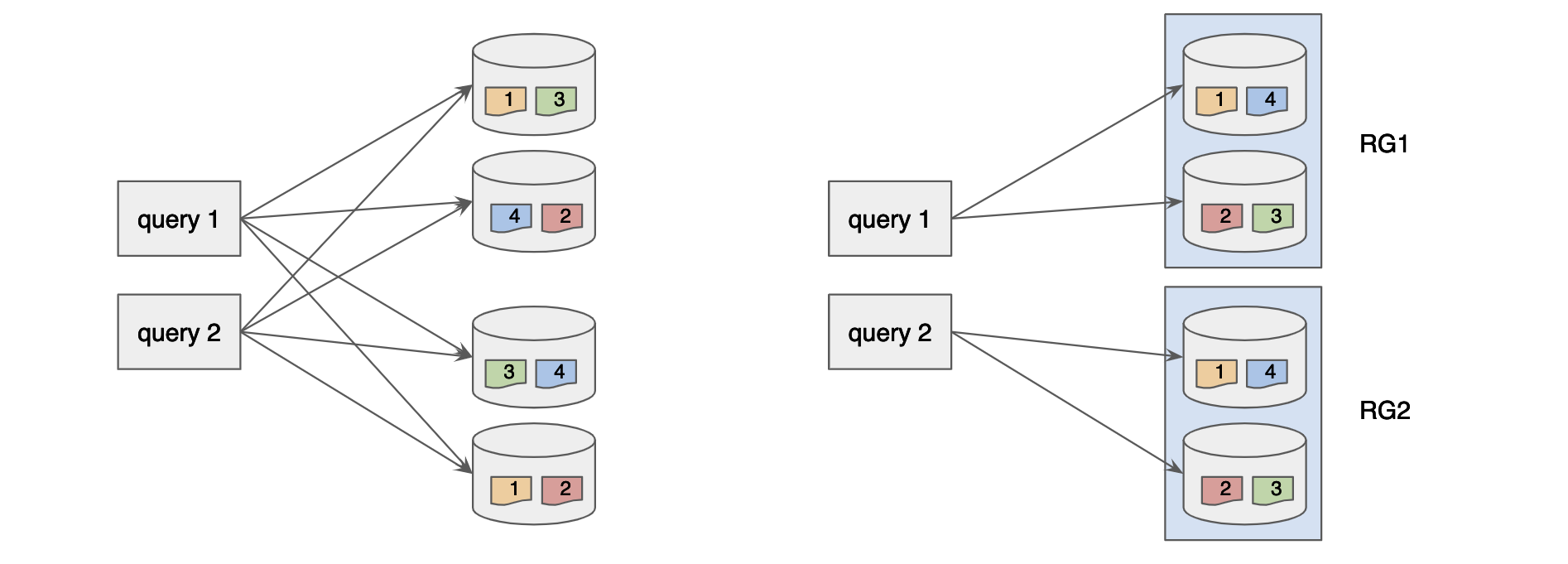
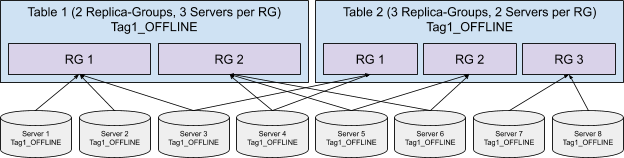
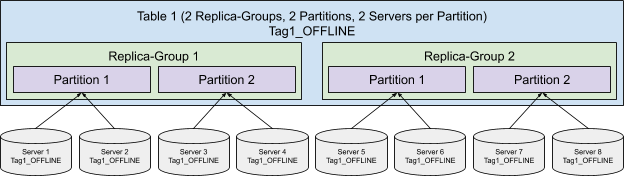
Replica-Group Segment Assignment is introduced to solve the horizontal scalability problem of the large use cases, which makes Pinot linearly scalable. This strategy breaks the servers into multiple replica-groups, where each replica-group contains a full copy of all the segments.
When executing queries, each query will only be routed to the servers within the same replica-group. In order to scale up the cluster, more replica-groups can be added without affecting the fanout of the query, thus not impacting the query performance but increasing the overall throughput linearly.
Partitioned Replica-Group Segment Assignment
In order to further increase the query performance, we can reduce the number of segments processed for each query by partitioning the data and use the Partitioned Replica-Group Segment Assignment.
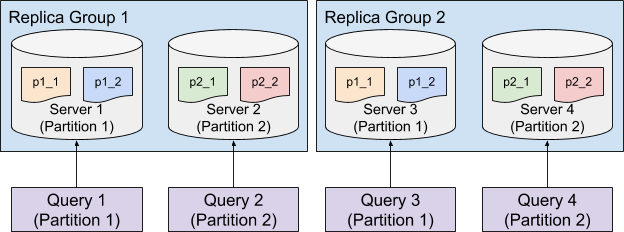
Partitioned Replica-Group Segment Assignment extends the Replica-Group Segment Assignment by assigning the segments from the same partition to the same set of servers. To solve a query which hits only one partition (e.g. SELECT * FROM myTable WHERE memberId = 123 where myTable is partitioned with memberId column), the query only needs to be routed to the servers for the targeting partition, which can significantly reduce the number of segments to be processed. This strategy is especially useful to achieve high throughput and low latency for use cases that filter on an id field.
Configure Segment Assignment
Segment assignment is configured along with the instance assignment, check Instance Assignment for details.
In order to optimize for low latency, we often recommend using high performance SSDs as server nodes. But if such a use case has vast amount of data, and need the high performance only when querying few recent days of data, it might become desirable to keep only the recent time ranges on SSDs, and keep the less frequently queried ones on cheaper nodes such as HDDs.
By storing data separately at different storage tiers, one can keep large amounts of data in Pinot while having control over the cost of the cluster. Usually, the most recent data is recommended to put in storage tier with fast disk access to support real-time analytics queries of low latency and high throughput; and older data in cheaper and slower storage tiers for analytics where higher query latency can be accepted.
Note that separating data storage by age is not about to achieve the compute-storage decoupled architecture for Pinot.
Access control can be set up at various points in Pinot, such as controller endpoints and broker query endpoints. By default we will use and hence not be enforcing any access controls. You can add access control by implementing the interface.
The access control factory can be configured in the controller configs by setting the fully qualified class name of the AccessControlFactory in the property controller.admin.access.control.factory.class
The access control factory can be configured in the broker configs by setting the fully qualified class name of the AccessControlFactory in the property pinot.broker.access.control.class. Any other properties required for initializing the factory can be set in the broker configs as properties with the prefix pinot.broker.access.control.
With this feature, you can have a single tenant, but for servers in the tenant, you can have multiple data directories on severs, like one data path backed by SSD to keep recent data; one data path backed by HDD to keep older data, to bring down the cost of keeping long term historical data.
Config
The servers should start with those configs to enable multi-datadir. In fact, only the first one is required. The tierBased directory loader is aware of the multiple data directories. The tierNames or dataDir specified for each tier are optional, but still recommended to set as server config so that they are consistent across the cluster for easy management. Their values can overwritten in TableConfig as shown below.
The controllers should enable local tier migration for segment relocator.
The tables specify which data to be put on which storage tiers, as an exmaple below
As in this example Segments older than 7 days are kept on hotTier, under path: /tmp/multidir_test/hotTier; and segments older than 15 days are kept on coldTier, under data path /tmp/multidir_test/my_custom_colddir (due to overwriting, although not recommended).
The configs are same as seen in . But instead of moving data across tenants, the data is moved across data paths on the servers locally, as driven by the SegmentRelocator, the periodic task running on the controller.
Monitoring
Tutorial
If you are deploying using the helm chart with Kubernetes, see the tutorial on setting up Prometheus and Grafana to monitor Pinot.
Pinot uses to collect metrics within our application components. These metrics can be published to a metrics server with the help of interface. By default, metrics are published to JMX using the .
You can write a listener to publish metrics to another metrics server by implementing the MetricsRegistryRegistrationListener interface. This listener can be injected into the controller by setting the fully qualified name of the class in the controller configs for the property pinot.controller.metrics.metricsRegistryRegistrationListeners.
You would have to design your own systems to view and monitor these metrics. You can refer to complete list of supported metrics on our .
JMX to Prometheus
Metrics published to JMX could also be exposed to Prometheus through tooling like .
To run as a javaagent, and run:
This will expose a port at 8080 to dump metrics as Prometheus format for Prometheus scrapper to fetch.
Decoupling Controller from the Data Path
Decouple the controller from the data path for real-time Pinot tables.
Ingestion bottleneck on the Pinot Controller
For real-time tables, when a Pinot server finishes consuming a segment, the segment goes through a completion protocol sequence. By default, the segment is uploaded to the lead Pinot controller which in turn persists the segment to deep store (for example, NFS, S3 or HDFS). As a result, because all real-time segments flow through the controller, it may become a bottleneck and slow down the overall ingestion rate. To overcome this limitation, we've added a new stream-level configuration to bypass the controller and upload the completed segment to deep store directly.
Upload completed segment to deep store directly
To upload the completed segment to the deep store directly, add the following stream-level configuration.
When this configuration is enabled, Pinot servers attempt to upload the completed segment to the segment store directly, bypassing the controller. When finished, Pinot updates the controller with the corresponding segment metadata.
pinot.server.instance.segment.store.uri is optional by default. However, this config is required so that the server knows where the deep store is. Before enabling realtime.segment.serverUploadToDeepStore on the table, verify the pinot.server.instance.segment.store.uri=<controller.data.dir> is configured on the servers.
Overview of peer download policy
Peer download policy allows failure recovery in case uploading the completed segment to the deep store fails. If the segment store is unavailable, the corresponding segments can still be downloaded directly from the Pinot servers.
Enable peer download for segments
This scheme only works for real-time tables using the Low Level Consumer (LLC) mode. To enable peer download for segments, update the controller, server, and table configurations as follows:
Controller Config
Add the followings to the controller configuration:
Server Config
Add the following things to the server configuration:
Here. the URI of segment store should point to the full path in the corresponding data directory, with both the filesystem scheme and path (eg: file://dir or hdfs://path or s3://path).
Replace pinot.server.storage.factory.class.(scheme) with the corresponding scheme (for example, hdfs, s3 or gcs) of the segment store URI configured above. Then, add the PinotFS subclass for the scheme as the config value.
Table config
Add the following to the real-time :
In this case, the peerSegmentDownloadScheme can be either http or https.
Config for failure case handling
Enabling peer download may incur LLC segments failed to be uploaded to segment store in some failure cases, e.g. segment store is unavailable during segment completion. Add the following controller config to enable the upload retry by a controller periodic job asynchronously.
Tuning
Tuning Pinot
This section provides information on various options to tune Pinot cluster for storage and query efficiency. Unlike key-value store, tuning Pinot sometimes can be tricky because the cost of query can vary depending on the workload and data characteristics.
If you want to improve query latency for your use case, you can refer to Index Techniques section. If your use case faces the scalability issue after tuning index, you can refer Optimizing Scatter and Gather for improving query throughput for Pinot cluster. If you have identified a performance issue on the specific component (broker or server), you can refer to the Tuning Broker or Tuning Server section.
Query Scheduling
Schedule queries to prioritize them.
Pinot supports various different query scheduling mechanisms to allow for more control around which queries have priority when executing on the server instances.
Currently, there are the following options that can be configured using the pinot.query.scheduler.name configuration:
First Come First Serve (fcfs) (Default)
Bounded First Come First Serve (bounded_fcfs)
Token Bucket (tokenbucket)
First Come First Serve
This is the default scheduling mechanism, which simply allows all queries to execute in a first come, first serve mechanism. For most deployments, this is likely sufficient, but high QPS deployments that have skewed query workloads may struggle under this scheduling mechanism.
Bounded Schedulers
Bounded query schedulers operate under a context of a single table, and additionally respect the following configurations:
pinot.query.scheduler.threads_per_query_pct (default 20%) will allow individual threads to take up to this percentage of the threads allocated to a table resource group
pinot.query.scheduler.table_threads_soft_limit_pct (default 30%) indicates that once this percentage of the available threads are taken up by this resource group, the scheduler should prefer other resource groups but still allow queries in this group
Bounded First Come First Serve
Similarly to the "first come first serve" scheduling mechanism, this option will bound the resource utilization by ensuring that only a certain number of queries are running concurrently (set using the pinot.query.scheduler.query_runner_threads configuration).
Token Bucket Scheduler
This query scheduling mechanism will periodically grant tokens to each scheduler group, and will select the group to run with the highest number of tokens assigned to it. This can be configured using the following configurations:
pinot.query.scheduler.tokens_per_ms will indicate how many tokens to generate per second for each group. The default value for this is the number of threads avaialble to run queries (which will essentially attempt to schedule more queries than is possible to run)
pinot.query.scheduler.token_lifetime_ms indicates the lifetime of every allocated token
This scheduler applies a linear decay for groups that have recently been scheduled to avoid starvation and allow groups with light workloads to be scheduled.
Using multiple tenants
With this feature, you can create multiple tenants, such that each tenant has servers of different specs, and use them in the same table. In this way, you'll bring down the cost of the historical data by using a lower spec of node such as HDDs instead of SSDs for storage and compute, while trading off slight latency.\
Config
You can configured separate tenants for the table by setting this config in your table config json.
pinot.query.scheduler.table_threads_hard_limit_pct (default 45%) indicates that once this percentage of the available threads are taken up, the scheduler should not schedule any more queries for this resource group
controller.segmentRelocator.enableLocalTierMigration=true
// by the way,
// controller.segment.relocator.frequencyPeriod=3600s, by default
// controller.segmentRelocator.initialDelayInSeconds=random [120, 300), by default
In this example, the table uses servers tagged with base_OFFLINE. We have created two tenants of Pinot servers, tagged with ssd_OFFLINE and hdd_OFFLINE. Segments older than 7 days will move from base_OFFLINE to ssd_OFFLINE, and segments older than 15 days will move to hdd_OFFLINE.
name
Name of the server group. Every group in the list must have a unique name
segmentSelectorType
The strategy used for selecting segments. The only supported strategy as of now is time, which will pick segments based on segment age.
segmentAge
This property is required when segmentSelectorType is time. Set a period string, eg. 15d, 24h, 60m. Segments which are older than the age will be moved to the the specific tenant
storageType
The type of storage. The only supported type is pinot_server
How does data move from one tenant to another?
On adding this config, the Segment Relocator periodic task will move segments from one tenant to another, as and when the segment crosses the segment age.
Under the hood, this job runs a rebalance. So you can achieve the same effect as a manual trigger by running a rebalance
Query Routing using Adaptive Server Selection
Adaptive Server Selection is a new routing capability for Pinot Brokers where incoming queries are routed to the best available server instead of following the default round robin approach while choosing servers. With this feature, Brokers will be sensitive to changes on the Servers like GC issues, slowness, network slowness, etc. The broker will thus adaptively route more queries to faster servers and lesser queries to slower servers
OOM Protection Using Automatic Query Killing
Pinot's built in heap usage monitoring and OOM protection
Pinot has implemented a mechanism to monitor the total jvm heap size and per query memory allocation approximation for server (see ). If enabled, this mechanism can help to protect the server from OOM caused by expensive queries (e.g. distinctcount + group by on high cardinality columns). Upon an immediate risk of heap depletion, this mechanism will kick in and kill from the most expensive query(s). Here are the server configurations:
Config
Default
Description
Rebalance Brokers
Rebalance operation is used to recompute assignment of brokers or servers in the cluster. This is not a single command, but more of a series of steps that need to be taken.
In case of brokers, rebalance operation is used to recalculate the broker assignment to the tables. This is typically done after capacity changes.
Capacity changes
These are typically done when downsizing/uplifting a cluster, or replacing nodes of a cluster.
Account for threads' cpu time of a query. If memory sampling is disabled/unavailable, the killing decision will be based on CPU time. If both are disabled, the framework will not able to pick the most expensive query.
If a query allocates memory below this ratio of total heap size (Xmx) it will not be killed. This is to prevent aggressive killing when the heap memory is not mainly allocated for queries
pinot.query.scheduler.accounting.gc.backoff.count
5
When the framework consecutively kills this many expensive queries it will explicitly trigger gc to reclaim the memory.
Each broker maintains stats individually for all servers. These stats are collected at the broker during query processing when the query is routed to the servers and after the response is received from the servers. These stats are maintained in-memory. Some of the stats collected at broker per server are as follows:
Number of in-progress / in-flight queries
EWMA (Exponential Weighted Moving Average) for latencies seen by queries
EWMA (Exponential Weighted Moving Average) for number of ongoing queries at any time
Adaptive Routing
When the broker receives a query, it will use the above stats to pick the best available server. This enables the broker to automatically reduces the number of queries it sends to slow servers and increase the number of queries it sends to faster servers. We currently support the following strategies:
NO_OP : Uses the default RoundRobin approach. In other words, this will give existing behavior where stats are not used by broker when picking the servers to route the query to.
NUM_INFLIGHT_REQ : Uses the number of in-flight requests stat to determine the best server
LATENCY : Uses the EWMA latency stat to determine the best server
HYBRID : Uses a combination of in-flight requests and latency to determine the best server
The above strategies works in tandem with the following available Routing mechanisms today:
Balanced Routing
ReplicaGroup Routing
So, a table can be configured to use Balanced or Replica group segment assignment + routing and can still leverage the adaptive server selection feature.
Configs
The configuration for enabling/disabling this feature and the knobs for performance tuning are present at the Broker instance level. The feature is currently turned off by default.
Enabling Stats Collection and Adaptive Routing
To enable Stats Collection, set pinot.broker.adaptive.server.selector.enable.stats.collection = true. Note that setting this property alone will only enable stats collection and not perform Adaptive Routing
To enable an Adaptive Routing Strategy, use one of the following configs. The HYBRID strategy works well for most use cases. Unless you are an advanced user, we recommend using the HYBRID strategy.
The following configs are already set to default values that work well for most usecases. For advanced users, the following knobs are available to tune Adaptive Routing Strategies
Prefix all the below properties with pinot.broker.adaptive.server.selector.
Property
Description
Default Value
ewma.alpha
Alpha value for Exponential Moving Average. A higher value would provide more weightage to incoming values and lower weightage to older values
0.666
autodecay.window.ms
If the EWMA value has not been updated for a while, the duration after which the value should be decayed
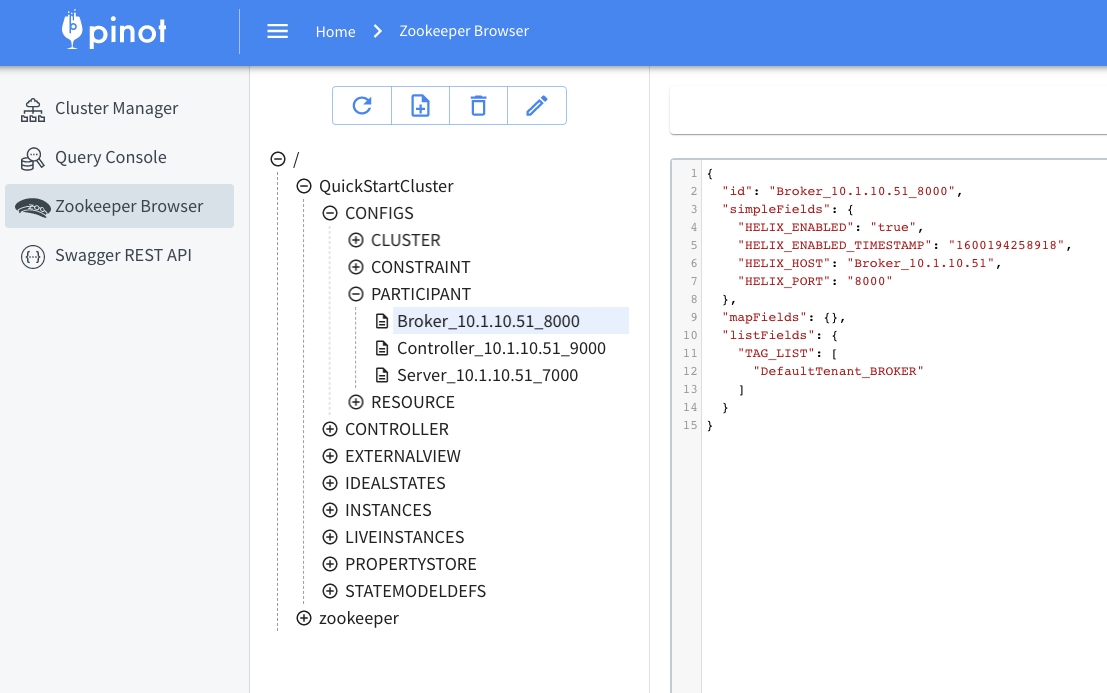
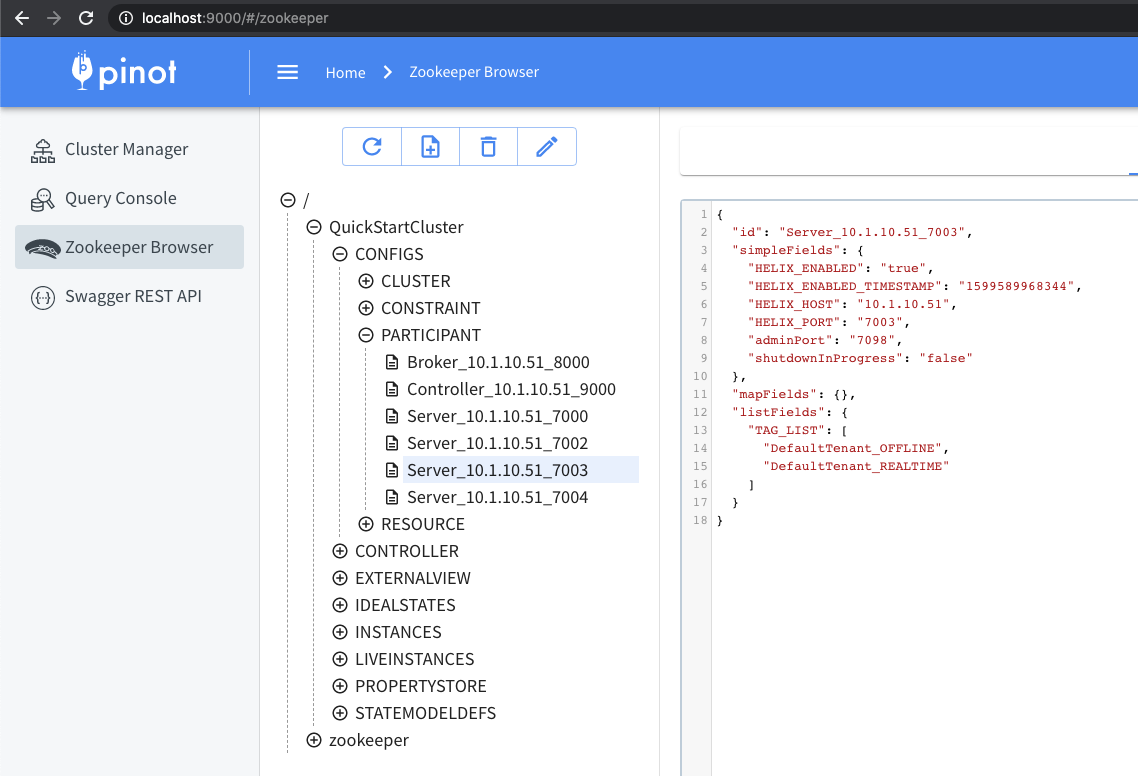
Every broker added to the Pinot cluster, has tags associated with it. A group of brokers with the same tag forms a Broker Tenant. By default, a broker in the cluster gets added to the DefaultTenant i.e. gets tagged as DefaultTenant_BROKER. Below is an example of how this tag looks in the znode, as seen in ZooInspector.
Broker tag
A Pinot table config has a tenants section, to define the tenant to be used by the table. More details about this in the Tenants section.
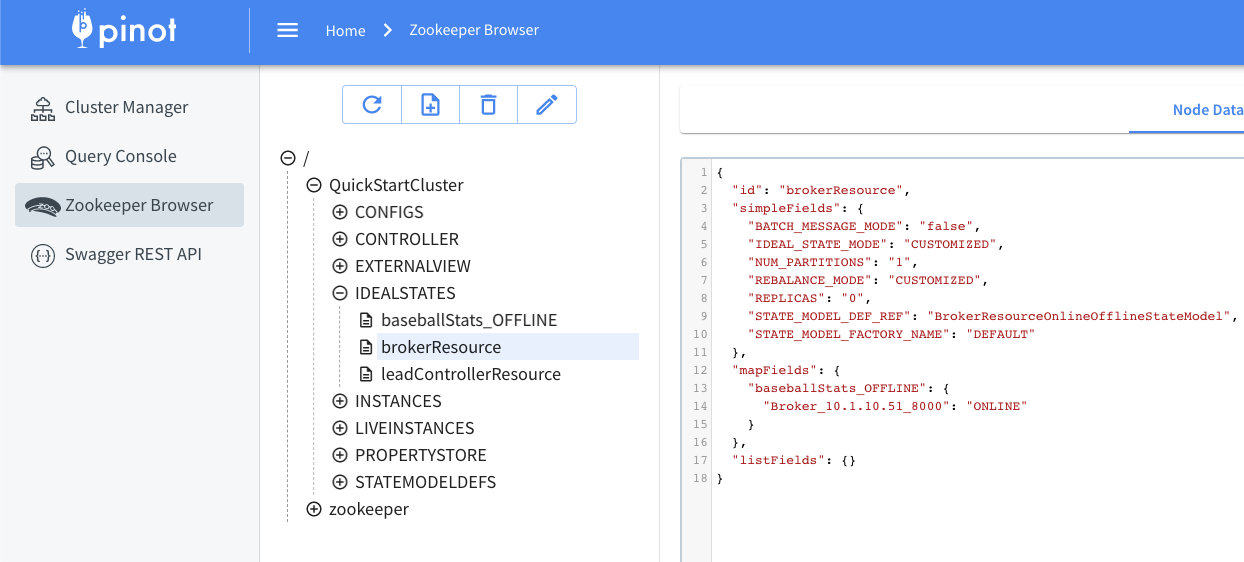
Using the tenant defined above, a mapping is created, from table name to brokers and stored in the IDEALSTATES/brokerResource. This mapping can be used by external services that need to pick a broker for querying.
brokerResource IDEALSTATE
Updating tags
If you want to scale up brokers, add new brokers to the cluster, and then tag them based on the tenant used by the table. If you're using DefaultTenant, no tagging needs to be done, as every broker node by default joins with tag DefaultTenant_BROKER.
If you want to scale down brokers, untag the brokers you wish to remove.
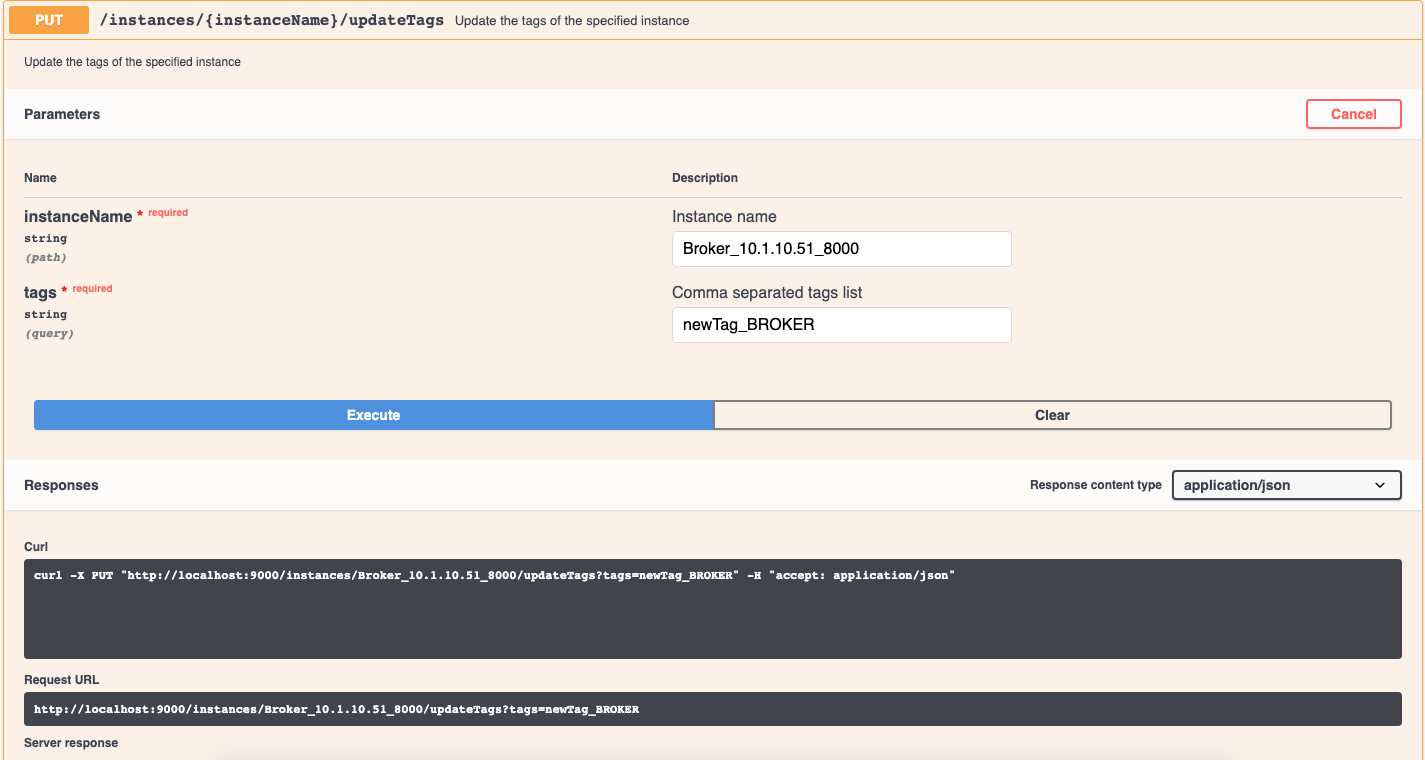
To update the tags on the broker, use the following API:
PUT /instances/{instanceName}/updateTags?tags=<comma separated tags>
updateTags API
Example for tagging the broker as per your custom tenant:
PUT /instances/Broker_10.20.151.8_8000/updateTags?tags=customTenant_BROKER
Example for untagging a broker:
PUT /instances/Broker_10.20.151.8_8000/updateTags?tags=untagged_BROKER
Rebuild broker resource
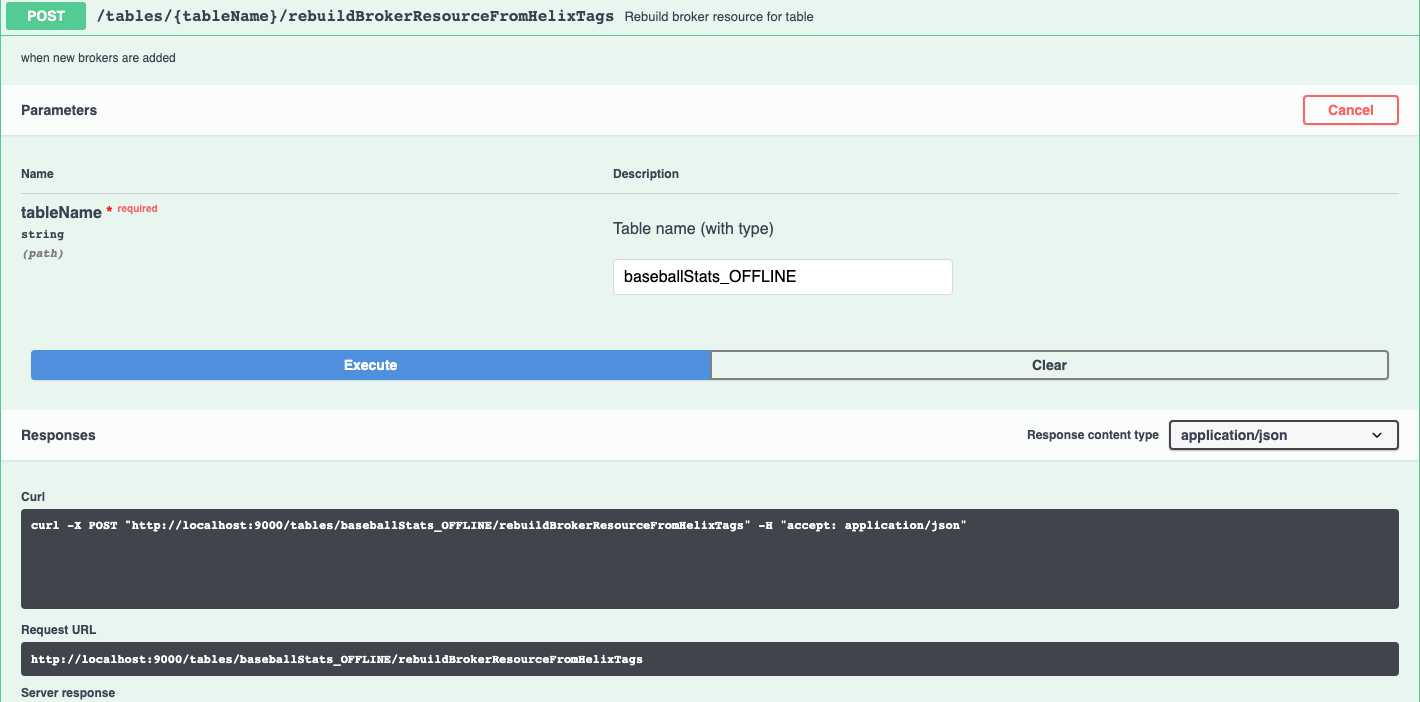
After making any capacity changes to the broker, the brokerResource needs to be rebuilt. This can be done with the below API:
POST /tables/{tableNameWithType}/rebuildBrokerResourceFromHelixTags
rebuildBrokerResource API
Drop nodes
This is when you untagged and now want to remove the node from the cluster.
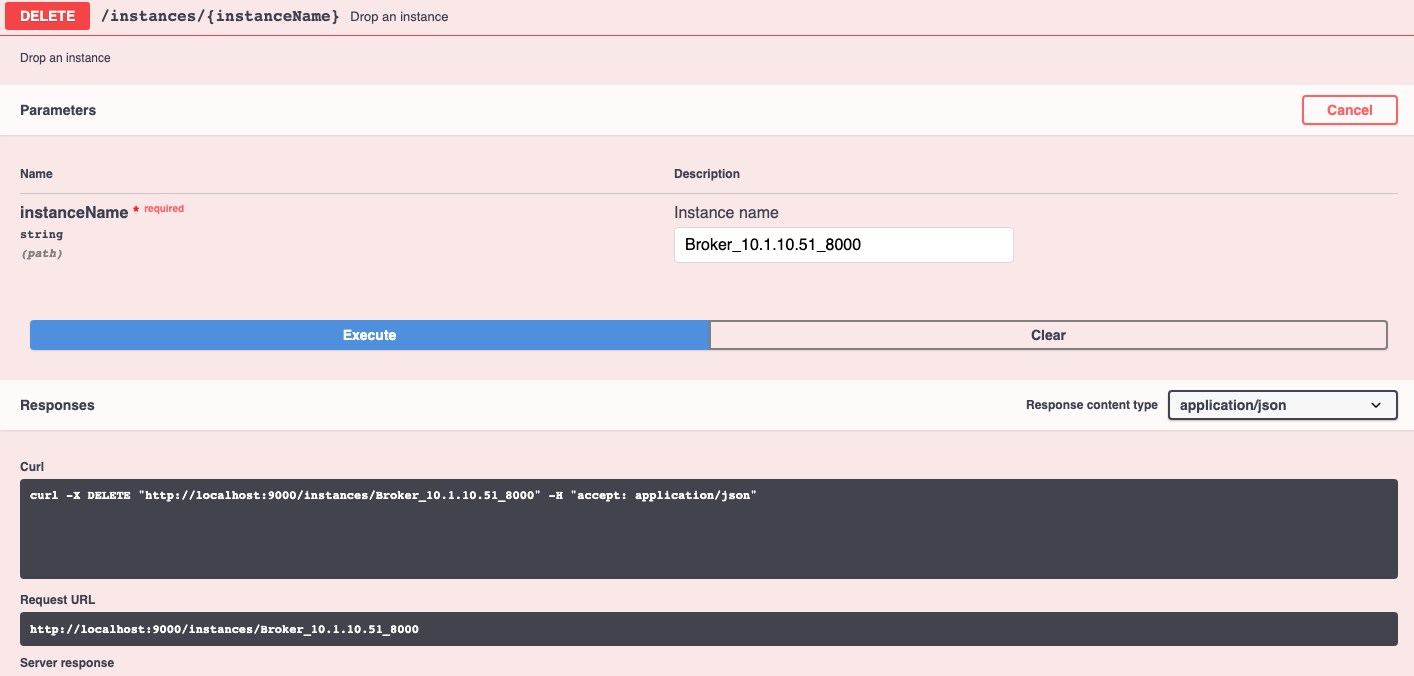
First, shutdown the broker. Then, use API below to remove the node from the cluster.
DELETE /instances/{instanceName}
Troubleshooting
If you encounter the below message when dropping, it means the broker process hasn't been shut down.
If you encounter below message, it means the broker has not been removed from the ideal state. Check the untagging and rebuild steps went through successfully.
Failed to drop instance Broker_10.1.10.51_8000 -
    Instance Broker_10.1.10.51_8000 is still live
Failed to drop instance Broker_172.17.0.2_8099 -
    Instance Broker_172.17.0.2_8099 exists in ideal state for brokerResource
avg.initialization.val
Initial value for EWMA average
1.0
stats.manager.threadpool.size
Number of threads reserved to process Adaptive Server Selection Stats.
2
Motivation
Data Consistency
Pinot supports atomic update on segment level, which means that when data consisting of multiple segments are pushed to a table, as segments are replaced one at a time, queries to the broker during this upload phase may produce inconsistent result due to interleaving of old and new data.
Data Rollback
Furthermore, Pinot currently does not support data rollback features. In case of a bad data push, the table owner needs to re-run the flow with the previous data and re-ingest data to Pinot. This end-to-end process can take hours and the Pinot table can potentially be in a bad state during this long period.
The consistent push and rollback protocol allows a user to atomically switch between data snapshots and rollback to the previous data in the case of a bad data push. For complete motivation and reasoning, refer to the design doc above. Currently, we only support OFFLINE table REFRESH use cases.
How this works
Segment lineage data structure has been introduced in Zookeeper (under the path <cluster_name>/PROPERTYSTORE/SEGMENT_LINEAGE/<table_name>) for keeping track of which segments have been replaced by which new set of segments, as well as corresponding state and timestamp.
When broker answers queries from the users, it will go through the lineage entries and only route to the segments in segmentsFrom for those in "IN_PROGRESS" or "REVERTED" state and the segments in segmentsTo for those in "COMPLETED" state, therefore preserving data snapshot atomicity.
Below are the APIs available on the controller to invoke the segment replacement protocol.
startReplaceSegments: Signifies to the controller that a replacement protocol is about to atomically replace segmentsFrom, a source list of segments, by segmentsTo , a target list of segments, which then persists a segment lineage entry with "IN PROGRESS" state to Zookeeper and returns its ID.
endReplaceSegments: Ends the replacement protocol associated with the segment lineage entry ID passed in as a parameter by changing the state to "COMPLETED".
revertReplaceSegments: Reverts the replacement protocol associated with the segment lineage entry ID passed in as a parameter by changing the state to "REVERTED".
However, we don't typically expect users to invoke these APIs directly.
Instead, consistent push is built into batch ingestion jobs (currently only supported for the standalone execution framework).
Step 1: Set up config for your OFFLINE, REFRESH table. Enable consistentDataPush under IngestionConfig -> BatchIngestionConfig.
Step 2: Execute the job by following instructions for.
How to trigger Data Rollback
Step 0: Identify the segment lineage entry ID corresponding to the segment swap that would like to be rolled back by using the /lineage REST API to list segment lineage.
Step 1: Use the revertReplaceSegments REST API to rollback data.
Step 2: As a sanity check, use the /lineage REST API again to ensure that the corresponding lineage entry is in "REVERTED" state.
Cleanup
Retention manager manages the cleanup of segments as well as segment lineage data.
On a high level, the cleanup logic is as follows:
Cleanup unused segments: For entries in "COMPLETED" state, we remove segments in segmentsFrom. For entries in "REVERTED" or "IN_PROGRESS" state whose timestamp is more than 24 hours old, we remove segments in segmentsTo.
Once all segments in step 1 are cleaned up, we remove the lineage entry.
The cleanup is usually handled in 2 cycles.
Cleanup regarding startReplaceSegment API:
We proactively remove the first snapshot if the client side is pushing the 3rd snapshot, so we are not exceeding the 2x disk space.
If the previous push fails in the middle (IN_PROGRESS/REVERTED state), we also clean up the segmentsTo.
Implications of enabling Consistent Push
Enabling consistent push can lead to up to 2x storage usage (assuming data size between snapshots are roughly equivalent) since at any time, we are potentially keeping both replacing and replaced segments.
Typically, for the REFRESH use case, users would directly replace segments by uploading segments of the same name. With consistent push, however, a timestamp is injected as the segment name postfix in order to differentiate between replacing and to be replaced segments. The older segments will be cleaned up by the Retention manager after a day from when the consistent push happened.
Currently, there is no way to disable consistent push for a table with consistent push enabled, due to the unique segment postfix issue mentioned above. Users will need to create a new table until support for disabling consistent push in-place is implemented.
If the push job fails for any reason, the job will rollback all the uploaded segments (revertReplaceSegments) to maintain data equivalence prior to the push.
Pinot supports inspecting and modifying Log4J log levels dynamically in production environments through REST. This can often be helpful when debugging an issue that is transient in nature and restarting the server with new configurations files could alter the behavior.
Supported Operations
List All Loggers
Parameter Type
Parameter Name
Description
Sample Usage:
Fetch Specific Logger
Parameter Type
Parameter Name
Description
Sample Usage:
Set Logger Level
Parameter Type
Parameter Name
Description
Sample Usage
Downloading Component Logs
Pinot supports downloading logs directly over HTTP in situations where the operator may not have access to the container, but has access to the rest endpoints.
If the operator has access to the Controller, they can download log files from any one of the other components.
Supported Operations
List Available Log Files
Parameter Type
Parameter Name
Description
Download a Log File
Parameter Type
Parameter name
Description
Remote Log APIs
These APIs are only supported on the Controller
List Log Files on All Instances
Parameter Type
Parameter Name
Description
List Log Files on a Specific Instance
Parameter Type
Parameter Name
Description
Download Remote Log From Given Instance
Parameter Type
Parameter Name
Description
Instance Assignment
This page introduces all the instance assignment strategies, when to use them, and how to configure them.
Instance assignment is the strategy of assigning the servers to host a table. Each instance assignment strategy is associated with one segment assignment strategy (read more about ).
Instance assignment is configured via the InstanceAssignmentConfig. Based on the config, Pinot can assign servers to a table, then assign segments to servers using the segment assignment strategy associated with the instance assignment strategy.
There are 3 types of instances for the InstanceAssignmentConfig: OFFLINE, CONSUMING and COMPLETED. OFFLINE represents the instances hosting the segments for the offline table;
Minion merge rollup task
The Minion merge rollup task lets you merge small segments into larger ones. This helps to improve query performance and disk storage by aggregating data at a courser granularity to reduce the data processed during query execution.
This task is supported for the following use cases:
OFFLINE tables, APPEND only
REALTIME tables, without upsert or dedup
Pinot managed Offline flows
Original design doc:
Issue:
The Pinot managed offline flows feature allows a user to simply set up a REALTIME table, and let Pinot manage populating the OFFLINE table. For complete motivation and reasoning, refer to the design doc above.
Setting to "accept: application/json" is recommended
Header
accept string
Setting to "accept: application/json" is recommended
Path Parameter
loggerName string
The name of the logger (fully qualified path)
Header
accept string
Setting to "accept: application/json" is recommended
Path Parameter
loggerName string
The name of the logger (fully qualified path)
Header
accept string
Setting to "accept: application/json" is recommended
Header
accept string
Setting to "accept: application/octet_string" is recommended
Query Parameter
filePath string
The path to the file, can be obtained using GET /loggers/files
Header
accept string
Setting to "accept": application/json" is recommended
Header
accept string
Setting to "accept": application/json" is recommended
Path Parameter
instanceName string
Indicates which instance to collect logs from
Header
accept string
Setting to "accept: application/octet
Path Parameter
instanceName string
Indicates which instance to collect logs from
Query Parameter
Query Parameter
GET /loggers
$ curl -X GET -H "accept: application/json" localhost:8000/loggers
["root","org.reflections","org.apache.pinot.tools.admin"]
GET /loggers/{loggerName}
> curl -X GET -H "accept: application/json" localhost:8000/loggers/root
{"filter":null,"level":"INFO","name":"root"}
PUT /loggers/{loggerName}?level={level}
$ curl -X PUT -H "accept: application/json" localhost:8000/loggers/root?level=ERROR
{"filter":null,"level":"ERROR","name":"root"}
GET /loggers/files
GET /loggers/download?filePath={filePath}
GET /loggers/instances
GET /loggers/instances/{instanceName}
GET /loggers/instances/{instanceName}/download?filePath={filePath}
CONSUMING
represents the instances hosting the consuming segments for the real-time table;
COMPLETED
represents the instances hosting the completed segments for the real-time table. For real-time table, if
COMPLETED
instances are not configured, completed segments will use the same instance assignment strategy as the consuming segments. If it is configured, completed segments will be automatically moved to the
COMPLETED
instances periodically.
Default Instance Assignment
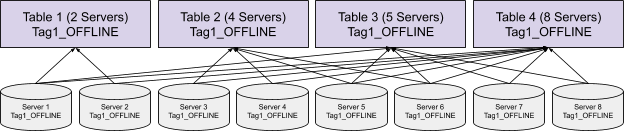
The default instance assignment strategy simply assigns all the servers in the cluster to each table, and uses the Balanced Segment Assignment for the table. This strategy requires no extra configurations for the cluster, and it works well for small clusters with few tables where all the resources can be shared among all the tables.
Tag-Based Instance Assignment
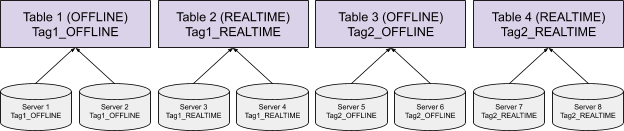
For performance critical use cases, we might not want to share the server resources for multiple use cases to prevent the use case being impacted by other use cases hosted on the same set of servers. We can use the Tag-Based Instance Assignment to achieve isolation for tables.
(Note: Logically the Tag-Based Instance Assignment is identical to the Tenant concept in Pinot, but just a different way of configuring the table. We recommend using the instance assignment over the tenant config because it can achieve more complex assignment strategies, as described below.)
In order to use the Tag-Based Instance Assignment, the servers should be tagged via the Helix InstanceConfig, where the tag suffix (_OFFLINE or _REALTIME) denotes the type of table the server is going to serve. Each server can have multiple tags if necessary.
After configuring the server tags, the Tag-Based Instance Assignment can be enabled by setting the tag within the InstanceAssignmentConfig for the table as shown below. Only the servers with this tag will be assigned to host this table, and the table will use the Balanced Segment Assignment.
Control Number of Instances
On top of the Tag-Based Instance Assignment, we can also control the number of servers assigned to each table by configuring the numInstances in the InstanceAssignmentConfig. This is useful when we want to serve multiple tables of different sizes on the same set of servers. For example, suppose we have 30 servers hosting hundreds of tables for different analytics, we don’t want to use all 30 servers for each table, especially the tiny tables with only megabytes of data.
Replica-Group Instance Assignment
In order to use the Replica-Group Segment Assignment, the servers need to be assigned to multiple replica-groups of the table, where the Replica-Group Instance Assignment comes into the picture. Enable it and configure the numReplicaGroups and numInstancesPerReplicaGroup in the InstanceAssignmentConfig, and Pinot will assign the instances accordingly.
Partitioned Replica-Group Instance Assignment
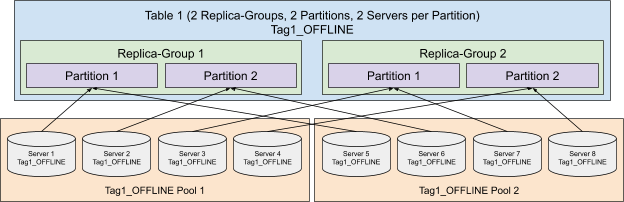
Similar to the Replica-Group Segment Assignment, in order to use the Partitioned Replica-Group Segment Assignment, servers not only need to be assigned to each replica-group, but also the partition within the replica-group. Adding the numPartitions and numInstancesPerPartition in the InstanceAssignmentConfig can fulfill the requirement.
(Note: The numPartitions configured here does not have to match the actual number of partitions for the table in case the partitions of the table changed for some reason. If they do not match, the table partition will be assigned to the server partition in a round-robin fashion. For example, if there are 2 server partitions, but 4 table partitions, table partition 1 and 3 will be assigned to server partition 1, and table partition 2 and 4 will be assigned to server partition 2.)
Instance Assignment for Low Level Consumer (LLC) Real-time Table
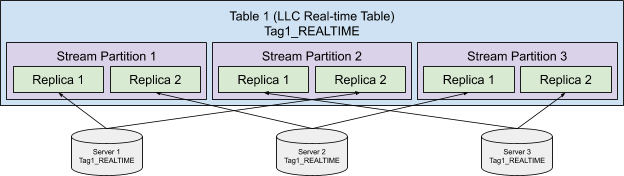
For LLC real-time table, all the stream events are split into several stream partitions, and the events from each stream partition are consumed by a single server. Because the data is always partitioned, the LLC real-time table is using Partitioned Replica-Group Instance Assignment implicitly with numPartitions the same as the number of stream partitions, and numInstancesPerPartition of 1, and we don't allow configuring them explicitly. The replica-group based instance assignment can still be configured explicitly.
Without explicitly configuring the replica-group based instance assignment, the replicas of the stream partitions will be evenly spread over all the available instances as shown in the following diagram:
With replica-group based instance assignment, the stream partitions will be evenly spread over the instances within the replica group.
Pool-Based Instance Assignment
This strategy is designed for accelerating the no-downtime rolling restart of the large shared cluster.
For example, suppose we have a cluster with 100 servers hosting hundreds of tables, each table has 2 replicas. Without organizing the segments, in order to keep no-downtime (at least 1 replica for each table has to be alive) for the cluster, only one server can be shut down at the same time, or there is a very high chance that both replicas of some segments are served on the down servers, which causes down time for the segment. Rolling restart servers one by one could take a very long time (even days) for a large cluster with petabytes of data. Pool-Based Instance Assignment is introduced to help organize the segments so that each time multiple servers can be restarted at the same time without bringing down any segment.
To use the Pool-Based Instance Assignment, each server should be assigned to a pool under the tag via the Helix InstanceConfig as shown below. Then the strategy can be configured by enabling the poolBased in the InstanceAssignmentConfig. All the tables in this cluster should use the Replica-Group Instance Assignment, and Pinot will assign servers from different pools to each replica-group of the table. It is guaranteed that servers within one pool only host one replica of any table, and it is okay to shut down all servers within one pool without bringing down any table. This can significantly reduce the deploy time of the cluster, where the 100 servers for the above example can be restarted in 2 rounds (less than an hour) instead of 100 rounds (days).
(Note: A table can have more replicas than the number of pools for the cluster, in which case the replica-group will be assigned to the pools in a round-robin fashion, and the servers within a pool can host more than one replicas of the table. It is still okay to shut down the whole pool without bringing down the table because there are other replicas hosted by servers from other pools.)
This strategy is to maximize Fault Domain diversity for replica-group based assignment strategy. Specifically, data center and cloud service (e.g. Azure) today provides the idea of rack or fault domain, as to ensure hardware resiliency upon power/network failure.
Specifically, if a table has R replicas and the underlying infrastructure provides F fault domains, then we guarantee that with the Fault-Domain-Aware Instance Assignment algorithm, if a fault domain is down, at most Ceil(R/F) instances from R mirrored machines can go down.
The configuration of this comes in two folds:
Tag the servers of a specific Fault Domain with the same pool ID (see instance config tagging in pool based assignment).
Specify partitionSelector in instanceAssignmentConfigMap to use FD_AWARE_INSTANCE_PARTITION_SELECTOR
Change the Instance Assignment
Sometimes we don’t have the instance assignment configured in the optimal way in the first shot, or the capacity or requirement of the use case changes and we have to change the strategy. In order to do that, simply apply the table config with the updated InstanceAssignmentConfig, and kick off a rebalance of the table (read more about Rebalance Servers). Pinot will reassign the instances for the table, and also rebalance the segments on the servers without downtime.
The Minion merge rollup task merges all segments of segment K time buckets (default 1) from the oldest to the newest records. After processing, the segments are time aligned by bucket.
For example, if the table has hourly records starting with 11-01-2021T13:56:00, and is configured to use bucket time of 1 day, the Merge rollup task merges the records for the window \[11-01-2021, 11-02-2021) in the first run, followed by \[11-02-2021, 11-03-2021) in the next run, followed by \[11-03-2021, 11-04-2021) in the next run, and so on.
Multi-level merge is supported to apply different compressions for different time ranges. For example, for 24 hours you can retain hourly records of data, rollup data from 1 week ago to 1 day ago into daily granularity, and rollup data older than a week to monthly granularity.
This feature uses the following metadata in Zookeeper:
CustomMap of SegmentZKMetadata: Keeps the mapping of { "MergeRollupTask.mergeLevel" : {mergeLevel} }. Indicates that the segment is the result of a merge rollup task. Used to skip time buckets that have all merged segments to avoid reprocessing.
MergeRollupTaskMetadata: Stored in the path: MINION\_TASK\_METADATA/MergeRollupTask/{tableNameWithType}. This metadata keeps the mapping from mergeLevel to waterMarkMs. Used to determine when to schedule the next merge rollup task run. The watermark is the start time of current processing buckets. All data before the watermark is merged and time aligned.
Merge rollup task uses SegmentReplacementProtocol to achieve broker-level atomic swap between the input segments and result segments. Broker refers to the SegmentLineage metadata to determine which segments should be routed.
This feature uses the pinot-minions and the Helix Task Executor framework, which consists of 2 parts:
MergeRollupTaskGenerator: The minion task scheduler, which schedules tasks of type MergeRollupTask. This task is scheduled by the controller periodic task, PinotTaskManager. For each mergeLevel from the highest to the lowest granularity (hourly -> daily -> monthly):
Time buckets calculation: Starting from the watermark, calculate up to k time buckets that has un-merged segments at best effort. Bump up the watermark if necessary.
Segments scheduling: For each time bucket, select all overlapping segments and create minion tasks.
MergeRollupTaskExecutor: The minion task executor, which executes the MergeRollupTask generated by the task generator. These tasks are run by the pinot-minion component.
Process segments: Download input segments as indicated in the task config. The segment processor framework partitions the data based on time value and rollup if configured.
Configure the Minion merge rollup task
Start a pinot-minion.
Set up your OFFLINE table. Add "MergeRollupTask" in the task configs, like this:
Enable PinotTaskManager (disabled by default) by adding the controller.task properties below to your controller conf, and then restart the controller (required).
(Optional) Add the following advanced configurations as needed:
For detail about these advanced configurations, see the following table:
Property
Description
Default
mergeType
Allowed values are
concat - no aggregations
rollup - perform metrics aggregations across common dimensions + time
concat
bucketTimePeriod
Time bucket size. Adjust this to change the time bucket. E.g. if set to 1h, the output segments will have records in 1 hour range.
This metric keeps track of the task delay in the number of time buckets. For example, if we see this number is 7, and the merge task is configured with "bucketTimePeriod = 1d", this means that we have 7 days of delay. Useful to monitor if the merge task is stuck in production.
OFFLINE only - this feature is not relevant for this mode.
REALTIME only - this feature is built for this mode. While having a real-time-only table setup (versus a hybrid table setup) is certainly lightweight and lesser operations, you lose some of the flexibility that comes with having a corresponding OFFLINE table.
For example, in real-time only mode, it is impossible to backfill a specific day's data, even if you have that data available offline somewhere, whereas you could've easily run a one off backfill job to correct data in an OFFLINE table.
It is also not possible to re-bootstrap the table using some offline data, as data for the REALTIME table strictly must come in through a stream. In OFFLINE tables, it is very easy to run jobs and replace segments in the table.
In REALTIME tables, the data often tends to be highly granular and we achieve very little aggregations. OFFLINE tables let you look at bigger windows of data hence achieving rollups for time column, aggregations across common dimensions, better compression and even dedup.
This feature will automatically manage the movement of the data to a corresponding OFFLINE table, so you don't have to write any offline jobs.
HYBRID table - If you already have a hybrid table this feature again may not be relevant to you. But you could explore using this to replace your offline push jobs, and simply keep them for backfills.
How this works
The Pinot managed offline flows feature will move records from the REALTIME table to the OFFLINE table, one time window at a time. For example, if the REALTIME table has records with timestamp starting 10-24-2020T13:56:00, then the Pinot managed offline flows will move records for the time window [10-24-2020, 10-25-2020) in the first run, followed by [10-25-2020, 10-26-2020) in the next run, followed by [10-26-2020, 10-27-2020) in the next run, and so on. This window length of 1d is just the default, and it can be configured to any length of your choice.
Note
Only completed (ONLINE) segments of the real-time table are used for movement. If the window's data falls into the CONSUMING segment, that run will be skipped. That window will be processed in a future run when all data has made it to the completed segments.
This feature uses the pinot-minions and the Helix Task Executor framework. This feature consists of 2 parts
RealtimeToOfflineSegmentsTask
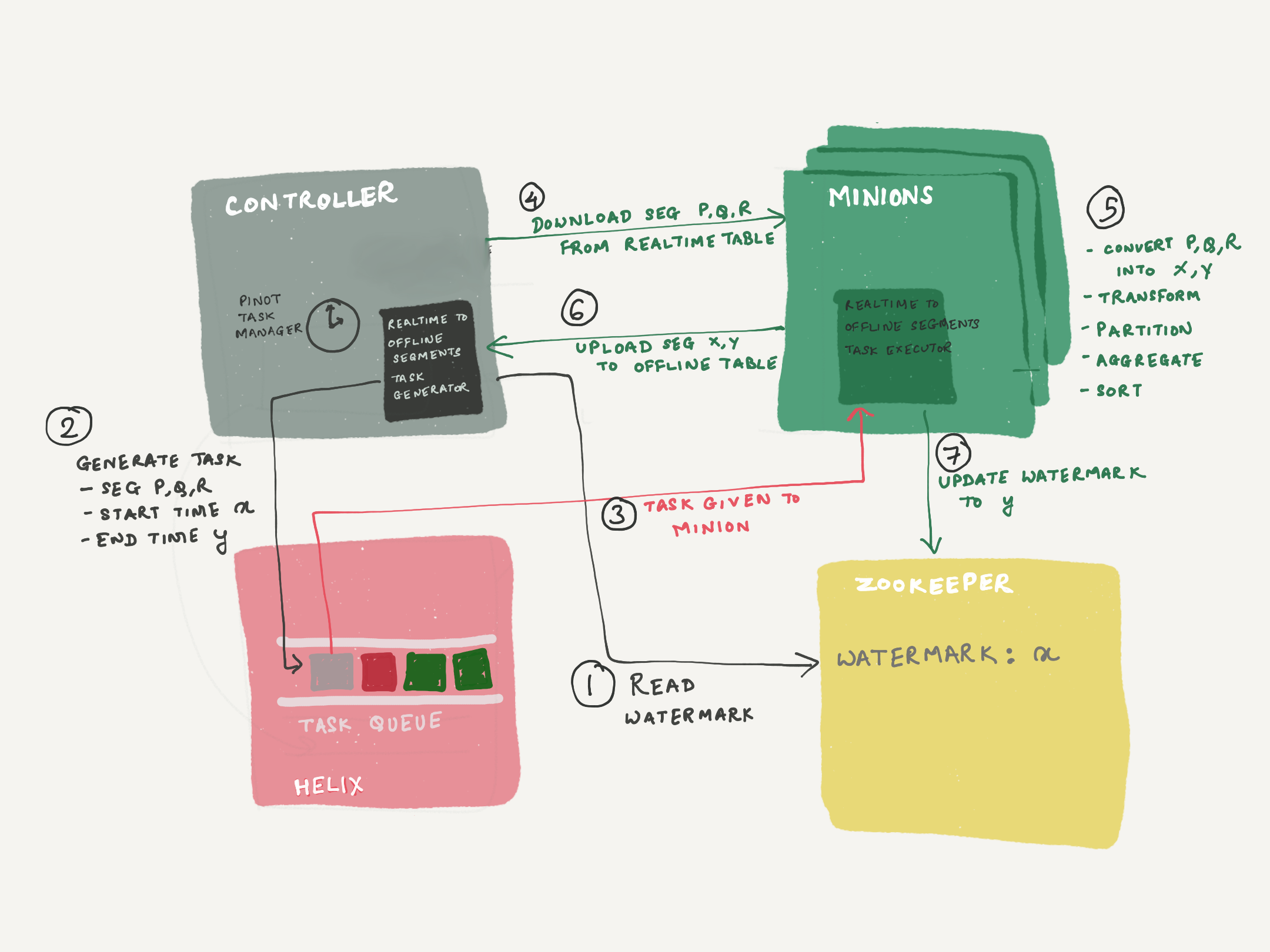
RealtimeToOfflineSegmentsTaskGenerator - This is the minion task scheduler, which schedules tasks of type "RealtimeToOfflineSegmentsTask". This task is scheduled by the controller periodic task - PinotTaskManager.
A watermark is maintained in zookeeper, which is the end time of the time window last successfully processed. The task generator refers to this watermark, to determine the start of the time window, for the next task it generates. The end time is calculated based on the window length (configurable, 1d default). The task generator will find all segments which have data in [start, end), and set it into the task configs, along with the start and end.
The generator will not schedule a new task, unless the previous task has COMPLETED (or been stuck for over 24h). This is to ensure that we always move records in sequential time windows (exactly mimicking offline flows), because out-of-order data pushes will mess with the time boundary calculation of the hybrid table.
RealtimeToOfflineSegmentsTaskExecutor - This is a minion task executor to execute the RealtimeToOfflineSegmentsTask generated by the task generator. These tasks are run by the pinot-minion component.
The task executor will download all segments from the REALTIME table, as indicated in the task config. Using the SegmentProcessorFramework, it will extract data for [start, end), build the segments, and push them to the OFFLINE table. The segment processor framework will do any required partitioning & sorting based on the OFFLINE table config.
Before exiting from the task, it will update the watermark in zookeeper, to reflect the end time of the time window processed.
Config
Step 0: Start a pinot-minion
Step 1: Set up your REALTIME table. Add "RealtimeToOfflineSegmentsTask" in the task configs
Step 2: Create the corresponding OFFLINE table
Step 3: Enable PinotTaskManager
The PinotTaskManager periodic task is disabled by default. Enable this using one of the 2 methods described in Auto-Schedule section. Set the frequency to some reasonable value (frequently is better, as extra tasks will not be scheduled unless required). Controller will need a restart after setting this config.
Step 4: Advanced configs
If needed, you can add more configs to the task configs in the REALTIME table, such as
where,
Property
Description
Default
bucketTimePeriod
Time window size for each run. Adjust this to change the time window. E.g. if set to 1h, each task will process 1h data at a time.
1d
bufferTimePeriod
Buffer time. Will not schedule tasks unless time window is older than this buffer.
Configure this according to how late you expect your data. E.g. if your system can emit events later than 3d, set this to 3d to make sure those are included.
Note: Once a given time window has been processed, it will never be processed again.
2d
The following properties are deprecated/removed in release 0.8.0
timeColumnTransformFunction (removed): Use ingestion transforms or roundBucketTimePeriod instead
collectorType (deprecated): Replaced by mergeType
Limitations & possible enhancements
Late data problem
Once the time window has moved forward, it will never be processed again. If some data arrives into your stream after the window has moved on, that data will never be processed. Set the "bufferTimePeriod" accordingly, to account for late data issues in your setup.
We will potentially consider ability to schedule ad hoc one-off tasks. For example, user can specify "rerun for day 10/23", which would sweep all segments again and collect data, replacing the old segments. This will help resolve the problem of data arriving very late.
Backfill/bootstrap
This feature automates the daily/hourly pushes to the offline counterpart of your hybrid table. And since you now have an OFFLINE table created, it opens up the possibility of doing an ad hoc backfill or re-bootstrap. However, there are no mechanisms for doing an automated backfill/re-bootstrap from some offline data. You still have to write your own flows for such scenarios.
Memory constraints
The segments download, data extraction, transformation, aggregations, sorting all happens on a single minion node for every run. You will need to be mindful of the memory available on the minion machine. Adjust the bucketSize and maxNumRecordsPerSegment if you are running into memory issues.
We will potentially introduce smarter config adjustments based on memory, or consider using Spark/Hadoop MR.
As explained in , Apache Pinot is a distributed system where different components have specific roles. Queries arrive at one of the , that calculates which are going to participate in the query. In most clusters, a single server cannot hold all the segments, so each server has a partial view of the complete data. At the same time, segments are usually replicated on different servers in order to have high availability and better performance. In order to produce a complete result, the broker needs to calculate a subset of servers that contains all the segments that are required to resolve the query. Once this subset is calculated, the router uses a scatter and gather algorithm that sends the query to each server and then merges the partial results into the complete one.
controller.task.scheduler.enabled=true
controller.task.frequencyPeriod=1h  #Specify the frequency (more frequent is better, as extra tasks aren't scheduled unless required).
Upload segments: Upload output segments with the segment replacement protocol. Once completed, the input segments are ready to be deleted and cleaned up by the retention manager.
bufferTimePeriod
Buffer time. Will not schedule tasks unless time bucket is older than this buffer.
Configure this according to how late you expect your data. E.g. if your system can emit events later than 3d, set this to 3d to make sure those are included.
Note: Once a given time window has been processed, it will never be processed again.
None
roundBucketTimePeriod
Round the time value before merging the rows. This is useful if time column is highly granular than needed, you can rollup the time values (e.g. milliseconds granularity in the original data, but okay with minute level granularity in the application - set to 1m
None
{metricName}.aggregationType
Aggregation function to apply to the metric for aggregations. Only applicable for rollup cases. Allowed values are sum, max, min, distinctCountHLL, distinctCountThetaSketch, distinctCountTupleSketch, distinctCountCpcSketch, distinctCountULL
sum
maxNumRecordsPerSegment
Control the number of records you want in a segment generated. Useful if the time bucket has many records, but you don't want them all in the same segment.
5,000,000
maxNumRecordsPerTask
Control single task workload. Useful to protect minion from overloading by a single task.
50,000,000
maxNumParallelBuckets
Control number of processing buckets per run. Useful to speed up the task scheduling for bootstrapping. E.g. if set to 10, the task generator will schedule 10 buckets per run.
1
There may be several subsets of servers that contain all the required segments. Any of them will return the correct result for the given query, but the subset used may affect the query performance. It is clear that the more servers participate in the query, the more CPUs, memory and IO can be used and therefore the better peak performance can be achieved. This is why, by default, brokers uniformly distribute the workload among as many servers as possible with balanced workload. Given that servers use segments as the minimum unit of work, the maximum parallelism is defined by the number of segments that are required to resolve the query.
What may be less clear is that the more servers participate in the query, the worse the tail latency (and even the resilience) will be. The reason is that the scatter and gather algorithm cannot produce a correct complete result until the partial results of all participating servers are collected. Therefore the latency of the query must be at least the higher latency of the servers participating and if any server crashes during the execution, the result merged in the broker may be incorrect. The more servers participate in a query, the higher the possibility to touch a server that requires some time to answer or to fail.
An easy-to-understand scenario is the impact of a full GC on a server. Let say a given query takes, on average, 30ms to execute. Depending on the JVM configuration that is used, a full GC may stop the process for a few hundreds of milliseconds, so if our query hits one server doing a full GC the latency will increase by at least one order or magnitude. Given that a correctly configured server shouldn't be stopped by full GCs very often, if to resolve this query a broker uses 3 servers, the possibility of hitting a server running a full GC is very small. Therefore, the tail latency of this query hitting 3 servers is expected to be close to 30ms. But if instead of 3 servers our query is spread on 30 servers, the possibility of hitting a server running a full GC increases significantly and therefore the tail latencies (p95, p99, etc) will increase.
To improve the tail latency, Apache Pinot provides two techniques at routing level:
Reduce the query fanout by exploding data distribution.
Reduce the query fanout by exploding data replication.
Reduce query fanout by exploding data distribution
As explained above, the broker must calculate the subset of servers that contains all the segments required to have a complete result. By default, the broker doesn't know anything about segments, so the subset of servers must contain all the segments in the table. This increases the number of servers that need to be asked. For example, in an extreme case where somehow the broker were able to know that only one segment was required, it could just ask one of the servers that contains that segment. By skipping servers that will not contain interesting data, the tail latency can be reduced without impacting the maximum peak performance.
Given that the number of segments may be large, the broker cannot store too much information per segment. One example of this is the bloom filters, which are used by servers to prune segments that will not contain relevant data to the given query. Given that the number of segments in a cluster can be quite large, brokers cannot afford to store them in memory and therefore bloom filters cannot be used to improve the rooting.
Instead, the user can inform Apache Pinot about specific patterns on which the data is actually distributed among segments. There are two patterns that can brokers can take advantage of and both can be used at the same time:
Data ingested ordered by the optional time column.
Data ingested partitioned by some column.
Data ingested ordered by the optional time column
When the schema defines a primary time column and data is ingested in approximate order by that column, brokers can optimize routing of queries that filter by that column. This is a common case for example when rows represent events (like logs, metrics, etc). As usual, Apache Pinot does not require events to be inserted in strict order. The closer the data distribution is to the strict order, the more selective this pruner will be but this technique can be used even when the data is not completely ordered.
To enable this optimization, segmentPartitionConfig must contain the time pruner type:
Data ingested partitioned by some column.
Apart from the ascending time, Apache Pinot can also take advantage of other distribution data patterns: Partition by segments. In order to use this feature, the table needs to be configured to use a partition function. Pinot will apply this function to each row in a segment and will store the set of partitions seen in the segment. Later, when a query is executed, Pinot will analyze the query in order to look for partition constraints. For example, when executing a query like select col1 from Table1 where col2 = 3, Pinot will calculate the partition associated with col2 = 3 and will prune segments that do not contain rows on that partition.
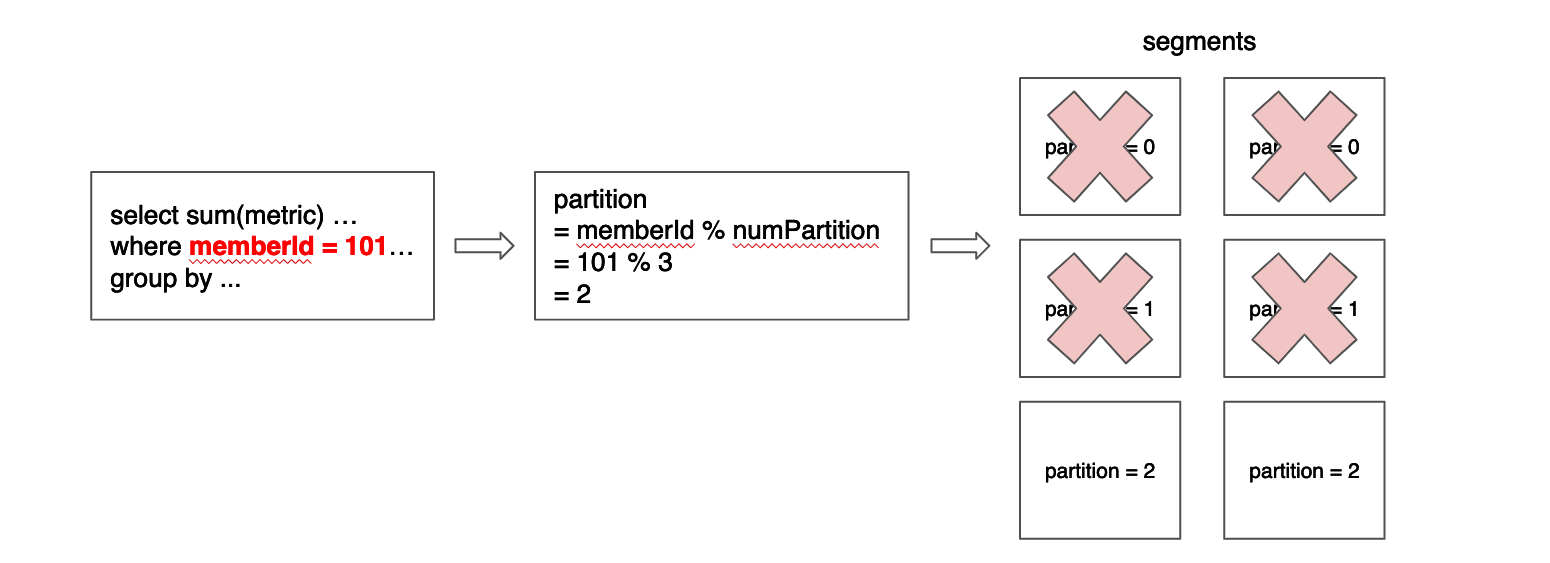
In order to make this pruning more efficient, segments should have the least number of partitions possible, which ideally is 1. More formally, given a function p, for all segments s, given any pair of rows r1 and r2, it should be true that p(r1) = p(r2). For example, in a table configured to have 3 partitions by memberId column, using modulo as the partition function, a segment that contains a row with memberId = 101 may also contain another row with memberId = 2 and another with memberId = 335, but it should not contain a row with memberId = 336 or memberId = 334.
Data cannot always be partitioned by a dimension column or even when it is, not all queries can take advantage of the distribution. But when this optimization can be applied, a lot of segments can be pruned. The current implementation for partitioning only works for EQUALITY and IN filter (e.g. memberId = xx, memberId IN (x, y, z)). Below diagram gives the example of data partitioned on member ID while the query includes an equality filter on member ID.
Apache Pinot currently supports Modulo, Murmur, ByteArray and HashCode hash functions and partitioning can be enabled by setting the following configuration in the table config.
After setting the above config, data should be partitioned with the same partition function and number of partitions before running Pinot segment build and push job for offline push. Here's a scala UDF example of a partition function that Pinot understands, which is to be used for data partitioning.
When applied correctly, partition information should be available in the segment metadata.
In order to maximize the partition pruning efficiency, it is important to reduce the number of partitions contained on each segment. Pinot will not move rows between segments to maximize partition efficiency, so when possible, rows should be correctly distribute before ingesting them into Pinot.
When using real-time tables, usually the input source can be used to do this partition. For example, one very usual input source in real-time tables is Kafka. In this case, in order to achieve maximum partition efficiency, Pinot and Kafka should use the same partition configuration.
When using offline tables, each input file should be crafted to contain rows on the same partition. Imagine we are creating a table from a list of CSV files. Ideally all rows in the csv should belong to the same partition. In the example above where we used modulo and 3 partitions, the value memberId = 101 will be associated with partition 2 (memberId % 3 = 2). Therefore to maximize the partition efficiency other rows in the same CSVv should have a memberId equal to 2, 5 or 104 but should not have values like 1, 3, 100 or 102.
Remember that Pinot does not impose a hard requirement here. It is fine if segments contain rows of more than one partition. What should be avoided is to have most segments associated with most partitions, given that in that case Pinot won't be actually able to prune most segments.
Reduce the query fanout by exploding data replication.
Although using partitions can drastically reduce the fanout, it only applies to specific queries and requires a specific data distribution between segments. The most consistent way to limit the fanout is to define replica group segment alignment. A Replica Group is a subset of servers that contains a ‘complete’ set of segments of a table. Once we assign the segment based on the replica group, each query can be answered by fanning out to a single replica group instead of all servers.
To use replica groups, the table configuration must be changed in the following ways:
Replica groups must be declared in the InstanceAssignmentConfig section.
RoutingConfig.instanceSelectorType must be changed to replicaGroup.
As seen above, you can use numReplicaGroups to control the number of replica groups (replications), and use numInstancesPerReplicaGroup to control the number of servers to span. For instance, let’s say that you have 12 servers in the cluster. Above configuration will generate 3 replica groups (numReplicaGroups=3), and each replica group will contain 4 servers (numInstancesPerPartition=4). In this example, each query will span to a single replica group (4 servers).
As seen above, replica groups give you the control on the number of servers to span for each query. When you try to decide the proper number of numReplicaGroups and numInstancesPerReplicaGroup, consider the trade-off between throughput and latency. Given a fixed number of servers, increasing numReplicaGroups factor while decreasing numInstancesPerReplicaGroup will make each query use less servers, which may reduce the possibility of one of them having a full GC. However, each server will need to process more number of segments per query, reducing the throughput, to the point that extreme values may even increase the average latency. Similarly, decreasing numReplicaGroups while increasing numInstancesPerReplicaGroup will make each query use more servers, increasing the possibility of one of them having a full GC but making each server process less number of segments per query. So, this number has to be decided based on the use case requirements.
Single replica routing
By default, the Pinot broker will route queries to the segment replica that is currently under the least load. It is possible to have the Pinot broker route all queries for a specific table to the same server for a given segment. You might do this if you are finding inconsistencies in query results due to an offset for consuming segments across different replicas.
You can enable this feature at different levels, as shown in the following examples.
To enable for a specific query via query options, which overrides the table/broker level configuration:
To enable for a specific table using table config settings, which overrides the broker level configuration, add the following in your table config:
To enable for all tables in the cluster using broker config settings:
It's important to note that this feature operates on a best-effort basis and routing may revert to routing to other replicas if there are alterations in segment assignments or if one or more servers become unavailable.
Additionally, adopting this feature could lead to potential skew in server resource utilization, particularly in clusters with a smaller number of tables, as the query load may no longer be evenly distributed across servers.
Round the time value before merging the rows. This is useful if time column is highly granular in the REALTIME table and is not needed by the application. In the OFFLINE table you can rollup the time values (e.g. milliseconds granularity in REALTIME table, but okay with minute level granularity in the application - set to 1m
None
mergeType
(supported since release 0.8.0)
Allowed values are
concat - no aggregations
rollup - perform metrics aggregations across common dimensions + time
dedup - deduplicates rows with the same values
concat
{metricName}.aggregationType
Aggregation function to apply to the metric for aggregations. Only applicable for rollup case. Allowed values are sum, max, min
sum
maxNumRecordsPerSegment
Control the number of records you want in a segment generated. Useful if the time window has many records, but you don't want them all in the same segment.
5,000,000
Rebalance Servers
The rebalance operation is used to recompute the assignment of brokers or servers in the cluster. This is not a single command, but rather a series of steps that need to be taken.
In the case of servers, rebalance operation is used to balance the distribution of the segments amongst the servers being used by a Pinot table. This is typically done after capacity changes or config changes such as replication or segment assignment strategies or table migration to a different tenant.
Changes that require a rebalance
Below are changes that need to be followed by a rebalance.
Upgrading Pinot with confidence
This page describes the Pinot cross-release compatibility test suite.
Pinot has unit and integration tests that verify that the system can work well as long as all components are in the same version. Further, each PR goes through reviews in which Pinot committers can decide whether a PR may break compatibility, and if so, how it can be avoided. Even with all this, it is useful to be able to test an upgrade before actually subjecting a live installation to upgrades.
Pinot has multiple components that run independently of each other. Therefore upgrading a mission-critical pinot cluster will result in scenarios where one component is running an old version and the other a new version of Pinot. It can also happen that this state (of multiple versions) is in place for days together. Or, we may need to revert the upgrade process (usually done in reverse order) -- possibly due to reasons outside of Pinot.
Pinot is highly configurable, so it is possible that there are few installations that use the same combination of configuration options as any one site does. Therefore, it may be that a defect or incompatibility exists with that particular combination of configurations, and went undetected in reviews.
In practice, installations upgrade their deployments to newer versions periodically, or when an urgent bug-fix is needed, or when a new release is published. It is also possible that an installation has not upgraded Pinot for a long time. Either way, it is usually the case that installations will pull in a lot more new/modified software than the feature or bug fix they need.
In a mission-critical Pinot installation, the administrators require that during (and certainly after) the upgrade, correctness of normal operations (segment pushes, ingestion from streams, queries, monitoring, etc.) is not compromised..
For the reasons stated above, it is useful to have a way to test an upgrade before applying to the production cluster. Further, it is useful to be able to customize the tests to run using the unique table/schema/configurations/queries combination that an installation is using. If an installation has not upgraded pinot for a long time, it is useful to know what parts may be incompatible during the upgrade process, and schedule downtime if required.
As of release 0.8.0, Pinot has a compatibility tester that you can run before upgrading your installation with a new release. You can specify your own configuration for the pinot components, your table configurations and schema, your queries with your sample data, and run the compatibility suite (you can build one based on the sample test suite provided).
We recommend that you upgrade Pinot components in the following order (if you need to roll back a release, do it in the reverse order).
Helix Controller (if separate from Pinot controller, else do step 2)
Pinot Controller
Broker
Server
Minion
The test suite runs through an upgrade sequence of upgrading each component one at a time (Controller, Broker, and Server in that order), and then reverting the new versions back to old version (Server, Broker and Controller, in that order). In between each upgrade or downgrade (referred to as a "phase"), a set of test operations (as specified in the test suite) is executed. The operations are specified in a declarative way in yaml files. At present the following operations are supported:
Create a table with a specific table config and schema
Create a segment from an input file and add it to a table
Run the queries specified in a file and verify the results as specified in a file
Create a Kafka topic with specified number of partitions
Ingest rows into the Kafka topic (so that server can consume them)
Delete a table
Delete a segment from a table
One or more of the above set of test operations can be done during each phase in the rollout or roll-back sequence. The test suite does the following steps in sequence
Set up a cluster with old version of controller, broker and server
Stop old controller, start new controller
Stop old broker and start new broker
Stop old server and start new server
Stop new server and start old server
Stop new broker and start old broker
Stop new controller and start old controller
Tests can be run in each phase, (i.e. between any two steps outlined above, or, after the last step). You can create a test suite by writing yaml files for each phase. You may decide to skip any phase by not providing a yaml file for that phase.
The idea here is as follows:
Any persisted files (such as table configs, schemas, data segments, etc.) are readable during and after upgrade.
Any persisted files while in the new release are readable after a rollback (in case that is required).
Protocols between the components evolve in a backward compatible manner.
Minion upgrades is currently not supported in the test framework. Also, testing compatibility of the controller APIs is not supported at this time. We welcome contributions in these areas.
See the yaml files provided along with the source code for examples on how to specify operations for each roll forward/backward stage of the upgrade process.
Running the compatibility test suite
There are two commands available. The first one allows you to identify the versions or builds between which you want to ascertain compatibility. The second one runs the test suite.
Depending on how old your versions are, you may have some build failures. It will be useful to create the following file as compat-settings.xml and set it in an environment variable before running the checkoutAndBuild.sh command:
And the command to run the compatibility test suite is as follows:
You can use command line tools to verify compatibility against a previous release of Pinot (the tools support a --help option).
Here are the steps to follow before you upgrade your installation
Determine the revision of Pinot you are currently running
This can be a commit hash, or a release tag (such as release-0.7.1). You can obtain the commit hash from the controller URI /version.
Decide the version of Pinot you want to upgrade to
This can be a tag or a commit hash.
Clone the current master
Clone the current source code from Pinot and go to the appropriate directory. This will get you the latest compatibility tester.
Check out and build the two releases
Checkout and build the sources of the two releases you want to verify. Make sure your working directory (-w argument) has enough space to hold two build trees, logs, etc.
Run compatibility regression suite
The command will exit with a status of 0 if all tests pass, 1 otherwise.
NOTE:
You can run the compCheck.sh command multiple times against the same build, you just need to make sure to provide a new working directory name each time.
You can specify a -k option to the compCheck.sh command to keep the cluster (Kafka, Pinot components) running. You can then attempt the operation (e.g. a query) that failed.
Query and Data files
So we can use the same data files and queries, upload them as new set of rows (both in real-time and offline tables), we encourage you to modify your table schema by adding an integer column called generationNumber. Each time data is uploaded, the values written as __GENERATION_NUMBER__ in your input data files (or in the query files) are substituted with a new integer value.
This allows the test suite to upload the same data as different segments, and verify that the current data as well as the previously uploaded ones are all working correctly in terms of responding to queries. The test driver automatically tests all previous generation numbers as well.
Consider an input line in the data file like the following:
When this input line is processed to generate a segment or push data into Kafka, the string __GENERATION_NUMBER__ will be replaced with an integer (each yaml file is one generation, starting with 0).
Similarly, consider a query like the following:
Before issuing this query, the tests will substitute the string __GENERATION_NUMBER__ with the actual generation number like above.
Use of generation number is optional (the test suite will try to substitute the string __GENERATION_NUMBER__ , but not find it if your input files do not have the string in them). Another way is to ensure that the set of queries you provide for each phase also includes results from the previous phases. That will make sure that all previously loaded data are also considered in the results when the queries are issued.
Result files
The first time you set up your result files, it is important that you look over the results carefully and make sure that they are correct.
In some cases, Pinot may provide different results each time you execute a query. For example, consider the query:
Since ORDER BY is not specified, if there are more than 5 results, there is no guarantee that Pinot will return the same five rows every time. In such a case, you can include all possible values of foo where x = 7 matches, and indicate that in your result file by specifying isSuperset: true. An example of this feature is shown below:
See the sample test suite for an example of how to use this in the result file.
Sample test suite
The sample test suite provided does the following between each stage of the upgrade:
Add a segment to an offline table
Run queries against new segments, and all old segments added thus far.
Add more rows to Kafka, ensuring that at least one segment is completed and at
least some rows are left uncommitted, so that we can test correct re-consumption of those
rows after rollout/rollback.
Run queries against the data ingested so far.
The table configurations schemas, data and queries have been chosen in such a way as to cover the major features that Pinot supports.
As a good practice, we suggest that you build your own test suite that has the tables, schemas, queries, and system configurations used in your installation of Pinot, so that you can verify compatibility for the features/configurations that your cluster uses.
$ # This is the tool to check out and build the versions to test
$ checkoutAndBuild.sh -h
Usage: checkoutAndBuild.sh [-o olderCommit] [-n newerCommit] -w workingDir
  -w, --working-dir                      Working directory where olderCommit and newCommit target files reside

  -o, --old-commit-hash                  git hash (or tag) for old commit

  -n, --new-commit-hash                  git hash (or tag) for new commit

If -n is not specified, then current commit is assumed
If -o is not specified, then previous commit is assumed (expected -n is also empty)
Examples:
    To compare this checkout with previous commit: 'checkoutAndBuild.sh -w /tmp/wd'
    To compare this checkout with some older tag or hash: 'checkoutAndBuild.sh -o release-0.7.1 -w /tmp/wd'
    To compare any two previous tags or hashes: 'checkoutAndBuild.sh -o release-0.7.1 -n 637cc3494 -w /tmp/wd
$ # Create the following file
$ cat /tmp/compat-settings.xml
<settings>
     <mirrors>
          <mirror>
               <id>maven-default-http-blocker</id>
               <mirrorOf>dummy</mirrorOf>
               <name>Dummy mirror to override default blocking mirror that blocks http</name>
               <url>http://0.0.0.0/</url>
               <blocked>false</blocked>
         </mirror>
    </mirrors>
</settings>

$ export PINOT_MAVEN_OPTS="/tmp/compat-settings.xml"
$ # And now, run the checkoutAndBuid.sh
$ checkoutAndBuild.sh -o <oldVersion> -n <newVersion> -w <workingDir>
# This is the tool to run the compatibility test suite against
$ ./compCheck.sh -h
Usage:  -w <workingDir> -t <testSuiteDir> [-k]
MANDATORY:
  -w, --working-dir                      Working directory where olderCommit and newCommit target files reside.
  -t, --test-suite-dir                   Test suite directory

OPTIONAL:
  -k, --keep-cluster-on-failure          Keep cluster on test failure
  -h, --help                             Prints this help
git clone https://github.com/apache/pinot.git
cd compatibility-verifier
123456,__GENERATION_NUMBER__,"s1-0",s2-0,1,2,m1-0-0;m1-0-1,m2-0-0;m2-0-1,3;4,6;7,Java C++ Python,01a0bc,k1;k2;k3;k4;k5,1;1;2;2;2,"{""k1"":1,""k2"":1,""k3"":2,""k4"":2,""k5"":2}",10,11,12.1,13.1
SELECT longDimSV1, intDimMV1, count(*) FROM FeatureTest2 WHERE generationNumber = __GENERATION_NUMBER__ AND (stringDimSV1 != 's1-6' AND longDimSV1 BETWEEN 10 AND 1000 OR (intDimMV1 < 42 AND stringDimMV2 IN ('m2-0-0', 'm2-2-0') AND intDimMV2 NOT IN (6,72))) GROUP BY longDimSV1, intDimMV1 ORDER BY longDimSV1, intDimMV1 LIMIT 20
SELECT foo FROM T1 WHERE x = 7 GROUP BY bar LIMIT 5
Moving table from one tenant to a different tenant
Capacity changes
These are typically done when downsizing/uplifting a cluster or replacing nodes of a cluster.
Tenants and tags
Every server added to the Pinot cluster has tags associated with it. A group of servers with the same tag forms a server tenant.
By default, a server in the cluster gets added to the DefaultTenant i.e. gets tagged as DefaultTenant_OFFLINE and DefaultTenant_REALTIME.
Below is an example of how this looks in the znode, as seen in ZooInspector.
A Pinot table config has a tenants section, to define the tenant to be used by the table. The Pinot table will use all the servers which belong to the tenant as described in this config. For more details about this, see the Tenants section.
Updating tags
0.6.0 onwards
In order to change the server tags, use the following API.
PUT /instances/{instanceName}/updateTags?tags=<comma separated tags>
0.5.0 and prior
UpdateTags API is not available in 0.5.0 and prior. Instead, use this API to update the Instance.
PUT /instances/{instanceName}
For example,
NOTE
The output of GET and input of PUT don't match for this API. Make sure to use the right payload as shown in example above. Particularly, notice that the instance name "Server_host_port" gets split up into separate fields in this PUT API.
When upsizing/downsizing a cluster, you will need to make sure that the host names of servers are consistent. You can do this by setting the following config parameter:
Replication changes
In order to change the replication factor of a table, update the table config as follows:
OFFLINE table - update the replication field
REALTIME table - update the replicasPerPartition field
Segment Assignment changes
The most common segment assignment change is moving from the default segment assignment to replica group segment assignment. Discussing the details of the segment assignment is beyond the scope of this page. More details can be found in Routing and in this FAQ question.
Table Migration to a different tenant
In a scenario where you need to move table across tenants, for e.g table was assigned earlier to a different Pinot tenant and now you want to move it to a separate one, then you need to call the rebalance API with reassignInstances set to true.
Rebalance Algorithms
Currently, two rebalance algorithms are supported; one is the default algorithm and the other one is minimal data movement algorithm.
The Default Algorithm
This algorithm is used for most of the cases. When reassignInstances parameter is set to true, the final lists of instance assignment will be re-computed, and the list of instances is sorted per partition per replica group. Whenever the table rebalance is run, segment assignment will respect the sequence in the sorted list and pick up the relevant instances.
Minimal Data Movement Algorithm
This algorithm focuses more on minimizing the data movement during table rebalance. When reassignInstances parameter is set to true and this algorithm gets enabled, the position of instances which are still alive remains the same, and vacant seats are filled with newly added instances or last instances in the existing alive instance candidate. So only the instances which change the position will involve in data movement.
In order to switch to this table rebalance algorithm, just simply set the following config to the table config before triggering table rebalance:
When instanceAssignmentConfigMap is not explicitly configured, minimizeDataMovement flag can also be set into the segmentsConfig:
Running a Rebalance
After any of the above described changes are done, a rebalance is needed to make those changes take effect.
To run a rebalance, use the following API.
POST /tables/{tableName}/rebalance?type=<OFFLINE/REALTIME>
This API has a lot of parameters to control its behavior. Make sure to go over them and change the defaults as needed.
Note
Typically, the flags that need to be changed from the default values are
includeConsuming=true for REALTIME
downtime=true if you have only 1 replica, or prefer a faster rebalance at the cost of a momentary downtime
Query param
Default value
Description
dryRun
false
If set to true, rebalance is run as a dry-run so that you can see the expected changes to the ideal state and instance partition assignment.
includeConsuming
false
Applicable for REALTIME tables.
CONSUMING segments are rebalanced only if this is set to true.
Moving a CONSUMING segment involves dropping the data consumed so far on old server, and re-consuming on the new server. If an application is sensitive to increased memory utilization due to re-consumption or to a momentary data staleness, they may choose to not include consuming in the rebalance. Whenever the CONSUMING segment completes, the completed segment will be assigned to the right instances, and the new CONSUMING segment will also be started on the correct instances. If you choose to includeConsuming=false and let the segments move later on, any downsized nodes need to remain untagged in the cluster, until the segment completion happens.
Checking status
The following API is used to check the progress of a rebalance Job. The API takes the jobId of the rebalance job. The API to see the jobIds of rebalance Jobs for a table is shown next.
Note that rebalanceStatus API is available from this commit
Below is the API to get the jobIds of rebalance jobs for a given table. The API takes the table name and jobType which is TABLE_REBALANCE.
Real-time
Learn about tuning real-time tables.
Tuning Real-time Performance
See the section on before reading this section.
Pinot servers ingest rows into a consuming segment that resides in volatile memory. Therefore, pinot servers hosting consuming segments tend to be memory bound. They may also have long garbage collection cycles when the segment is completed and memory is released.
curl -X GET "https://localhost:9000/rebalanceStatus/ffb38717-81cf-40a3-8f29-9f35892b01f9" -H "accept: application/json"
{"tableRebalanceProgressStats": {
    "startTimeMs": 1679073157779,
    "status": "DONE", // IN_PROGRESS/DONE/FAILED
    "timeToFinishInSeconds": 0, // Time it took for the rebalance job after it completes/fails
    "completionStatusMsg": "Finished rebalancing table: airlineStats_OFFLINE with minAvailableReplicas: 1, enableStrictReplicaGroup: false, bestEfforts: false in 44 ms."

     // The total amount of work required for rebalance
    "initialToTargetStateConvergence": {
      "_segmentsMissing": 0, // Number of segments missing in the current state but present in the target state
      "_segmentsToRebalance": 31, // Number of segments that needs to be assigned to hosts so that the current state can get to the target state.
      "_percentSegmentsToRebalance": 100, // Total number of replicas that needs to be assigned to hosts so that the current state can get to the target state.
      "_replicasToRebalance": 279 // Remaining work to be done in %
    },

    // The pending work for rebalance
    "externalViewToIdealStateConvergence": {
      "_segmentsMissing": 0,
      "_segmentsToRebalance": 0,
      "_percentSegmentsToRebalance": 0,
      "_replicasToRebalance": 0
    },

    // Additional work to catch up with the new ideal state, when the ideal
    // state shifts since rebalance started.
    "currentToTargetConvergence": {
      "_segmentsMissing": 0,
      "_segmentsToRebalance": 0,
      "_percentSegmentsToRebalance": 0,
      "_replicasToRebalance": 0
    },
  },
  "timeElapsedSinceStartInSeconds": 28 // If rebalance is IN_PROGRESS, this gives the time elapsed since it started
  }
curl -X GET "https://localhost:9000/table/airlineStats_OFFLINE/jobstype=OFFLINE&jobTypes=TABLE_REBALANCE" -H "accept: application/json"
You can configure Pinot servers to use off-heap memory for dictionary and forward indices of consuming segments by setting the value of pinot.server.instance.realtime.alloc.offheap to true. With this configuration in place, the server allocates off-heap memory by memory-mapping files. These files are never flushed to stable storage by Pinot (the Operating System may do so depending on demand for memory on the host). The files are discarded when the consuming segment is turned into a completed segment.
By default, the files are created under the directory where the table’s segments are stored in local disk attached to the consuming server. You can set a specific directory for consuming segments with the configuration pinot.server.consumerDir. Given that there is no control over flushing of pages from the memory mapped for consuming segments, you may want to set the directory to point to a memory-based file system, eliminating wasteful disk I/O.
If you don't want to use memory-mapping, set pinot.server.instance.realtime.alloc.offheap.direct to true. In this case, pinot allocates direct ByteBuffer objects for consuming segments. Using direct allocation can potentially result in address space fragmentation.
Note that we still use heap memory to store inverted indices for consuming segments.
Controlling number of rows in consuming segment
The number of rows in a consuming segment needs to be balanced. Having too many rows can result in memory pressure. On the other hand, having too few rows results in having too many small segments. Having too many segments can be detrimental to query performance, and also increase pressure on the Helix.
The recommended way to do this is to use the realtime.segment.flush.threshold.segment.size setting as described in StreamConfigs Section. You can run the administrative tool pinot-admin.sh RealtimeProvisioningHelper that will help you to come up with an optimal setting for the segment size.
Moving completed segments to different hosts
This feature is available only if the consumption type is LowLevel.
The structure of the consuming segments and the completed segments are very different. The memory, CPU, I/O and GC characteristics could be very different while processing queries on these segments. Therefore it may be useful to move the completed segments onto different set of hosts in some use cases.
You can host completed segments on a different set of hosts using the tagOverrideConfig as described in Table Config. Pinot will automatically move them once the consuming segments are completed.
If you require more fine-tuned control over how segments are hosted on different hosts, we recommend that you use the Tag-Based Instance Assignment feature to accomplish this.
Controlling segment build vs. segment download on real-time servers
This feature is available only if the consumption type is LowLevel.
When a real-time segment completes, a winner server is chosen as a committer amongst all replicas by the controller. That committer builds the segment and uploads to the controller. The non-committer servers are asked to catchup to the winning offset. If the non-committer servers are able to catch up, they are asked to build the segment and replace the in-memory segment. If they are unable to catchup, they are asked to download the segment from the controller.
Building a segment can cause excessive garbage and may result in GC pauses on the server. Long GC pauses can affect query processing. You might want to force the non-committer servers to download the segment from the controller instead of building it again. The completionConfig as described in Table Config can be used to configure this.
Fine tuning the segment commit protocol
This feature is available only if the consumption type is LowLevel.
Once a committer is asked to commit the segment, it builds a segment, and issues an HTTP POST to the controller, with the segment. The controller then commits the segment in Zookeeper and starts the next consuming segment.
It is possible to configure the servers to do a split commit, in which the committer performs the following steps:
Build the segment
Start a transaction with the lead controller to commit the segment (CommitStart phase)
Post the completed segment to any of the controllers (and the controller posts it to segment store)
End the transaction with the lead controller (CommentEnd phase). Optionally, this step can be done with the segment metadata.
This method of committing can be useful if the network bandwidth on the lead controller is limiting segment uploads.In order to accomplish this, you will need to set the following configurations:
On the controller, set pinot.controller.enable.split.commit to true (default is false).
On the server, set pinot.server.enable.split.commit to true (default is false).
On the server, set pinot.server.enable.commitend.metadata to true (default is false).
RealtimeProvisioningHelper
This tool can help decide the optimum segment size and number of hosts for your table. You will need one sample Pinot segment from your table before you run this command. There are three ways to get a sample segment:
If you have an offline segment, you can use that.
You can provision a test version of your table with some minimum number of hosts that can consume the stream, let it create a few segments with large enough number of rows (say, 500k to 1M rows), and use one of those segments to run the command. You can drop the test version table, and re-provision it once the command outputs some parameters to set.
If you don't have a segment in hand or provisioning of a test version of your table is not an easy option, you can provide schema which is decorated with data characteristics. Then the tool generates a segment based on the provided characteristics behind the scene and proceeds with the real-time analysis. In case the characteristics of real data is very different, you may need to modify the parameters. You can always change the config after you get segments from real data.
As of Pinot version 0.5.0, this command has been improved to display the number of pages mapped, as well as take in the push frequency as an argument if the real-time table being provisioned is a part of a hybrid table. If you are using an older version of this command, download a later version and re-run the command. The arguments to the command are as follows:
tableConfigFile: This is the path to the table config file
numPartitions: Number of partitions in your stream
numHosts: This is a list of the number of hosts for which you need to compute the actual parameters. For example, if you are planning to deploy between 4 and 8 hosts, you may specify 4,6,8. In this case, the parameters will be computed for each configuration -- that of 4 hosts, 6 hosts, and 8 hosts. You can then decide which of these configurations to use.
numHours : This is a list of maximum number of hours you want your consuming segments to be in consuming state. After these many hours the segment will move to completed state, even if other criteria (like segment size or number of rows) are not met yet. This value must be smaller than the retention of your stream. If you specify too small a value, then you run the risk of creating too many segments, this resulting in sub-optimal query performance. If you specify this value to be too big, then you may run the risk of having too large segments, running out of "hot" memory (consuming segments are in read-write memory). Specify a few different (comma-separated) values, and the command computes the segment size for each of these.
sampleCompletedSegmentDir: The path of the directory in which the sample segment is present. See above if you do not have a sample segment.
pushFrequency : This is optional. If this is a hybrid table, then enter the frequency with which offline segments are pushed (one of "hourly", "daily", "weekly" or "monthly"). This argument is ignored if retentionHours is specified.
maxUsableHostMemory: This is the total memory available in each host for hosting retentionHours worth of data (i.e. "hot" data) of this table. Remember to leave some for query processing (or other tables, if you have them in the same hosts). If your latency needs to be very low, this value should not exceed the physical memory available to store pinot segments of this table, on each host in your cluster. On the other hand, if you are trying to lower cost and can take higher latencies, consider specifying a bigger value here. Pinot will leave the rest to the Operating System to page memory back in as necessary.
retentionHours : This argument should specify how many hours of data will typically be queried on your table. It is assumed that these are the most recent hours. If pushFrequency is specified, then it is assumed that the older data will be served by the offline table, and the value is derived automatically. For example, if pushFrequency is daily, this value defaults to 72. If hourly, then 24. If weekly, then 8d
ingestionRate : Specify the average number of rows ingested per second per partition of your stream.
schemaWithMetadataFile : This is needed if you do not have a sample segment from the topic to be ingested. This argument allows you to specify to describe the data characteristics (like number of unique values each column can have, etc.).
numRows : This is an optional argument if you want the tool to generate a segment for you. If it is not give, then a default value of 10000 is used.
One you run the command, it produces an output as below:
The idea here is to choose an optimal segment size so that :
The number of segments searched for your queries are minimized
The segment size is neither too large not too small (where "large" and "small" are as per the range for your table).
Overall memory is optimized for your table, considering the other tables in the host, the query traffic, etc.
You can pick the appropriate value for segment size and number of hours in the table config, and set the number of rows to zero. Note that you don't have to pick values exactly as given in each of these combinations (they are calculated guesses anyway). Feel free to choose some values in between or out of range as you feel fit, and adjust them after your table is in production (no restarts required, things will slowly adjust themselves to the new configuration). The example given below chooses from the output.
Case 1: Optimize for performance, high QPS
From the above output you may decide that 6 hours is an optimal consumption time given the number of active segments looked at for a query, and you can afford about 4G of active memory per host. You can choose either 8 or 10 hosts, you choose 10. In this case, the optimal segment size will be 111.98M. You can then enter your real-time table config as below:
Case 2: Optimize for cost, low QPS
You may decide from the output that you want to make do with 6 hosts. You have only 2G of memory per host for active segments but you are willing to map 8G of active memory on that, with plenty of paging for each query. Since QPS is low, you may have plenty of CPU per query so huge segments may not be a problem. Choose 12 or 24h or consumption and pick an appropriate segment size. You may then configure something like:
This controls whether Pinot allows downtime while rebalancing.
If downtime = true, all replicas of a segment can be moved around in one go, which could result in a momentary downtime for that segment (time gap between ideal state updated to new servers and new servers downloading the segments).
If downtime = false, Pinot will make sure to keep certain number of replicas (config in next row) always up. The rebalance will be done in multiple iterations under the hood, in order to fulfill this constraint.
Note: If you have only 1 replica for your table, rebalance with downtime=false is not possible.
minAvailableReplicas
1
Applicable for rebalance with downtime=false.
This is the minimum number of replicas that are expected to stay alive through the rebalance.
lowDiskMode
false
Applicable for rebalance with downtime=false.
When enabled, segments will first be offloaded from servers, then added to servers after offload is done. It may increase the total time of the rebalance, but can be useful when servers are low on disk space, and we want to scale up the cluster and rebalance the table to more servers.
bestEfforts
false
Applicable for rebalance with downtime=false.
If a no-downtime rebalance cannot be performed successfully, this flag controls whether to fail the rebalance or do a best-effort rebalance.
reassignInstances
false
Applicable to tables where the instance assignment has been persisted to zookeeper. Setting this to true will make the rebalance first update the instance assignment, and then rebalance the segments.
bootstrap
false
Rebalances all segments again, as if adding segments to an empty table. If this is false, then the rebalance will try to minimize segment movements.
Using tag-based instance assignment to host completed segments on different hosts:
is specified, then this value is assumed to be the retention time of the real-time table (e.g. if the table is retained for 6 months, then it is assumed that most queries will retrieve all six months of data). As an example, if you have a real-time only table with a 21 day retention, and expect that 90% of your queries will be for the most recent 3 days, you can specify a
retentionHours
value of 72. This will help you configure a system that performs much better for most of your queries while taking a performance hit for those that occasionally query older data.