arrow-left

All pages
gitbookPowered by GitBook
1 of 1

Loading...

Running in Kubernetes

Pinot quick start in Kubernetes

Get started running Pinot in Kubernetes.

circle-info

Note: The examples in this guide are sample configurations to be used as reference. For production setup, you may want to customize it to your needs.

hashtag
Prerequisites

hashtag
Kubernetes

This guide assumes that you already have a running Kubernetes cluster.

If you haven't yet set up a Kubernetes cluster, see the links below for instructions:

    • Make sure to run with enough resources: minikube start --vm=true --cpus=4 --memory=8g --disk-size=50g

hashtag
Pinot

Make sure that you've downloaded Apache Pinot. The scripts for the setup in this guide can be found in our.

hashtag
Set up a Pinot cluster in Kubernetes

hashtag
Start Pinot with Helm

The Pinot repository has pre-packaged Helm charts for Pinot and Presto. The Helm repository index file is .

Note: Specify StorageClass based on your cloud vendor. Don't mount a blob store (such as AzureFile, GoogleCloudStorage, or S3) as the data serving file system. Use only Amazon EBS/GCP Persistent Disk/Azure Disk-style disks.

  • For AWS: "gp2"

hashtag
Check Pinot deployment status

hashtag
Load data into Pinot using Kafka

hashtag
Bring up a Kafka cluster for real-time data ingestion

hashtag
Check Kafka deployment status

Ensure the Kafka deployment is ready before executing the scripts in the following steps. Run the following command:

Below is an example output showing the deployment is ready:

hashtag
Create Kafka topics

Run the scripts below to create two Kafka topics for data ingestion:

hashtag
Load data into Kafka and create Pinot schema/tables

The script below does the following:

  • Ingests 19492 JSON messages to Kafka topic flights-realtime at a speed of 1 msg/sec

  • Ingests 19492 Avro messages to Kafka topic flights-realtime-avro at a speed of 1 msg/sec

  • Uploads Pinot schema airlineStats

hashtag
Query with the Pinot Data Explorer

hashtag
Pinot Data Explorer

The script below, located at ./pinot/helm/pinot, performs local port forwarding, and opens the Pinot query console in your default web browser.

hashtag
Query Pinot with Superset

hashtag
Bring up Superset using Helm

  1. Install the SuperSet Helm repository:

  1. Get the Helm values configuration file:

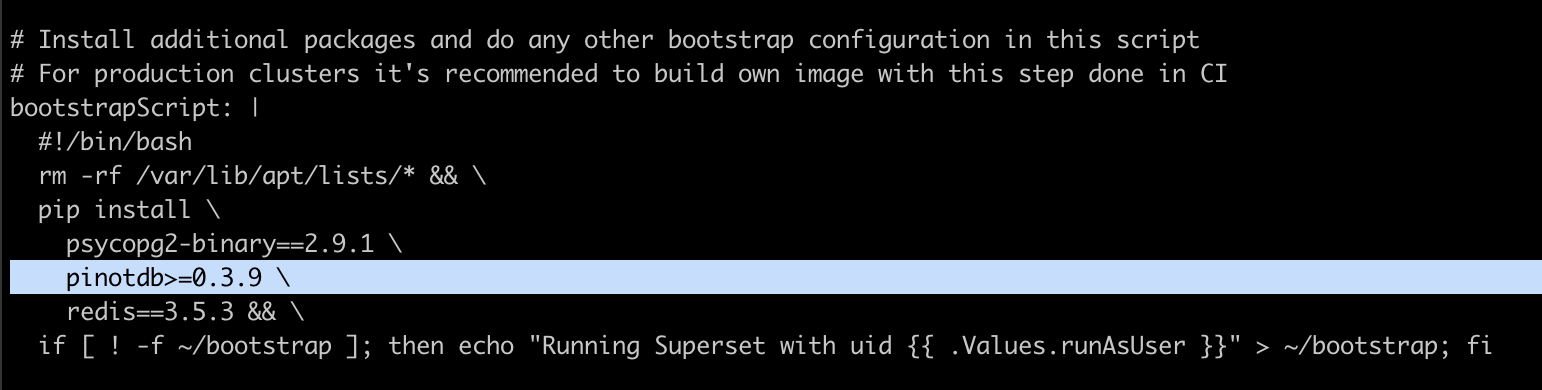
  1. For Superset to install Pinot dependencies, edit /tmp/superset-values.yaml file to add apinotdb pip dependency into bootstrapScript field.

  2. You can also build your own image with this dependency or use the image apachepinot/pinot-superset:latest instead.

  1. Replace the default admin credentials inside the init section with a meaningful user profile and stronger password.

  2. Install Superset using Helm:

  1. Ensure your cluster is up by running:

hashtag
Access the Superset UI

  1. Run the below command to port forward Superset to your localhost:18088.

  1. Navigate to Superset in your browser with the admin credentials you set in the previous section.

  2. Create a new database connection with the following URI: pinot+http://pinot-broker.pinot-quickstart:8099/query?controller=http://pinot-controller.pinot-quickstart:9000/

  3. Once the database is added, you can add more data sets and explore the dashboard options.

hashtag
Access Pinot with Trino

hashtag
Deploy Trino

  1. Deploy Trino with the Pinot plugin installed:

  1. See the charts in the Trino Helm chart repository:

  1. In order to connect Trino to Pinot, you'll need to add the Pinot catalog, which requires extra configurations. Run the below command to get all the configurable values.

  1. To add the Pinot catalog, edit the additionalCatalogs section by adding:

circle-info

Pinot is deployed at namespace pinot-quickstart, so the controller serviceURL is pinot-controller.pinot-quickstart:9000

  1. After modifying the /tmp/trino-values.yaml file, deploy Trino with:

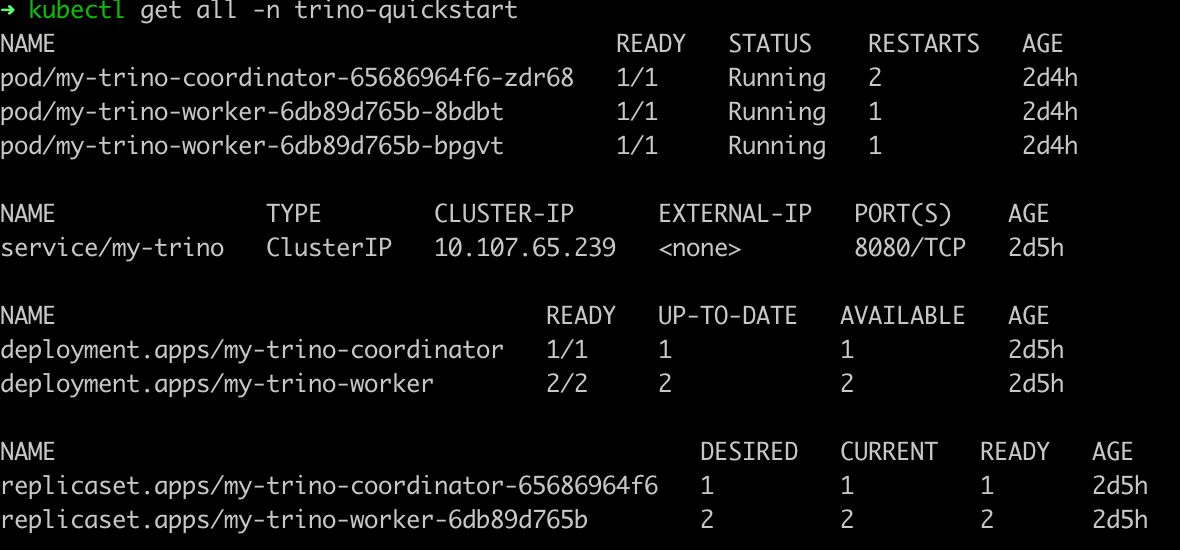
  1. Once you've deployed Trino, check the deployment status:

hashtag
Query Pinot with the Trino CLI

Once Trino is deployed, run the below command to get a runnable Trino CLI.

  1. Download the Trino CLI:

  1. Port forward Trino service to your local if it's not already exposed:

  1. Use the Trino console client to connect to the Trino service:

  1. Query Pinot data using the Trino CLI, like in the sample queries below.

hashtag
Sample queries to execute

hashtag
List all catalogs

hashtag
List all tables

hashtag
Show schema

hashtag
Count total documents

hashtag
Access Pinot with Presto

hashtag
Deploy Presto with the Pinot plugin

  1. First, deploy Presto with default configurations:

  1. To customize your deployment, run the below command to get all the configurable values.

  1. After modifying the /tmp/presto-values.yaml file, deploy Presto:

  1. Once you've deployed the Presto instance, check the deployment status:

hashtag
Query Presto using the Presto CLI

Once Presto is deployed, you can run the below command from , or follow the steps below.

  1. Download the Presto CLI:

  1. Port forward presto-coordinator port 8080 to localhost port 18080:

  1. Start the Presto CLI with the Pinot catalog:

  1. Query Pinot data with the Presto CLI, like in the sample queries below.

hashtag
Sample queries to execute

hashtag
List all catalogs

hashtag
List all tables

hashtag
Show schema

hashtag
Count total documents

hashtag
Delete a Pinot cluster in Kubernetes

To delete your Pinot cluster in Kubernetes, run the following command:

Set up a Kubernetes Cluster using Amazon Elastic Kubernetes Service (Amazon EKS)

  • Set up a Kubernetes Cluster using Google Kubernetes Engine (GKE)

  • Set up a Kubernetes Cluster using Azure Kubernetes Service (AKS)

  • For GCP: "pd-ssd" or "standard"
  • For Azure: "AzureDisk"

  • For Docker-Desktop: "hostpath"

  • 1.1.1 Update Helm dependency

    1.1.2 Start Pinot with Helm

    For Helm v2.12.1:

    If your Kubernetes cluster is recently provisioned, ensure Helm is initialized by running:

    Then deploy a new HA Pinot cluster using the following command:

    For Helm v3.0.0:

    1.1.3 Troubleshooting (For helm v2.12.1)

    If you see the error below:

    Run the following:

    If you encounter a permission issue, like the following:

    Error: release pinot failed: namespaces "pinot-quickstart" is forbidden: User "system:serviceaccount:kube-system:default" cannot get resource "namespaces" in API group "" in the namespace "pinot-quickstart"

    Run the command below:

  • Creates Pinot table airlineStats to ingest data from JSON encoded Kafka topic flights-realtime

  • Creates Pinot table airlineStatsAvro to ingest data from Avro encoded Kafka topic flights-realtime-avro

  • Enable Kubernetes on Docker-Desktoparrow-up-right
    Install Minikube for local setuparrow-up-right
    open source project on GitHubarrow-up-right
    herearrow-up-right
    herearrow-up-right
    Sample Output of K8s Deployment Status
    # checkout pinot
    git clone https://github.com/apache/pinot.git
    cd pinot/helm/pinot
    helm dependency update
    helm init --service-account tiller
    helm install --namespace "pinot-quickstart" --name "pinot" pinot
    kubectl create ns pinot-quickstart
    helm install -n pinot-quickstart pinot ./pinot
    helm repo add pinot https://raw.githubusercontent.com/apache/pinot/master/helm
    kubectl create ns pinot-quickstart
    helm install pinot pinot/pinot \
        -n pinot-quickstart \
        --set cluster.name=pinot \
        --set server.replicaCount=2
    kubectl get all -n pinot-quickstart
    helm repo add kafka https://charts.bitnami.com/bitnami
    helm install -n pinot-quickstart kafka kafka/kafka --set replicas=1,zookeeper.image.tag=latest
    kubectl get all -n pinot-quickstart | grep kafka
    pod/kafka-0                                                 1/1     Running     0          2m
    pod/kafka-zookeeper-0                                       1/1     Running     0          10m
    pod/kafka-zookeeper-1                                       1/1     Running     0          9m
    pod/kafka-zookeeper-2                                       1/1     Running     0          8m
    kubectl -n pinot-quickstart exec kafka-0 -- kafka-topics.sh --bootstrap-server kafka-0:9092 --topic flights-realtime --create --partitions 1 --replication-factor 1
    kubectl -n pinot-quickstart exec kafka-0 -- kafka-topics.sh --bootstrap-server kafka-0:9092 --topic flights-realtime-avro --create --partitions 1 --replication-factor 1
    kubectl apply -f pinot/pinot-realtime-quickstart.yml
    ./query-pinot-data.sh
    helm repo add superset https://apache.github.io/superset
    helm inspect values superset/superset > /tmp/superset-values.yaml
    kubectl create ns superset
    helm upgrade --install --values /tmp/superset-values.yaml superset superset/superset -n superset
    kubectl get all -n superset
    kubectl port-forward service/superset 18088:8088 -n superset
    helm repo add trino https://trinodb.github.io/charts/
    helm search repo trino
    helm inspect values trino/trino > /tmp/trino-values.yaml
    additionalCatalogs:
      pinot: |
        connector.name=pinot
        pinot.controller-urls=pinot-controller.pinot-quickstart:9000
    kubectl create ns trino-quickstart
    helm install my-trino trino/trino --version 0.2.0 -n trino-quickstart --values /tmp/trino-values.yaml
    kubectl get pods -n trino-quickstart
    curl -L https://repo1.maven.org/maven2/io/trino/trino-cli/363/trino-cli-363-executable.jar -o /tmp/trino && chmod +x /tmp/trino
    echo "Visit http://127.0.0.1:18080 to use your application"
    kubectl port-forward service/my-trino 18080:8080 -n trino-quickstart
    /tmp/trino --server localhost:18080 --catalog pinot --schema default
    trino:default> show catalogs;
      Catalog
    ---------
     pinot
     system
     tpcds
     tpch
    (4 rows)
    
    Query 20211025_010256_00002_mxcvx, FINISHED, 2 nodes
    Splits: 36 total, 36 done (100.00%)
    0.70 [0 rows, 0B] [0 rows/s, 0B/s]
    trino:default> show tables;
        Table
    --------------
     airlinestats
    (1 row)
    
    Query 20211025_010326_00003_mxcvx, FINISHED, 3 nodes
    Splits: 36 total, 36 done (100.00%)
    0.28 [1 rows, 29B] [3 rows/s, 104B/s]
    trino:default> DESCRIBE airlinestats;
            Column        |      Type      | Extra | Comment
    ----------------------+----------------+-------+---------
     flightnum            | integer        |       |
     origin               | varchar        |       |
     quarter              | integer        |       |
     lateaircraftdelay    | integer        |       |
     divactualelapsedtime | integer        |       |
     divwheelsons         | array(integer) |       |
     divwheelsoffs        | array(integer) |       |
    ......
    
    Query 20211025_010414_00006_mxcvx, FINISHED, 3 nodes
    Splits: 36 total, 36 done (100.00%)
    0.37 [79 rows, 5.96KB] [212 rows/s, 16KB/s]
    trino:default> select count(*) as cnt from airlinestats limit 10;
     cnt
    ------
     9746
    (1 row)
    
    Query 20211025_015607_00009_mxcvx, FINISHED, 2 nodes
    Splits: 17 total, 17 done (100.00%)
    0.24 [1 rows, 9B] [4 rows/s, 38B/s]
    helm install presto pinot/presto -n pinot-quickstart
    kubectl apply -f presto-coordinator.yaml
    helm inspect values pinot/presto > /tmp/presto-values.yaml
    helm install presto pinot/presto -n pinot-quickstart --values /tmp/presto-values.yaml
    kubectl get pods -n pinot-quickstart
    ./pinot-presto-cli.sh
    curl -L https://repo1.maven.org/maven2/com/facebook/presto/presto-cli/0.246/presto-cli-0.246-executable.jar -o /tmp/presto-cli && chmod +x /tmp/presto-cli
    kubectl port-forward service/presto-coordinator 18080:8080 -n pinot-quickstart> /dev/null &
    /tmp/presto-cli --server localhost:18080 --catalog pinot --schema default
    presto:default> show catalogs;
     Catalog
    ---------
     pinot
     system
    (2 rows)
    
    Query 20191112_050827_00003_xkm4g, FINISHED, 1 node
    Splits: 19 total, 19 done (100.00%)
    0:01 [0 rows, 0B] [0 rows/s, 0B/s]
    presto:default> show tables;
        Table
    --------------
     airlinestats
    (1 row)
    
    Query 20191112_050907_00004_xkm4g, FINISHED, 1 node
    Splits: 19 total, 19 done (100.00%)
    0:01 [1 rows, 29B] [1 rows/s, 41B/s]
    presto:default> DESCRIBE pinot.dontcare.airlinestats;
            Column        |  Type   | Extra | Comment
    ----------------------+---------+-------+---------
     flightnum            | integer |       |
     origin               | varchar |       |
     quarter              | integer |       |
     lateaircraftdelay    | integer |       |
     divactualelapsedtime | integer |       |
    ......
    
    Query 20191112_051021_00005_xkm4g, FINISHED, 1 node
    Splits: 19 total, 19 done (100.00%)
    0:02 [80 rows, 6.06KB] [35 rows/s, 2.66KB/s]
    presto:default> select count(*) as cnt from pinot.dontcare.airlinestats limit 10;
     cnt
    ------
     9745
    (1 row)
    
    Query 20191112_051114_00006_xkm4g, FINISHED, 1 node
    Splits: 17 total, 17 done (100.00%)
    0:00 [1 rows, 8B] [2 rows/s, 19B/s]
    kubectl delete ns pinot-quickstart
    Error: could not find tiller.
    kubectl -n kube-system delete deployment tiller-deploy
    kubectl -n kube-system delete service/tiller-deploy
    helm init --service-account tiller
    kubectl apply -f helm-rbac.yaml